The principle of Write Once, Deploy Everywhere (WODE) aims to simplify the creation of apps for multiple platforms. Choosing the right development path is crucial due to its significant initial investment, impact on the development team, and potential difficulty in reversing course.
While hybrid solutions like Ionic utilize web technologies for cross-platform rendering, they often fail to deliver a truly native experience that users expect.
The term “native” itself has become somewhat ambiguous with frameworks like React Native and Xamarin that compile down to native code.
This article examines the advantages and disadvantages of different mobile development approaches, considering factors like team composition, budget, and user experience. The goal is to help product managers make well-informed decisions.
Understanding Write Once, Deploy Everywhere
Write Once, Deploy Everywhere allows developers to create an application once, using a single development stack independent of the target platforms (e.g., Android, iOS, Windows), and deploy it seamlessly. The ideal scenario involves achieving this without compromising maintainability, performance, or user experience (UX).
The traditional alternative involves developing separate applications for each platform, which can be resource-intensive.
Key factors to consider when selecting a development path include:
- Project maturity
- Development team size and composition
- Target platform(s)
- Time-to-market constraints
- Flexibility to switch approaches if needed
Navigating these factors and the multitude of opinions on the subject can be challenging and leave project managers uncertain about the optimal path.
Broadly, mobile development paths fall into two categories: native and WODE. WODE is further divided into:
- Hybrid frameworks: Utilizing web technologies for cross-platform rendering.
- Non-hybrid frameworks: Employing native UI elements instead of rendering through a web view.
While most WODE frameworks are hybrid, the trend is shifting towards non-hybrid options like React Native, Xamarin, and Appcelerator to enhance performance and UX.
Each approach has its strengths and weaknesses, making it suitable for specific use cases. This article analyzes the pros and cons of each path, considering priorities like team composition, project cost, and UX.
In most cases, native applications deliver the best user experience but come at a slightly higher cost. When budget constraints outweigh user experience, native might not be ideal. However, if UX is paramount, native becomes the clear winner. WODE applications often require significant time or native expertise to improve UX, negating the purpose of choosing a non-native approach in the first place.
Furthermore, WODE-based applications generally have a less refined UX compared to native counterparts. Consequently, native development remains the optimal choice for most teams and projects.
Examining Native Applications
Native applications are developed using the platform’s core language (e.g., Java for Android, Obj-C or Swift for iOS). They demand developers to be proficient in the language and understand platform-specific nuances like third-party integration, layout management, and OS interactions.
Advantages
Extensive Customization: Native components allow for high customization, limited only by underlying framework interfaces. Native developers often find creative solutions to overcome limitations.
Support communities provide numerous examples of achieving unconventional tasks within native environments. For instance, creating a fullscreen overlay on iOS, as illustrated in Figure 1, requires manipulating the view stack to position it above standard UI elements. Such customization is generally exclusive to native applications.

Optimal Performance: Native applications set the performance benchmark, as other frameworks introduce intermediate layers that can introduce overhead.
Enhanced Maintainability: Operating systems evolve constantly. Native apps are easier to update in response to OS changes, minimizing reliance on third-party frameworks and reducing the time required to support new OS versions.
Disadvantages
Increased Resource Requirements: Developing for multiple platforms often necessitates dedicated engineers for each, increasing team size and cost. This diversity of skills can also lead to fragmentation and hinder collaboration.
Potentially Slower Development: Building separate apps for each platform can lengthen the development cycle, especially with smaller teams.
Risk of Subpar Performance: While native development allows for fine-tuning, it also requires expertise. Insufficiently skilled developers can create poorly performing applications.
Note: This applies to all development approaches. Inadequate developer skills often result in applications that fail to meet design standards or satisfy users.
Exploring Hybrid Applications
Hybrid applications typically leverage HTML/CSS/LESS for UI design (the “V” in MVC), JavaScript (often with frameworks like AngularJS) for the controller (“C”), and frameworks like PhoneGap/Cordova for web view rendering.
While frameworks like AngularJS promote code organization, using JavaScript introduces its own limitations and considerations. Choosing JavaScript as part of the technology stack requires careful evaluation. Numerous well-written articles highlight reasons to avoid JavaScript when possible:
Advantages
Small Development Teams: Hybrid frameworks enable small teams, especially those with web development backgrounds, to build simple cross-platform applications quickly.
Accelerated Development: Developing a single view layer using web technologies speeds up the process, especially for multiple platforms.
Disadvantages
Potential UX Shortcomings: Using a single view layer can lead to a subpar UX, as a one-size-fits-all UI design might not feel native on all platforms. The webview-based approach can also make users feel like they are interacting with a website rather than a native application, impacting satisfaction and retention.
Customization Challenges: Improving UX with platform-specific UIs results in complex frameworks that are expensive to maintain. Custom bridge components are needed to translate high-level UI designs for frameworks like Cordova, diminishing the benefits of a rapid design cycle.
Performance Limitations: Rendering through a webview can lead to performance bottlenecks, especially when interacting with OS-level features. Hybrid apps generally have a lower performance ceiling compared to native counterparts.
Plugin Management Complexity: Custom features often require specific Cordova plugins. Developing or finding suitable third-party plugins adds development time and introduces ongoing maintenance overhead.
OS Support Delays: OS updates might require updates to Cordova, PhoneGap, Ionic, and custom components/plugins. This reliance on external frameworks introduces uncertainty and potential delays in supporting new OS features.
Analyzing Non-hybrid Applications
Non-hybrid apps, like hybrid ones, begin with UI design using non-native languages (e.g., HTML/CSS with JavaScript for React Native, C# for Xamarin). However, they compile down to native code and render using native UI elements, offering a potential blend of both worlds.
The decision to use JavaScript (as in React Native) should be carefully considered, especially for teams unfamiliar with or opposed to it.
Advantages
Improved Performance over Hybrid: Rendering with native UI components inherently boosts performance compared to webview-based hybrid apps.
Small Development Teams: Similar to hybrid frameworks, non-hybrid options allow small, web-focused teams to create cross-platform applications.
Faster Development: A single view layer accelerates development for multiple platforms.
Rapid Iterations (React): React’s real-time rendering of changes without recompilation streamlines the development process.
Disadvantages
Customization Costs: Achieving platform-specific UI/UX requires complex, potentially costly custom UI components and bridge components written in native languages.
Third-Party Dependencies: React Native has a large number of dependencies, increasing the risk of outdated components and complicating updates. Xamarin faces challenges integrating third-party libraries, often requiring manual intervention.
OS Support Lag: Similar to hybrid frameworks, relying on intermediate layers can delay support for new OS features.
Long-Term Support (React Native): Facebook’s lack of a long-term support commitment for React Native might be a concern for some project managers.
Making the Right Choice
When budget is not a primary concern, Figure 2 demonstrates that native development is generally the optimal choice, especially when considering the team’s composition and application requirements. With limited development resources, React Native emerges as a viable option under tight deadlines.
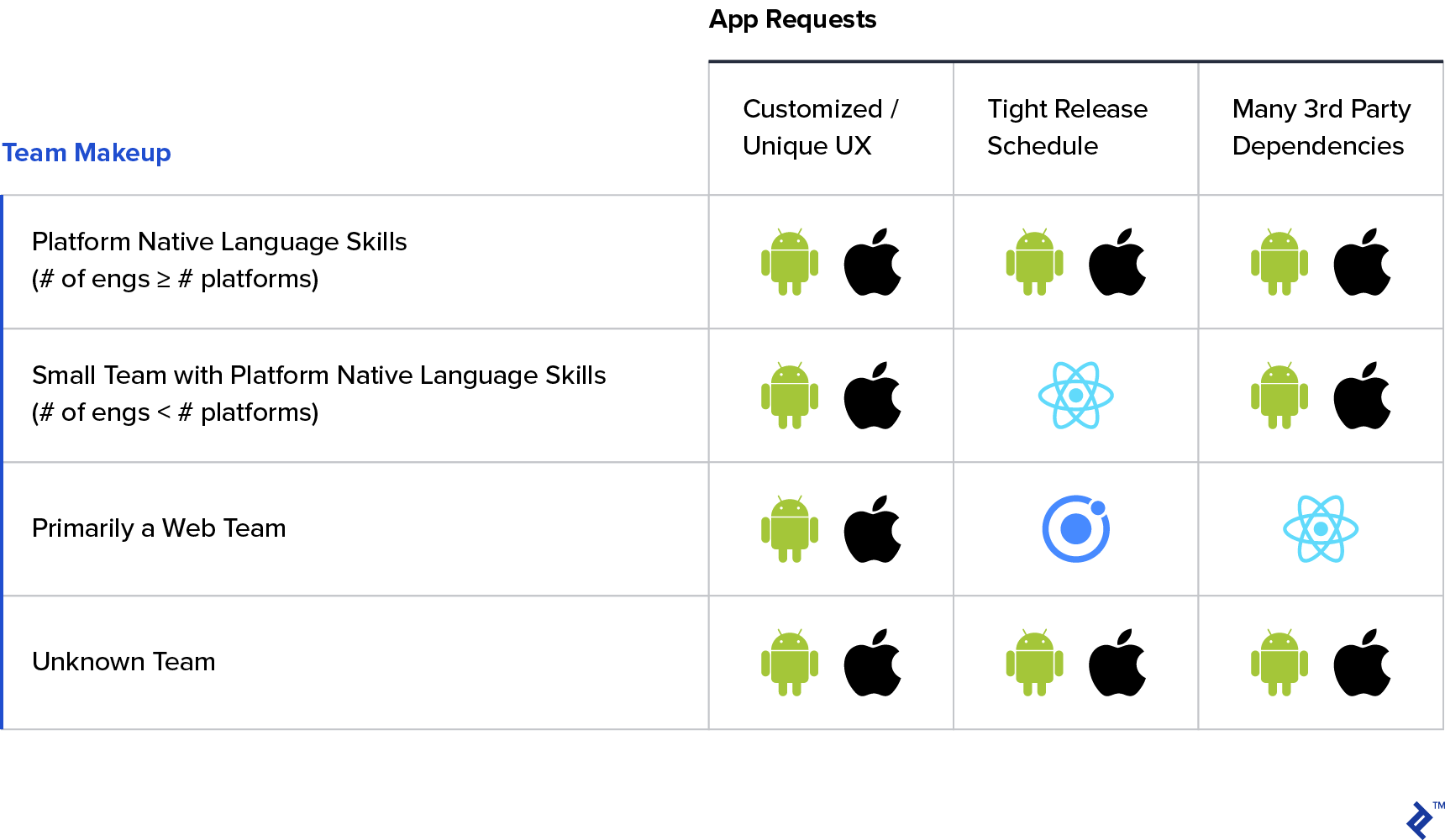
For web-focused teams requiring customized UX, expanding the team’s skillset or bringing in native expertise is recommended. Maintaining a purely framework-based approach for custom elements is often unsustainable.
However, if customization isn’t critical, Ionic or React might be suitable depending on the timeline. Ionic is preferable for teams unfamiliar with JSX, while React’s existing reliance on third-party dependencies makes adding more less impactful.
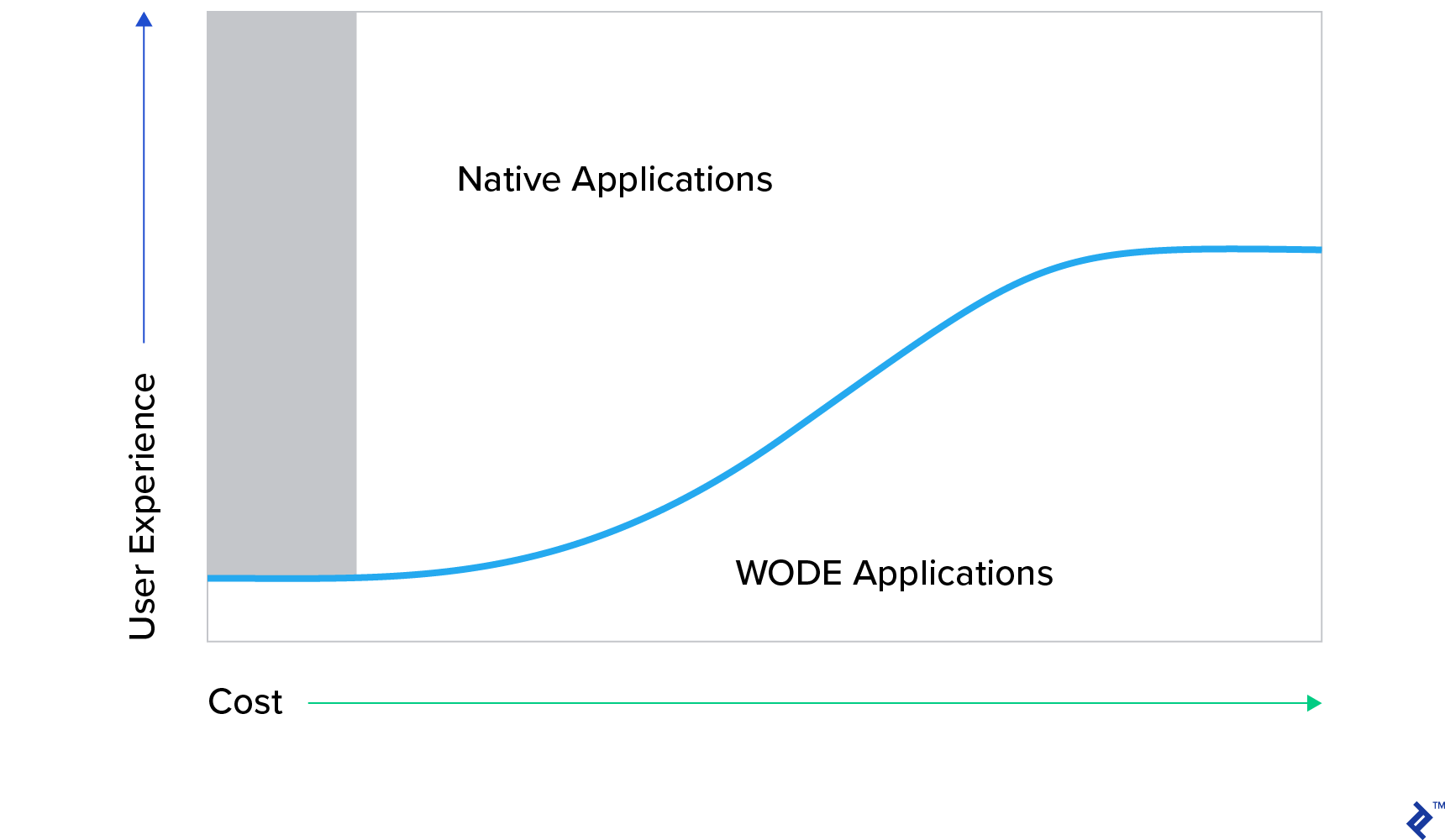
When budget is paramount, the team structure becomes secondary, as assembling the right team within the allocated budget takes precedence. Figure 3 highlights the higher initial cost but superior UX potential of native applications. WODE apps, despite resource investment, will likely have limited UX.
This article aims to provide clarity on the advantages and disadvantages of various mobile development approaches, helping to align team expertise, project requirements, and budget considerations. While WODE frameworks have their place, understanding the trade-offs is crucial before choosing a non-native path.