Determining the optimal structure for your Google Shopping campaigns can be tough, especially with a massive product catalog in your Shopping Product Feed. Should everything go into one Ad Group, should you segment by product groups, or are multiple campaigns with multiple Ad Groups the way to go?
The truth is there’s no single correct answer. As long as you’re hitting your revenue and ROI goals, and managing your campaigns efficiently, that’s what counts.
However, the choices you make regarding campaign structure can significantly impact one of the biggest challenges in Google Shopping: controlling which search terms trigger your product ads.
This post will explore different options and argue for organizing your products into multiple Ad Groups per campaign. Want to create a powerful Google Shopping campaign? Download our free guide!
1. One Campaign, One Ad Group
The simplest setup is a single campaign with a single Ad Group containing all your product groups. Pros:
- Simple setup
- Easy management Cons:
- Difficult to control search queries with negative keywords
- Unable to boost bids on brand or high-intent terms without increasing generic impressions and clicks
- No control over search queries at the product level
- Limited exposure and clicks for some products
- Managing bids for poor performers is difficult without removing them from the feed Sticking with this approach in 2018 means missing out on optimization opportunities.
2. Two Campaigns with Campaign Priorities
This method utilizes two campaigns with different priority settings and negative keyword lists to gain better control over which search terms trigger your ads.
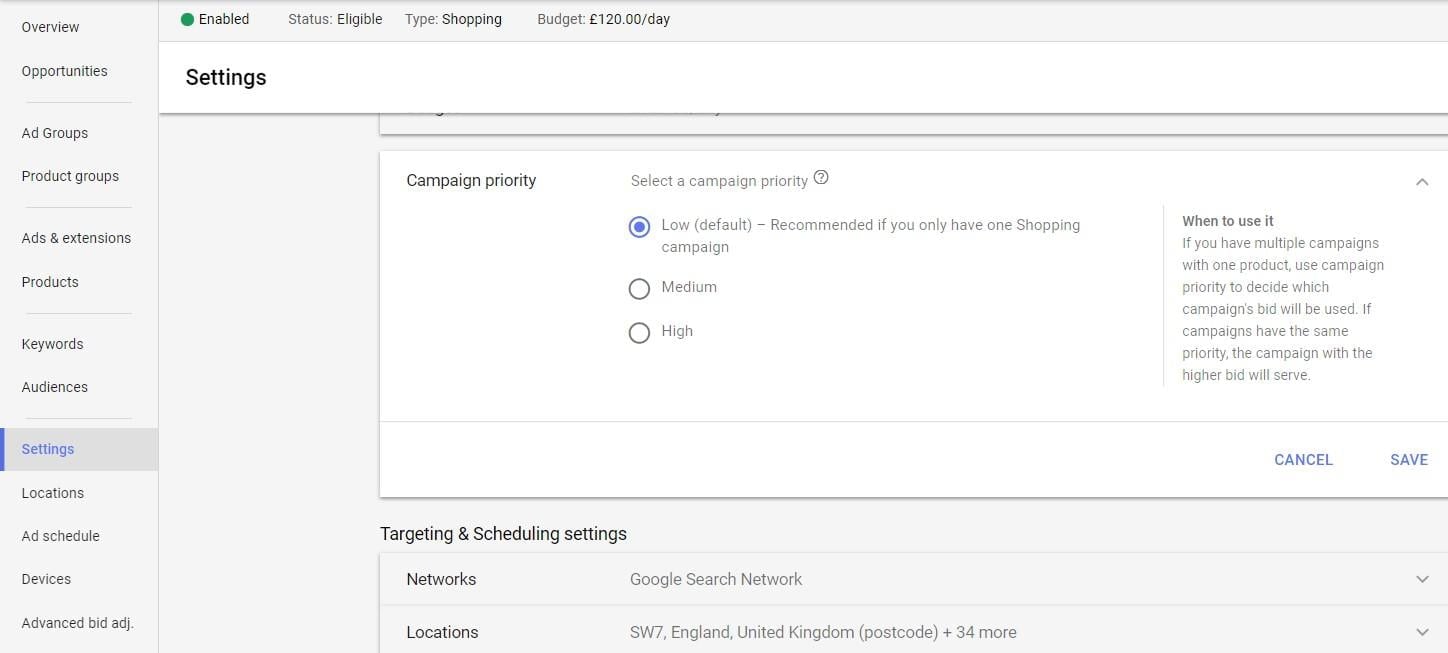
Setting campaign priorities in the new Google Ads interface Pros:
- Easy setup – create one campaign and copy it with different priority settings
- More control over bids for high-intent terms like brand names or specific queries (e.g., “bulk,” “multi-buy”) Cons:
- Double the campaigns to manage
- Requires careful budget allocation to prevent unwanted query triggering in either campaign
- No control over search queries at the product SKU level
- Challenges in dividing products within a single Ad Group in each campaign
- Limited exposure and clicks for certain products due to grouping
- Difficulty in managing poorly performing products without removing them from the feed
3. Three Campaigns, Three Ad Groups
Taking it a step further, this approach utilizes three campaigns with different priority settings for refined bidding on high-intent search queries. While having only three priority levels feels limiting, it does offer more control. Pros:
- Enhanced control over bidding on high-intent terms with three campaigns
- Improved account profitability
- Ability to set device, location, and audience bid adjustments for each campaign based on search term performance Cons:
- Triple the campaigns to manage
- Requires careful budget allocation to maintain control over query triggering
- Challenges in dividing products within a single Ad Group in each campaign
- No control over search queries at the product level
- Limited exposure and clicks for certain products due to grouping
- Difficulty in managing poorly performing products without removing them from the feed Let’s explore different ways to implement a three-priority campaign structure:
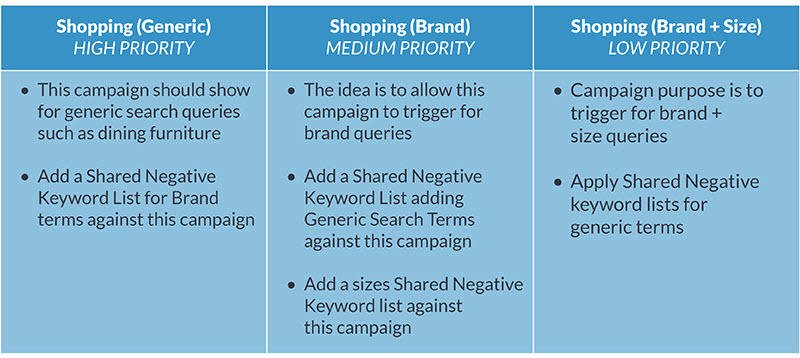
3.1 Generic, Brand, and Brand + Size Campaigns
Segment by generic terms, branded terms, and brand plus high-intent attributes like size or product name.
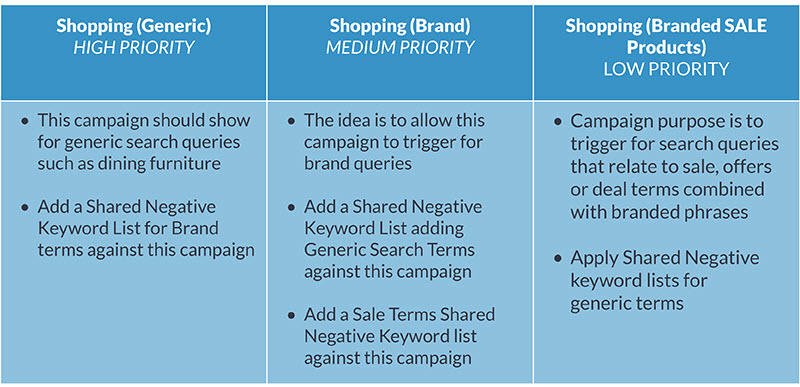
3.2 Generic, Brand, and Sale + Brand Campaigns
Similar to the previous approach, this focuses on boosting bids for sale products (which tend to convert well). Everyone loves a good deal! Segment by generic terms, branded terms, and brand plus high-intent attributes like size or product name.
3.3 Short, Medium, and Long Query Length Campaigns
This approach focuses on controlling search query length.
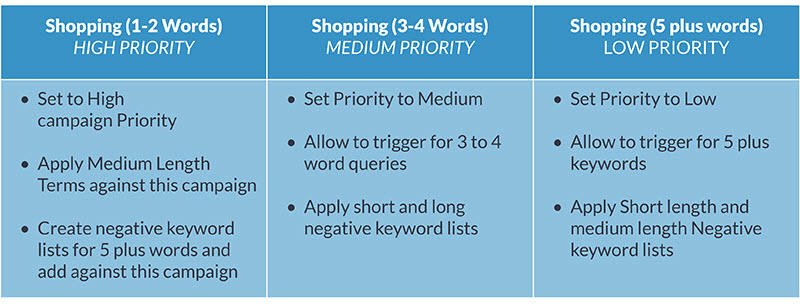
This method is tricky. It requires analyzing historical Shopping data to identify well-converting query lengths. You can find this information in Google Analytics or by analyzing your search term data in Excel. Unless you can automate negative keyword additions, this approach is difficult to maintain. You might also hit the Keyword List limit (20 shared libraries with 5000 negative keywords each).
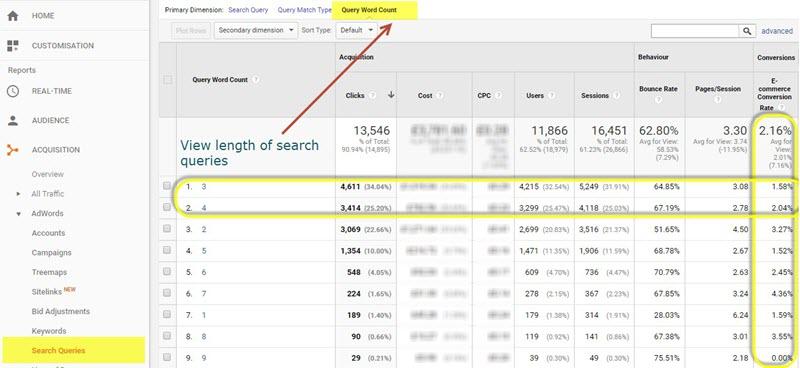
Analyzing search query length in Google Analytics’ Search Queries Report Tip: Exclude brand-related terms when determining the best-converting query lengths.
4. Profit Margin-Based Campaigns
This approach involves setting up campaigns based on product category profit margins. If you manufacture your own products, those margins are likely higher than for other products you sell. Pros:
- Enhanced control over bidding on high-intent terms with three campaigns
- Focus on traffic that generates the highest returns
- Improved account profitability
- Ability to set device, location, and audience bid adjustments for each campaign based on search term performance Cons:
- Requires multiple sets of two or three campaign priority groups for each product category if you offer a diverse product range
- Requires careful budget allocation
- Challenges in dividing products within a single Ad Group in each campaign
- No control over search queries at the product SKU level
- Limited exposure and clicks for certain products due to grouping
- Difficulty in managing poorly performing products without removing them from the feed This approach can be scaled to 6, 9, 12 or more campaigns, categorizing by product type:
- Furniture – Shopping (Generic)
- Furniture – Shopping (Brand)
- Furniture – Shopping (Brand+Model No.)
- Kitchen – Kitchen (Generic)
- Kitchen – Shopping (Brand)
- Kitchen – Shopping (SALE + Brand)
The Case for Multiple Ad Groups
All the examples above suggest using one Ad Group and dividing products using available Product Grouping attributes and custom labels. While this works initially, it limits control over product management within your account.
Disadvantages of Using Only One Ad Group
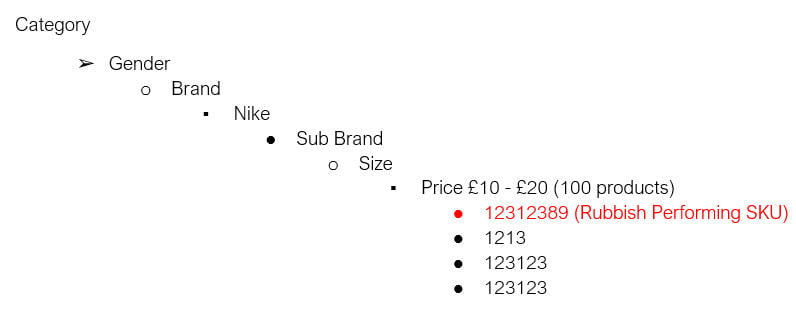
Creating one Ad Group and segmenting by attributes like Brand, Price, and Category is fine when starting out with Google Shopping. However, this approach has limitations.
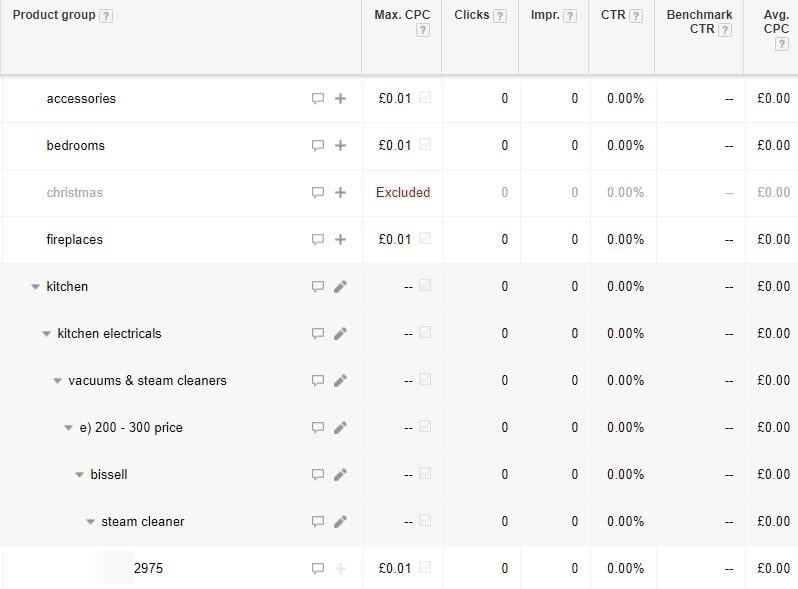
1. Complex Segmentation
Dividing by categories, products, brands, prices, and IDs becomes tedious with large product catalogs.
2. Data Interpretation Challenges
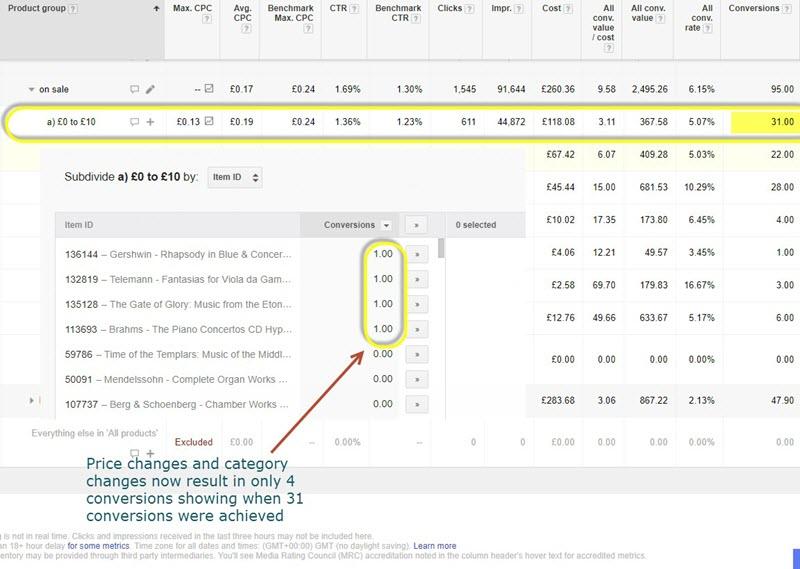
Data analysis becomes tricky if products change prices or categories, as well-performing SKUs disappear from their original product group divisions.
3. Lack of Keyword-Product Association
It’s impossible to know which keywords trigger clicks for specific products. With numerous products in one Ad Group, you can’t correlate good or bad conversions with specific search terms. This might lead to excluding potentially valuable terms.
4. Difficulty in Brand-Specific Control
Controlling brand searches for brands you sell versus those you don’t becomes challenging. For instance: if you sell Swan kettles but not Swan fridges or freezers, and also offer other dishwasher brands, you’ll need to be extra careful with negative keywords compared to segmenting by product categories, brands, or even SKUs into separate Ad Groups. With a vast product catalog and numerous brands in one Ad Group, this seemingly small issue can snowball into a significant problem.
5. Time-Consuming Product Exclusion
Managing and excluding poorly performing products takes longer with a massive number of products in one Ad Group.
6. Limited Product Visibility
If product groups containing many products have a single bid, most won’t get impressions or clicks. This skews performance and bidding decisions, as they’re based only on the few products that were seen and clicked.
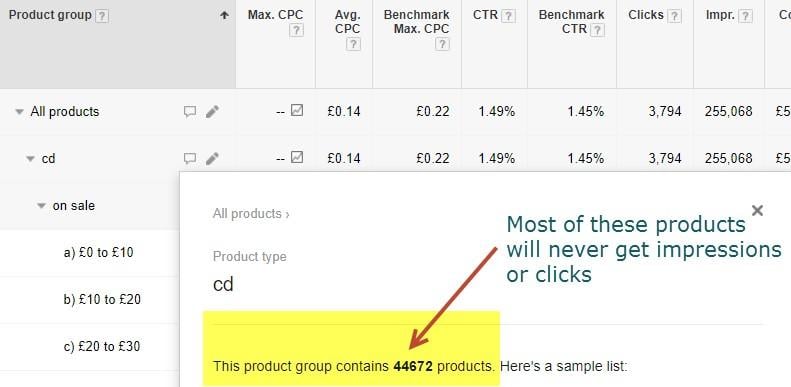
Managing search queries at the product SKU level is impossible without splitting products into different Ad Groups.

Account performance improvement example using multiple campaigns and Ad Groups
Advantages of Multiple Ad Groups:
- Reduced wasted spend: Manage search terms more effectively, identify keywords triggering clicks, and use Ad Group negative keywords accordingly.
- Granular insights: Access detailed keyword data triggering impressions and clicks.
- Data integrity: Prevent data inconsistencies caused by feed and product group changes.
Disadvantages of Multiple Ad Groups:
- Slower data collection: Might take longer to gather sufficient click data for bid adjustments or automation.
- Management complexity: Reviewing, adjusting, and managing bids can be challenging with many Ad Groups.
- Time-consuming setup: Splitting products and creating Ad Groups can be time-consuming without tools.
In Conclusion
Moving from a general to a granular approach with your Google Shopping campaigns, just like with traditional Search Network campaigns, can yield significant performance improvements.
How are you structuring your Google Shopping campaigns? Share your thoughts in the comments below!
Pete Keyworth brings over 12 years of experience in online business growth. From crafting and implementing search strategies for B2C and B2B companies to setting up Google Shopping, Google Ads text ads, and display campaigns, Pete is a seasoned member of the Hallam team.