The arrival of Apple’s newest iPhone, as always, created quite a buzz, but did it live up to the hype? The company’s announcements weren’t exactly groundbreaking, focusing mainly on updated iPhones (the 6 series), a larger-than-life tablet, and a stylus with a $99 price tag.
But wait, there’s more!
Apple is making a big deal about Force Touch, now called 3D Touch, on the latest iPhones. Although it debuted on the Apple Watch and some MacBooks, this isn’t Apple’s first foray into Force Touch, nor are they the pioneers of this technology.
Since these new iPhones are essentially just “S” model upgrades, Apple needed something to make them stand out. They checked the boxes with a faster processor and a better camera, but what about innovative features? Enter Force Touch, mirroring the debut of the Touch ID on the iPhone 5S to differentiate it from its predecessor.
Force Touch: What Is It?
You might think from my tone that I consider Force Touch a mere marketing ploy to make warmed-up products seem new. Well, you wouldn’t be entirely wrong. However, it does have some merit and the potential to revolutionize user interface design and enhance user experience.
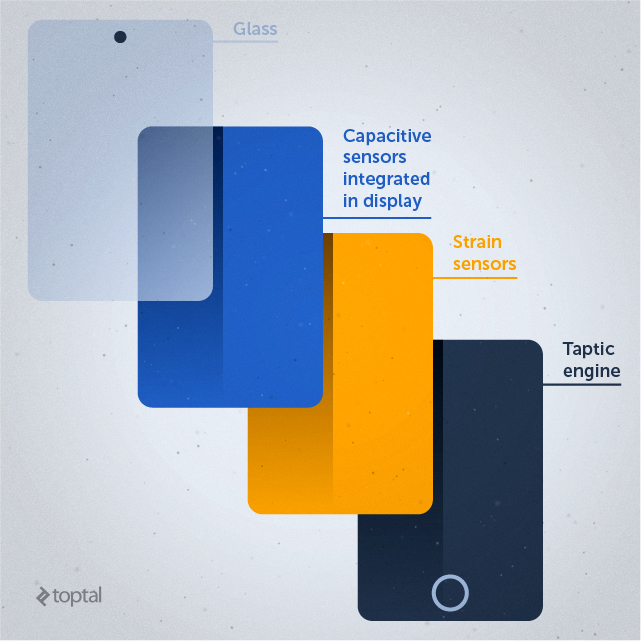
Here’s the gist of how it works:
- Sensors in the screen assembly (digitizer) measure the amount of pressure applied.
- This data is then analyzed to interpret the user’s intended action.
- Different pressure levels correspond to different actions.
- Several modes exist, allowing for a quick “peek” at an element or a full “pop” to open it.
- 3D Touch isn’t limited to just two or three pressure levels.
- The potential applications for varied pressure levels across diverse apps are vast.
Apple chose a simple implementation of Force Touch on the Apple Watch, primarily for accessing UI elements with increased pressure. On MacBooks, the same principle facilitates scrolling or video scrubbing using varying pressure on the trackpad. The new iPhones take this a step further with a wider range of functions.
I won’t delve into the technical complexities behind this technology, but I do want to highlight a few points:
- Apple is not the first to implement Force Touch technology.
- Past attempts at implementing Force Touch haven’t been successful.
- Apple won’t have the Force Touch field to itself for long.
Force Touch isn’t a novel concept. BlackBerry dabbled with it back in 2008, and a few Android phone manufacturers explored it as well. In fact, Force Touch support has existed in the Android ecosystem for years, introduced via the getPressure() API in Android 1.0 (API Level 1).
Recent weeks have seen announcements of Force Touch support in a few Android phones, notably from Chinese brands. However, this shouldn’t be interpreted as Chinese Android companies outpacing their Korean, Japanese, and Taiwanese counterparts. The timing is simply due to Chinese brands generally updating flagship phones in the latter half of the year, while Samsung, LG, HTC, and others do so in early Q1.
Why Hasn’t Force Touch Taken Off on Android and Windows?
Given that almost all flagship smartphones rely on similar hardware—ARM processors from TSMC and Samsung foundries, NAND and RAM from Samsung and Toshiba, displays from Sharp, LG, Samsung, often topped with Corning Gorilla Glass—why haven’t other companies embraced Force Touch sooner? After all, the hardware is comparable, and Android has supported Force Touch for years.
Several explanations and factors are at play. Hardware fragmentation is a challenge in the Android world, with different devices using different digitizers and displays. The specifics of each component, from the type of glass to its curvature, can impact implementation.
Apple doesn’t face these hurdles because it exerts complete control over both its hardware and software, ensuring a uniform user experience across devices—a luxury not afforded to the Android and Windows ecosystems.
The other consideration is the actual utility of Force Touch. Does it significantly enhance the user experience? Only time will tell. Apple clearly believes in its potential, but I’m not entirely sold. While there are certainly good use cases for Force Touch, and developers will undoubtedly find more as it becomes widely available, it could also introduce unnecessary complexity to how we interact with our devices. As a tech enthusiast, I’m sure I’d pick it up quickly and probably enjoy it, but what about the average user? What about the millions of tablet and smartphone users who might find it more of an annoyance than a benefit?

Still, there’s no denying that Force Touch has the potential to improve the user experience in numerous apps and mobile operating systems. Let’s explore some possibilities for the future of mobile app development with Force Touch:
- Gaming: Force Touch could open up new dimensions in mobile gaming, allowing developers to create more intricate and immersive experiences.
- Productivity: Applications like word processors and spreadsheets could become more efficient and user-friendly with Force Touch integration.
- Content Consumption: Force Touch has the potential to enhance how users interact with audio and video players, e-book readers, and other content consumption platforms.
- Security: Imagine a future where pressure sensitivity adds an extra layer of security, replacing simple lock patterns with a more sophisticated system.
- Gestures: Force Touch could enable smarter off-screen gestures, making it easier and faster to launch apps or perform quick actions.
Of these, I see gaming as the most promising area for Force Touch to shine, but that’s just my personal perspective.
Apple Prepares Developers for 3D Touch
This brings us to the crucial question of implementation. Apple wasted no time in rallying developers to optimize their apps for 3D Touch. Their 3D Touch developer website is already packed with resources to facilitate a smooth transition.
Developers can access sample code, class references for pressure sensitivity, Peek and Pop functionality, and Quick Actions. Xcode 7 and iOS 9 include all the necessary APIs for building 3D Touch-enabled apps and actions.
sample code for TouchCanvas is readily available for download, but Apple advises developers that the 3D Touch technical documentation is still a work in progress, referring to it as a “preliminary document” for an evolving API and technology.
To help developers get up to speed quickly, Apple has also made a few 3D Touch guides available. These concise guides offer a quick rundown of Peek and Pop, homescreen actions, human interface guidelines, and the 3D Touch developer environment. I highly recommend checking out the official documentation for a more in-depth understanding—it’s a quick and informative read.
Now, wouldn’t it be fascinating to know which Apple announcement truly captivated developers? Well, the developers and beta testers at Cardiogram, an Apple Watch app company, decided to find out. They monitored their heartbeats during Apple’s recent event and posted the results online the results. Given their focus on Apple Watch development, their enthusiasm for wearable announcements is no surprise. However, they also experienced a surge of excitement (or perhaps sticker shock) at the reveal of the Apple Pencil’s price.
Interestingly, there’s no data on developers’ reactions to 3D Touch or the new A9 system-on-chip. Perhaps this indicates a lack of widespread enthusiasm for the nitty-gritty of silicon and hardware among developers.
Despite this, it’s safe to say that 3D Touch didn’t exactly set the iOS development world on fire. But it’s early days. As a new feature exclusive to the latest Apple devices, it will take a couple of years for 3D Touch to reach widespread adoption across iOS hardware.
What about Android developers? Is Android Force Touch development poised to be the next big thing?
Exploring Android Force Touch Development
As mentioned earlier, Force Touch support has been part of the Android framework since its early days, though it technically became accessible with API Level 5. We’ve also discussed the challenges that have hindered progress in this area.
Apple has once again taken an existing technology and, through its marketing prowess, made it relevant and desirable. However, this doesn’t guarantee that Apple’s 3D Touch will dominate the Force Touch landscape or become a must-have feature.
In a surprising turn of events, Huawei actually released a Force Touch-enabled smartphone a few weeks ahead of Apple. They weren’t alone; ZTE also joined the party with its own Force Touch smartphone. If you’re curious to see Huawei’s Mate S using Force Touch to weigh a banana (yes, you read that right), I encourage you to check out this link. Of course, this is a rather gimmicky demonstration of Force Touch and more of a novelty than a practical application.
Information on Force Touch support from other Android vendors is scarce. There haven’t been any announcements about upcoming Force Touch-enabled phones from Samsung, LG, Sony, or even Google’s Nexus line. This doesn’t rule out the possibility, but it might be some time before Force Touch becomes a standard feature on Android devices.
This begs the question: Should developers jump on the Android Force Touch bandwagon right now? My personal opinion is probably not.
However, the Android hardware landscape is becoming increasingly commoditized, and even budget-friendly and mid-range devices are starting to incorporate features previously exclusive to flagship phones like the Nexus series. Fingerprint scanners are a prime example. While not yet ubiquitous on flagship phones from major brands, a quick glance at the Asian market reveals a plethora of affordable Android phones (in the $150-$200 range) equipped with fingerprint scanners. I anticipate a similar trajectory for Force Touch, especially if it gains traction among iPhone users. Don’t be surprised to see Force Touch implemented in the next generation of flagship Android phones from leading brands.
Force Touch: Reimagining UI and UX
Apple’s decision to debut Force Touch on its smartwatch makes a lot of sense. The technology expands user input options without the need for additional buttons or sacrificing precious screen space. It’s all about maximizing functionality within the constraints of a small display.
This doesn’t diminish its potential on larger devices like smartphones and tablets. Given the sheer size of many flagship phones, Force Touch could be instrumental in improving one-handed usability, offering quicker access to features and settings. This also holds true for tablets, particularly in gaming and other app-specific scenarios.
Beyond mobile gaming, Force Touch holds significant promise for revolutionizing user interface (UI) and user experience (UX) design. It’s only a matter of time before Apple, Google, and other tech giants begin integrating Force Touch into a wide array of devices, including tablets, laptops, hybrid convertibles, smartphones, and perhaps even gaming consoles and touch-sensitive desktop monitors. While implementing it on larger screens might present technical challenges, it’s certainly within the realm of possibility.
As for UI and UX, we can expect big tech to lead the charge, embedding Force Touch hardware into new products and complementing these advancements with software updates for mobile operating systems and core apps. Developers will then need to adapt and update their apps to incorporate Force Touch support—if they deem it worthwhile. While not mandatory, the potential is there. Each developer will have to weigh the pros and cons before deciding whether to invest in 3D Touch support for their existing apps.

Although Apple and Google will strive to make the transition as smooth as possible from a technical standpoint, it will require more than simply plugging in a few lines of code and leveraging new APIs. Designing a Force Touch-enabled app from scratch is one thing, but retrofitting support into an existing app is a different ball game. The UI will need to be adapted, and depending on the nature of the app and the developer’s vision, this could prove to be a complex undertaking.
When implemented thoughtfully, Force Touch and 3D Touch have the potential to streamline navigation and enhance the user experience. That’s the ultimate goal. However, simply shoehorning it in as a gimmick without careful consideration could have the opposite effect. Fortunately, Apple has already released clear guidelines for 3D Touch. Unless developers want to experiment and break new ground, the risk of negatively impacting user experience should be minimal.
In most cases, there’s no need to reinvent the wheel. 3D Touch will primarily serve as an additional feature for newer iPhones. For example, developers could utilize 3D Touch for actions that currently rely on a long press, offering a faster and more intuitive alternative. This is arguably the simplest and most effective approach to implementing 3D Touch. Rather than overhauling the entire UI, the technology can be used to complement existing functionalities, speeding up interactions and saving users precious seconds. Importantly, for users accustomed to the old way of doing things or those with older hardware, the long press option will likely remain available.
Is Force Touch Just Another Smartphone Gimmick?
The future of smartphones is, for better or worse, tied to novelty. From a hardware perspective, there’s limited room for innovation that truly sets devices apart. We’ve already reached a point where we have the largest, highest-resolution screens that can comfortably fit in our hands, powered by cutting-edge processors that will continue to improve as the semiconductor industry advances. Smartphones and tablets have matured to the point where evolution has plateaued.
While Force Touch, fingerprint scanners, additional sensors, and increasingly sophisticated cameras might enhance the competitive edge of certain smartphones, there’s no revolutionary technology on the horizon that will allow any device to truly dominate the market. Force Touch is simply another step in this ongoing evolution—a promising feature that can improve user experience, but not a game-changer.
With the technology just starting to roll out, it will be a couple of years before it reaches the majority of smartphones across all operating systems and vendors. There’s no need to rush into implementation, as its reach will be limited for the next few quarters. This doesn’t mean it should be ignored, but there’s no immediate pressure to adopt it either.
If you’re an iOS developer, I’ve already provided some useful resources that you can explore in a matter of minutes. It’s always beneficial to stay abreast of emerging technologies, so why not give them a quick read over your next coffee break?