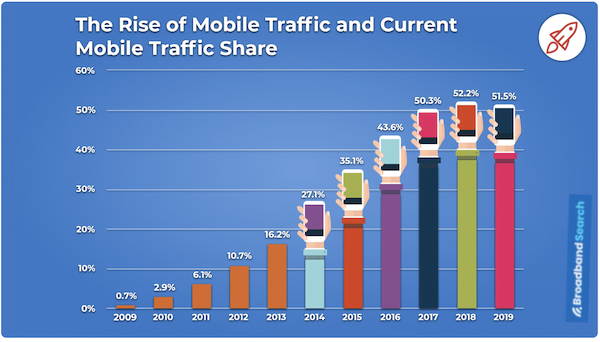
A recent 2020 study reveals a staggering 504% increase in daily mobile traffic consumption since 2011. As more people turn to their smartphones for content, optimizing the mobile experience is paramount. This not only benefits your audience but also your SEO. Google prioritizes websites that load quickly and engage users, penalizing those with slow loading times and high bounce rates.
We understand that mobile optimization is crucial for your content approach and SEO, and Google AMP is a tool designed for this purpose. However, its suitability for your website depends on factors such as your industry, business size, model, content strategy, and more. In this article, we’ll delve into:
- What Google AMP is, its ideal users, and its mechanics.
- The advantages and disadvantages of Google AMP.
- How to implement AMP on your website, should it align with your needs. By the end of this post, you’ll have a solid understanding of SEO and how to ensure optimal mobile performance for your website, regardless of whether Google AMP is the right fit.
What exactly is Google AMP?
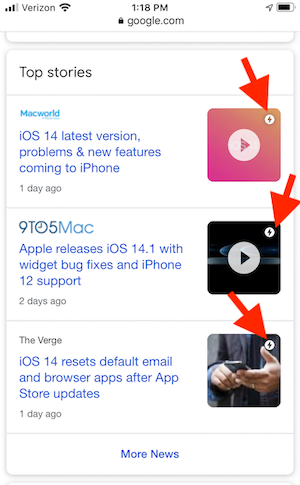
In 2016, Google launched Accelerated Mobile Pages—an open-source web solution aiming to transform mobile content consumption. This initiative was a direct response to Facebook’s Instant Articles and Apple’s iOS 9 news platform (Apple News). An AMP version of a webpage, be it a product page, blog post, or landing page, is designed for instantaneous loading on mobile devices. These pages might appear differently, potentially in a card format within mobile search results. The presence of the AMP lightning bolt symbol next to a search result indicates faster loading compared to non-AMP pages.
Early study suggested that Google AMP pages loaded four times faster and consumed eight times less data than traditionally optimized mobile pages. The fundamental goal was to establish an open-source framework that enhances the mobile experience by making it significantly faster.
The fundamental goal was to establish an open-source framework that enhances the mobile experience by making it significantly faster.
Is AMP essential?
Before we explore the pros and cons of Google AMP, it’s essential to understand that while AMP can be beneficial for SEO, it’s not always essential. Its advantages are more relevant to certain businesses than others. We’ll delve deeper into this later, but here are some key points to consider:
- AMP is prevalent among publisher sites with a large volume of news articles or blog content. If your website isn’t primarily article-based, AMP might not be necessary.
- If you publish numerous articles and already utilize a CDN (content delivery network), it likely offers performance optimization features like image hosting, file caching, and lazy loading.
- AMP pages prioritize a clean and straightforward reader experience, often by limiting certain JavaScript functions and plugins. If your lead capturing and audience tracking rely on third-party tools, ensure your AMP pages function and capture data seamlessly.
- AMP itself is not a direct Google ranking factor. It can improve aspects of your pages considered by Google’s algorithm (especially with Core Web Vitals becoming crucial in 2021), but alternative methods for optimizing your site’s experience and performance exist.
- If you already have a mobile version of your site or have implemented mobile optimization measures (like consolidated or minified CSS code), AMP may be redundant and could complicate performance and reporting.
While AMP can help your SEO, it is not necessarily essential for SEO, and its benefits are more applicable to some businesses than others. In conclusion, prioritizing page speed and mobile experience is vital for SEO. Google AMP is one approach to achieve this. Continue reading to understand its mechanics and whether it aligns with your business needs.
What are the benefits of Google AMP?
Besides faster loading and an enhanced user experience, AMP offers several advantages to businesses focused on content and SEO:
Increased website engagement
Lightweight AMP content is ideal for users with unreliable internet connections. Additionally, reduced page load time significantly improves user experience, increasing the likelihood of visitors spending more time on your site.
Improved ranking and traffic
Given that Google considers page load time a ranking factor, AMPs are favored in its search algorithms, influencing rankings. Essentially, if two sites are comparable, the faster one gains an advantage.
Lower bounce rates
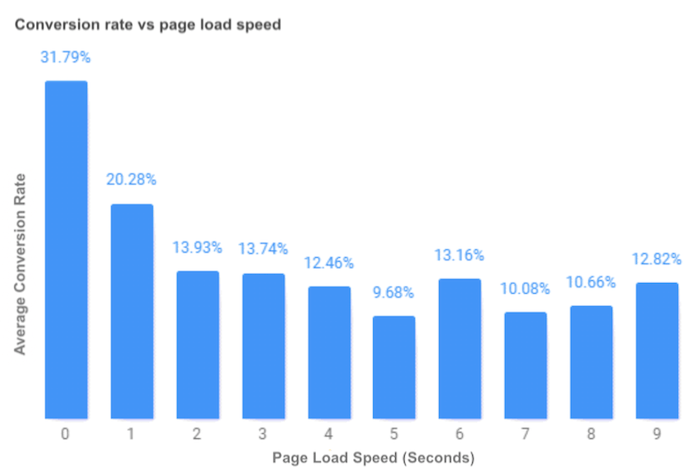
Faster loading pages encourage visitors to stay longer. A Google study revealed a bounce rate of 53% of website visits are abandoned for mobile sites taking over 23 seconds to load. Moreover, publishers implementing AMP observed a potential 2x increase increase in time spent on a page. This extended engagement can translate to more conversions from your content.
More time on your website can mean more conversions from your content.
Increased ad views
AMP’s HTML coding enhances the visibility and usability of banners and images, leading to higher ad viewability rates. This, in turn, provides publishers with more opportunities for content monetization.
Higher click-through rates
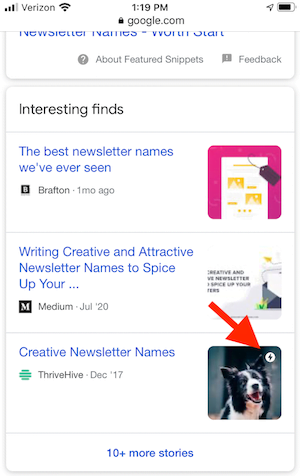
A significant advantage of AMP is its prominent placement in the Top Stories section (or carousel) of Google’s mobile search results. This prime visibility significantly increases the likelihood of users clicking on AMP pages, resulting in higher click-through rates.
Current AMP statistics
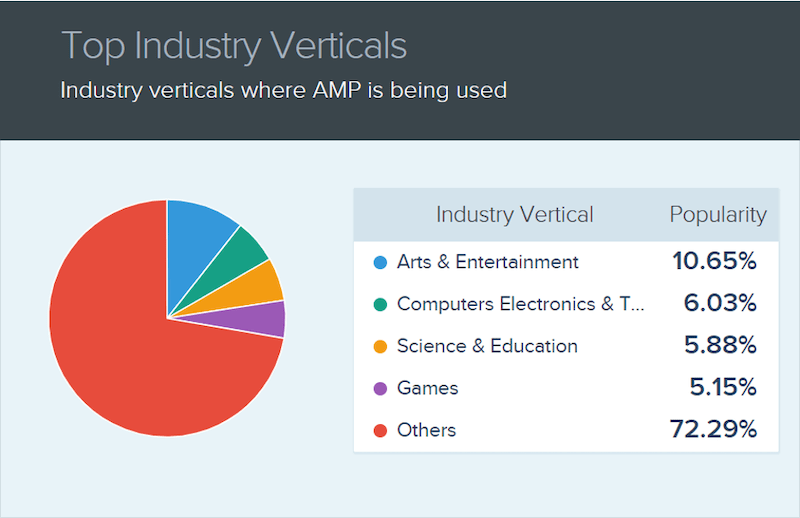
While numerous popular websites like Yahoo, CNN, BBC, Reddit, Washington Post, WordPress, Gizmodo, Wired, Independent.co.uk, Pinterest, eBay, and many others utilize AMP technology today, it’s not exclusive to large corporations. Over 1.4 million websites currently employ AMP. The chart below illustrates the industries with the highest AMP adoption rates:
- Arts & Entertainment leads with nearly 11% of total AMP usage.
- Computer Electronics & Technology follows with about 6%.
- Science & Education is close behind at 5.88%.
- Gaming accounts for approximately 5.15% of AMP usage.
- The remaining 73% represents the combined, individually insignificant percentages of all other industries.
The anatomy of a Google AMP page
To grasp how Google AMP enhances your SEO and content marketing strategy, it’s essential to understand the three primary components of an AMP page. AMP HTML AMP HTML, unlike regular HTML (or HTML5), incorporates mobile-centric properties and customized tags. It guarantees specific baseline performance characteristics, ensuring faster content loading on user devices. This translates to quicker content consumption and a superior user experience, potentially impacting conversion rates and SEO/content marketing metrics like bounce rate and time on site.
Speaking of user experience, are you up to date on Google’s upcoming page experience update? AMP JavaScript AMP JavaScript enables AMP pages to deliver the core functionalities of regular pages more efficiently. The AMP JavaScript library adheres to best practices like inline CSS and font triggering, ensuring rapid AMP page rendering. It also facilitates performance-enhancing techniques like pre-calculating page element layouts before resource loading and disabling slow CSS selectors—all crucial for a seamless user experience.
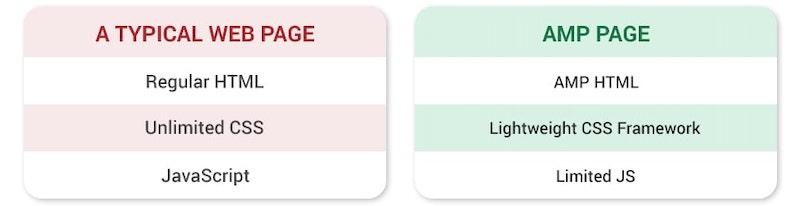
Image source AMP Cache The AMP cache exclusively serves validated pages, allowing them to pre-load securely and efficiently. This ensures that a confirmed page functions flawlessly, eliminating dependencies on external factors that could hinder page speed. As illustrated below, reducing HTML code tag management and loading only mobile-friendly page elements significantly speeds up AMP page rendering. This Will Critchlow’s Whiteboard Friday provides a simplified visual representation:
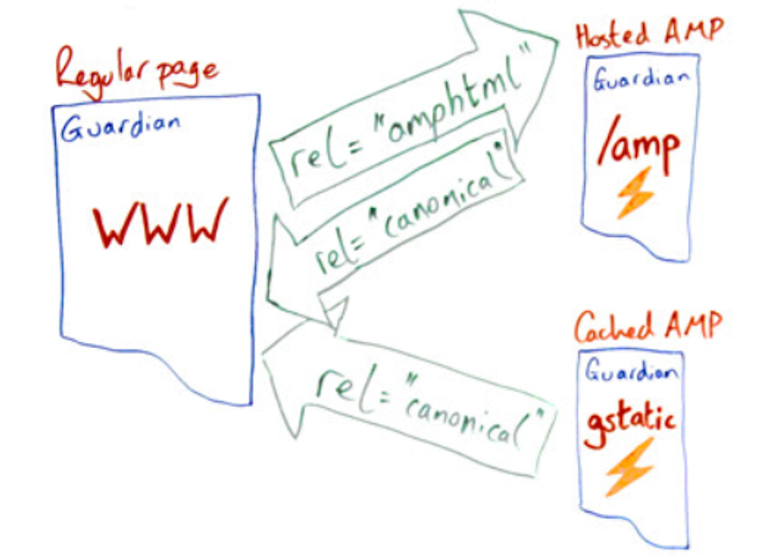
Critchlow highlights that the presence of an AMP version is designated in the source code with the rel AMP HTML link. For instance, adding /amp at the end of any news article URL on The Guardian website, even on desktop, reveals the AMP HTML linked in the source code. You can also observe the AMP difference: Here’s a regular Guardian news story page:
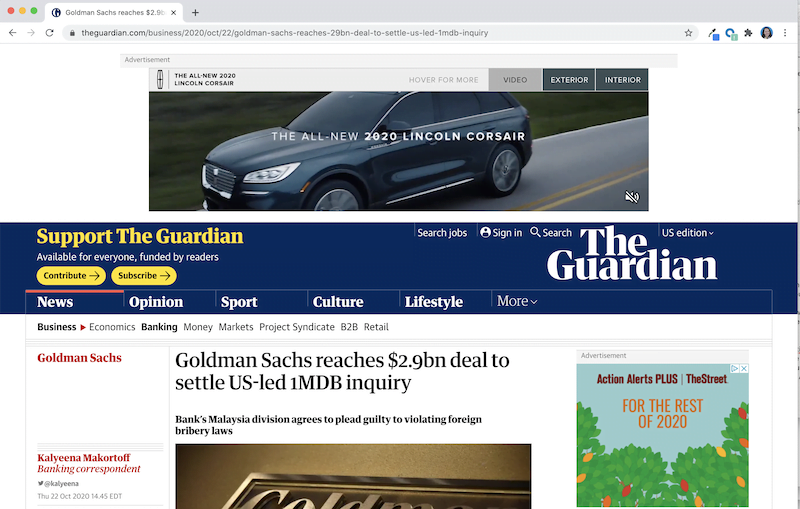
And here’s the AMP version of the same Guardian news story page: This is achieved by appending “/amp” to the end of the URL.

By eliminating ads, menu navigation, recommended reads, and other resource-intensive elements, the AMP page loads faster and provides a more streamlined reader experience.
Drawbacks and additional considerations for integrating Google AMP
While AMP can enhance your ranking and improve content delivery, particularly for mobile users, it’s crucial to acknowledge its drawbacks and limitations before implementation:
- Adopting AMP pages necessitates sacrificing numerous UX elements. AMP HTML prioritizes efficiency over elaborate design, so if visually engaging content is paramount, this might not be suitable.
- Besides limited images on AMP pages, only one advertisement per page is permitted. This restrictive framework doesn’t support disruptive ads like expandable formats, and implementing direct-sold ads can be challenging.
- From a marketing perspective, it doubles the crawl requirement for a single piece of content as part of Google’s push for parity. For numerous publishers, it’s been observed to drive impressions without necessarily impacting engagement metrics. This is partly due to the Top Stories carousel, which encourages users to explore content from various sources.
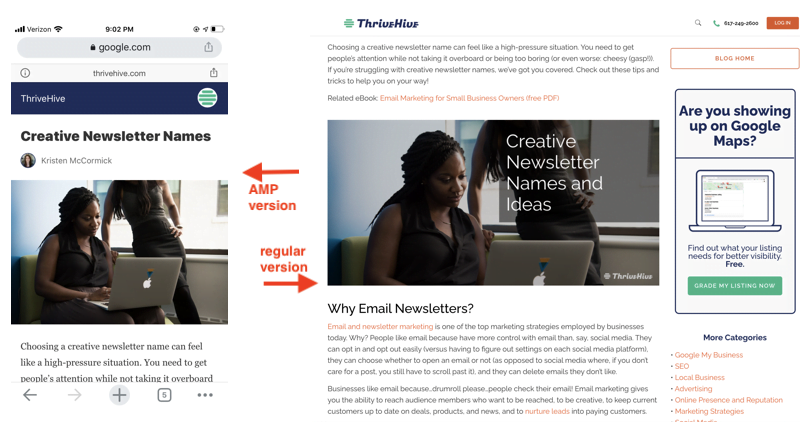
- Similarly, Google’s AMP viewer can dilute brand identity by displaying a Google domain in the address bar. While a workaround exists to display the actual site atop the AMP page, it consumes valuable space above the fold. You might not achieve the same brand consistency with an AMP page compared to a standard page, as demonstrated below:
- AMP’s effectiveness relies on users clicking the AMP version of a webpage instead of the canonical version. Although studies show that the AMP library can reduce server requests for document fetching by as much 77%, the AMP version isn’t always served if implementation is flawed.
- Despite being around for four years, AMP is still relatively new. Here are some final points to consider when deciding whether to implement AMP on your site:
- A streamlined version of CSS is required.
- You’re limited to AMP’s provided JavaScript library, potentially leading to lazy loading as a downside.
- Proper validation of AMP sites is essential for consistent functionality.
- AMP plugin pages lack form support.
- Custom fonts require special loading for an optimal experience.
- Declaring image heights and widths is mandatory.
- AMP-approved extensions are necessary for incorporating video content. Lastly, AMP prioritizes speed and readability over shareability. Since social sharing buttons rely on JavaScript, they might not display correctly.
AMP prioritizes speed and readability, not shareability.
How to implement AMP to improve your content and SEO
For WordPress users, the simplest way to implement AMP is through the official AMP plugin plugin from WordPress and Google. If you desire greater control over AMP page aesthetics or easier analytics gathering, consider other free plugins such as WeeblrAMP or AMP for WP.

However, not all businesses utilize WordPress, and plugins have their constraints. Let’s outline the steps for implementing AMP without relying on plugins.
Step #1: Create your AMP page template
The initial step is creating an AMP page template from scratch for your blog posts and other high-quality content. Begin your AMP HTML page with <!doctype html> and identify it as AMP content by adding a lightning bolt symbol (?) within the HTML tag: <html ?>. Here’s a basic AMP HTML page structure for your content:
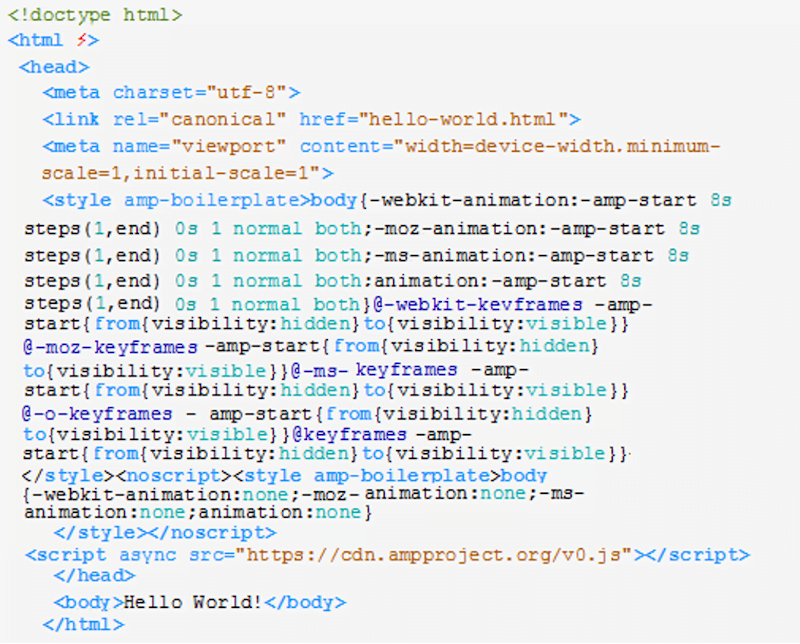
Mandatory tags for your AMP HTML documents:
- and tags
- as the first element within the tag
- inside the tag to load the AMP JavaScript library
- within the tag
- <meta name=”viewport” content=”width=device-width,minimum-scale=1,initial-scale=1”> inside the tag
- AMP boilerplate code within the tag Changeable tags within page code:
- link href=”hello-world.html”
- Content within the body section Hello World! Now that you understand how to create an AMP page template, let’s explore the HTML tags available for your AMP pages.
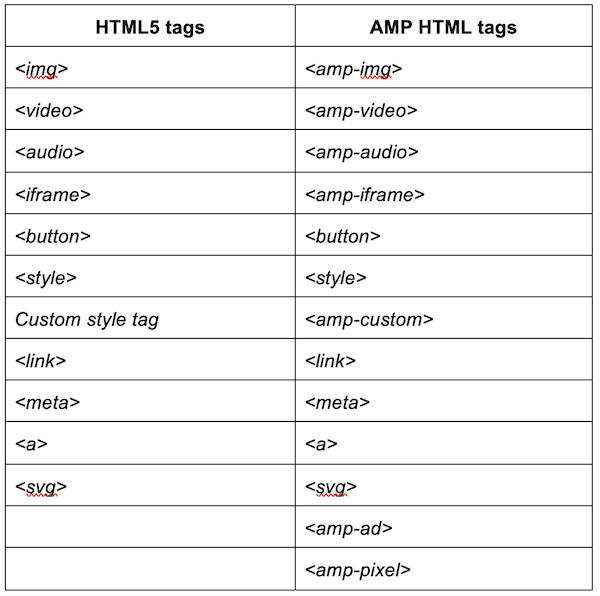
However, some HTML tags are incompatible with AMP pages, including:
Step #2: Preview and validate your AMP page
Preview your AMP page by opening it directly in your browser from your file system or using a local web server like Apache 2. To validate your AMP page, open it in your browser, append “#development=1” to the URL, and then access the Chrome DevTools console to check for errors.
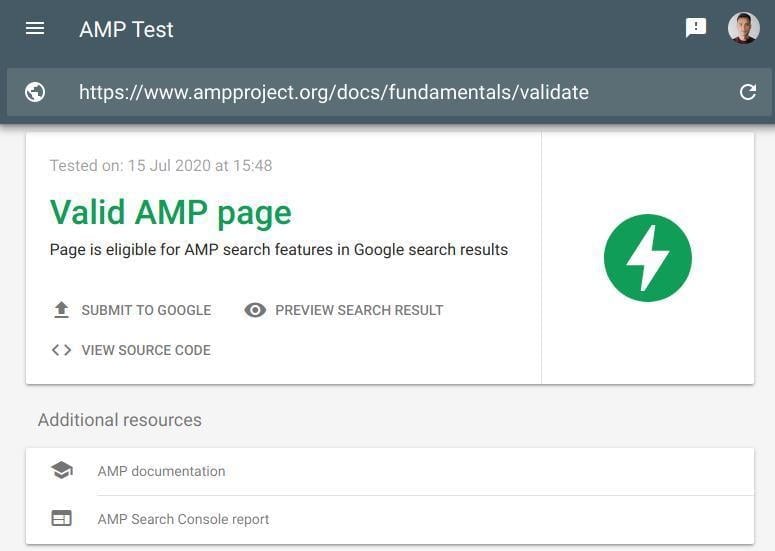
Image source Bruce Day suggests initially testing one or two page types from your website on AMP. Ideally, include some ranking pages to observe if Google serves their AMP versions in mobile search results. Note that it might take a few days for Google to discover, analyze, and index the AMP version of a page. Allow the rollout to run for at least a month, preferably longer, to gather substantial data and determine if a sitewide AMP implementation is worthwhile.
It can take a couple of days for Google to find, check, and index the AMP version of a page, and you should run your AMP pages for at least a month in order to gain meaningful data.
Step #3: Track performance
Tracking your AMP pages’ performance is essential, not only to compare against competitors but also to gauge alignment with your goals. Utilize in-house tools like Google Analytics or various third-party B2B tools. Several analytics providers offer built-in AMP analytics features.
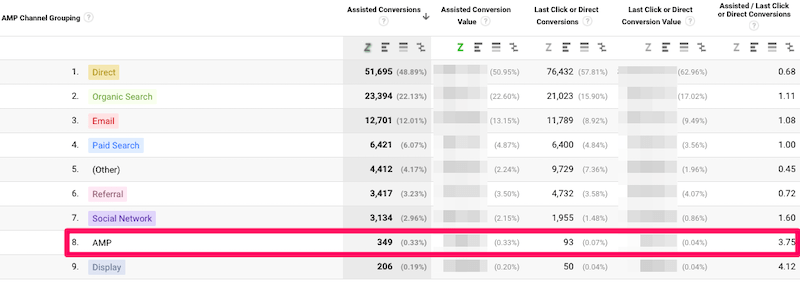
Image source Remember to use canonical URLs and other variables to define what should be recorded. This is vital for identifying any traffic fluctuations caused by AMP. The extraUrlParams attribute in amp-analytics adds a query string parameter (e.g., “type=amp”) to the canonical URL, simplifying AMP page differentiation from standard pages in analytics. This allows you to compare overall page traffic before and after AMP implementation.
Canonical URLs enable you to isolate AMP traffic in Google analytics for better tracking and optimization.
Is AMP right for you?
AMP effectively accelerates web pages, ultimately enhancing content delivery and user experience, especially for mobile users. If, based on your business model and the criteria outlined above, it aligns with your business needs, carefully consider the implementation factors and steps discussed. While it requires effort, having better-performing content yields long-term benefits.