Thinking about putting together an event? Whether it’s online, offline, or a bit of both, you want to make sure your promotional efforts are worth the investment. Your goal is to get people talking, get them to show up, generate leads and revenue, and ultimately support your overall business objectives.
From conferences and workshops to concerts, grand openings, and webinars, Facebook ads can be a powerful tool to boost your event attendance. This guide will walk you through using Facebook and Instagram effectively to promote your event and drive registrations (both free and paid). We’ll cover everything you need to know to get started, including:
- Leveraging Facebook ads for event promotion.
- Incorporating Branded Content ads into your Facebook page.
- A/B testing ad creatives to maximize registrations.
- Utilizing Instagram advertising with non-event campaign objectives.
- Promoting recurring events effectively through Facebook ads.
Remember, in the world of events, “selling out” is a good thing! So, let’s get those registrations and ticket sales rolling in!
Start with a Facebook Event
The first step is to create a Facebook event from your Business Page. This is a simple and effective way to start generating buzz, engagement, and registrations without spending any money. With Facebook’s organic reach not being what it used to be, creating an event is crucial before running ads. You’ll need that extra visibility to reach larger and more targeted audiences. It’s unfortunate that organic reach has diminished, but the reality is, you have to pay to play. Your ads are now competing for attention against people’s friends, family, long-lost classmates, and, of course, adorable cat videos in their news feeds.
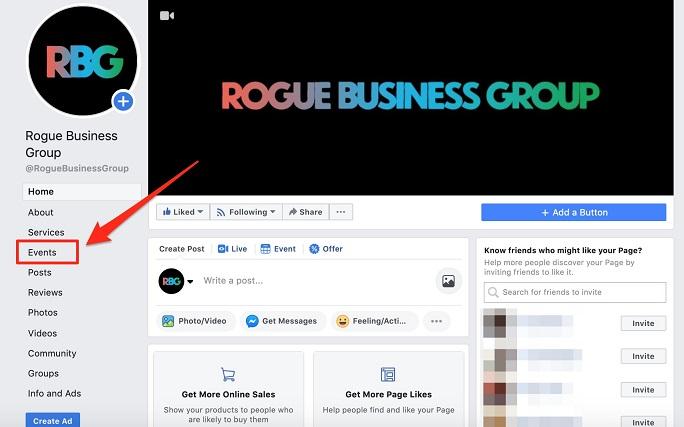
To create your event, go to Business Manager and navigate to your Business Facebook Page. Click on “Events” on the left-hand side, as shown below in this example of a local non-profit business group page we manage.
The “Event” page is where you’ll find all your upcoming and past events. You can share, edit, boost, and view them from this central location. It’s also where you’ll create new events, as seen here:
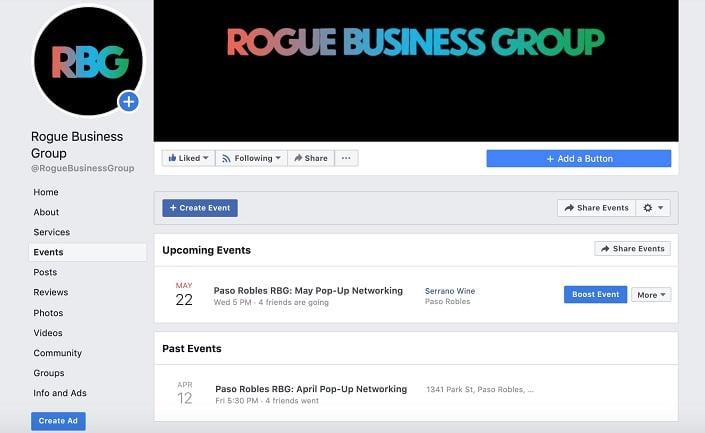
To set up a new event, click the blue “+ Create Event” button and follow the steps on the next page. Fill in all the essential details, such as the name, date, time, description, and registration link (if applicable). You can also invite your Facebook friends and share the event on your personal page. Once published, the event will automatically appear as both a post and a listing on your Business Page, like this:
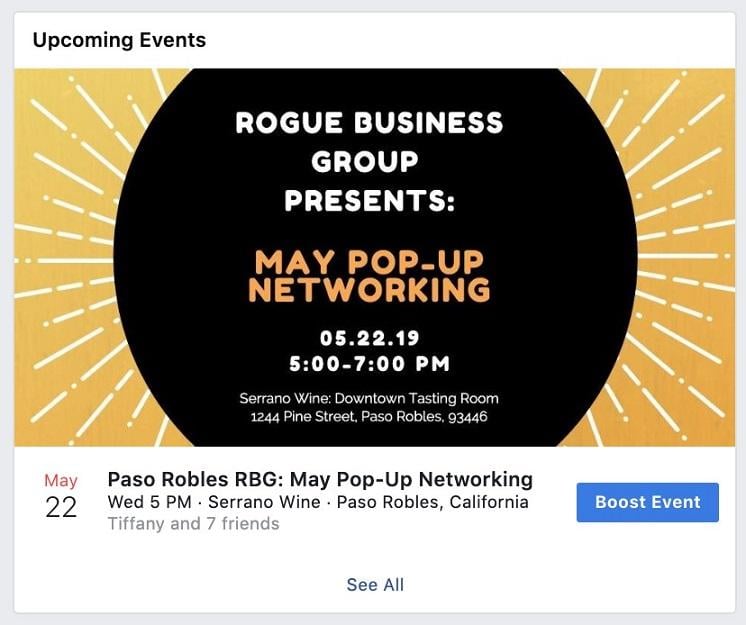
Even if you’re only promoting your event on your website, creating a corresponding Facebook event is highly recommended. The benefits are numerous, including wider reach, more precise targeting, and ultimately, increased event attendance—especially when paired with effective Facebook ad promotion. Let’s dive into how to make that happen.
Promote Your Event with Facebook Ads
Once your grand opening or other event is live on your Business Page, it’s time to head over to the Facebook Ads Manager. Here, you’ll create a campaign to put your event in front of the right audience.
When setting up your campaign, choose “Event Responses” as your objective. This objective is designed specifically for events, but it’s not the only one you can use—more on that later.
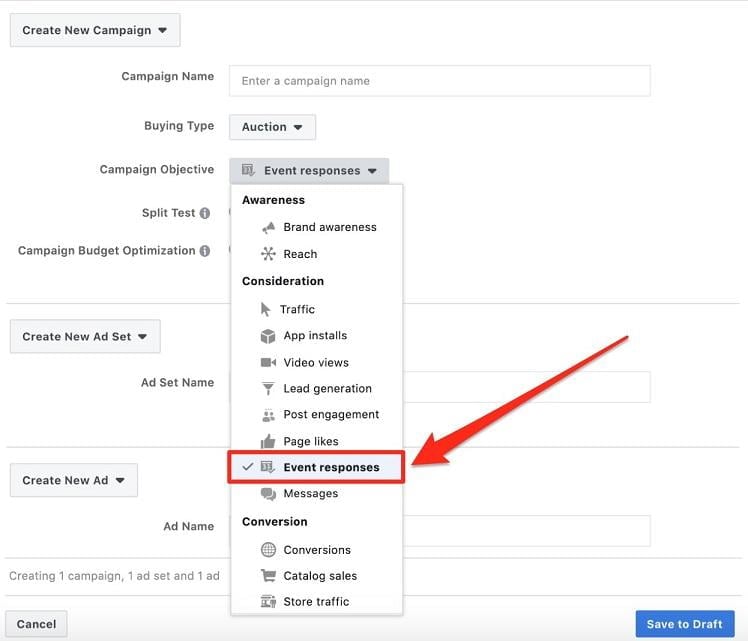
Next, in the ad set level, define your target audience and budget. If you’re not planning on using Campaign Budget Optimization, or CBO (Campaign Budget Optimization) yet, keep in mind that it will become the standard budgeting option later this year (September 2019). CBO will require advertisers to set and manage budgets at the campaign level rather than the ad set level.
With targeting and budget in place, move on to the ad level tab to craft your event ad. Give your ad a compelling name. As you scroll down below the ad copy section, you’ll find a field to type in your event title. Search for the exact title you used on your Business Page.
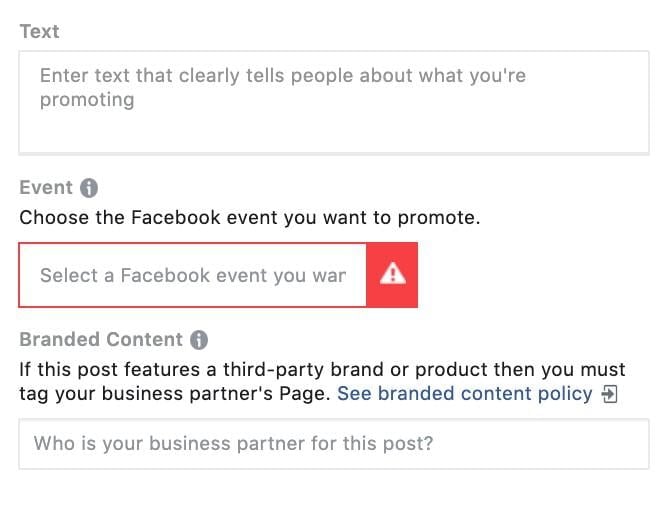
Once you’ve entered the event title, the ad content will automatically populate with the details from your event page, as shown below:
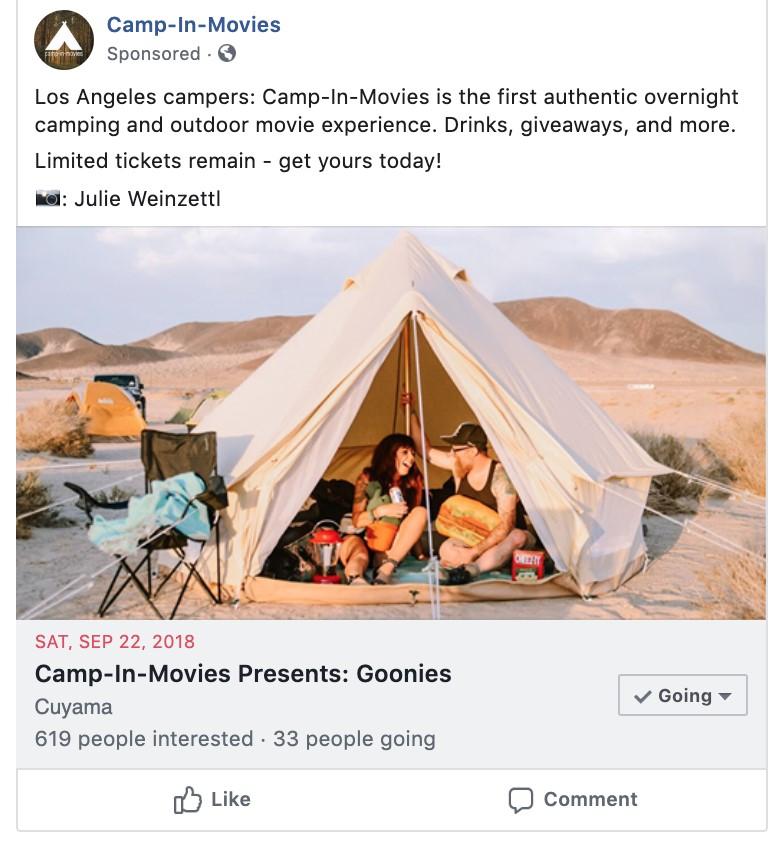
You’re almost there!
After launching your ads, you can optimize your campaign by A/B testing different ad copy variations or swapping out the creatives. To edit any event details displayed below the creative, you’ll need to make those changes directly on your event page.
Speaking of testing…
Test Your Facebook Ads Strategy
Testing copy and creative is important, but it’s not the only area to optimize. Here are five more strategies to test and see what drives the most attendees to your events:
1. Leverage the Branded Content Feature
If you’re collaborating with another brand for your event and they tag your company in a post, take advantage of the Branded Content feature (as shown in the ad setup screenshot above). For example, if you’re a smaller or newer company, partnering with a larger, well-known brand in your industry—perhaps as a sponsor—can be incredibly beneficial. If they post about you and tag your business page, you can then run that post as an ad in your own account and target various audiences. Here’s an example:
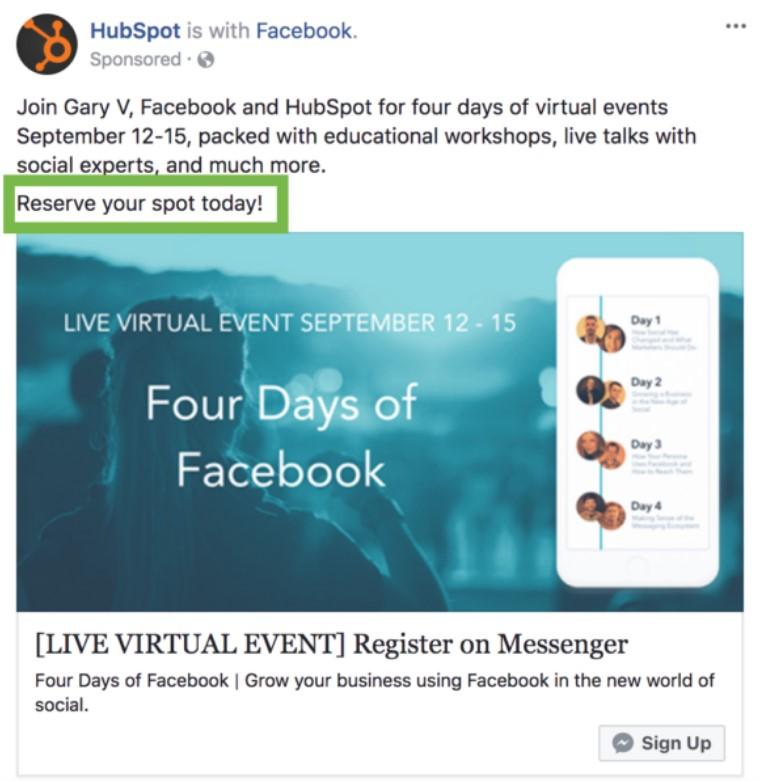
Partnering with other brands and utilizing the Branded Content feature can significantly boost your credibility, especially if you’re a new or smaller company. Having a recognizable and trusted brand like HubSpot in the example above vouching for you can increase awareness, engagement, and ultimately, event attendance.
2. Explore Non-Event Campaign Objectives for Instagram Placements
While Facebook’s event response objective campaigns are effective, they don’t directly translate to Instagram placements. However, you can still advertise your event across both platforms and in additional placements by choosing a different campaign objective.
Opt for a campaign objective like “traffic” to direct people to your website. This way, they can learn more about your event and register directly on your site. If you’re using a third-party event registration site that doesn’t allow Facebook Pixel placement, you’ll lose tracking once users land on their page. Ideally, handle registrations on your site to track conversions back to your Facebook and Instagram ads. This gives you valuable insights into what’s working and what’s not with your ad set targeting, copy, and creative variations.
If you’re using a popular event registration platform like EventBrite, you can add your Facebook Pixel to their platform to maintain tracking. Here are the steps on how to add your Facebook Pixel to EventBrite.
To further expand your reach, choose Instagram as an ad placement within the ad set level. This allows you to reach users in both the Instagram feed and Instagram Stories. Use compelling calls to action like “Learn More,” “Sign Up,” or even “Get Showtimes” if you’re promoting multiple dates or times. Since Instagram is a highly visual platform, testing video ads for your event can be incredibly effective.
4. Promote a First-Time Event with Facebook Ads
Launching a brand new new event? Entice your audience with compelling content that highlights what they can expect. Showcase speakers, artists, musicians, topics of discussion, or other key elements that will pique their interest. Highlighting specific sessions, venues, or early bird pricing can incentivize people to register early.
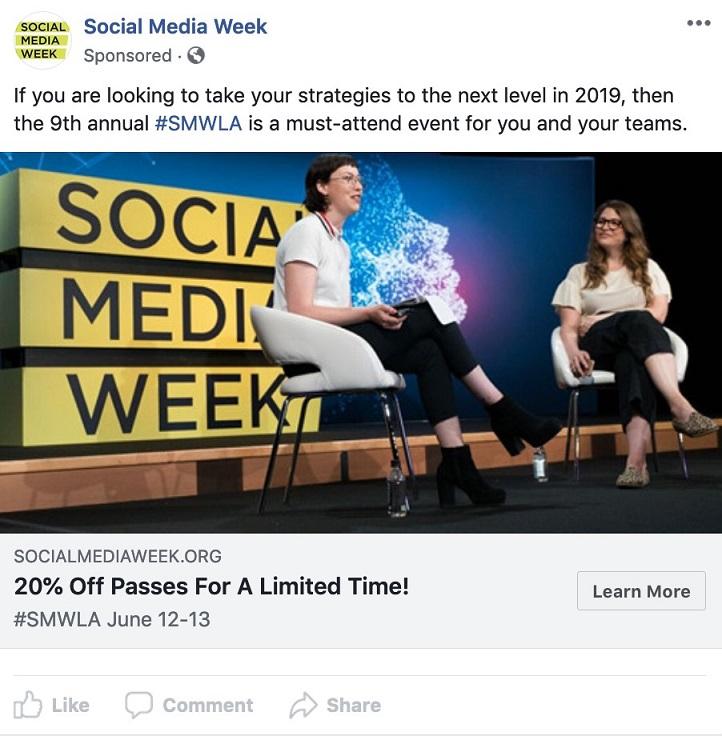
If your event is business-related and requires attendees to take time off work or travel, consider targeting both potential attendees and their employers. We’ve seen success with “ask your boss” forms that outline the event’s benefits, making it easier for attendees to make a case for attending.
5. Advertise Recurring Events on Facebook
Do you host recurring events like monthly meetups, webinars, annual conferences, or multi-city tours? Encourage past attendees to return by showcasing new and exciting aspects of the upcoming event. Emphasize that while the event stays true to its core values, there’s always something fresh to experience. For instance, when promoting conferences, we’ve highlighted both familiar elements and the addition of new speakers, sessions, networking events, and exhibitors to boost retention rates.
When targeting individuals who haven’t attended similar events in the past, use compelling visuals in your ads, such as images and videos showcasing a large and engaged audience. This helps establish authority and credibility, creating a sense of FOMO (fear of missing out) for those who missed out last time. If you’ve had a successful event, don’t be afraid to show it off and invite new people to join the experience!
For remarketing campaigns, offer sneak peeks and behind-the-scenes content to generate excitement and move potential attendees further down the funnel. Attending events, especially solo, can be intimidating. Make the process exciting, seamless, and easy to encourage conversions.
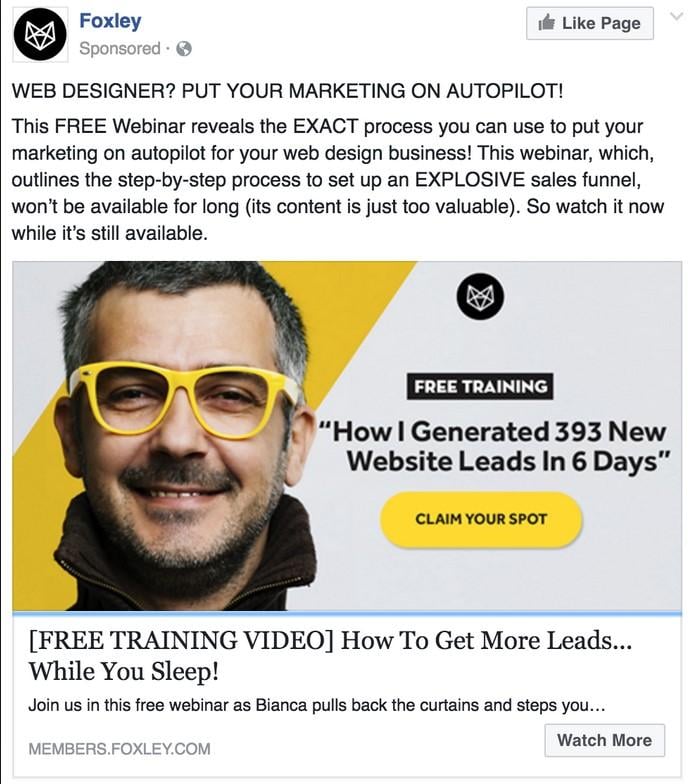
If you’re promoting an online webcast, create a short teaser video featuring the speaker sharing valuable insights and encouraging registrations to learn more. Here’s a great example of a webinar ad that effectively highlights the value proposition of both the teaser and the full webinar:
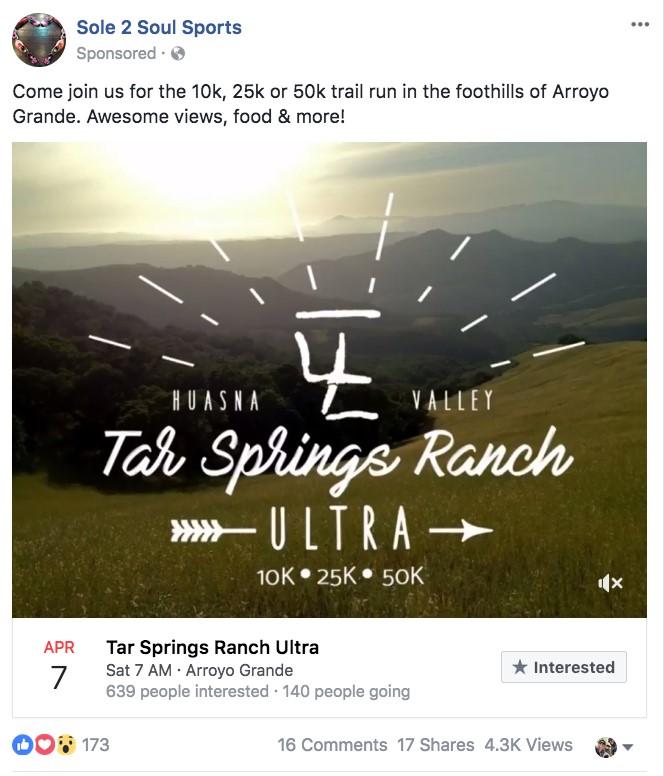
For fundraising events, focus on the positive impact attendees will have by supporting a non-profit and how the experience will be mutually enjoyable, helpful, and rewarding. When running ads for a musician client’s tour, create separate campaigns for each city, tailoring the targeting, copy, and creatives to resonate with the local audience. For local events, we’ve found success using creative elements that reflect the event’s location and the target demographic.
From Awareness to Attendance with Facebook Event Promotion
Now that you’re armed with strategies to promote your event using Facebook ads, it’s time to put them into action. Head over to your Business Page to create your event, navigate to Ads Manager, and start experimenting with different campaign options to spread the word! Pay close attention to what resonates best with your audience and use those insights for future events, whether they’re similar or entirely new. The beauty of event marketing lies in its endless possibilities for creativity. Generate genuine excitement around your event, and watch it soar!