When working with Scala.js, the Scala to JavaScript compiler, you might encounter limitations with its dependency management system, particularly in the context of modern JavaScript development. While Scala.js uses WebJars, JavaScript developers typically rely on NPM for managing dependencies. Given that NPM primarily caters to server-side dependencies, an extra step involving tools like Browserify or Webpack is usually required to generate browser-compatible code.
This article outlines the process of integrating Scala.js with the extensive collection of JavaScript modules available through NPM. A practical illustration of the techniques discussed here can be found in this GitHub repository. By referring to the example and this article, you’ll be able to utilize NPM for managing your JavaScript libraries, create a consolidated bundle using Browserify, and seamlessly incorporate the result into your own Scala.js project. Notably, this entire process can be achieved without locally installing Node.js, as everything is handled through SBT.

Managing Dependencies in Scala.js Projects
Developing applications using languages that compile to JavaScript is increasingly common. More developers are turning to languages like CoffeeScript and TypeScript or utilizing transpilers like Babel to leverage ES6 features today. Additionally, Google Web Toolkit (GWT), which compiles Java to JavaScript, finds extensive use in enterprise applications. Considering this landscape, opting for Scala.js as a Scala developer seems quite natural. The compiler boasts speed, generates efficient code, and allows developers to utilize a single language for both front-end and back-end development.
However, integrating Scala tools into the JavaScript world does come with its share of challenges. Bridging the gap between the JavaScript and Scala ecosystems becomes necessary at times. Scala.js offers exceptional interoperability with JavaScript. Being a Scala to JavaScript compiler, Scala.js facilitates seamless interaction between Scala and JavaScript code. Crucially, Scala.js allows for the creation of typed interfaces (facades) to interact with untyped JavaScript libraries. This mirrors the approach taken in TypeScript. For developers accustomed to strongly typed languages like Java, Scala, or even Haskell, JavaScript might feel too loosely typed. The desire for a strongly typed language layered atop an untyped one is likely a primary motivator for considering Scala.js.
Within the standard Scala.js toolchain, which relies on SBT, a particular aspect remains somewhat unresolved: how to effectively incorporate external dependencies, such as additional JavaScript libraries, into your project. The standard approach in SBT leans towards WebJars for managing dependencies, suggesting their use for managing JavaScript dependencies as well. Regrettably, my personal experience suggests this method falls short.
The Limitations of WebJars
As previously mentioned, the typical method for incorporating JavaScript dependencies in Scala.js revolves around WebJars. Given that Scala is fundamentally a JVM language and Scala.js leverages SBT for building projects, and considering SBT excels at managing JAR dependencies, this choice seems logical.
The WebJar format was introduced specifically to address the need for importing JavaScript dependencies within the JVM ecosystem. WebJars are essentially JAR files that house web assets, differentiating themselves from typical JAR files that solely contain compiled Java classes. Scala.js, therefore, encourages the use of WebJars for importing JavaScript dependencies, mirroring the way JAR dependencies are managed in Scala projects.
A Promising Concept with Practical Challenges
The primary hurdle with WebJars lies in the difficulty of finding specific versions of arbitrary JavaScript libraries packaged as WebJars. The vast majority of JavaScript libraries are readily available as NPM modules. To bridge this gap, an automated tool called npm-to-webjar was introduced. However, attempting to import a library available as an NPM module, in my case VoxelJS – a library for creating Minecraft-like environments on web pages – I encountered failures. The npm-to-webjar tool stumbled due to the absence of license information in the library descriptor.
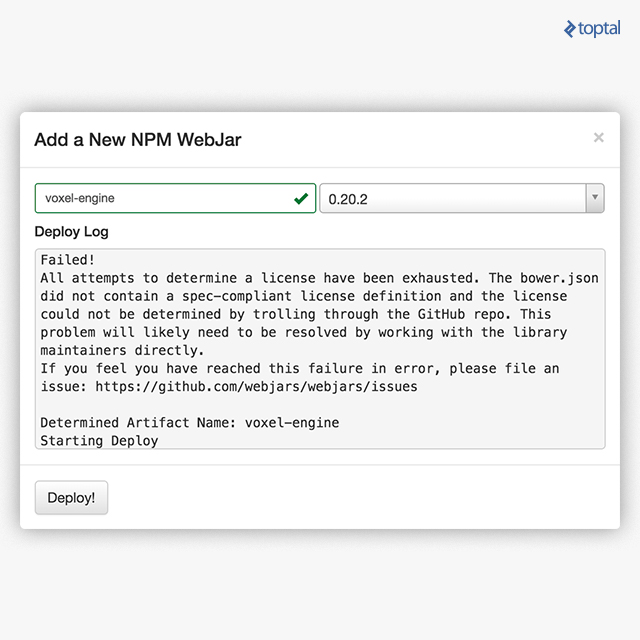
You might encounter similar frustrations with other libraries for various reasons. In essence, directly accessing every library as a WebJar seems impractical. The constraint of depending solely on WebJars for accessing JavaScript libraries proves to be overly restrictive.
Transitioning to NPM and Browserify
The Node Package Manager (NPM), bundled with Node.js, has emerged as the standard packaging format for most JavaScript libraries. Leveraging NPM provides effortless access to a vast collection of JavaScript libraries.
It’s important to remember that NPM is specifically designed for Node packages. Node.js, a server-side JavaScript runtime built on the V8 JavaScript engine, utilizes NPM for installing packages intended for server-side use. Consequently, NPM, in its native form, is not directly applicable to browser-based development. However, the widespread adoption of the Browserify tool, itself distributed as an NPM package, has extended NPM’s utility to encompass browser applications.
Browserify serves as a specialized packager for browser-based development. It effectively bundles NPM modules into a single file suitable for use in browser environments. A common workflow among JavaScript developers involves managing packages with NPM and subsequently using Browserify to prepare them for web applications. It’s worth noting that alternative tools, like Webpack, serve a similar purpose.
Bridging the Gap Between SBT and NPM
Considering the points outlined above, I sought a mechanism to leverage NPM for installing dependencies, invoke Browserify to package them for browser consumption, and seamlessly integrate the result with my Scala.js project. While the task proved to be somewhat intricate, it remained achievable. I successfully implemented a solution that I’ll elaborate on here.
For simplicity, I chose Browserify as my bundling tool, primarily because it can be seamlessly integrated into SBT. While I haven’t experimented with Webpack in this context, I anticipate it’s similarly feasible. Fortunately, I wasn’t starting from scratch. Existing tools and features simplified the process:
- SBT’s Built-in NPM Support: The
sbt-webplugin, initially developed for the Play Framework, empowers SBT to manage NPM dependencies. - JavaScript Execution within SBT: Thanks to the
sbt-jsengineplugin, executing Node.js tools directly within SBT is possible, eliminating the need for a separate Node.js installation. - Scala.js’s Ability to Utilize Generated Bundles: Scala.js offers a concatenation function that allows developers to include arbitrary JavaScript libraries in their applications.
Harnessing these capabilities, I constructed an SBT task to download NPM dependencies and subsequently invoke Browserify, producing a single, browser-ready bundle.js file. While I attempted to integrate this procedure directly into the compilation pipeline, the overhead of running the bundling process with each compilation proved too significant. Moreover, since dependencies are not constantly changing, a more practical approach involves manually generating the bundle only when dependency changes occur.
My solution involves creating a dedicated subproject responsible for downloading and packaging JavaScript libraries using NPM and Browserify. I introduced a bundle command within this subproject to initiate the dependency gathering process. The generated bundle is then placed within the project’s resources directory for use by the Scala.js application.
It’s important to note that this bundle command is designed to be executed manually whenever modifications are made to your JavaScript dependencies. As mentioned earlier, it’s not tightly coupled to the automated compilation process.
Utilizing the Bundler
To utilize the example project, begin by cloning the repository using the standard Git command:
| |
Next, copy the bundle folder into your Scala.js project. This folder represents the dedicated subproject responsible for bundling dependencies. To establish a connection between this subproject and your main project, add the following lines to your build.sbt file:
| |
Additionally, include the following lines in your project/plugins.sbt file:
| |
Once these steps are complete, you’ll have a new bundle command at your disposal for gathering your project’s dependencies. Executing this command will generate a bundle.js file within your project’s src/main/resources folder.
Including the Bundle in Your Scala.js Application
The previously described bundle command effectively gathers dependencies using NPM and packages them into a bundle.js file. When you execute the fastOptJS or fullOptJS commands in your Scala.js project, Scala.js will generate a myproject-jsdeps.js file, which includes all the resources you’ve specified as JavaScript dependencies. This, naturally, includes your bundle.js file. To incorporate these bundled dependencies into your application, utilize the following lines of code:
| |
By doing so, your bundled dependencies become readily accessible within the myproject-jsdeps.js file. With the bundle in place, you’ve effectively addressed the challenge of importing dependencies and making them available for use in your browser-based application. The next step involves actually utilizing these JavaScript libraries, which falls under the realm of Scala.js coding and presents a separate set of considerations. For completeness, we’ll delve into how to interact with the bundle from within your Scala.js code and create facades to utilize the imported libraries.
Integrating a Generic JavaScript Library into a Scala.js Application
To summarize, we’ve walked through the process of employing NPM and Browserify to generate a consolidated bundle and include it in a Scala.js project. However, the question of how to effectively utilize a generic JavaScript library within this context remains.
The overall process, which we’ll examine in detail throughout the remainder of this article, involves the following steps:
- Dependency Selection: Choose the desired libraries from NPM and include them in the
bundle/package.jsonfile. - Loading Libraries: Utilize the
requirefunction to load the selected libraries within a library module file located atbundle/lib.js. - Scala.js Facade Creation: Write Scala.js facades to provide type-safe access to the JavaScript
Bundleobject within your Scala.js code. - Application Logic: Write the application logic using the newly typed libraries.
Incorporating a Dependency
NPM leverages the package.json file as the standard mechanism for managing project dependencies.
Let’s illustrate this process by incorporating two popular libraries: jQuery and Lodash. Keep in mind that this is primarily for demonstration purposes. An excellent jQuery wrapper is already available as a Scala.js dependency with a well-defined module, and Lodash’s functionality might not be as relevant in the Scala world.
Navigate to the npmjs.com website, locate the libraries you intend to use, and select specific versions. For our example, let’s assume we opt for jquery-browserify version 13.0.0 and lodash version 4.3.0. Update the dependencies block within your packages.json file accordingly:
| |
Ensure that browserify remains included, as it’s essential for bundle generation. However, it’s not mandatory to include it within the final bundle itself.
If you have NPM installed locally, you can achieve the same result by navigating to the bundle directory and executing the following command:
| |
This command will automatically update your package.json file. Don’t worry if you don’t have NPM installed. SBT will handle downloading and managing a Java-based version of Node.js and NPM, ensuring the necessary JARs are retrieved and executed when you run the bundle command from within SBT.
Exporting the Library
With the packages successfully downloaded, the next step involves instructing Browserify to bundle them and make them accessible to the rest of the application.
Browserify operates by emulating Node.js’s require behavior within the browser environment. This implies the need for a require statement that imports your chosen libraries. Since our goal is to expose these libraries to Scala.js, the bundling process will also generate a top-level JavaScript object named Bundle. Therefore, modify the lib.js file, which is responsible for exporting a JavaScript object, and require all your libraries as fields within this object.
To export jQuery and Lodash to Scala.js, the code would look like this:
| |
Now, when you run the bundle command, the libraries will be downloaded, bundled, and placed into the final bundle, ready for consumption within your Scala.js application.
Interacting with the Bundle
At this point, you’ve accomplished the following:
- Integrated the
bundlesubproject into your Scala.js project and configured it correctly. - Added the desired libraries to the
package.jsonfile. - Included
requirestatements for the libraries within thelib.jsfile. - Successfully executed the
bundlecommand.
As a result, you now have a Bundle top-level JavaScript object, providing access points to your chosen libraries through its fields.
You can now seamlessly interact with this bundle from your Scala.js code. A simple way to access the libraries is as follows:
| |
This code snippet allows you to access the bundled libraries from within your Scala.js code. However, this approach doesn’t fully leverage the benefits of Scala.js, as the libraries remain untyped. A more robust solution involves writing typed “facades” or wrappers to interact with these initially untyped JavaScript libraries in a type-safe, Scala-like manner.
Providing a comprehensive guide on writing facades for every JavaScript library is beyond the scope of this article, as the specifics depend on the library you intend to wrap. Instead, I’ll present a illustrative example. For a more in-depth understanding, refer to the official Scala.js documentation. Additionally, resources like the list of available facades and studying existing facade source code can provide valuable insights.
While the discussion so far has focused on arbitrary, unmapped libraries, the remaining sections will utilize a library with an existing already available facade for illustrative purposes.
Encapsulating a JavaScript API in Scala.js
When you use require in JavaScript, the resulting object can take on various forms. It could be a function, an object, a string, or even a boolean. In cases where it’s a string or boolean, the require statement is often invoked solely for its side effects.
In our ongoing example, jquery represents a function that returns an object. This returned object provides additional methods. A common usage pattern is jquery(<selector>).<method>. It’s important to acknowledge that jquery also allows for the shorthand $.<method> syntax. However, for the sake of simplicity, our example won’t delve into all possible usage scenarios. Keep in mind that for complex JavaScript libraries, mapping the entirety of their APIs to static Scala types might not always be straightforward. In such cases, leveraging js.Dynamic to provide a dynamic (untyped) interface to JavaScript objects can be necessary.
To handle the most prevalent use case, I defined jquery within the Bundle object as follows:
| |
This function returns a jQuery object. In our simplified example, an instance of a trait is defined with a single method (feel free to expand upon this):
| |
For the Lodash library, we model the entire library as a single JavaScript object, as it’s essentially a collection of functions that can be called directly:
| |
The lodash trait is similarly concise (you can add more methods as needed):
| |
With these definitions in place, we can finally write Scala code that utilizes the underlying jQuery and Lodash libraries, both loaded from NPM and bundled using Browserify:
| |
A complete working example can be found here.
Conclusion
As a Scala enthusiast, I was thrilled to discover Scala.js. It presented the opportunity to utilize a single language for both server-side and client-side development. Given Scala’s closer resemblance to JavaScript compared to Java, using Scala.js in the browser feels remarkably intuitive and natural. Additionally, leveraging Scala’s strengths, such as its extensive library ecosystem, powerful macros, and excellent IDE and build tool support, becomes readily feasible. The ability to share code between the server and client, a feature with numerous practical applications, further adds to its appeal.
For those already using JavaScript transpilers like CoffeeScript, Babel, or TypeScript, transitioning to Scala.js might not seem drastically different. However, the advantages it brings to the table are undeniable. The key lies in embracing the best of both worlds and ensuring they harmonize seamlessly.