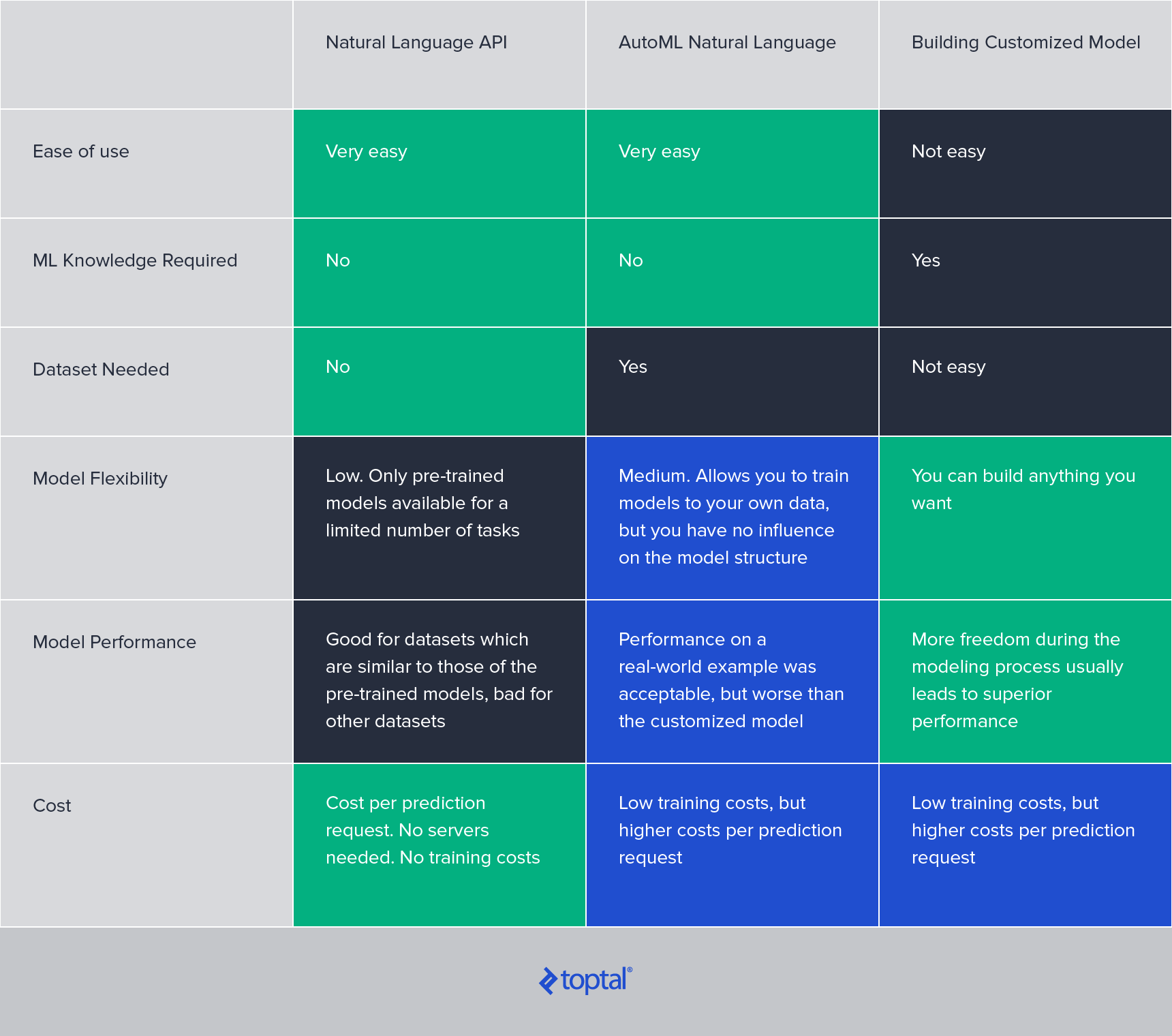
The field of artificial intelligence has witnessed a surge in research focused on natural language processing (NLP), an area where machine learning and linguistics converge. Recent years have been marked by breakthroughs, including the notable GPT-2 model by OpenAI, capable of generating realistic and coherent articles about any topic from a short input.
This surge in interest is fueled by the emergence of numerous commercial applications. Our interactions now include home assistants powered by NLP, transcribing audio and comprehending our queries. Companies are increasingly turning to automated chatbots for customer communication. Online marketplaces leverage NLP to detect fake reviews, media outlets generate news articles, and recruitment firms match resumes to job postings. Social media giants utilize it for automated content moderation, while legal professionals analyze contracts with NLP’s assistance.
Historically, training and deploying machine learning models for such tasks was a complex endeavor, demanding specialized expertise and costly infrastructure. However, the increasing demand for such applications has prompted major cloud providers to develop NLP-related services, significantly reducing workload and infrastructure costs. The average cost of cloud services has been steadily decreasing, a trend predicted to persist.
This article will delve into two such products offered by Google Cloud Services: “Google Natural Language API” and “Google AutoML Natural Language.”
Google Natural Language API
The Google Natural Language API provides a user-friendly gateway to a suite of powerful pre-trained NLP models developed by Google for diverse tasks. These models, trained on massive text corpora, generally perform well on datasets that don’t rely heavily on highly specialized language.
A key advantage of utilizing these pre-trained models through the API is the elimination of the need for a training dataset. The API enables users to generate predictions immediately, proving invaluable when labeled data is scarce.
The Natural Language API encompasses five distinct services:
- Syntax Analysis
- Sentiment Analysis
- Entity Analysis
- Entity Sentiment Analysis
- Text Classification
Syntax Analysis
Google’s syntax analysis dissects a given text, providing a detailed breakdown of each word along with extensive linguistic information. This information comprises two main parts:
Part of speech: This analysis delves into the morphology of each token, offering a granular understanding of its type (noun, verb, etc.), gender, grammatical case, tense, mood, voice, and more.
For instance, consider the input sentence, “A computer once beat me at chess, but it was no match for me at kickboxing.” (Emo Philips). The part-of-speech analysis yields:
| A | tag: DET |
| 'computer' | tag: NOUN number: SINGULAR |
| 'once' | tag: ADV |
| 'beat' | tag: VERB mood: INDICATIVE tense: PAST |
| 'me' | tag: PRON case: ACCUSATIVE number: SINGULAR person: FIRST |
| at | tag: ADP |
| 'chess' | tag: NOUN number: SINGULAR |
| ',' | tag: PUNCT |
| 'but' | tag: CONJ |
| 'it' | tag: PRON case: NOMINATIVE gender: NEUTER number: SINGULAR person: THIRD |
| 'was' | tag: VERB mood: INDICATIVE number: SINGULAR person: THIRD tense: PAST |
| 'no' | tag: DET |
| 'match' | tag: NOUN number: SINGULAR |
| 'for' | tag: ADP |
| 'kick' | tag: NOUN number: SINGULAR |
| 'boxing' | tag: NOUN number: SINGULAR |
| '.' | tag: PUNCT |
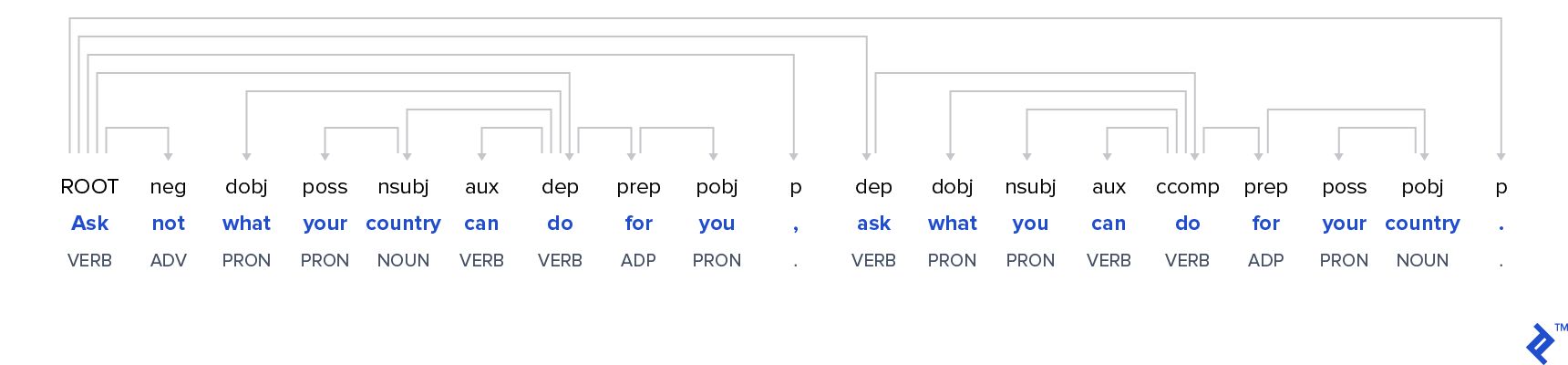
Dependency trees: This aspect visually represents the syntactic structure of each sentence using a dependency tree. Arrows emanating from each word illustrate the words it modifies.
The dependency tree for a famous Kennedy quote is shown below:
Widely used Python libraries like nltk and spaCy offer comparable functionalities. While the quality of analysis is consistently high across all three options, the Google Natural Language API stands out for its user-friendliness. Achieving the aforementioned analysis requires minimal coding (as demonstrated in a later example). However, unlike the open-source and free spaCy and nltk, the Google Natural Language API incurs costs after exceeding a certain free request limit (detailed in the cost section).
Beyond English, the syntactic analysis supports ten additional languages: Simplified Chinese, Traditional Chinese, French, German, Italian, Japanese, Korean, Portuguese, Russian, and Spanish.
Sentiment Analysis
In contrast to syntax analysis, which is often used in the initial stages of a pipeline to generate features for machine learning models, the sentiment analysis service is ready for immediate use.
Google’s sentiment analysis determines the predominant emotional tone within a given text, returning two values:
Score: This value, ranging from -1 (negative) to +1 (positive) with 0 representing neutrality, indicates the emotional leaning of the text.
Magnitude: This value quantifies the intensity of the expressed emotion.
Let’s examine some examples:
| Input Sentence | Sentiment Results | Interpretation |
| The train to London leaves at four o'clock | Score: 0.0 Magnitude: 0.0 | A completely neutral statement, which doesn't contain any emotion at all. |
| This blog post is good. | Score: 0.7 Magnitude: 0.7 | A positive sentiment, but not expressed very strongly. |
| This blog post is good. It was very helpful. The author is amazing. | Score: 0.7 Magnitude: 2.3 | The same sentiment, but expressed much stronger. |
| This blog post is very good. This author is a horrible writer usually, but here he got lucky. | Score: 0.0 Magnitude: 1.6 | The magnitude shows us that there are emotions expressed in this text, but the sentiment shows that they are mixed and not clearly positive or negative. |
Google’s sentiment analysis model benefits from training on a vast dataset. While its precise structure remains undisclosed, curiosity about its real-world performance led me to evaluate it using a portion of the Large Movie Review Dataset, a dataset created by Stanford University researchers in 2011.
Randomly selecting 500 positive and 500 negative movie reviews from the test set, I compared the predicted sentiment with the actual review label. The resulting confusion matrix is as follows:
| Positive Sentiment | Negative Sentiment | |
| Good Review | 470 | 30 |
| Bad Review | 29 | 471 |
Impressively, the model achieves a 94% accuracy rate in classifying both positive and negative movie reviews. This performance is commendable for a ready-to-use solution without any fine-tuning for this specific task.
Note: The sentiment analysis is available for the same languages as the syntax analysis, with the exception of Russian.
Entity Analysis
Entity Analysis involves identifying known entities such as public figures or landmarks within a given text. This capability proves highly valuable for various classification and topic modeling tasks.
The Google Natural Language API provides basic information about each detected entity, often including a link to the corresponding Wikipedia article (if available). Additionally, a salience score is calculated, indicating the importance or centrality of an entity within the overall document. Scores closer to 0 denote lower salience, while those closer to 1.0 signify high salience.
Submitting the following example sentence to the API, “Robert DeNiro spoke to Martin Scorsese in Hollywood on Christmas Eve in December 2011.”, yields the following output:
| Detected Entity | Additional Information |
| Robert De Niro | type : PERSON salience : 0.5869118 wikipedia_url : https://en.wikipedia.org/wiki/Robert_De_Niro |
| Hollywood | type : LOCATION salience : 0.17918482 wikipedia_url : https://en.wikipedia.org/wiki/Hollywood |
| Martin Scorsese | type : LOCATION salience : 0.17712952 wikipedia_url : https://en.wikipedia.org/wiki/Martin_Scorsese |
| Christmas Eve | type : PERSON salience : 0.056773853 wikipedia_url : https://en.wikipedia.org/wiki/Christmas |
| December 2011 | type : DATE Year: 2011 Month: 12 salience : 0.0 wikipedia_url : - |
| 2011 | type : NUMBER salience : 0.0 wikipedia_url : - |
The analysis accurately identifies and classifies all entities, except for a minor repetition of “2011.” It’s worth noting that the entity analysis API goes beyond the fields shown in the example output, also detecting organizations, works of art, consumer goods, phone numbers, addresses, and prices.
Entity Sentiment Analysis
Combining entity detection with sentiment analysis, Entity Sentiment Analysis takes a step further to determine the prevailing emotions directed towards different entities within a text.
While Sentiment Analysis analyzes and aggregates all displays of emotion in a document, Entity Sentiment Analysis focuses on identifying dependencies between different parts of the document and the identified entities. It then attributes the emotions expressed in these text segments to the corresponding entities.
For instance, analyzing the opinionated text, “The author is a horrible writer. The reader is very intelligent on the other hand.”, produces the following results:
| Entity | Sentiment |
| author | Salience: 0.8773350715637207 Sentiment: magnitude: 1.899999976158142 score: -0.8999999761581421 |
| reader | Salience: 0.08653714507818222 Sentiment: magnitude: 0.8999999761581421 score: 0.8999999761581421 |
Currently, entity sentiment analysis is limited to English, Japanese, and Spanish.
Text Classification
The Google Natural language API also includes a ready-to-use text classification model.
This model excels at classifying input documents into a comprehensive set of hierarchically structured categories. For example, the category “Hobbies & Leisure” encompasses several sub-categories, including “Hobbies & Leisure/Outdoors”, which further branches into sub-categories like “Hobbies & Leisure/Outdoors/Fishing.”
Consider this excerpt from a Nikon camera advertisement:
“The D3500’s large 24.2 MP DX-format sensor captures richly detailed photos and Full HD movies—even when you shoot in low light. Combined with the rendering power of your NIKKOR lens, you can start creating artistic portraits with smooth background blur. With ease.”
The Google API categorizes this text as follows:
| Category | Confidence |
| Arts & Entertainment/Visual Art & Design/Photographic & Digital Arts | 0.95 |
| Hobbies & Leisure | 0.94 |
| Computers & Electronics/Consumer Electronics/Camera & Photo Equipment | 0.85 |
All three categories seem plausible, although one might intuitively rank the third entry higher than the second. However, it’s crucial to consider that this input segment represents only a small portion of the complete camera advertisement, and the classification model’s performance tends to improve with longer text.
Based on extensive testing with various documents, I’ve found the classification model’s results to be generally meaningful. However, similar to other models within the Google Natural Language API, the classifier operates as a black box, offering no room for modification or fine-tuning by the user. This limitation is particularly significant in text classification, as most companies have their own unique text categories that differ from those used by the Google model, potentially rendering the Natural Language API text classification service unsuitable for a majority of users.
Another constraint is the classification model’s exclusive support for English language texts.
How to Use the Natural Language API
The Google Natural Language API’s primary strength lies in its user-friendliness. It requires minimal technical expertise and virtually no coding skills. The Google Cloud website provides code snippets for interacting with the API in various programming languages.
For instance, calling the sentiment analysis API in Python is as simple as this:
| |
Invoking other API functionalities follows a similar pattern, merely replacing client.analyze_sentiment with the corresponding function.
Overall Cost of Google Natural Language API
Google employs a per-request pricing model for all services within the Natural Language API. While this approach eliminates fixed costs associated with deployment servers, it can lead to higher expenses when dealing with large datasets.
The following table outlines the pricing (per 1,000 requests) based on the number of monthly requests:
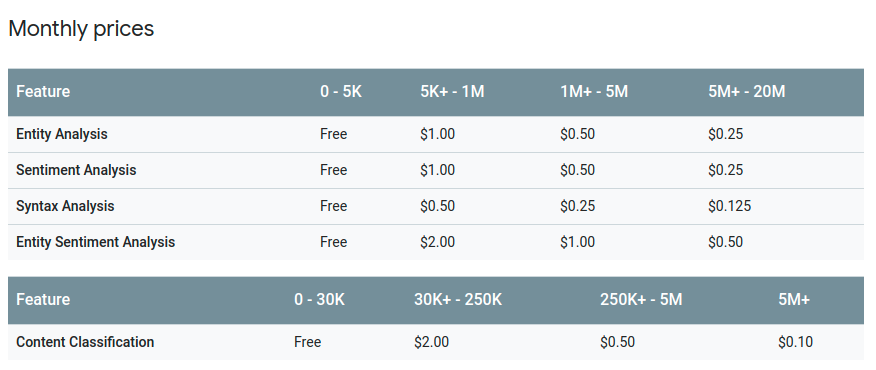
Documents exceeding 1,000 characters are counted as multiple requests. For example, analyzing the sentiment of 10,000 documents, each containing 1,500 characters, would be billed as 20,000 requests. With the first 5,000 requests being free, the total cost would amount to $15. Analyzing one million documents of the same size would cost $1,995.
Convenient, but Inflexible
The Google Natural Language API excels as a convenient option for rapid, ready-to-use solutions. It demands minimal technical proficiency and no knowledge of the underlying machine learning models.
However, its inflexibility and lack of model access pose significant drawbacks. The models cannot be tailored to specific tasks or datasets.
In real-world scenarios, most tasks necessitate more customized solutions than the standardized Natural Language API functions can provide.
For such situations, Google AutoML Natural Language emerges as a more suitable alternative.
Google AutoML Natural Language
When the Natural Language API’s capabilities fall short, AutoML Natural Language](https://cloud.google.com/natural-language/automl/docs/) offers a more powerful solution. This Google Cloud Service, currently in beta, empowers users to create tailored machine learning models. Unlike the Natural Language API, AutoML models are trained on user-provided data, ensuring a better fit for specific tasks.
Custom machine learning models for content classification prove particularly useful when the predefined categories offered by the Natural Language API are too general or irrelevant to your specific use case or knowledge domain.
While AutoML demands more user involvement, primarily in providing a training dataset, the model training and evaluation processes are fully automated and require no machine learning expertise. The entire process can be managed without writing any code using the intuitive Google Cloud console. However, for those who prefer automation, support for all common programming languages is available.
What Can Be Done With Google AutoML Natural Language?
The AutoML service currently addresses three use cases, all limited to the English language.
1. AutoML Text Classification
Unlike the pre-trained text classifier within the Natural Language API, which operates with a fixed set of categories, AutoML text classification constructs customized machine learning models using the categories you define in your training dataset.
2. AutoML Sentiment Analysis
While the Natural Language API’s sentiment analysis performs well in general use cases like movie reviews, its performance can decline when dealing with documents containing a high volume of domain-specific language. AutoML Sentiment Analysis addresses this limitation by enabling you to train a sentiment model specifically tailored to your domain.
3. AutoML Entity Extraction
Many business contexts involve domain-specific entities (e.g., legal contracts, medical documents) that the Natural Language API may not recognize. AutoML entity extraction allows you to train a customized entity extractor using a dataset with marked entities. With a sufficiently large dataset, the trained model can even identify previously unseen entities.
How to Use AutoML Natural Language
Utilizing the three AutoML functionalities involves a straightforward four-step process:
Dataset Preparation: The dataset must adhere to a specific format (CSV or JSON) and reside in a storage bucket. For classification and sentiment models, the dataset consists of two columns: text and label. For entity extraction, the dataset requires the text and the location of each entity within the text.
Model Training: Model training occurs automatically. Unless instructed otherwise, AutoML automatically partitions the training set into training, testing, and validation sets. While users can manually define this split, it’s the sole aspect of model training they can influence. The remaining training process operates as a fully automated black box.
Evaluation: Upon completion of training, AutoML presents precision and recall scores, along with a confusion matrix. However, the absence of information about the model itself makes it challenging to pinpoint the causes of suboptimal model performance.
Prediction: Once satisfied with the model’s performance, deploying it involves a few simple clicks, taking only a few minutes.
AutoML Model Performance
The training process can be time-consuming, likely due to the complexity of the underlying models. Training a small test classification task with 15,000 samples and 10 categories took several hours. A real-world scenario involving a significantly larger dataset took several days.
While Google hasn’t disclosed details about the specific models employed, it’s plausible that Google’s BERT model is used with minor adjustments for each task. Fine-tuning large models like BERT is computationally demanding, especially when extensive cross-validation is involved.
In a real-world test, I compared the AutoML classification model’s performance against a BERT-based model I developed. Surprisingly, the AutoML model, despite being trained on the same data, performed notably worse than my model, achieving 84% accuracy compared to my model’s 89%.
This suggests that while AutoML offers convenience, for tasks where performance is critical, investing the time to develop a custom model might be worthwhile.
AutoML Pricing
AutoML’s pricing for predictions, at $5 per 1,000 text records, is considerably higher than that of the Natural Language API. Additionally, AutoML charges $3 per hour for model training. While this cost might seem negligible initially, it can accumulate significantly for use cases requiring frequent retraining, especially considering the lengthy training times.
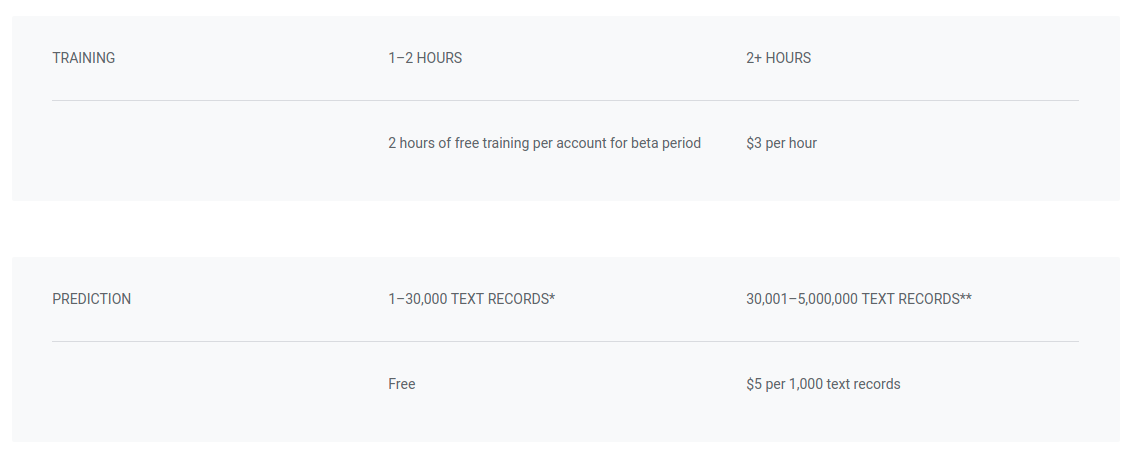
Let’s revisit the example used for the Natural Language API:
Analyzing the sentiment of 10,000 documents, each containing 1,500 characters, would result in 20,000 requests. Assuming a 20-hour model training time, costing $48, and with the first 30,000 requests for prediction being free, AutoML proves to be cost-effective for small datasets like this.
However, analyzing one million documents of the same size would incur a cost of $9,850, making it a more expensive option. For large datasets, developing and deploying your own model without relying on AutoML might be more economical.
Google Natural Language API vs. AutoML Natural Language
Google AutoML Natural Language offers significantly more power than the Natural Language API, empowering users to train models customized for their specific datasets and domains.
It maintains a user-friendly approach, requiring no machine learning expertise. However, the trade-offs include higher costs and the need for a high-quality dataset to train well-performing models.
Currently, the AutoML beta supports only three NLP tasks (classification, sentiment analysis, entity extraction) and exclusively handles English language documents. However, as the service matures, it’s anticipated to expand its language support and encompass additional NLP tasks.
Comparison of Natural Language Processors