In the middle of the previous year, I decided to develop an application for Android, iOS, and the web. Flutter emerged as the ideal framework for mobile platforms, but I needed to find a suitable counterpart for the web.
Despite my immediate affinity for Flutter, I still harbored some reservations. While Flutter effectively propagates state down the widget tree using InheritedWidget or Redux and its variants, I anticipated a more reactive view layer in a modern framework like Flutter. Ideally, widgets would be inherently stateless, dynamically updating based on externally supplied state. Moreover, Flutter’s limited support for Android and iOS posed a challenge since I aimed to publish on the web as well. Given the substantial business logic within my existing app, maximizing code reuse was paramount, making the prospect of duplicating code changes across multiple platforms unacceptable.
My search for solutions led me to BLoC, and I highly recommend watching Flutter/AngularDart – Code sharing, better together (DartConf 2018) for a concise introduction.
Understanding the BLoC Pattern

In essence, BLoC, coined by Google, stands for “business logic components.” This pattern emphasizes encapsulating as much business logic as possible within pure Dart code to facilitate reuse across different platforms. To effectively implement BLoC, adhere to the following principles:
- Layer-based Communication: Establish a clear communication flow between layers, with views interacting with the BLoC layer, which in turn communicates with repositories that interface with the data layer. Avoid bypassing layers during communication.
- Interface-driven Communication: Define interfaces using pure, platform-agnostic Dart code to ensure seamless interaction between components. For detailed information, refer to the documentation on implicit interfaces.
- Stream and Sink-based I/O: BLoCs communicate exclusively through streams and sinks, a concept we’ll explore further later.
- Simplified Views: Maintain the separation of concerns by keeping business logic out of views, relegating them to data presentation and user interaction handling.
- Platform-agnostic BLoCs: Implement BLoCs using pure Dart code, avoiding any platform-specific logic or dependencies. Refrain from introducing platform-conditional code within BLoCs, as they operate above the platform layer.
- Injection of Platform-specific Dependencies: While BLoCs themselves remain platform-agnostic, they may need to interact with platform-specific repositories. Inject these dependencies to maintain BLoC portability. By adhering to interface-based communication and dependency injection, we ensure that BLoCs remain agnostic to the underlying repository implementation, whether it’s designed for Flutter or AngularDart.
Remember that BLoCs receive input through a sink and provide output through a stream, both integral parts of the StreamController.
By rigorously following these rules during web (or mobile) app development, creating a corresponding mobile (or web) version becomes remarkably straightforward, primarily involving building the views and platform-specific interfaces. Even with rudimentary platform knowledge, crafting views in AngularDart or Flutter becomes readily achievable. This approach can result in reusing over half of your codebase, as the BLoC pattern enforces structure and maintainability.
Developing a BLoC Todo App with AngularDart and Flutter
To demonstrate this concept, I developed a straightforward todo app using Flutter and AngularDart. This application utilizes Firecloud as a back-end and implements a reactive approach to view generation. It comprises three main parts:
bloctodo_app_fluttertodoapp_dart_angular
Feel free to expand this structure with additional components, such as data interfaces or localization interfaces. The key principle is to ensure that communication between layers occurs exclusively through well-defined interfaces.
Examining the BLoC Code
Within the bloc/ directory, you’ll find the following:
lib/src/bloc: This directory houses the BLoC modules, implemented as pure Dart libraries containing the core business logic.lib/src/repository: Interfaces responsible for data interaction reside here.lib/src/repository/firestore: This repository contains the FireCloud data interface along with its corresponding model. In this simplified app, we have a single data model (todo.dart) and interface (todo_repository.dart). However, real-world applications typically involve multiple models and repository interfaces.lib/src/repository/preferences: This directory includespreferences_interface.dart, a basic interface for persisting successfully authenticated usernames in local storage (web) or shared preferences (mobile).
| |
Both web and mobile implementations need to adhere to this interface to store and retrieve the default username from local storage or shared preferences. Here’s how the AngularDart implementation looks:
| |
This straightforward implementation fulfills its intended purpose. Notably, the asynchronous initPreferences() method returns null. This method requires implementation on the Flutter side, as retrieving the SharedPreferences instance in a mobile environment is asynchronous.
| |
Let’s delve further into the lib/src/bloc directory. Each view responsible for handling business logic should have its dedicated BLoC component. Here, you’ll find base_bloc.dart, endpoints.dart, and session.dart. The session.dart BLoC manages user authentication (sign-in and sign-out) and provides endpoints for repository interfaces. The session interface exists because the firebase and firecloud packages differ between web and mobile, necessitating platform-specific implementations.
| |
The session class is designed as a global singleton. It governs the app’s transition between the login and todo-list views based on the state of its _isSignedIn.stream getter. Additionally, it exposes endpoints for repository implementations when a valid userId exists (indicating a signed-in user).
The base_bloc.dart file serves as a foundation for all other BLoCs, handling tasks like load indicator management and error dialog display as needed.
To illustrate business logic implementation, let’s examine todo_add_edit_bloc.dart. As its name suggests, this BLoC component is responsible for adding and editing todo items. It includes a private method called _addUpdateTodo(bool addUpdate).
| |
This method takes a boolean argument addUpdate and acts as a listener for the final BehaviorSubject<bool> _addUpdate = BehaviorSubject<bool>(). When a user clicks the save button, an event dispatches a true value to this subject’s sink, triggering the BLoC function. This interaction is seamlessly handled by the following Flutter code snippet on the view side.
| |
The _addUpdateTodo method verifies that both the title and description fields are non-empty and updates the _todoError BehaviorSubject accordingly. This error handling mechanism is responsible for displaying errors in the view’s input fields if no values are provided. If validation succeeds, the code determines whether to create a new TodoBloc or update an existing one, ultimately persisting the data to FireCloud using the _toDoRepository.
Observe the following key points within this business logic implementation:
- Public Streams and Sinks: Only streams and sinks are publicly accessible within the BLoC. The
_addUpdateTodomethod remains private, inaccessible from the view. - Reactive Value Updates: The
_title.valueand_description.valueproperties are populated as the user provides input in the corresponding text fields. Text input events trigger updates to these sinks, ensuring reactive updates within the BLoC and subsequent reflections in the view. - Platform-Independent BLoC: The
_toDoRepositorydependency, potentially platform-specific, is injected into the BLoC, preserving its platform independence.
Another illustrative example is the _getTodos() method within the todo_list.dart BLoC. It listens for snapshots of the todo collection and streams the data to a list in its associated view. The view dynamically updates based on changes in the collection stream.
| |
When working with streams or their reactive equivalents, ensure proper closure to prevent resource leaks. We achieve this through the dispose() method available in each BLoC. Always dispose of the BLoC associated with a view within the view’s own dispose or destroy method.
| |
In the context of an AngularDart project:
| |
Injecting Platform-specific Repositories
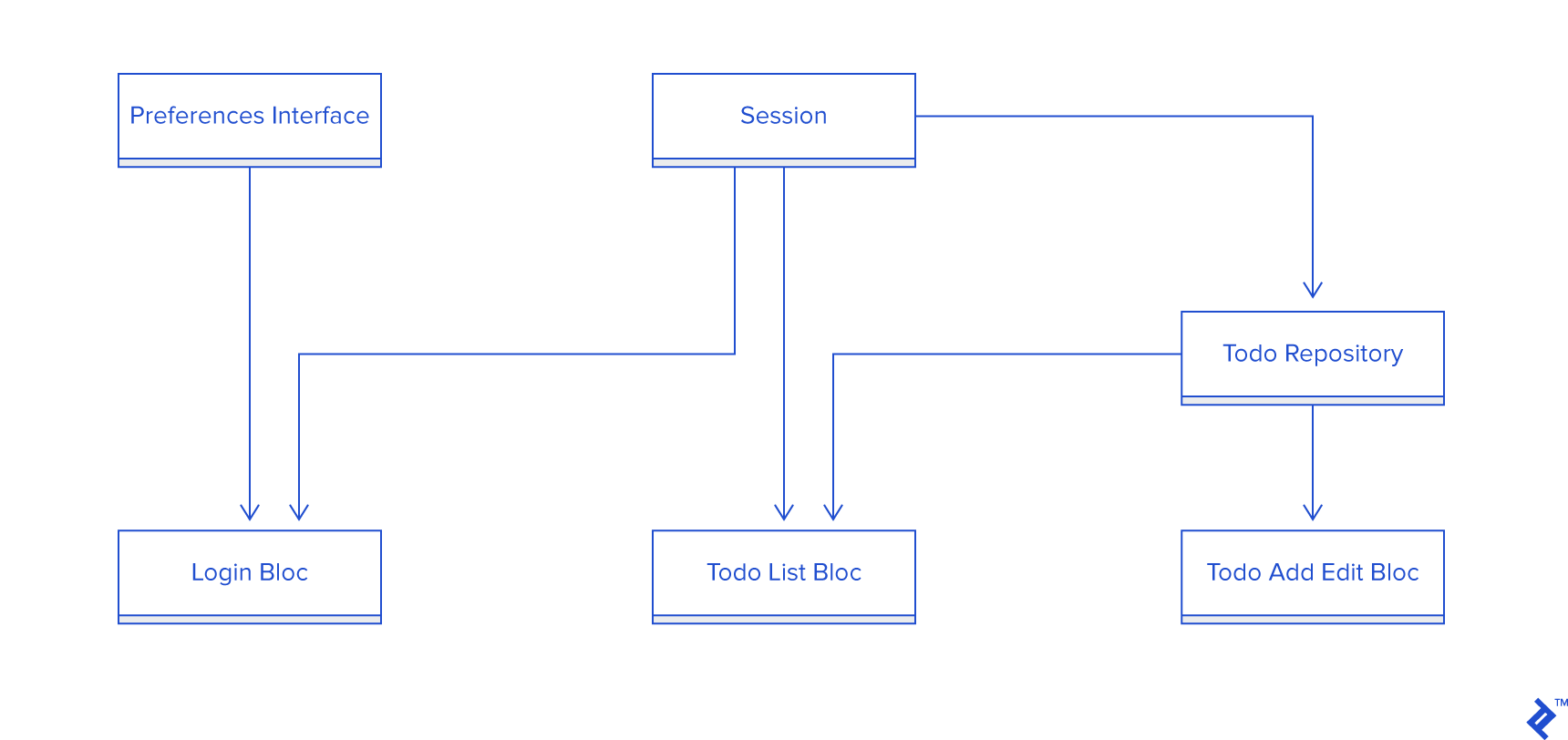
As emphasized earlier, BLoCs should exclusively deal with pure Dart code, avoiding platform-dependent elements. However, TodoAddEditBloc requires the ToDoRepository to interact with Firestore, which relies on platform-specific Firebase packages. To address this, we provide separate implementations of the ToDoRepository interface and inject them into our apps.
For Flutter, I opted for the flutter_simple_dependency_injection package, resulting in the following implementation:
| |
Using this within a widget looks like this:
| |
AngularDart simplifies this process with its built-in dependency injection mechanism using providers.
| |
And in a component:
| |
Notice that Session acts as a global entity, providing sign-in/out functionality and endpoints utilized by both ToDoRepository and various BLoCs. The ToDoRepository itself depends on an endpoints interface implemented by SessionImpl, showcasing the layered communication flow. Importantly, the view interacts solely with its corresponding BLoC, remaining agnostic to the underlying implementation details.
Constructing the Views
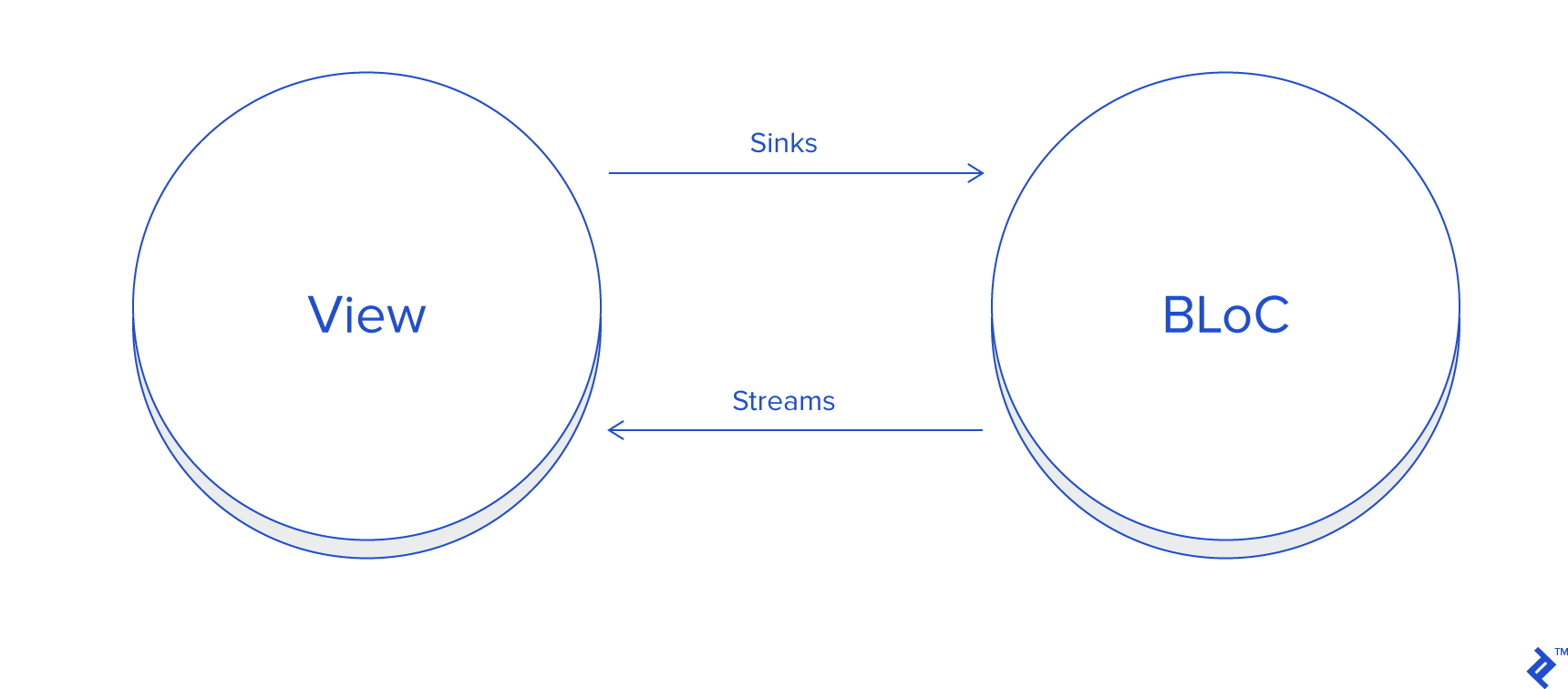
Strive for simplicity in your views, focusing on data presentation from the BLoC and relaying user interactions back to the BLoC. Let’s analyze the TodoAddEdit widget in Flutter and its web counterpart, TodoDetailComponent, both responsible for displaying and allowing modifications to todo items.
Flutter:
| |
And later in the code:
| |
The StreamBuilder widget automatically rebuilds whenever an error occurs (e.g., empty input) by listening to _todoAddEditBloc.todoErrorStream. User input in the text field is captured by _todoAddEditBloc.titleSink, a sink within the BLoC, ensuring reactive updates.
The initial value of the input field, when editing an existing todo, is populated by listening to _todoAddEditBloc.todoStream, which provides either the selected todo or an empty one for new additions.
We manage text field value assignment using its controller: _titleController.text = todo.title;.
Clicking the save icon in the app bar triggers _todoAddEditBloc.addUpdateSink.add(true), which in turn invokes the _addUpdateTodo(bool addUpdate) function in the BLoC, handling the logic for adding, updating, or presenting errors to the user.
This reactive approach eliminates the need for manual widget state management.
AngularDart simplifies view creation even further. After injecting the component’s BLoC using providers, the todo_detail.html template handles data display and user interaction delegation to the BLoC.
| |
Similar to Flutter, we use ngModel to bind the input field’s value to the title stream, providing the initial value.
| |
The inputKeyPress output event transmits characters typed by the user back to the BLoC’s description sink. Clicking the material button with (trigger)="todoAddEditBloc.addUpdateSink.add(true)" dispatches the add/update event to the BLoC, again triggering the _addUpdateTodo(bool addUpdate) function. Examining the todo_detail.dart component code reveals minimal logic, primarily consisting of strings for display. These strings are intentionally placed in the component rather than the HTML to facilitate potential localization.
This pattern of minimal business logic within components and widgets extends to all other parts of the application.
Consider a scenario with complex data presentation logic or a table requiring value formatting (dates, currencies, etc.). While it might be tempting to retrieve raw values from the BLoC and format them in the view, this approach violates the separation of concerns. Instead, values should be passed to the view already formatted as strings.
Formatting itself constitutes business logic. For instance, if formatting depends on a runtime-configurable app parameter, providing that parameter to the BLoC and leveraging a reactive approach ensures that formatting logic resides within the BLoC. This results in targeted view updates only when necessary.
Although the TodoBloc model in our example is deliberately simplistic, with model conversion from FireCloud to BLoC happening in the repository, you can perform this conversion within the BLoC if needed to prepare model values for direct display.
Conclusion
This article provides a high-level overview of the BLoC pattern and its practical implementation. It demonstrates the feasibility of code sharing between Flutter and AngularDart, enabling the creation of native and cross-platform applications.
Through exploration of the example project, you’ll discover that a well-implemented BLoC architecture significantly accelerates mobile and web app development. The near-identical code for ToDoRepository and its implementation, along with the similarities in view composition logic, exemplify this efficiency. Once you’ve established a few widgets or components, development can proceed rapidly.
I hope this article conveys the excitement and enjoyment I experience when building web and mobile apps using Flutter, AngularDart, and the BLoC pattern. For those interested in cross-platform desktop development with JavaScript, I recommend “Electron: Cross-platform Desktop Apps Made Easy” by Toptaler Stéphane P. Péricat.