In this article, I’m excited to showcase a fully functional application that utilizes Apache Spark and Docker, technologies I previously discussed.
This project originated from an IBM hackathon where the goal was to develop weather-related mobile apps using weather data, Analytics for Apache Spark, and IBM Bluemix. Sparkathon’s purpose was to leverage weather information and analytics to create innovative mobile applications.
IBM, known for its strong presence in investing in Spark, recently acquired the digital arm of The Weather Channel, making this hackathon a strategic opportunity for publicity.
Finding Your Ideal Weather
Imagine having planned time off and a desire for a specific weather experience but lacking a clear destination. My Perfect Weather app addresses this by helping you discover the perfect location based on your weather preferences.
Here are some relatable scenarios:
- You promised your child a kite-flying outing, but the wind refuses to cooperate.
- Living in a perpetually windy and rainy city (like Edinburgh, Scotland), you yearn for sunshine and warmth.
- An irresistible urge to build a snowman takes hold.
- You’re determined to have a successful fishing trip.
Functionality
The app operates on a simple premise. You define your ideal weather conditions, including temperature, wind speed, precipitation type, and probability, as shown in the screenshot. The service then identifies the best destinations based on your criteria, ranking them by the number of “perfect days” and displaying the top five matches. These perfect days are visually highlighted for easy identification.
Let’s revisit the previous scenarios:
- Set the wind speed between 16 and 32 km/h (perfect for kites), with a low chance of rain and a comfortable temperature.
- Opt for a minimum temperature that provides sufficient warmth, with no chance of rain.
- Choose a temperature around or below 0°C, with snow as the precipitation type and a high chance of snowfall.
- Select a wind speed below 16 km/h, minimal rain and cloud cover (to avoid excessive sunlight and encourage fish to stay near the surface), and a pleasant temperature.
Seamlessly integrated with the travel search service Momondo, the app lets you easily explore travel options to your chosen destination.
Behind the Scenes
With the exception of the travel search component, the entire application resides within the IBM Bluemix platform.
Thanks to the free trial provided to hackathon participants, hosting the app was effortless.
Here’s a breakdown of the data flow and component interaction:
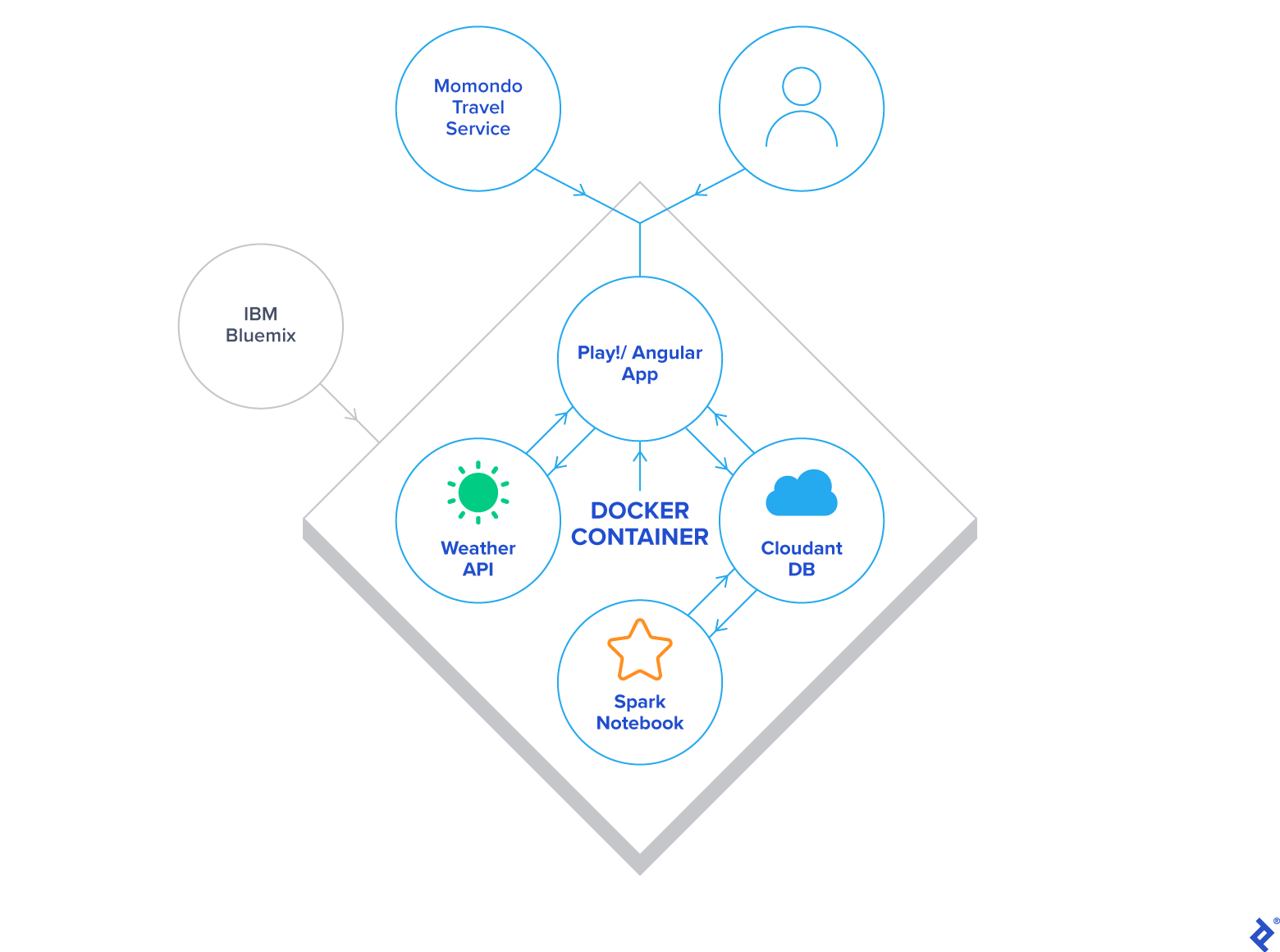
The Play application, hosted within a Docker container, communicates with the Weather Service to download a 10-day forecast into Cloudant. Subsequently, Spark processes this raw data from Cloudant and stores it back for efficient access by the Play application.
Upon accessing the app, users encounter a form to specify their weather preferences. The backend then queries Cloudant for cities meeting those criteria, followed by a second query to retrieve the full 10-day forecast for the selected cities. The results, displayed to the user, show weather conditions per city and per day, with the final cell for each city containing a link to Momondo. Clicking this link pre-populates the flight search form with the destination and travel dates. Returning users (identified by a cookie) may also have their origin and number of travelers pre-filled.
While this overview highlights the key aspects, the following sections delve deeper into specific components.
Spark and Weather Insights
Initial project stages involved understanding the Weather API and other Bluemix services, followed by exploratory data analysis of weather data using Spark. This provided crucial insights into the data model and its application within the project.
Out of the following Weather REST API endpoints, only the first was utilized:
| |
Weather forecasts for each city were obtained by querying this endpoint with the city’s latitude and longitude through the geocode parameter.
Given that the number of API requests directly corresponded to the number of supported cities, I had to consider the Insights for Weather Service free tier’s 500 daily call limit. For this demonstration, I opted for fifty popular European tourist destinations, allowing for multiple daily calls per city and accommodating failed requests without exceeding the limit. Expanding to cover most global cities would require a paid API subscription.
The project’s ultimate goal is to have Spark analyze weather data for approximately 50,000 cities worldwide, encompassing ten days of forecast data and running multiple times daily for optimal accuracy.
Currently, all Spark code is executed within a Jupyter notebook due to platform limitations. This code retrieves, processes, and writes back raw weather data to and from Cloudant DB.
Cloudant NoSQL DB
Cloudant NoSQL DB proved to be a pleasure to work with, offering ease of use and a well-designed browser-based UI. While lacking a dedicated driver, its straightforward REST API facilitated seamless interaction via HTTP.
Alternatively, Bluemix Spark’s Cloudant Data Sources API allows for reading from and writing to Cloudant without low-level calls. However, it’s important to note that creating new databases within Cloudant directly from Spark is not supported; this must be done beforehand using the web UI or other means.
Play Framework
The web application, implemented in Scala, is intentionally simplistic. A single-page app built with AngularJS and Bootstrap is served by the controller, while a service handles interactions with the Weather API and Cloudant.
One notable challenge arose from the IBM Container Service: running the app on the user-friendly port 80. Due to the inability to use Docker port forwarding and map external port 80 to the Play app’s internal port 9000 within Bluemix, I resorted to running as root inside the container (not recommended) and modifying Play’s application.conf:
| |
Docker
Docker proved invaluable, particularly during deployment to Bluemix. Its use eliminated the need for Cloud Foundry Apps expertise, Scala buildpack configurations, or other complexities. Simply pushing the Docker image was sufficient to have the app up and running.
The Docker image was created using a Typesafe Docker Plugin, further simplifying the process by obviating the need for a formal Dockerfile.
With minimal initial configuration, these commands were all it took to deploy the app to the cloud:
| |
It’s worth noting that the Bluemix Container Service performs vulnerability assessments on images before execution. While not strictly necessary for this app, patching /etc/login.defs in the parent image was required to pass the assessment. The Dockerfile provides further details.
Obstacles Encountered
Spark’s relatively recent integration with IBM Bluemix brings some limitations. Notably, code execution is currently restricted to notebooks, preventing scheduled runs. This poses a challenge for My Perfect Weather, as the displayed weather data will gradually become outdated without manual re-runs of the Spark notebook. Hopefully, IBM will address this shortcoming soon.
Additionally, a minor discrepancy in the Insights for Weather API documentation was discovered. While the expected values for precipitation type were rain and snow, a third value, precip, was also encountered. For simplicity, this value, indicating a mix of rain and snow, is treated as snow within the app.
Achievements and Learnings
My Perfect Weather embodies a compelling concept, and I’m proud to have implemented it rapidly by integrating various technologies. Although still a work in progress, its functionality is a testament to the power of these tools.
The project was an immense learning opportunity. My introduction to IBM Bluemix was an adventure in itself, and I gained valuable experience with Cloudant DB, despite being new to it, thanks to my prior exposure to MongoDB.
This project also reinforced my preference for backend development. As someone who prioritizes functionality over aesthetics, working with Bootstrap and CSS involved a fair share of searching, copying, pasting, and modifying. A big thank you to my wife for her contributions to design, visuals, demos, and overall guidance.
Future Directions
Enhancing My Perfect Weather with additional weather controls and expanding coverage to encompass more of the world, or at least Europe, are among the future goals. With a larger dataset of cities and weather conditions, presenting the most relevant “perfect days” will become increasingly complex, potentially necessitating the use of Spark MLlib and Spark Streaming to analyze user session data.
The ability to schedule Spark jobs, once implemented by IBM, will be crucial for fully automating the service.
Explore My Perfect Weather
Experience the app firsthand on your computer, smartphone, or tablet by visiting myperfectweather.eu.
The source code is available on Github.
My Perfect Weather was initially developed for the IBM Sparkathon, a competition with nearly 600 participants, where it secured both the Grand Prize and the Fan Favorite award. Further details can be found in the project page.