As JavaScript rapidly evolves into a full-stack language, we see a surge in applications leveraging frameworks that empower web browsers to handle more UI processing tasks. These tasks include data binding, managing data views, transforming data, and many other services. Among these frameworks, AngularJS stands out as one of the most capable, extensible, and popular options. A key component of the AngularJS framework is something called a directive. AngularJS provides numerous useful directives and, more importantly, a robust framework for building custom directives.
At their core, directives are JavaScript functions designed to manipulate and augment the behavior of HTML DOM elements. These directives can range from very simple to incredibly complex. Therefore, it’s crucial to develop a strong understanding of their various options and the functions that manipulate them.
This tutorial will delve into the four functions that execute during the creation and application of a directive to the DOM, providing illustrative examples along the way. This explanation assumes a basic familiarity with AngularJS and custom directives. If you’re new to Angular, a tutorial on building your first AngularJS app might be a good starting point.
The Four Functions of the AngularJS Directive Life Cycle
AngularJS offers numerous configuration options for directives, and understanding their relationships is essential. Each directive undergoes a process akin to a life cycle as AngularJS compiles and links it to the DOM. This life cycle begins and ends within the AngularJS bootstrapping process, before the page is rendered. During this life cycle, there are four distinct functions that can execute if defined. These functions empower developers to control and tailor the directive at various stages of its life cycle.
These four functions are: compile, controller, pre-link, and post-Link.
The compile function enables the directive to manipulate the DOM before it is compiled and linked, allowing for the addition, removal, or modification of directives and other DOM elements.
The controller function facilitates communication between directives. This allows sibling and child directives to request information from the controllers of their siblings and parents.
The pre-link function enables private $scope manipulation before the post-link process commences.
The post-link function serves as the primary workhorse of the directive.
The post-link function is where post-compilation DOM manipulation occurs. This includes configuring event handlers, setting up watches, and performing other essential tasks. These four functions are defined within the directive declaration as follows:
| |
Typically, not all of these functions are required. In most scenarios, developers will primarily create a controller and post-link function, adhering to the following pattern:
| |
In this configuration, link refers to the post-link function.
Whether you utilize all or only some of these functions, understanding their execution order is crucial, especially in relation to the rest of the AngularJS application.
AngularJS Directive Function Execution in Relation to Other Directives
Let’s consider the following HTML snippet with the directives parentDir, childDir, and grandChildDir applied to an HTML fragment.
| |
The execution order of these functions within a directive, and relative to other directives, is as follows:
- Compile Phase
- Compile Function: parentDir
- Compile Function: childDir
- Compile Function: grandChildDir
- Controller & Pre-Link Phase
- Controller Function: parentDir
- Pre-Link Function: parentDir
- Controller Function: childDir
- Pre-Link Function: childDir
- Controller Function: grandChildDir
- Pre-Link Function: grandChildDir
- Post-Link Phase
- Post-Link Function: grandChildDir
- Post-Link Function: childDir
- Post-Link Function: parentDir
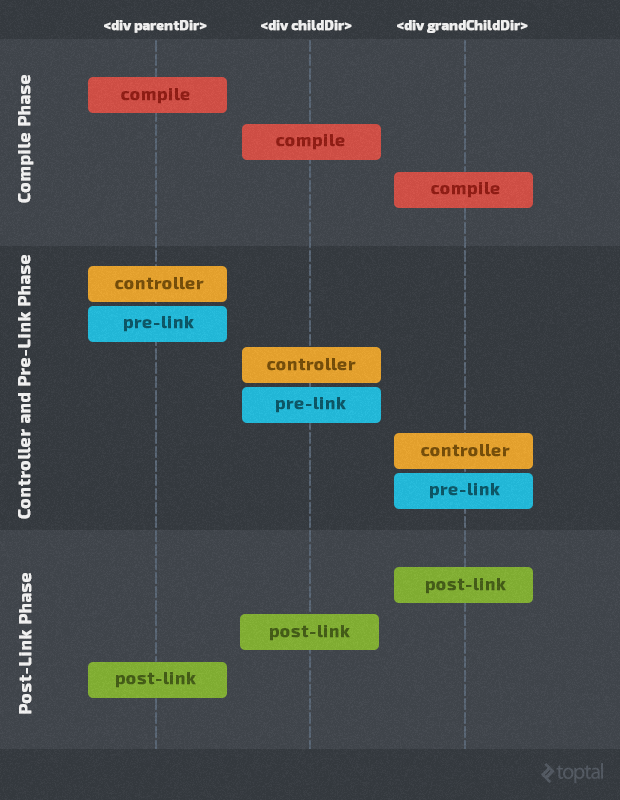
AngularJS Directive Function Explanation: A Deeper Look
The compilation phase takes place first. Essentially, this phase involves attaching event listeners to the DOM elements. For instance, if a DOM element is bound to a $scope property, the event listener responsible for updating it with the value of that property is applied to the element. The compilation process begins with the root DOM element from which the AngularJS application was bootstrapped. It then traverses down the branches of the DOM using a depth-first approach, compiling a parent element before moving on to its children until it reaches the leaf nodes.
Once compilation is finished, you can no longer add or remove directives from the DOM (though there is a workaround for this using the compile service directly). The next phase involves calling the controllers and pre-link functions for all directives. During the controller call, the $scope becomes available and can be utilized. The $element injected into the controller contains the compiled template but doesn’t include the transcluded child content (the content between the start and end HTML tags to which the directive is applied).
By definition, controllers in an MVC pattern simply pass the model to the view and define functions for handling events. Therefore, a directive’s controller should not modify the directive’s DOM. There are two reasons for this: it violates the purpose of the controller, and the transcluded child content hasn’t been added to the DOM yet.
So, what does a controller do beyond modifying the $scope? It allows child directives to communicate with their parent directives. Think of the controller function as a controller object that’s passed to the child directive’s post-link function if requested. This means the controller is typically used to facilitate communication between directives by creating an object with properties and methods accessible to its sibling and child directives. Since a parent directive cannot know if a child directive will require its controller, it’s best to limit the code within this method to functions and properties that child directives can safely use.
After the controller function, the pre-link function executes. The pre-link function often causes confusion among developers. Many online resources and books suggest it’s only used in rare cases and that developers will likely never need it. However, these explanations often fail to provide concrete examples of when it might be useful.
In reality, the pre-link function is quite straightforward. If you examine the AngularJS source code, you’ll find an excellent example of its use in the ng-init directive. Why is it used there? It provides an ideal way to execute private code involving the $scope; code that sibling and child directives cannot call. Unlike the controller function, the pre-link function is not passed to other directives. Therefore, you can use it to execute code that modifies its directive’s $scope. The ng-init directive does precisely this. When its pre-link function executes, it simply executes the JavaScript code passed to it against the directive’s $scope. Child directives can then access the result of this execution through the $scope’s prototypal inheritance during their controller, pre-link, and post-link function executions. However, these child directives cannot re-execute the code within the parent’s pre-link function. The directive may also need to execute other code unrelated to the $scope that should remain private.
Some seasoned AngularJS developers might argue that this “private” code could reside within the controller and simply not be called by child directives. While this argument holds true if the original developer is the only one using the directive, encapsulating private code within the pre-link function becomes highly beneficial if the directive is intended for distribution and reuse by other developers. Since developers can’t predict how their directive might be reused in the future, safeguarding private code from execution by a child directive is a prudent approach to directive code encapsulation. Consider it good practice to place public directive communication code within the controller function and private code within the pre-link function.
Similar to the controller, the pre-link function should never manipulate the DOM or execute a transclude function, as the content for child directives hasn’t been linked yet.
The controller and pre-link functions for each directive execute before those of its child directives. Once this phase is complete for all directives, AngularJS initiates the linking phase, executing the post-link functions for each directive. This linking phase operates in reverse order compared to the compile, controller, and pre-link execution flows. It starts with the leaf DOM nodes and works its way up to the root DOM node. The post-link DOM traversal largely follows a depth-first path. As each child directive is linked, its post-link function is executed.
The post-link function is the one most commonly implemented in custom AngularJS directives. Within this function, you can perform almost any reasonable action. You can manipulate the DOM (for the directive itself and its child elements only), access the $scope, utilize the controller object for parent directives, run transclude functions, and more. However, some limitations exist. You cannot add new directives to the DOM, as they won’t be compiled. Additionally, all DOM manipulations must be performed using DOM functions. Simply calling the html function on the DOM element and passing in new HTML will erase all event handlers added during the compilation process.
For instance, the following code snippets will not behave as expected:
| |
or
| |
While these snippets might seem like they should change the HTML, reassigning the string version of the DOM elements will actually remove all event handlers established during compilation.
The post-link function is typically used to set up event handlers, $watches, and $observes.
Once all post-link functions have been executed, the $scope is applied to the compiled and linked DOM structure, bringing the AngularJS page to life.
Directive Function Chart
The following chart summarizes the purpose of each directive function, what’s available during its execution, and best practices for its appropriate use:
| Execution Order | Directive Function | DOM | Transclude | $scope | Callable by Child |
|---|---|---|---|---|---|
| 1 | compile | DOM has not been compiled but template has been loaded into the DOM element content area. Directives can be added and removed. DOM can be manipulated with both DOM functions and HTML string replacement. | Transclude function is available but is deprecated and should not be called. | Not available. | Function cannot be called by child elements. |
| 2 | controller | Compiled DOM element is available but should not be modified. Transcluded child content has not been added to the DOM element. No DOM changes should occur because this is a controller and transcluded child content has not been linked in yet. | Transclude function is available but should not be called. | $scope is available and can be used. Function parameters are injected using the $injector service. | Function is passed into child directive linking functions and is callable by them. |
| 3 | pre-link | Compiled DOM element is available but should not be modified because child directive DOM elements have not been linked in yet. | Transclude function is available but should not be called. | $scope is available and can be modified. | Function is not callable by child directives. But may call the controllers of parent directives. |
| 4 | post-link | Compiled DOM element and child directive DOM elements are available. DOM can be modified with DOM functions only (no HTML replacement) and only content that does not require compilation can be added. No adding/removing of directives is allowed. | Transclude function is available and may be called. | $scope is available and may be used. | Not callable by directive children but may call the controller of parent directives. |
Summary
In this exploration of AngularJS directives, we’ve covered the purpose, execution order, capabilities, and common use cases for each of the four directive functions: compile, controller, pre-link, and post-link. While the controller and post-link functions are the most frequently used, the compile and pre-link functions come into play when you need finer control over the DOM or require a private scope execution environment. By understanding these functions and their nuances, you can create more robust and sophisticated AngularJS applications.