Facebook is a leading advertising platform, forming a powerful duo with Google and attracting significant traffic and value for advertisers. It’s crucial for advertisers to understand that despite Facebook and Instagram’s efforts to uphold community standards, there might be placements where you wouldn’t want your ads to appear. This article will guide you through the brand safety and suitability tools available within Facebook Ads to safeguard your brands.
Contents
Safeguarding your brand: Facebook Ads safety and suitability controls
Let’s explore the range of options Facebook Ads provides for brand safety and suitability exclusions and controls.
 Are your Facebook Ad placements hindering your conversion rates? Discover the answer with our free, exclusive 2024 Facebook Ads benchmarks report!
1. Inventory filters
The first line of defense is Inventory Filters. These filters empower you to define the type of organic content you’re comfortable appearing alongside based on topic sensitivity.
There are three content sensitivity levels.
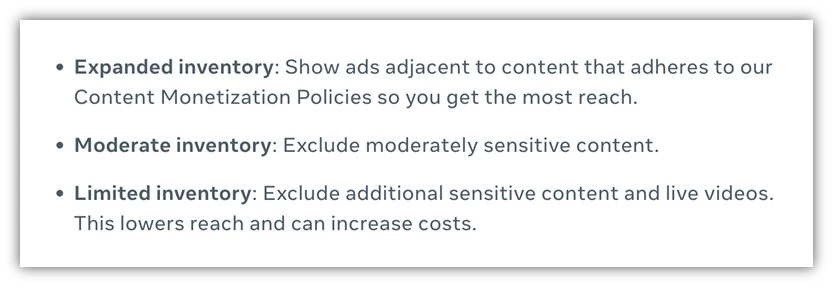 Limited inventory, the most restrictive option, ensures your ads steer clear of sensitive content, but it might reduce your reach and increase costs due to a narrower audience.
Moderate inventory, the default setting for in-content placements like Facebook in-stream videos, ads on Facebook Reels, and ads on Instagram Reels and Meta Audience Network, strikes a balance between reach and brand safety.
Expanded inventory, with the broadest reach, displays your ads across all content adhering to content monetization policies. It’s the default for feed placements like Facebook Feed, Facebook Reels, Instagram mobile feeds, and Instagram Reels.
Understanding what each filter level entails is key. Content like full nudity, excessive violence, terrorist acts, or misinformation, as identified by third-party fact-checkers, violates Facebook and Instagram Community Standards & Guidelines and is ineligible for monetization, preventing your ads from appearing alongside it.
Beyond these standards, categorizations vary by placement within the Facebook network. While it can get intricate, these tables outline the content types displayed in each placement:
- Feed Ads
- In-Content Placements
- Audience Network Knowing how to apply these controls is crucial. You have two options.
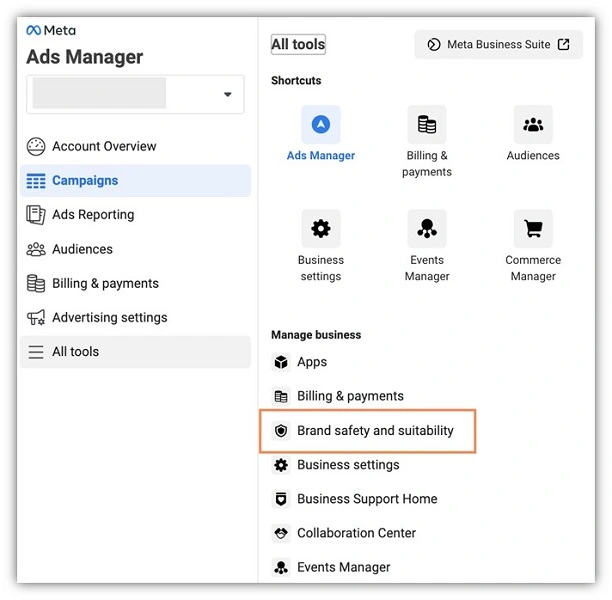 First, at the account level, navigate to Brand safety and suitability in the left-hand navigation.
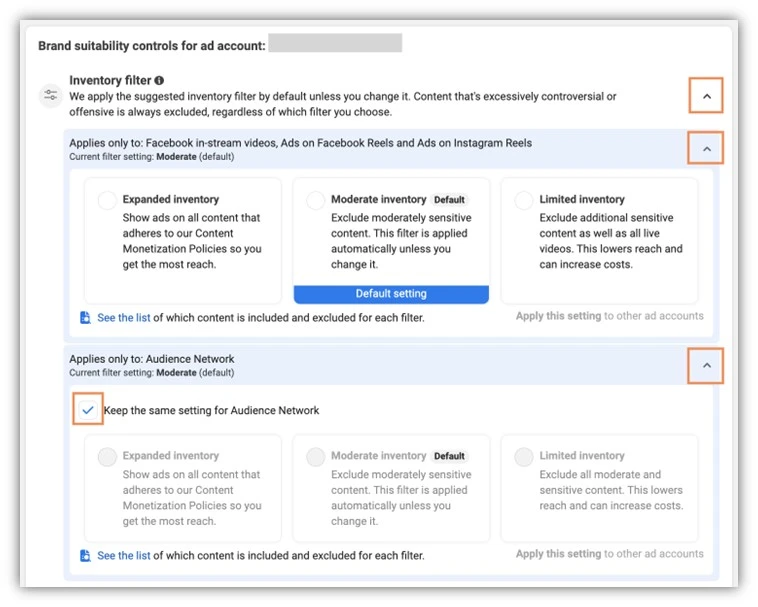 Click the Change link next to Inventory filter, open the drop-down arrows beside the Facebook in-stream videos, Ads on Facebook Reels and Ads on Instagram Reels and Audience Network sections, and select your desired inventory level for each section. For different Audience Network settings, uncheck “Keep the same setting for the Audience Network” and adjust accordingly.
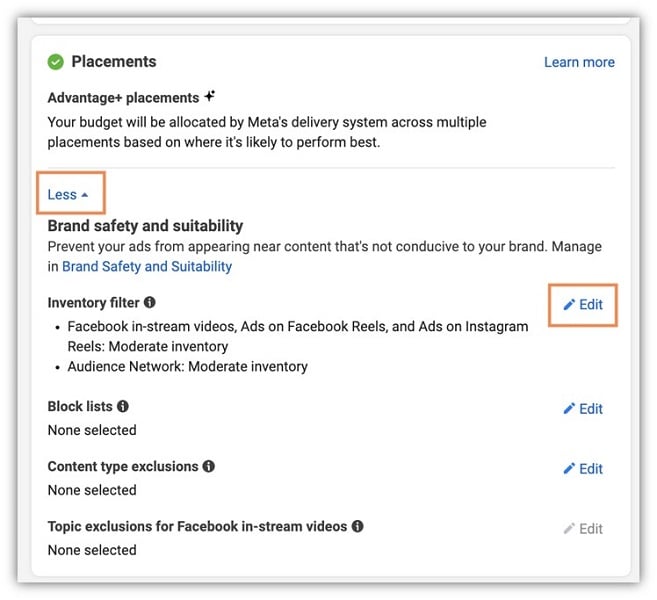 Alternatively, adjust the inventory filter at the ad set level by navigating to the desired campaign and ad set, scrolling to Placement controls, expanding the “More” option, clicking the edit pencil next to Inventory filters, and customizing the settings.
2. Placement controls
Beyond brand safety, Facebook Ads offers control over ad placements within the Meta Ads Network.
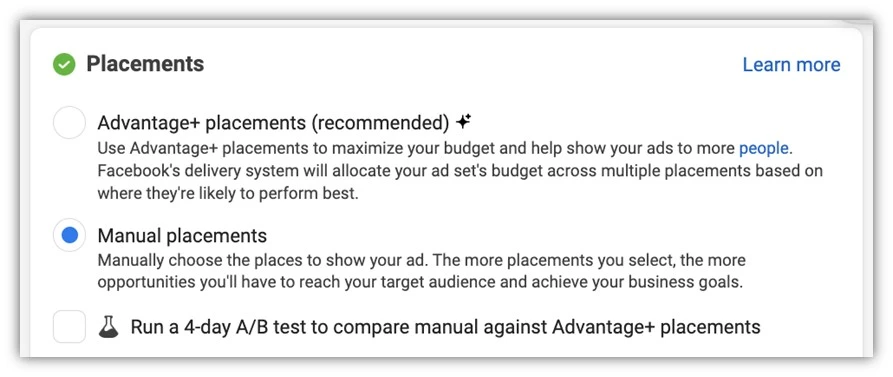 Switching to manual placements when editing placements reveals a comprehensive list of Facebook placements for opting in or out.
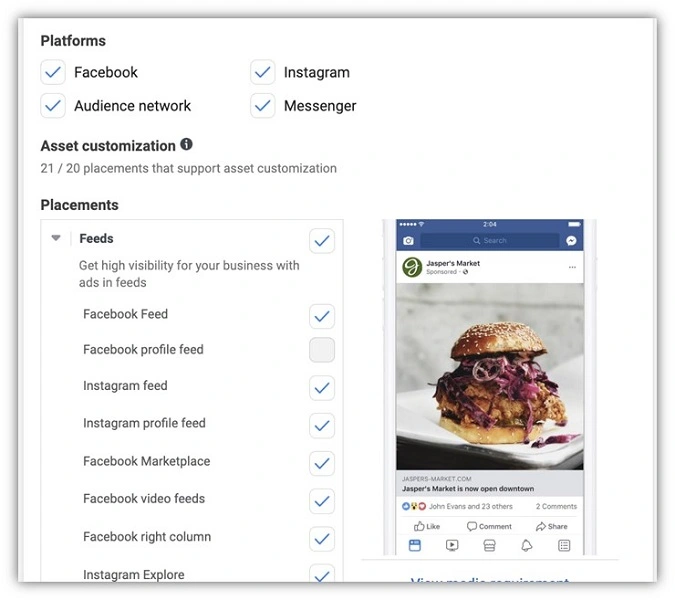 Checkboxes for Facebook, Instagram, Messenger, and Audience Network are available at the top, allowing further customization by selecting individual placements within each group.
 Ensure you’re reaching the right audience – explore our free guide to privacy-first Facebook Ads strategies!
3. Block lists
Facebook Ads enables advertisers to leverage Block Lists, preventing ads from appearing alongside specific placements within the Facebook network.
Distinct from placement targeting, Block Lists go a step further by enabling the exclusion of ads from specific monetizing partners’ content.
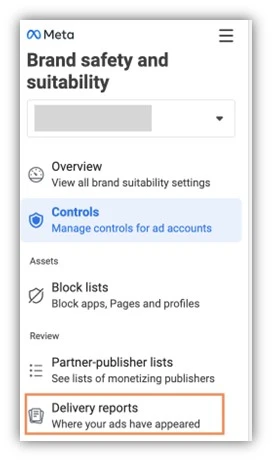 To determine ad placements, access Delivery Reports within the Brand Safety and Suitability manager.
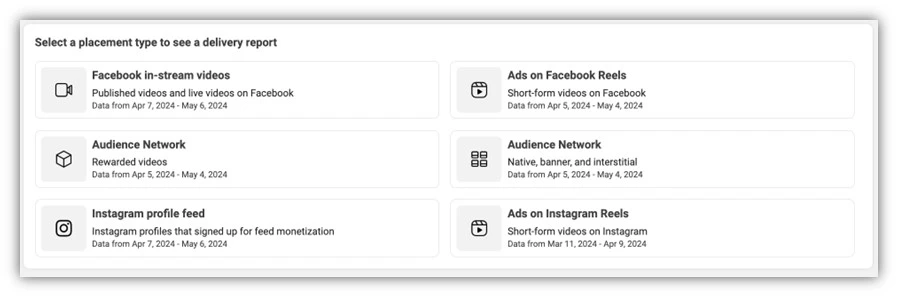 Choose the placement type for the delivery report.
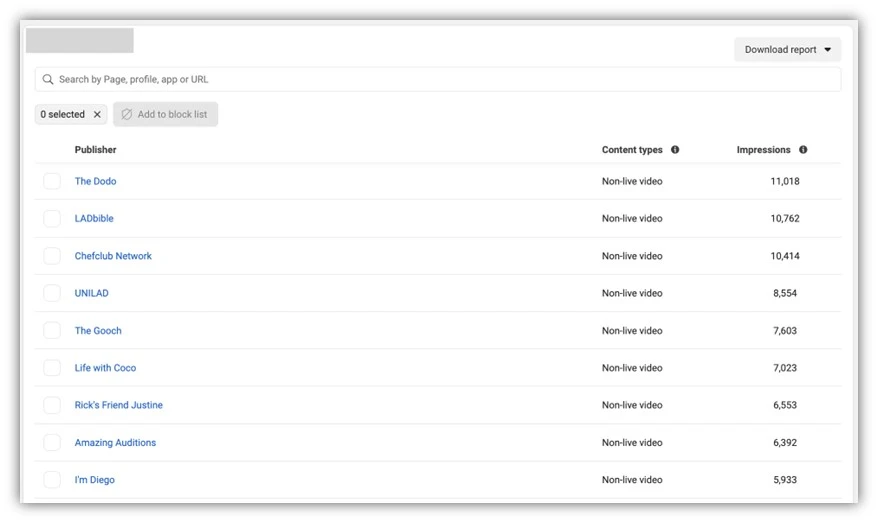 For instance, selecting Facebook in-stream videos generates a report listing specific pages where your ads have appeared. Each report provides similar insights.
Click on listings to review page appearances and assess your comfort level with ad placements. If satisfied, no action is required. However, if you wish to prevent ads from appearing on a specific site while remaining within the Facebook in-stream video placement, add individual placements to a Block List.
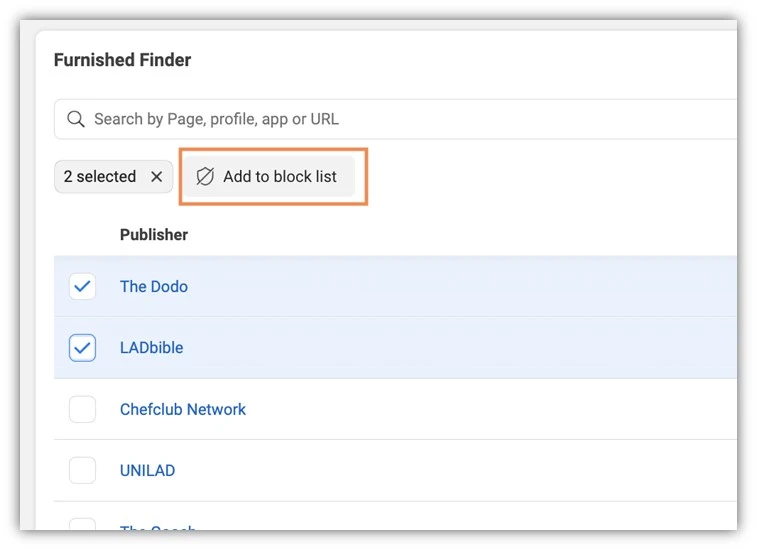 To do so, check the box next to the placement and click Add to a Block List.
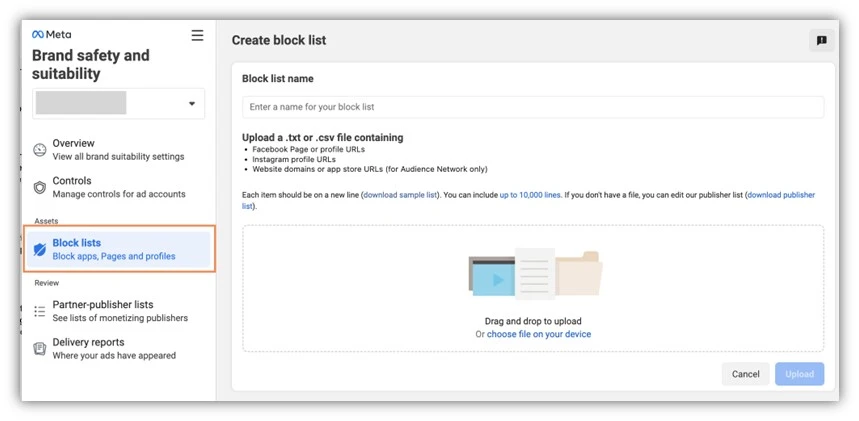 Alternatively, in the main Block List area of the Brand Safety and Suitability section, click “Create New” to upload a block list containing URLs of placements to exclude. Both methods are viable, but managing and updating through placement reports can be more convenient.
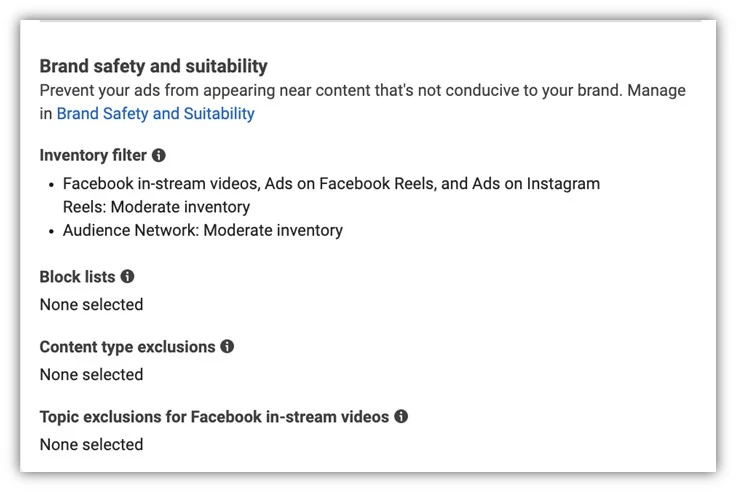 Block lists can also be applied at the campaign/ad set level if specific ads require restricted placements. Similar to previous controls, access placement controls at the ad set level, expand the “more” option, and add a block list.
4. Content type exclusions
Content type exclusions, accessible at the account or campaign/ad set level under placements, offer further control over ad placements.
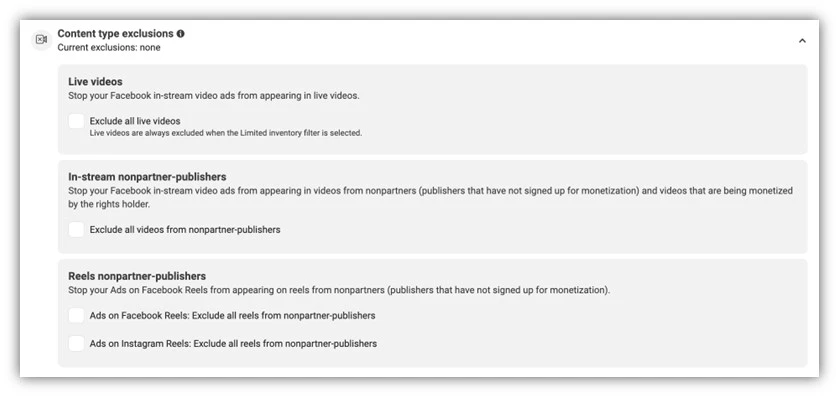 These straightforward controls allow the exclusion of Live videos, In-stream non-partner publishers, and Reels from non-partner publishers. This grants additional control by distinguishing “non-partner” publishers (those not signed up for monetization and potentially not subject to the same community standards) for In-stream and Reels placements.
Excluding unpredictable Live videos can also mitigate concerns about this content type.
5. Topic exclusions
Given the current climate of public discourse, Topic exclusions offer a valuable tool to prevent Facebook in-stream video ads from appearing in on-demand videos on sensitive topics.
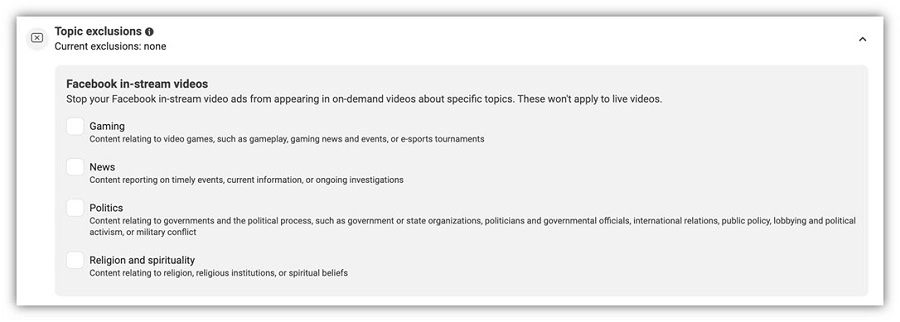 Applicable at the account or campaign/ad set level, this feature provides a simple checkbox list for Gaming, News, Politics, or Religion, allowing you to prevent content association with these potentially controversial topics.
Leveraging Facebook brand suitability controls
While Facebook strives to implement brand suitability controls effectively, it cannot guarantee complete compliance from all content and publishers with your specific brand suitability standards. This is where these controls prove invaluable.
Whether addressing a discerning client or encountering unsavory content, Facebook Ads’ brand safety and suitability controls offer straightforward methods to ensure ads appear alongside brand-safe content, protecting your company’s image. To further refine your Facebook Ads placements and targeting, explore how our solutions can help you achieve maximum Facebook ad campaign success!
Here’s a summary of Facebook Ads brand safety and suitability controls for your business:
- Inventory filters
- Placement controls
- Block lists
- Content type exclusions
- Topic exclusions