There’s a lot of talk about reactive programming in the Angular world. Reactive programming and Angular 2 seem like a perfect match. However, if you’re new to both, understanding them can feel like a steep climb.
This article will guide you through creating a reactive Angular 2 application using Ngrx. You’ll grasp what the pattern is, how it can be beneficial, and how it can enhance your Angular 2 applications.
Ngrx is a collection of Angular libraries designed for reactive extensions. Ngrx/Store uses Angular 2’s well-known RxJS observables to implement the Redux pattern. This offers numerous advantages, including simplifying application state to plain objects, enforcing unidirectional data flow, and more. With the Ngrx/Effects library, applications can interact with external systems by triggering side effects.
What Does Reactive Programming Mean?
Reactive programming is a popular term, but what exactly is it?
In essence, reactive programming is how applications manage events and data flow. Instead of directly requesting changes, components and other software elements are designed to react to them. This change in perspective can be significant.
RxJS is a powerful tool for reactive programming. This library simplifies event handling by providing observables and numerous operators to manipulate incoming data. Observables allow you to view events as continuous streams rather than isolated occurrences, enabling you to combine them to create new events you can listen to.
Reactive programming transforms how different parts of an application communicate. Instead of directly pushing data to components or services, they react to data changes.
Understanding Ngrx
Before exploring the application we’ll build, let’s quickly review core Redux concepts.
Store:
Think of the store as your client-side database, reflecting your application’s state. It’s the single source of truth.
In the Redux pattern, you only modify the store by dispatching actions.
Reducer:
Reducers are functions that determine how to handle actions and the application’s current state.
They apply a pure function (returning the same output for the same input with no side effects) to the previous state from the store. The result is a new state stored in the store.
Actions:
Actions are payloads containing the necessary information to modify the store. Essentially, an action has a type and a payload used by the reducer function to update the state.
Dispatcher:
Dispatchers provide an entry point to dispatch actions. In Ngrx, the store has a direct dispatch method.
Middleware:
While not used in this article, middleware functions intercept dispatched actions, enabling side effects. They are implemented in the Ngrx/Effect library and are often needed in real-world applications.
Why Choose Ngrx?
Reduced Complexity:
The store and unidirectional data flow significantly reduce coupling between application parts. This simplifies your application, as each part focuses on specific states.
Powerful Tooling:
Having the entire application state in one place provides a comprehensive overview and aids development. Redux also comes with excellent dev tools that leverage the store for state reproduction, time travel debugging, and more.
Architectural Simplicity:
While Ngrx benefits can be achieved through other means (Redux is an architectural pattern), it shines when building great fit for the Redux pattern applications like collaborative editing tools.
Following the pattern simplifies feature additions. For example, adding analytics becomes trivial, as you can track all dispatched actions.
Easy to Learn:
The pattern’s simplicity and widespread adoption make it easy for new team members to quickly understand the codebase.
Ngrx is most beneficial when numerous external factors, like a monitoring dashboard, can modify your application. Managing incoming data and state management in such scenarios can be challenging. Ngrx simplifies this with an immutable state provided by the store.
Building with Ngrx
To highlight Ngrx’s strengths with real-time data, let’s build a simple freelancer grid displaying online freelancers with filtering capabilities.
Project Setup
Angular CLI is a fantastic tool that streamlines setup. Feel free to use your preferred method, but this article will use it.
| |
Next, create a new application and install the necessary Ngrx libraries:
| |
Freelancers Reducer
Reducers are crucial in Redux. Let’s start by creating a “freelancers” reducer that generates a new state whenever an action is dispatched to the store.
freelancer-grid/freelancers.reducer.ts
| |
This is our freelancers reducer.
It’s called every time an action is dispatched. If the action is FREELANCERS_LOADED, it creates a new array from the action payload. Otherwise, it returns the old state reference, and nothing is changed.
Importantly, returning the old state reference signals no state change. So, calling state.push(something) won’t trigger a change detection. Remember that states are immutable, and a new state must be returned for changes to be reflected.
Freelancer Grid Component
Let’s create a grid component to display online freelancers. Initially, it will only reflect the store’s content.
| |
Add the following code to freelancer-grid.component.ts:
| |
And this to freelancer-grid.component.html:
| |
Let’s break down what we just did.
First, we created the freelancer-grid component.
It has a freelancers property that’s part of the application state in the Ngrx store. Using the select operator, we subscribe only to changes in the freelancers property. Any change to this property in the application state will notify our observable.
This approach has a significant advantage: our component depends only on the store. This makes it less complex and more reusable.
The template is straightforward. Note the async pipe in *ngFor. Since the freelancers observable is not directly iterable, the async pipe elegantly unwraps it and binds its value to the DOM. This simplifies working with observables.
Implementing Freelancer Removal
With a working foundation, let’s add actions to our application.
We want to remove freelancers from the state. Following Redux principles, we need to define this action in each affected state, which in this case is only the freelancers reducer:
| |
Creating a new array from the old one ensures an immutable state.
Now, let’s add a “delete freelancers” function to our component to dispatch this action:
| |
Simple, right?
We can now remove specific freelancers from the state, and the change will ripple through our application.
Let’s see how components interact through the store by adding another component.
Filter Reducer
Let’s start with the reducer. This component’s reducer is simple: it always returns a new state containing only the dispatched property. It should look like this:
| |
Filter Component
| |
We created a basic template with a form containing two fields (name and email) reflecting our state.
Instead of using the select operator, we subscribe to the filter state and update the formControl with the new value whenever it changes.
Angular 2 shines by providing numerous tools for interacting with observables.
We’ve already seen the async pipe. Now, we see the formControl class that allows us to observe an input’s value. This enables powerful features, like syncing the form with the state.
We used Rx.observable.merge to combine the two observables from our formControls. Then, we debounce the new observable before triggering the filter function.
In essence, we wait one second after either the name or email formControl changes before calling the filter function.
This showcases the elegance of RxJS, achieving complex behavior with just a few lines of code.
What does the filter function do?
It simply dispatches the UPDATE_FILTER action with the name and email values. The reducer handles updating the state accordingly.
Now, let’s connect this filter to our freelancer grid.
Easy, we just need to listen to the filter part of the store. Here’s the code:
| |
It’s as simple as that.
Again, we leverage RxJS to combine the filter and freelancers state.
combineLatest triggers when either observable emits a value. It then combines both states using the applyFilter function, returning a new observable. We don’t need to change any other code.
Notice how the component remains agnostic about how the filter is obtained, modified, or stored; it merely listens to it like any other state. We’ve added filtering without introducing new dependencies.
Handling Real-Time Data
Remember how Ngrx excels with real-time data? Let’s add that to our application.
Introducing the freelancers-service.
| |
This service simulates real-time data operations and should look like this:
| |
While not perfect, it serves our demonstration purposes.
This service is straightforward. It queries a user API and dispatches the results to the store. No need to overthink where the data goes. It goes to the store, which is both the beauty and potential pitfall of Redux. We’ll address this later. Every ten seconds, the service selects a few freelancers and dispatches actions to delete them and add new ones.
We need to modify our reducer to handle these operations:
| |
Now, our application can handle these real-time operations.
This service highlights that all state changes are synchronous, which is crucial to note. If the state application was asynchronous, this.addFadeClassToNewElements(); wouldn’t work because the DOM elements wouldn’t exist when called.
This synchronicity enhances predictability, which I personally find beneficial.
Embracing the Reactive Approach
In this tutorial, we’ve built a reactive application using Ngrx, RxJS, and Angular 2.
These are potent tools. Our implementation embodies a Redux architecture, which is powerful but comes with constraints that affect our application.
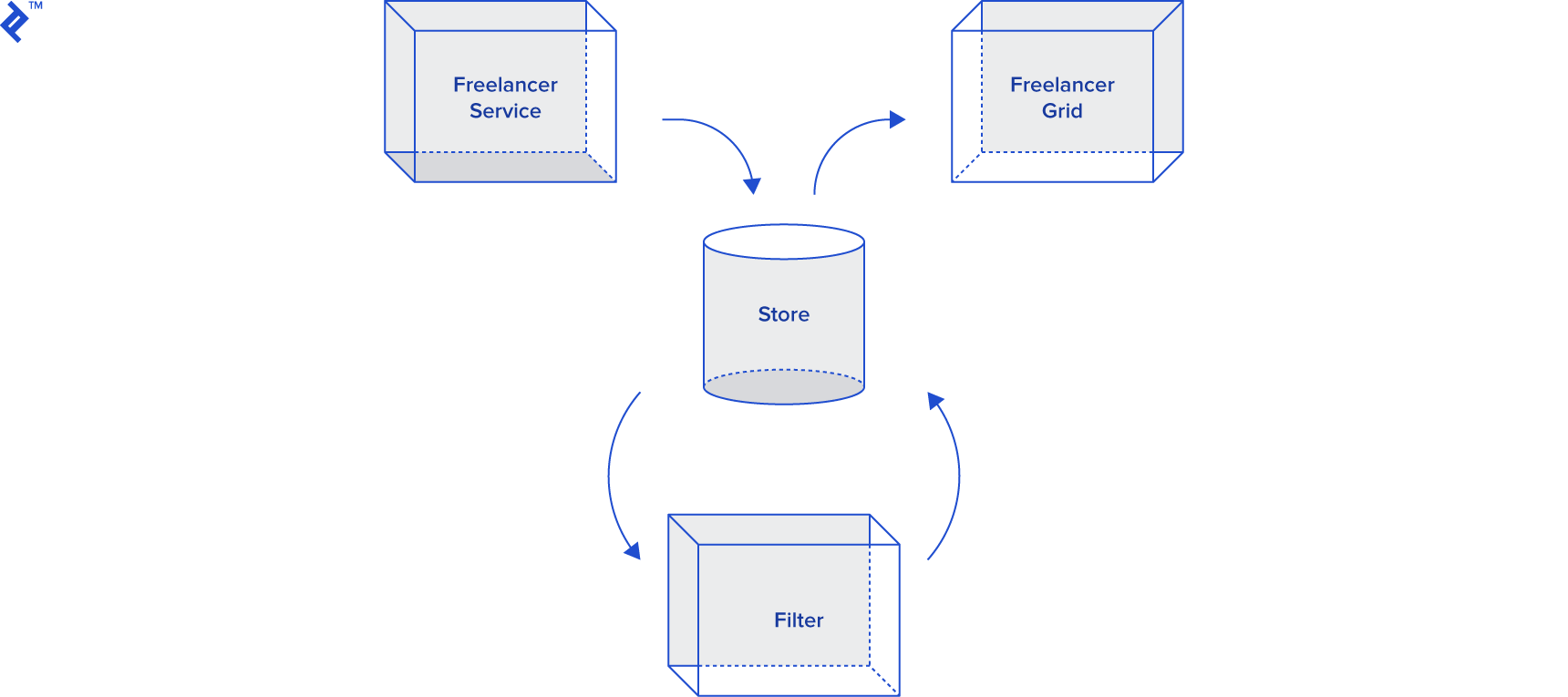
This diagram illustrates the architecture we’ve created.
Note that even though some components influence each other, they remain independent. This is a key aspect of this architecture: Components share a common dependency – the store.
Another notable characteristic is that we dispatch actions instead of calling functions. An alternative to Ngrx could be a service managing a particular state with observables and exposing functions instead of actions. This centralizes and makes the state reactive while isolating potential issues. This approach can reduce the overhead of reducers and actions as plain objects.
However, when your application state is updated from multiple sources and complexity arises, Ngrx is the answer.