Tutorial on creating a REST-like API in Ruby using Grape

As developers working with Ruby On Rails, it’s common to need API endpoints for our applications. This is essential for handling JavaScript-heavy Rich Internet clients, as well as native mobile apps on iOS and Android. Sometimes, the entire purpose of an application is to act as a JSON API, specifically serving these mobile apps.

This tutorial will guide you through using Grape, a REST-like API micro-framework for Ruby, to build backend support for a JSON API within a Rails application. Grape is designed to operate as a mountable rack engine that enhances our web applications without disrupting their existing functionality.
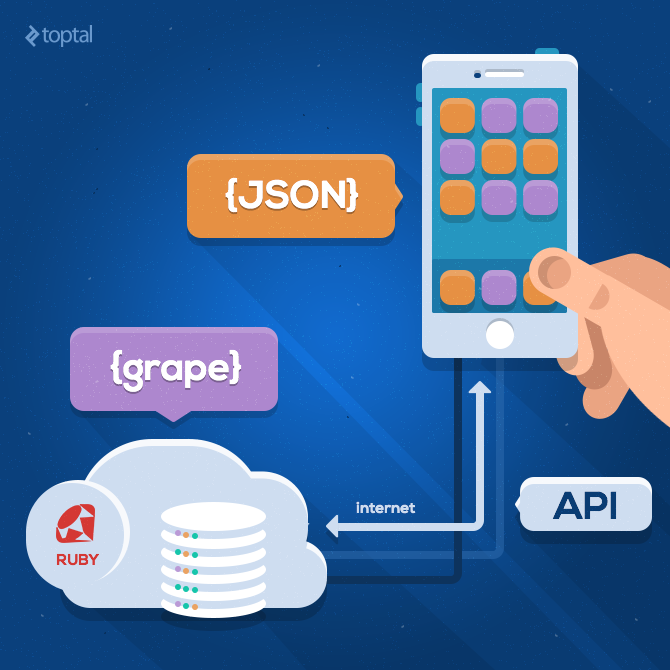
Web API in Ruby using Grape Gem

Use Case

This tutorial focuses on building an application that can record and review pair programming sessions. This application will be developed for iOS using ObjectiveC and will require communication with a backend service to store and retrieve data. Our primary goal is to create a robust and secure backend service that supports a JSON API.

This API will include methods for:

  • User login
  • Retrieving pair programming session reviews

NOTE: Ideally, the API would also handle the submission of pair programming reviews to the database. However, this is outside the scope of this tutorial. We’ll assume the database already contains sample pair programming reviews.

Key technical requirements include:

  • All API calls should return valid JSON.
  • Any unsuccessful API call needs to be logged with sufficient context for reproducibility and potential debugging.

Additionally, since this application will be accessed by external clients, security is paramount. Therefore:

  • Access should be limited to a specific group of tracked developers.
  • All requests, excluding login/signup, need authentication.

Test Driven Development And RSpec

We will employ Test Driven Development (TDD) as our development approach to guarantee predictable API behavior.

Testing will be done with RSpec, a well-established testing framework within the Ruby on Rails community. Throughout this article, we’ll refer to “specs” instead of “tests.”

Thorough testing involves both “positive” and “negative” tests. Negative specs focus on how an API endpoint behaves with missing or incorrect parameters, while positive specs cover scenarios where the API is called correctly.

Getting Started

Let’s set up the base for our backend API. We’ll start by generating a new Rails project:

1
rails new toptal_grape_blog

Now, add rspec-rails to the Gemfile to install RSpec:

1
2
3
group :development, :test do
  gem 'rspec-rails', '~> 3.2'
end

In the terminal, execute this command:

1
rails generate rspec:install

We can utilize some existing open-source software to enhance our testing framework:

Step 1: Add these to the Gemfile:

 1
 2
 3
 4
 5
 6
 7
 8
 9
10
...
gem 'devise'
...

group :development, :test do
...

  gem 'factory_girl_rails', '~> 4.5'
...
end

Step 2: Create a user model, set up the devise gem, and integrate it with the user model (allowing it to be used for authentication):

1
2
3
rails g model user
rails generate devise:install
rails generate devise user

Step 3: To enable concise user creation in our specs, include the factory_girl syntax method within the rails_helper.rb file:

1
2
RSpec.configure do |config|
  config.include FactoryGirl::Syntax::Methods

Step 4: Include the Grape gem in our DSL and install it:

1
2
gem 'grape'
bundle

User Login Use Case And Spec

A fundamental login feature is necessary for our backend. Assuming a valid login consists of a registered email and password, let’s create a basic structure for our login_spec:

 1
 2
 3
 4
 5
 6
 7
 8
 9
10
11
12
13
14
15
16
17
18
19
20
21
22
require 'rails_helper'

describe '/api/login' do
  context 'negative tests' do
    context 'missing params' do
      context 'password' do
      end
      context 'email' do
      end
    end
    context 'invalid params' do
      context 'incorrect password' do
      end
      context 'with a non-existent login' do
      end
    end
  end
  context 'positive tests' do
    context 'valid params' do
    end
  end
end

If either parameter is missing, the client should receive a 400 HTTP status code (Bad Request) with an error message indicating either ’email is missing’ or ‘password is missing’.

For testing, we’ll generate a valid user and set their email and password as default parameters for this suite. These parameters will be adjusted for each spec, either by omitting the password/email or providing different values.

Let’s start by creating the user and the parameter hash at the beginning of the spec, directly after the describe block:

1
2
3
4
5
6
7
describe '/api/login' do
  let(:email) { user.email }
  let(:password) { user.password }
  let!(:user) { create :user }
  let(:original_params) { { email: email, password: password } }
  let(:params) { original_params }
  ...

Now, we can expand our ‘missing params’/‘password’ context:

1
2
3
4
let(:params) { original_params.except(:password) }
it_behaves_like '400'
it_behaves_like 'json result'
it_behaves_like 'contains error msg', 'password is missing'

To avoid redundant expectations across the ’email’ and ‘password’ contexts, we can utilize shared examples. Uncomment the following line in rails_helper.rb to enable this:

1
Dir[Rails.root.join('spec/support/**/*.rb')].each { |f| require f }

Next, add the three RSpec shared examples to spec/support/shared.rb:

 1
 2
 3
 4
 5
 6
 7
 8
 9
10
11
12
13
14
15
16
17
18
19
20
21
RSpec.shared_examples 'json result' do
  specify 'returns JSON' do
    api_call params
    expect { JSON.parse(response.body) }.not_to raise_error
  end
end

RSpec.shared_examples '400' do
  specify 'returns 400' do
    api_call params
    expect(response.status).to eq(400)
  end
end

RSpec.shared_examples 'contains error msg' do |msg|
  specify "error msg is #{msg}" do
    api_call params
    json = JSON.parse(response.body)
    expect(json['error_msg']).to eq(msg)
  end
end

These shared examples call the api_call method, allowing us to define the API endpoint only once in our spec, adhering to the DRY principle principle. The api_call method is defined as follows:

1
2
3
4
5
6
describe '/api/login' do
...
  def api_call *params
    post "/api/login", *params
  end
...

We need to customize our user factory:

1
2
3
4
5
6
7
8
FactoryGirl.define do
  factory :user do
    password "Passw0rd"
    password_confirmation { |u| u.password }

    sequence(:email) { |n| "test#{n}@example.com" }
  end
end

Before running the specs, execute the migrations:

1
rake db:migrate

Keep in mind that the specs will currently fail as the API endpoint hasn’t been implemented yet. We’ll address this next.

Implementing The Login API Endpoint

Let’s start by creating a basic outline for our login API (app/api/login.rb):

 1
 2
 3
 4
 5
 6
 7
 8
 9
10
11
12
13
class Login < Grape::API
  format :json
  desc 'End-points for the Login'
  namespace :login do
    desc 'Login via email and password'
    params do
      requires :email, type: String, desc: 'email'
      requires :password, type: String, desc: 'password'
    end
    post do
    end
  end
end

Now, create an aggregator class to manage our API endpoints (app/api/api.rb):

1
2
3
4
class API < Grape::API
  prefix 'api'
  mount Login
end

Mount the API in the routes:

1
2
3
4
5
Rails.application.routes.draw do
...
  mount API => '/'
...
end

In api.rb, add code to check for missing parameters by rescuing from Grape::Exceptions::ValidationErrors:

1
2
3
4
5
6
rescue_from Grape::Exceptions::ValidationErrors do |e|
  rack_response({
    status: e.status,
    error_msg: e.message,
  }.to_json, 400)
end

To handle an invalid password, we’ll check for a 401 HTTP response code, which signifies unauthorized access. Include this check in the ‘incorrect password’ context:

1
2
3
4
let(:params) { original_params.merge(password: 'invalid') }
it_behaves_like '401'
it_behaves_like 'json result'
it_behaves_like 'contains error msg', 'Bad Authentication Parameters'

Apply the same logic to the ‘with a non-existent login’ context.

Next, implement the logic for handling invalid login attempts within login.rb:

1
2
3
4
5
6
7
8
post do
  user = User.find_by_email params[:email]
  if user.present? && user.valid_password?(params[:password])
  else
    error_msg = 'Bad Authentication Parameters'
    error!({ 'error_msg' => error_msg }, 401)
  end
end

With these changes, all negative specs for the login API should now pass. However, we still need to address the positive specs. Our positive spec anticipates the endpoint to return a 200 HTTP response code (success) with valid JSON and a valid token:

1
2
3
4
5
6
7
it_behaves_like '200'
it_behaves_like 'json result'

specify 'returns the token as part of the response' do
  api_call params
  expect(JSON.parse(response.body)['token']).to be_present
end

Add the expectation for a 200 response code to spec/support/shared.rb:

1
2
3
4
5
6
RSpec.shared_examples '200' do
  specify 'returns 200' do
    api_call params
    expect(response.status).to eq(200)
  end
end

Upon successful login, we’ll return the first valid authentication_token along with the user’s email in the following format:

1
{‘email’:<the_email_of_the_user>, ‘token’:<the users first valid token>}

If a token doesn’t exist for the user, we’ll create one:

1
2
3
4
5
6
...
if user.present? && user.valid_password?(params[:password])
  token = user.authentication_tokens.valid.first || AuthenticationToken.generate(user)
  status 200
else
...

To achieve this, we need an AuthenticationToken class associated with the user. Generate this model and run the migration:

1
2
rails g model authentication_token token user:references expires_at:datetime
rake db:migrate

Add the corresponding association to our user model:

1
2
3
class User < ActiveRecord::Base
  has_many :authentication_tokens
end

Then, define a valid scope in the AuthenticationToken class:

1
2
3
4
5
class AuthenticationToken < ActiveRecord::Base
  belongs_to :user
  validates :token, presence: true
  scope :valid,  -> { where{ (expires_at == nil) | (expires_at > Time.zone.now) } }
end

Note the use of Ruby syntax within the where statement. This is made possible by squeel gem, which allows for Ruby syntax in Active Record queries.

For validated users, we’ll create a “user with token entity,” utilizing the capabilities of grape-entity gem.

Write the spec for our entity and save it in user_with_token_entity_spec.rb:

 1
 2
 3
 4
 5
 6
 7
 8
 9
10
11
12
13
14
require 'rails_helper'

describe Entities::UserWithTokenEntity do
  describe 'fields' do
    subject(:subject) { Entities::UserWithTokenEntity }
    specify { expect(subject).to represent(:email)}

    let!(:token) { create :authentication_token }
    specify 'presents the first available token' do
      json = Entities::UserWithTokenEntity.new(token.user).as_json
      expect(json[:token]).to be_present
    end
  end
end

Define the entities in user_entity.rb:

1
2
3
4
5
module Entities
  class UserEntity < Grape::Entity
    expose :email
  end
end

Add a new class to user_with_token_entity.rb:

1
2
3
4
5
6
7
module Entities
  class UserWithTokenEntity < UserEntity
    expose :token do |user, options|
      user.authentication_tokens.valid.first.token
    end
  end
end

To prevent indefinite token validity, we’ll set them to expire after one day:

1
2
3
4
5
6
7
FactoryGirl.define do
  factory :authentication_token do
    token "MyString"
    expires_at 1.day.from_now
    user
  end
end

Now, we can return the expected JSON format using our new UserWithTokenEntity:

1
2
3
4
5
6
7
8
...
user = User.find_by_email params[:email]
if user.present? && user.valid_password?(params[:password])
  token = user.authentication_tokens.valid.first || AuthenticationToken.generate(user)
  status 200
  present token.user, with: Entities::UserWithTokenEntity
else
...

All specs should now be passing, fulfilling the functional requirements of our basic login API endpoint.

Pair Programming Session Review API Endpoint: Getting Started

Our backend should allow logged-in, authorized developers to query pair programming session reviews.

This new API endpoint will be mounted at /api/pair_programming_session and will return reviews associated with a specific project. Let’s start with a basic structure for this spec:

 1
 2
 3
 4
 5
 6
 7
 8
 9
10
11
12
13
14
15
require 'rails_helper'

describe '/api' do
  describe '/pair_programming_session' do
    def api_call *params
      get '/api/pair_programming_sessions', *params
    end

    context 'invalid params' do
    end

    context 'valid params' do
    end
  end
end

Create a corresponding empty API endpoint (app/api/pair_programming_sessions.rb):

 1
 2
 3
 4
 5
 6
 7
 8
 9
10
11
12
13
class PairProgrammingSessions < Grape::API
  format :json

  desc 'End-points for the PairProgrammingSessions'
  namespace :pair_programming_sessions do
    desc 'Retrieve the pairprogramming sessions'
    params do
      requires :token, type: String, desc: 'email'
    end
    get do
    end
  end
end

Mount this new API in app/api/api.rb:

1
2
3
4
...
  mount Login
  mount PairProgrammingSessions
end

Now, let’s gradually expand the spec and the API endpoint based on the requirements.

Pair Programming Session Review API Endpoint: Validation

Restricting API access to a defined set of developers is a crucial security requirement. Let’s add a specification for this:

 1
 2
 3
 4
 5
 6
 7
 8
 9
10
11
12
13
...
def api_call *params
  get '/api/pair_programming_sessions', *params
end

let(:token) { create :authentication_token }
let(:original_params) { { token: token.token} }
let(:params) { original_params }

it_behaves_like 'restricted for developers'

context 'invalid params' do
...

Create a shared example in shared.rb to verify that the request originates from a registered developer:

 1
 2
 3
 4
 5
 6
 7
 8
 9
10
11
12
13
RSpec.shared_examples 'restricted for developers' do
  context 'without developer key' do
    specify 'should be an unauthorized call' do
      api_call params
      expect(response.status).to eq(401)
    end
    specify 'error code is 1001' do
      api_call params
      json = JSON.parse(response.body)
      expect(json['error_code']).to eq(ErrorCodes::DEVELOPER_KEY_MISSING)
    end
  end
end

Next, create an ErrorCodes class (app/models/error_codes.rb):

1
2
3
module ErrorCodes
  DEVELOPER_KEY_MISSING = 1001
end

Anticipating future API expansion, we’ll create an authorization_helper for application-wide use, ensuring that only registered developers can access the API:

1
2
3
class PairProgrammingSessions < Grape::API
  helpers ApiHelpers::AuthenticationHelper
  before { restrict_access_to_developers }

Define the restrict_access_to_developers method within the ApiHelpers::AuthenticationHerlper module (app/api/api_helpers/authentication_helper.rb). This method will check if the Authorization key in the headers includes a valid ApiKey. Each developer requiring API access will need a valid ApiKey, potentially provided by an administrator or through an automated process (outside the scope of this tutorial).

 1
 2
 3
 4
 5
 6
 7
 8
 9
10
11
12
13
14
15
16
module ApiHelpers
  module AuthenticationHelper

    def restrict_access_to_developers
      header_token = headers['Authorization']
      key = ApiKey.where{ token == my{ header_token } }
      Rails.logger.info "API call: #{headers}\tWith params: #{params.inspect}" if ENV['DEBUG']
      if key.blank?
        error_code = ErrorCodes::DEVELOPER_KEY_MISSING
        error_msg = 'please aquire a developer key'
        error!({ :error_msg => error_msg, :error_code => error_code }, 401)
        # LogAudit.new({env:env}).execute
      end
    end
  end
end

Generate the ApiKey model and run the migrations: rails g model api_key token followed by rake db:migrate.

Now, we can check for user authentication in spec/api/pair_programming_spec.rb:

1
2
3
4
...
it_behaves_like 'restricted for developers'
it_behaves_like 'unauthenticated'
...

Define an unauthenticated shared example for reuse across specs (spec/support/shared.rb):

 1
 2
 3
 4
 5
 6
 7
 8
 9
10
11
12
RSpec.shared_examples 'unauthenticated' do
  context 'unauthenticated' do
    specify 'returns 401 without token' do
      api_call params.except(:token), developer_header
      expect(response.status).to eq(401)
    end
    specify 'returns JSON' do
      api_call params.except(:token), developer_header
      json = JSON.parse(response.body)
    end
  end
end

This shared example needs the token in the developer header, so add that to the spec (spec/api/pair_programming_spec.rb):

1
2
3
4
5
...
describe '/api' do
  let(:api_key) { create :api_key }
  let(:developer_header) { {'Authorization' => api_key.token} }
...

In app/api/pair_programming_session.rb, implement the user authentication attempt:

1
2
3
4
5
6
...
class PairProgrammingSessions < Grape::API
  helpers ApiHelpers::AuthenticationHelper
  before { restrict_access_to_developers }
  before { authenticate! }
...

Implement the authenticate! method in AuthenticationHelper (app/api/api_helpers/authentication_helper.rb):

 1
 2
 3
 4
 5
 6
 7
 8
 9
10
11
12
13
14
15
16
17
18
19
20
21
22
23
24
25
26
...
module ApiHelpers
  module AuthenticationHelper
    TOKEN_PARAM_NAME = :token

    def token_value_from_request(token_param = TOKEN_PARAM_NAME)
      params[token_param]
    end

    def current_user
      token = AuthenticationToken.find_by_token(token_value_from_request)
      return nil unless token.present?
      @current_user ||= token.user
    end

    def signed_in?
      !!current_user
    end

    def authenticate!
      unless signed_in?
        AuditLog.create data: 'unauthenticated user access'
        error!({ :error_msg => "authentication_error", :error_code => ErrorCodes::BAD_AUTHENTICATION_PARAMS }, 401)
      end
    end
...

Remember to include the BAD_AUTHENTICATION_PARAMS error code in the ErrorCodes class.

Now, let’s specify the expected behavior when the API is called with an invalid token. The return code should be 401 (unauthorized access), the result should be in JSON format, and an audit log should be created. Add the following to spec/api/pair_programming_spec.rb:

 1
 2
 3
 4
 5
 6
 7
 8
 9
10
11
12
13
14
...
context 'invalid params' do
  context 'incorrect token' do
    let(:params) { original_params.merge(token: 'invalid') }

    it_behaves_like '401'
    it_behaves_like 'json result'
    it_behaves_like 'auditable created'

    it_behaves_like 'contains error msg', 'authentication_error'
    it_behaves_like 'contains error code', ErrorCodes::BAD_AUTHENTICATION_PARAMS
  end
end
...

Add the “auditable created,” “contains error code,” and “contains error msg” shared examples to spec/support/shared.rb:

 1
 2
 3
 4
 5
 6
 7
 8
 9
10
11
12
13
14
15
16
17
18
19
20
21
22
23
24
25
...
RSpec.shared_examples 'contains error code' do |code|
  specify "error code is #{code}" do
    api_call params, developer_header
    json = JSON.parse(response.body)
    expect(json['error_code']).to eq(code)
  end
end

RSpec.shared_examples 'contains error msg' do |msg|
  specify "error msg is #{msg}" do
    api_call params, developer_header
    json = JSON.parse(response.body)
    expect(json['error_msg']).to eq(msg)
  end
end

RSpec.shared_examples 'auditable created' do
  specify 'creates an api call audit' do
    expect do
      api_call params, developer_header
    end.to change{ AuditLog.count }.by(1)
  end
end
...

Generate an audit_log model:

1
2
rails g model audit_log backtrace data user:references
rake db:migrate

Pair Programming Session Review API Endpoint: Returning Results

When called by an authenticated and authorized user, this API endpoint should return a set of pair programming session reviews grouped by project. Modify spec/api/pair_programming_spec.rb as follows:

1
2
3
4
5
6
...
context 'valid params' do
it_behaves_like '200'
it_behaves_like 'json result'
end
...

This specifies that a request with a valid api_key and parameters returns a 200 HTTP code (success) with the result provided as valid JSON.

The API will query and return pair programming sessions where the current user is a participant, formatted as JSON (app/api/pair_programming_sessions.rb):

1
2
3
4
5
6
7
...
get do
sessions = PairProgrammingSession.where{(host_user == my{current_user}) | (visitor_user == my{current_user})}
sessions = sessions.includes(:project, :host_user, :visitor_user, reviews: [:code_samples, :user] )
present sessions, with: Entities::PairProgrammingSessionsEntity
end
...

The database models for pair programming sessions are structured as follows:

  • 1-to-many relationship between projects and pair programming sessions
  • 1-to-many relationship between pair programming sessions and reviews
  • 1-to-many relationship between reviews and code samples

Generate the models and run the migrations:

1
2
3
4
5
rails g model project name
rails g model pair_programming_session project:references host_user:references visitor_user:references
rails g model review pair_programming_session:references user:references comment
rails g model code_sample review:references code:text
rake db:migrate

Update the PairProgrammingSession and Review classes to include the has_many associations:

 1
 2
 3
 4
 5
 6
 7
 8
 9
10
11
12
13
14
class Review < ActiveRecord::Base
  belongs_to :pair_programming_session
  belongs_to :user

  has_many :code_samples
end

class PairProgrammingSession < ActiveRecord::Base
  belongs_to :project
  belongs_to :host_user, class_name: :User
  belongs_to :visitor_user, class_name: 'User'

  has_many :reviews
end

NOTE: Ideally, these classes would be generated with accompanying specs, but this is outside this tutorial’s scope.

Now, we need to define classes to transform our models into their JSON representations (known as grape-entities in Grape). For simplicity, we’ll maintain a 1-to-1 mapping between models and Grape entities.

Start by exposing the code field from the CodeSampleEntity (api/entities/code_sample_entity.rb):

1
2
3
4
5
module Entities
  class CodeSampleEntity < Grape::Entity
    expose :code
  end
end

Next, expose the user and associated code_samples by reusing the UserEntity and CodeSampleEntity:

1
2
3
4
5
6
module Entities
  class ReviewEntity < Grape::Entity
    expose :user, using: UserEntity
    expose :code_samples, using: CodeSampleEntity
  end
end

Also, expose the name field from the ProjectEntity:

1
2
3
4
5
module Entities
  class ProjectEntity < Grape::Entity
    expose :name
  end
end

Finally, assemble these entities into a new PairProgrammingSessionsEntity, exposing the project, host_user, visitor_user, and reviews:

1
2
3
4
5
6
7
8
module Entities
  class PairProgrammingSessionsEntity < Grape::Entity
    expose :project, using: ProjectEntity
    expose :host_user, using: UserEntity
    expose :visitor_user, using: UserEntity
    expose :reviews, using: ReviewEntity
  end
end

With these steps, our API is fully implemented!

Generating Test Data

We’ll add sample data to db/seeds.rb for testing. This file should contain the necessary code to populate the database with default values. The data can be loaded using rake db:seed (or created with the database during db:setup). Here’s an example:

 1
 2
 3
 4
 5
 6
 7
 8
 9
10
11
12
13
14
15
16
17
18
19
20
21
22
23
24
user_1 = User.create email: 'railssuperhero@email.com', password: 'password', password_confirmation: 'password'
user_2 = User.create email: 'railshero@email.com', password: 'password', password_confirmation: 'password'
user_3 = User.create email: 'railsrookie@email.com', password: 'password', password_confirmation: 'password'
ApiKey.create token: '12345654321'

project_1 = Project.create name: 'Time Sheets'
project_2 = Project.create name: 'Toptal Blog'
project_3 = Project.create name: 'Hobby Project'

session_1 = PairProgrammingSession.create project: project_1, host_user: user_1, visitor_user: user_2
session_2 = PairProgrammingSession.create project: project_2, host_user: user_1, visitor_user: user_3
session_3 = PairProgrammingSession.create project: project_3, host_user: user_2, visitor_user: user_3

review_1 = session_1.reviews.create user: user_1, comment: 'Please DRY a bit your code'
review_2 = session_1.reviews.create user: user_1, comment: 'Please DRY a bit your specs'

review_3 = session_2.reviews.create user: user_1, comment: 'Please DRY your view templates'
review_4 = session_2.reviews.create user: user_1, comment: 'Please clean your N+1 queries'

review_1.code_samples.create code: 'Lorem Ipsum'
review_1.code_samples.create code: 'Do not abuse the single responsibility principle'

review_2.code_samples.create code: 'Use some shared examples'
review_2.code_samples.create code: 'Use at the beginning of specs'

The application is now ready for use. Start the Rails server to proceed.

Testing the API

We will use Swagger for manual browser-based testing of our API. This requires a few setup steps.

Add the necessary gems to your Gemfile:

1
2
3
4
...
gem 'grape-swagger'
gem 'grape-swagger-ui'
...

Run bundle to install them.

Include these assets in the asset pipeline (config/initializers/assets.rb):

1
2
Rails.application.config.assets.precompile += %w( swagger_ui.js )
Rails.application.config.assets.precompile += %w( swagger_ui.css )

In app/api/api.rb, mount the Swagger generator:

1
2
3
4
...
  add_swagger_documentation
end
...

Now, you can explore the API using Swagger’s UI by navigating to http://localhost:3000/api/swagger.

Swagger provides a user-friendly interface for exploring API endpoints and their operations. Clicking on an operation displays its required and optional parameters, along with their data types.

Important Note: Because API access is restricted to developers with a valid api_key, direct browser access to the API endpoint won’t be possible. To test this, we’ll use the Modify Headers for Google Chrome plugin extension in Google Chrome. This plugin allows modification of the HTTP header, enabling us to add a valid api_key (we’ll use the dummy api_key 12345654321 from our database seed file).

Now, we’re ready to begin testing.

To call the pair_programming_sessions API endpoint, we need to log in. Using one of the email and password combinations from our seed file, submit a login request to the login API endpoint via Swagger, as demonstrated below.
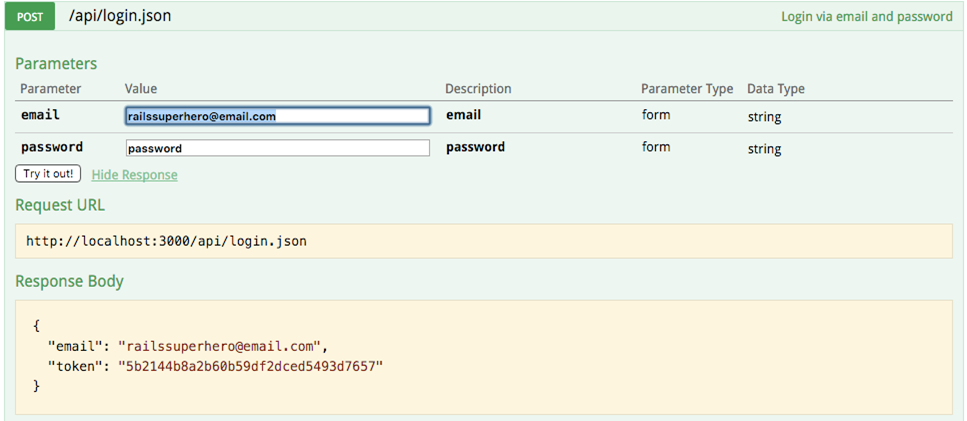
The returned token indicates that the login API is functioning correctly. This token can now be used to successfully execute the GET /api/pair_programming_sessions.json operation.
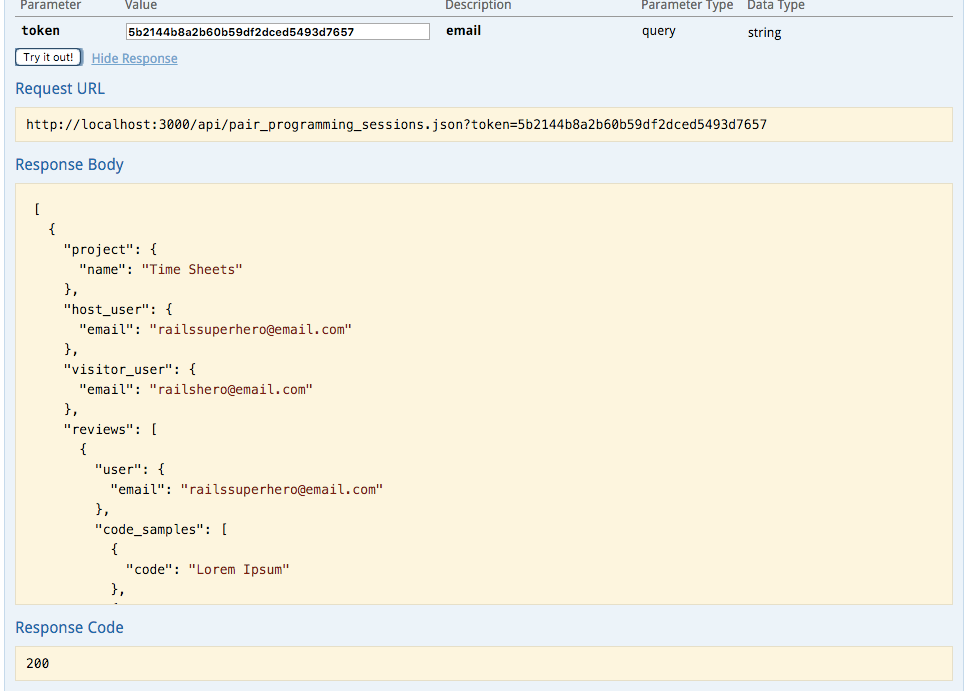
The result is returned as a well-structured JSON object. The JSON structure represents two nested 1-to-many associations: the project has multiple reviews, and each review has multiple code samples. This structure avoids the need for separate requests for reviews per project, addressing the N+1 query performance issue.

Wrap-up

As we’ve seen, creating comprehensive specs for your API helps ensure that it correctly handles both intended and potentially unintended use cases.

While this example API is relatively simple, the approach and techniques illustrated here can be applied to build more complex APIs of varying complexities using the Grape gem. This tutorial has hopefully demonstrated the usefulness and flexibility of Grape for implementing a JSON API within your Rails applications. Let me know if you have any other paraphrasing tasks for me.

Licensed under CC BY-NC-SA 4.0