Toptal is a company with a strong remote work culture. This requires using a tool that keeps team members connected and allows for instant communication.
In the early days, back in 2010, options like Slack were not available, so Skype became the obvious choice. While Toptal has since adopted Slack as its main community platform, Skype is still used as the primary communication channel for its core team.
Over time, Skype has evolved into a versatile tool accessible across various devices, allowing for synced chat history and easy calling and screen sharing. Despite some quirks, it’s a tool used daily for internal operations at Toptal.
As frequent Skype users, Toptal has compiled a list of tips to help other remote teams maximize their Skype experience.

Skype’s Web Version: A Convenient Option
Although still in beta, Skype’s web version, web.skype.com, offers the core functionality of Skype without needing a separate app installation. Accessible from various locations, some users have reported limitations in regions outside the US and Canada. However, Toptal has successfully used it from South America, Europe, and parts of Asia. Installing the browser plugin even allows for calls directly through the browser.
The web version provides a convenient way to use Skype when away from your primary computer. For instance, you can easily transition from a mobile phone conversation to a computer if needed.
Group Chats: A Hub for Remote Teams
Managing communication with hundreds of core team members would be impossible within a single chat room. Separate group chats provide a solution, allowing for organized team communication and effective collaboration.
Creating group chats is simple: start a new conversation, add team members, and give it a clear, memorable name. These chats serve as a central meeting point for teams to connect, hold calls, and communicate effectively. Well-managed group chats can last indefinitely, as evidenced by some of Toptal’s original groups still active today.
Skype’s cloud-based architecture has simplified group roles to just two: Admin and Speaker. Speakers can send messages and participate in calls, while Admins have additional permissions like removing members from the group.
Customizing Group Chats for Your Team
Recent updates to Skype groups allow the creation of unique, shareable links for adding new members, simplifying the process of bringing everyone together. For example, you can include the link in onboarding materials for easy access. Only group admins can create and enable this link, either through text commands ("/get uri") or the group profile (by clicking the group icon).
Another helpful feature is controlling chat history visibility. Enabling this allows new members to catch up on past conversations, ensuring everyone is up to speed.

Skype for iOS: A Transformation from Nightmare to Essential Tool
Since its first iPhone release, Skype has come a long way. Early versions were plagued with issues like battery drain, slow performance, and missing features like contact search. However, improvements to both Skype and iOS have addressed these problems. The larger battery on devices like the iPhone 6 Plus allows for all-day use without issues.
While these improvements took time to reach the iPad version, the recent release of Skype 6 has brought it up to speed. This version offers a refreshed interface similar to other iOS apps and brings the iPad client on par with its counterparts. Search functionality now works seamlessly across groups, users, and chat history.
Text Commands: Efficient Communication at Your Fingertips
Many Skype users remain unaware of this feature, even frequent ones. Typing “/help” in a chat reveals a list of commands for improved chat management (don’t worry, these commands aren’t visible to the group). Here are some useful examples:
- /topic groupname: Easily change the group name for clarity and relevance.
- /get admins: Display the admins for the current group.
- /setrole skypename admin: Grant admin privileges to another group member (requires admin rights).
- s/oldword/newword/: Quickly correct typos in your most recent message (doesn’t appear to work on mobile versions but functions on Skype for Mac).
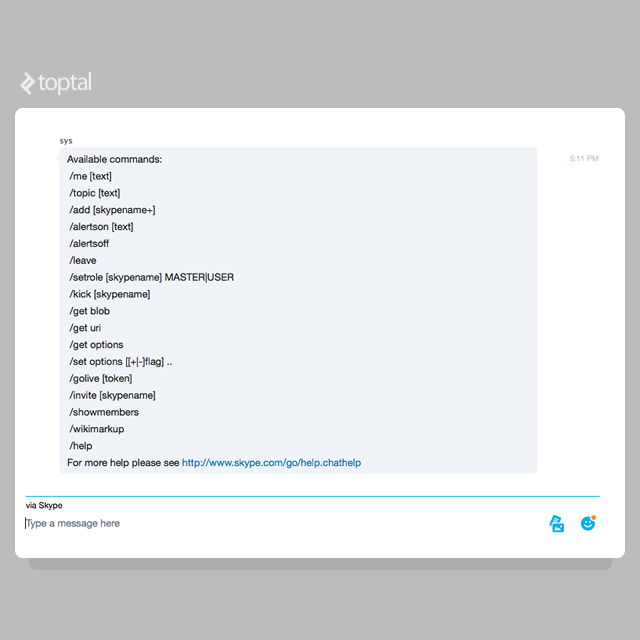
For a complete list of commands, refer to here.
Join Group Calls Anytime
While not a new feature, this remains incredibly useful. You can join ongoing calls even if you weren’t initially present. However, if you’ve just started Skype, allow a few seconds for group statuses to sync and identify the ongoing call. Avoid immediately clicking the call button for an active group call, as this could start a new call and cause confusion. Wait for the Call button to change to Join.
Skype as Your Primary Phone Number, Anywhere
Skype offers a suite of features that emulate a standard telephone, regardless of your location:
With a Skype Number, you can have a local phone number in over 20 countries, directing calls straight to your Skype account. This allows local contacts to reach you easily while traveling.
For those constantly on the move or with unreliable internet, Skype Forwarding forwards calls to your mobile number when you’re offline or unable to answer on Skype.
Both services have minimal fees, making them affordable for businesses. Having a Skype Number in Palo Alto, California, for example, allows US-based clients and Toptal team members to connect easily. When traveling, simply switch to a local SIM card and set up Skype Forwarding to that number. This way, you’re reachable anywhere, anytime, without expensive international call charges.
Simultaneous Calls on Multiple Devices
For busy individuals, this feature is invaluable. If you need to step away from a group call briefly, keep it running on your main device and use your phone or another Skype-enabled device for the second call. This avoids ending the group call and requiring everyone to restart without you.

Ensure a Stable Connection, Especially as the Host
Although Skype is transitioning from a P2P to a cloud-based network architecture, a stable connection remains crucial for group call hosts. A poor host connection negatively impacts call quality for all participants. A good host connection ensures a smooth experience, with only individuals experiencing connection issues facing potential disruptions.
Mute for Optimal Call Quality
This one is straightforward: Mute yourself when not speaking.
While initially feeling disruptive, muting yourself when not actively speaking significantly contributes to call quality. Background noise can severely impact the call, making it difficult for others to hear or speak. This is particularly important in group calls. Skype for Mac and Windows visually indicates who’s actively speaking or making noise, so rest assured, people will know when you’re multitasking.

For desktop and laptop users, Skype’s Push to Talk (PTT) hotkey simplifies this. Mute yourself at the start and hold the hotkey combination whenever you want to speak. An on-screen indicator confirms when you’re unmuted. The PTT key combination on Mac is [control]+[option]+[command]+[up arrow]. On Windows, the hotkey can be enabled and configured by following these instructions.
For mobile users, headphones with a mute button are recommended for easy audio control during calls.
Final Thoughts
Skype has transformed from a simple VOIP application into a powerful collaboration tool enabling remote teams to work together seamlessly and stay connected. Toptal’s extensive use of Skype over the past five-plus years confirms it as a reliable and dependable service. Skype continues to evolve, adapting to the changing internet landscape.
Skype has been instrumental to Toptal’s success. For distributed teams, integrating it into your workflow is highly recommended.