Are you aware of how your Instagram account is performing? You might have a sense of your likes or follower growth, but have you truly delved into your analytics? It’s crucial to explore this data!
Analyzing your Instagram analytics reveals how the platform contributes to your overall marketing plan. It empowers you to enhance and expand your business using this influential and widely used social platform.

This guide will clarify why your Instagram analytics are important and guide you through the available options. I’ll highlight the data most relevant to your business goals so you can prioritize your efforts. Finally, I’ll share a concise list of our top Instagram analytics tools.
Ready? Let’s begin.
Why Are Instagram Analytics Important?
With over 25 million Instagram business profiles globally, and over 200 million Instagrammers visiting at least one daily, it’s evident that businesses see the value in this advertising platform. However, if you’re unsure who sees your profile or ads, how your posts are doing, how engaging your stories are, and the actual value your account generates, your time spent posting could be unproductive.
Without regularly reviewing your Instagram analytics, you risk:
- Targeting the wrong demographic.
- Posting at suboptimal frequencies.
- Attracting irrelevant website traffic.
- Getting calls from an ad you ran only once!
- Missing partnership opportunities from mentions.
- Posting at unfavorable times.
- Overlooking brand engagement chances in comments or stories.
This is just a glimpse of what you could improve by regularly examining your Instagram data. This information refines your platform usage, maximizing value for your business and potentially making Instagram even more vital to your online marketing strategy.
Without further delay, let’s delve into the data!
Instagram Profile Analytics
Your profile analytics are accessed through your main “My Profile” page.

This page provides insights for a week at a time. You may have seen these before, but let’s explore the specific metrics:
- Impressions: How many times your posts were seen within the timeframe.
- Interactions: Actions taken on your account.
- Reach: Unique accounts that saw any of your posts.
- Profile Visits: Total profile views for the week.
- Website Clicks: Clicks on your website link from your profile.
- Call/email clicks: Clicks on the call/email button on your profile.
- Mentions: Times your account was mentioned by others.
Instagram Audience Analytics
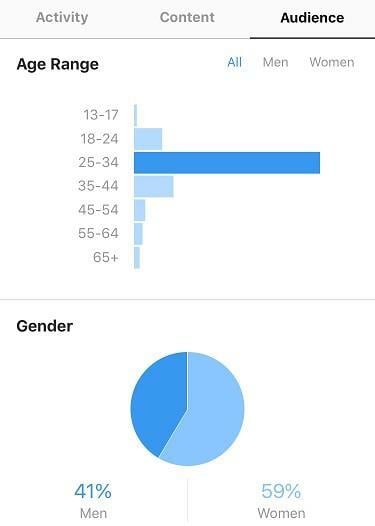
Who is your intended audience? You likely have a target demographic in mind. Does this match who actually sees and interacts with your posts? Fortunately, Instagram provides a dedicated analytics section to understand your audience.
Here’s what to focus on:
- Top locations: The top five cities and countries of your followers.
- Age range: Follower age breakdown: 13-17, 18-24, 25-34, 35-44, 45-54, 55-64, 65+.
- Gender: Male/female follower ratio.
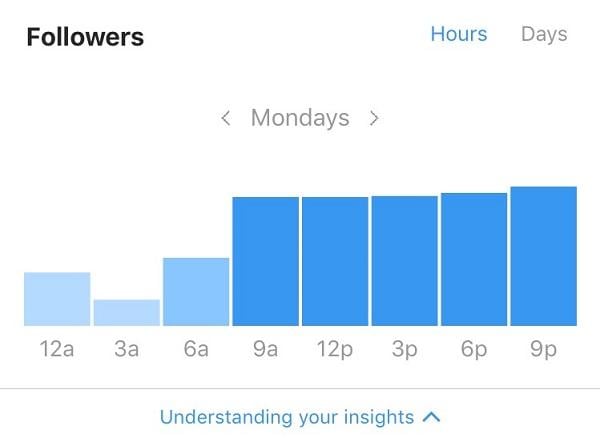
- Follower hours: The average time of day your followers use Instagram.
- Follower days: The days of the week your followers are most active.
Individual Post Analytics
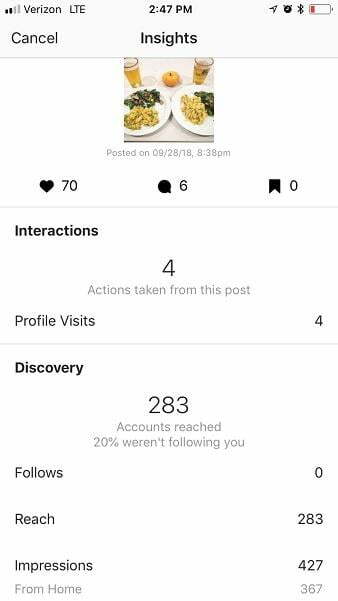
Once you’ve confirmed that the right audience is engaging with your profile, examine individual post analytics to gauge how specific messages resonate. This reveals how well your content performs.
Available post statistics include:
- Interactions: Actions taken directly from your post, such as profile visits, link clicks, or using the call/email button.
- Discovery: The number of accounts not following you who saw your post through Instagram’s “Discover” feature.
- Follows: New followers gained from a post.
- Reach: Unique accounts reached by the post.
- Impressions: Total post views, categorized by where they originated (home feed, hashtags, profile, etc.).
- Saves: Unique accounts that saved your post.
- Comments: Number of comments on your post.
Instagram Stories Analytics
Finally, we have Instagram Stories. Skipping these means missing a significant opportunity. This Snapchat-like feature is gaining popularity and offers another avenue to expose your brand or increase existing audience reach.
Track these statistics for your stories:
- Impressions: Total story views.
- Reach: Unique accounts that saw your story.
- Exits: Times viewers left your story mid-way.
- Replies: Total replies to story elements.
- People insights: Accounts that viewed a specific part of your story.
What Data Should You Track?
That’s a lot of data! To avoid feeling overwhelmed, here’s what to prioritize:
First, define your overarching platform goal. Is it driving website traffic, building a customer community, or raising brand awareness? You might even have multiple goals. Knowing your objectives is crucial to utilizing Instagram analytics effectively.
Here are three common goals and their key metrics:
#1: Increase Brand Awareness
If you’re new and want to establish your brand, or if you’re entering a new market, Instagram might be the perfect place to boost awareness.
Focus on these metrics:
- Follower count: Growth in followers indicates increasing brand awareness and positive reception. If you see this, your brand is resonating. To gain followers, consider targeted ads, collaborations with relevant brands, and contests encouraging follows and likes.
- Impressions: The more people who see your posts and stories, the better. For brand awareness, ensure your overall impressions are increasing.
- Reach: Reach also tracks views but focuses on unique accounts, unlike impressions. Growing reach is crucial for brand awareness.
#2: Generate Leads/Sales
Many marketers aim for more sales. Instagram offers various strategies, like targeted ads and follower-exclusive offers. But how do you measure success?

Track these key metrics:
- Website clicks: If you’re directing users to make purchases or fill out forms on your website through ads, posts, or stories, track how many actually do so.
- Call clicks/email clicks: Increased phone calls and emails suggest successful lead conversion.
- Follower hours/days: Understanding when your audience is most active lets you optimize your strategy. Run ads during peak engagement times.
#3: Build a Community
Instagram is ideal for fostering a community with its engaging content. If this is your goal, consistently monitor, respond to, and evaluate these metrics:
- Comments: Encourage conversations on your posts. Respond to comments and engage with your community. Even simply liking a comment shows you’re paying attention.
- Story Replies: This indicates community engagement with your stories. If viewers reply, it’s a good sign.
- Engagement: Track engagement across ads, posts, your profile, and stories to ensure you’re building that community feel.
Top 5 Best Instagram Analytics Tools
We’re all busy, and sifting through Instagram Insights can be tedious. Thankfully, tools exist to streamline the process. Here are five recommendations:
#1: Hootsuite
I’ve been a fan of Hootsuite since its early social scheduling days, long before Instagram existed. Their software has expanded significantly and includes excellent analytics tracking. For Instagram, Hootsuite helps track progress towards goal-related metrics and create visual reports.
#2: Squarelovin
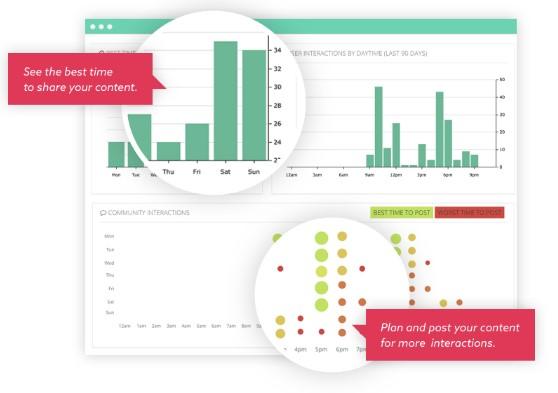
Squarelovin specializes in Instagram Insights, offering valuable helpful reporting features to enhance your strategy. They provide engagement charts to identify when your content performs best and graphs showing optimal posting times.
#3: Socialbakers
Socialbakers offers visually appealing free Instagram analytics tools to break down your hashtags, filters, top posts, and more. They also chart your post distribution over the last year for maintaining consistency. Socialbakers analyzes your profile, categorizing you as a leader, spammer, sleeper, or shy, to assess your strategy’s effectiveness.
#4: Sprout Social
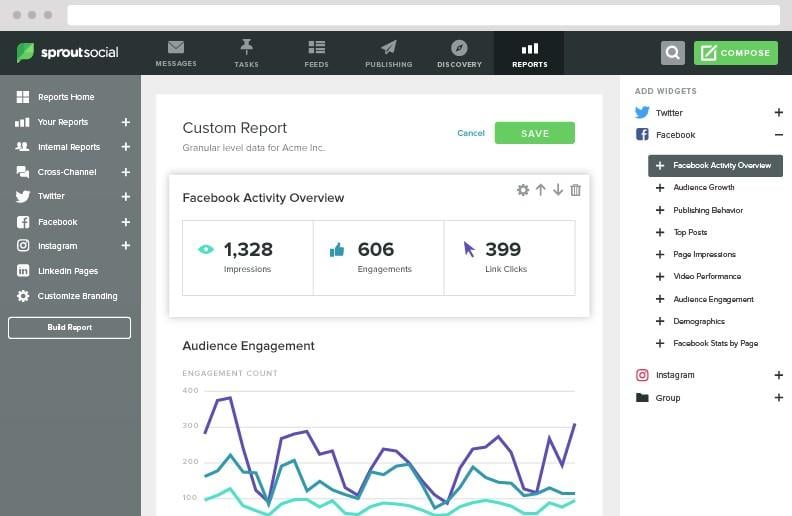
If you’re interested in customer reports and competitor analysis, Sprout Social could be your solution. Track follower growth, likes, and comments with visual graphs, and compare them with your competitors’ data to see where you stand.
#5: SocialRank
SocialRank focuses on understanding your audience. Analyze follower patterns, popular words in their bios and posts, and frequently used emojis. This not only clarifies your audience but also helps tailor your content effectively. Not bad!
Whether you opt for a dedicated tool or stick with Instagram’s native insights, I hope this guide encourages you to leverage the available data to grow your business on this powerful platform.