From its debut in 2011, Snapchat has enabled users to exchange fleeting images that disappear within seconds. Who could have predicted that this popular social tool would evolve into a major social media platform embraced by users of all ages, eventually becoming an invaluable asset for marketers? Today, Snapchat boasts 229 million daily users, securing its position among the top 10 most downloaded apps globally, surpassing 53 million downloads!

What makes Snapchat so incredibly popular, particularly among Millennials? One significant factor is the ability to use fun and imaginative filters. These filters let users share their experiences, whether it’s showcasing a cool park they’re visiting or documenting their Sunday Funday adventures. Beyond their entertainment value, Snapchat filters are a potent marketing tool for businesses. Curious how?
This guide will cover:
- Understanding Snapchat filters
- Creating a custom Snapchat filter
- Leveraging Snapchat filters for your brand
Demystifying Snapchat Filters
A Snapchat filter is essentially a visual overlay for photos. Businesses and individuals can create and purchase these filters to promote their brand or message. Often referred to as Snapchat Geofilters, they empower users to design personalized filters that align with their marketing goals.
Filters can be configured for specific durations and locations. A Snapchat filter designed to target a particular area is known as a Geofilter.
“[A Geofilter is] a location-based overlay you can find by swiping right on your Snapchat photo,” explains HubSpot. “[It’s] a particularly useful tool for promoting your business… A Geofilter can help you alert foot traffic to your business’s nearby proximity, and spread awareness to users both in and outside your chosen location.”
The Business Case for Snapchat Filters
Snapchat filters played a pivotal role in the platform’s meteoric rise to popularity. Prior to their introduction, Snapchat saw 600,000 daily downloads worldwide. The inclusion of Snapchat filters effectively doubled this rate.
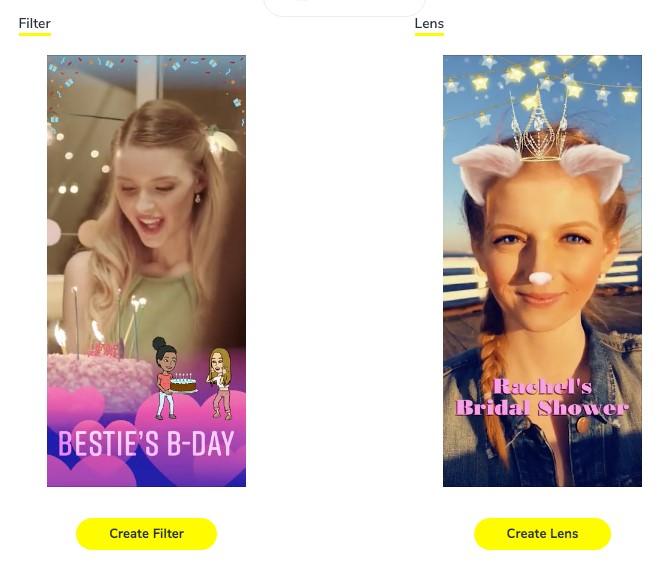
[Image: Left - a Snapchat filter overlay. Right - a VR lens.]
One study revealed that the filter feature is a primary driver of user engagement on Snapchat. Recognizing this, Snapchat empowered businesses to harness the power of branded Snapchat filters for growth.
Geofilters boast impressive visibility, with 40-60% of daily Snapchat users encountering them, according to HubSpot. A compelling example is a Geofilter campaign run by Bell Media, targeting students at the University of Alabama. This campaign reached a staggering 19,000 people in a mere five hours!
With a clear understanding of their value, let’s explore how to craft your own compelling Snapchat filters to attract more attention to your brand.
Crafting Custom Snapchat Filters
When it comes to utilizing Snapchat filters for business, there are two primary approaches:
- Design and purchase a filter directly within the Snapchat app without a Snapchat Business Account.
- Create a business account (if you don’t already have one) for enhanced control, multi-location filter creation, and more granular demographic targeting.
While the guest route offers speed and simplicity, a business account unlocks a greater degree of customization and expanded Snapchat advertising options. Let’s break down how to get started with a creating your own business account.
Now, let’s dive into the easy steps to create your custom Snapchat filters:
Step #1: Navigate to the “Create Your Own” website” page and select “Create Filter.”
Step #2: Upload your own custom design or select one of Snapchat’s ready-made templates. Add your personal touch with text, images, and emojis. Pro tip: Don’t forget to incorporate your business logo for enhanced brand recognition! Once you’re satisfied with your masterpiece, proceed to “Next.” Step #3: Set the start and end dates for your filter’s availability. This time frame can be adjusted, and you can even schedule your filter for specific days or times of the week. Step #4: Designate a “Geofence” to target the precise location where your filter will be accessible. Step #5: Choose whether your filter is intended for personal or business use. Submit your order and await confirmation from Snapchat – it’s really that straightforward!
Crafting Successful Snapchat Filters for Your Brand
Knowing how to set up a Snapchat filter is just the beginning; it’s crucial to use them effectively to maximize their impact. We’ve compiled five key tips to help you create engaging filters that resonate with your target audience:
1. Goal-Oriented Strategy
Creating Snapchat filters without a clear plan is like shooting in the dark. It might not resonate with your audience and could even come across as random or intrusive. Before launching a filter, define its purpose and the desired user interaction.
For example, imagine you own a floral shop running Mother’s Day promotions. Launching a Mother’s Day-themed Snapchat filter a couple of weeks before the occasion, when people are considering gift options, could be a strategic move.

Ultimately, a well-defined goal and purpose will ensure your filter piques interest and delivers tangible results for your business.
2. Walk in Your Customer’s Shoes
Put yourself in your customer’s position – would you use this Snapchat filter? This critical question should guide your design process. If it doesn’t appeal to your target audience, it serves little purpose.
Focus on creating filters that are enjoyable, entertaining, and timely. Consider tapping into current trends, incorporating holiday themes, or leveraging relatable humor to create a connection. By understanding and catering to your audience’s mindset, you’ll ensure your business Snapchat filters hit the mark.
3. Adhere to Snapchat’s Guidelines
This might seem obvious, but it’s easy to overlook. Don’t waste time and resources designing a stunning filter only to have it rejected by Snapchat. Here are the essential artwork guidelines outlined by Snapchat to keep in mind:
- File Size: 1080px wide by 2340px high
- Max File Size: 300 KB
- DPI: 72 (*error message if DPI is too high)
- File Type: PNG with a transparent background
- Filter Coverage: Ensure your filter occupies no more than 25% of the top or bottom screen area (Snapchatters still want to see themselves!)
Snapchat also provides a comprehensive list of submission guidelines and tips here.
4. Embrace Simplicity
The guideline about limiting filter coverage to 25% of the screen is deliberate. Users primarily engage with Snapchat for selfies and don’t want their faces obscured by a large brand logo.
Opt for clean and relevant designs that don’t overpower the user’s photo. Avoid being overly promotional – remember, the primary reason people use filters isn’t to endorse your brand. A great example of simplicity and relevance is this filter from The Detroit Zoo.

5. Analyze and Optimize
Like any marketing initiative, evaluating the performance of your Snapchat filters is crucial. Fortunately, Snapchat provides built-in analytics to track filter usage and engagement. Access these metrics by clicking the three-line icon in the top left corner, selecting “My Orders,” choosing your filter, and reviewing the data. You’ll gain insights into swipes, uses, views, and overall filter performance. This data can also be exported to a CSV file.
Unleash the Power of Snapchat Filters
Armed with this comprehensive guide, you’re ready to dive into the world of Snapchat filters. In our ever-evolving digital landscape, your audience is eager for fresh and engaging content. Snapchat filters offer a unique opportunity to connect, entertain, and leave a lasting impression.