Achieving success in paid search relies heavily on pinpointing your most effective keywords and building targeted ad groups, ads, and landing pages around them. This strategy helps you connect with potential customers actively looking for offerings similar to yours. However, unless you have unlimited funds, it’s equally important to identify and exclude keywords—and therefore, searchers—who aren’t interested in your products or services. Unfortunately, many Google Ads and Microsoft campaigns end up costing more than necessary because advertisers pay for clicks that fail to generate a return on their often-significant investment. This frustration leads some to abandon advertising on search networks altogether. So, how do you avoid the trap of wasted spending? The answer is negative keywords! By the end of this, you’ll have a solid understanding of:
- The precise definition of negative keywords
- How they can enhance the value and relevance of your paid search marketing endeavors
- The significance of negative keyword lists
- Techniques for finding and adding negative keywords efficiently Let’s dive in.
Understanding Negative Keywords
Negative keywords act as a shield, preventing your ad from appearing to individuals who search for or browse content related to those specific terms. Successful paid search management involves continuously expanding your list of biddable keywords while refining the existing ones to maximize relevance and, ultimately, ROI. This refinement goes beyond simply pausing underperforming keywords; it entails eliminating certain search queries entirely. Negative keywords empower you to do exactly that, ensuring your ads reach only the most promising audience. Similar to your biddable keywords, negative keywords can be implemented at the account, campaign, or ad group level and come in different match types: broad, phrase, and exact. Grasping these match types is essential for maximizing the impact of negative keywords in your Google Ads and Bing ad accounts.
Decoding Negative Keyword Match Types
When utilizing negative broad match, your keywords are matched to various phrase variations, not all of which are logical extensions of your target phrase or relevant to your business. In the example below, the negative broad match keyword running shoes would block queries containing the entire negative keyword, even if the words appear in a different order.
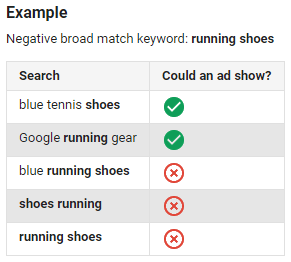
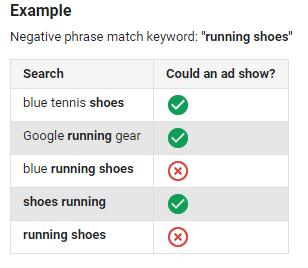
However, this doesn’t mean all relevant search queries will be eliminated; your ads can still enter an auction if they contain some (but not all) terms from your negative keyword. The example above demonstrates this, where an ad would still appear for searches like “blue tennis shoes” and “google running gear.” Negative phrase match keywords offer slightly less restriction. Using the same example, your ads would be eligible to appear for any search query that doesn’t include the exact phrase “running shoes.” This iteration only negates queries containing the precise phrase you specify. A query might have additional words, but if it contains your exact specified phrase, your budget remains safe.
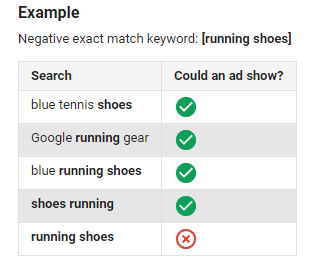
Lastly, negative exact match keywords exist to eliminate specific search queries. By adding them to your Google Ads account, your ads will only be hidden when a user enters exactly what you’ve specified. No extra words. Nothing else.
Note that the Display Network and YouTube (TrueView campaigns) handle things differently; all negative keywords are treated as exact match in these campaigns. Regardless of your chosen network, be mindful that excessive negative keywords can hinder your reach. A meticulously curated list, however, can lead to substantial savings.
Additional Benefits of Negative Keywords
Enhanced Click-Through Rate (CTR) — Preventing your ads from running against irrelevant queries reduces exposure to uninterested impressions, leading to a higher percentage of clicks on your ad. More Targeted Ad Groups — By removing unrelated keywords, you refine your ad groups’ relevance. Small, tightly knit ad groups allow you to craft a single message resonating with the entire keyword group. Cost Savings (Yes, Again) — It’s worth mentioning twice! Avoiding payments for useless clicks saves significant money by filtering out unqualified searchers. You also avoid bidding against yourself, preventing impression cannibalization and diluted keyword-level data. Improved Conversion Rate — Negative keywords ensure your ads don’t appear for terms you know won’t convert, such as competitor names or those indicating a lack of commercial intent.
 Find the best keywords for your business with our easy Free Keyword Tool.
Implementing Negative Keywords
You’re eager to leverage broad and phrase match keywords to capture more traffic, but a burning question remains… How do I combat irrelevant clicks, impressions, and uncontrolled ad spend? Traditionally, discovering negative keywords was tedious, involving brainstorming sessions (with limited effectiveness) or meticulously analyzing search query reports in Google Ads.
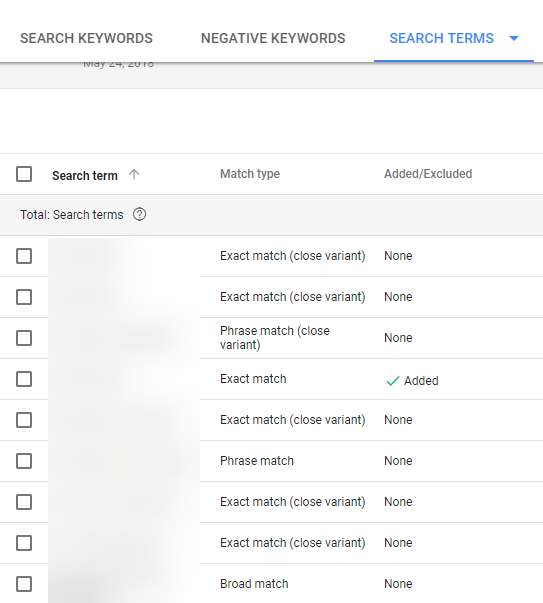
To begin, navigate to the “Keywords” tab within the Google Ads UI at the account, campaign, or ad group level:
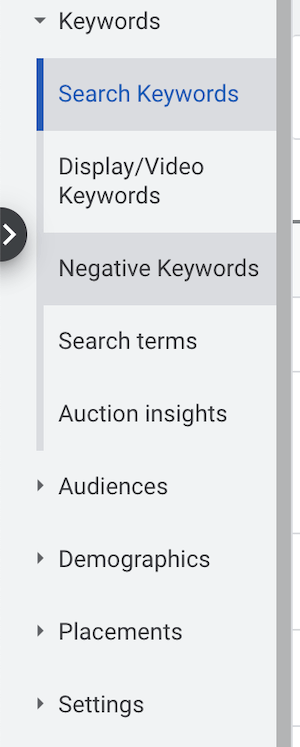
The default view displays your biddable keywords, but not the triggering queries. To access this information, click “Search Terms” within the same menu. Welcome to the realm of Queries!
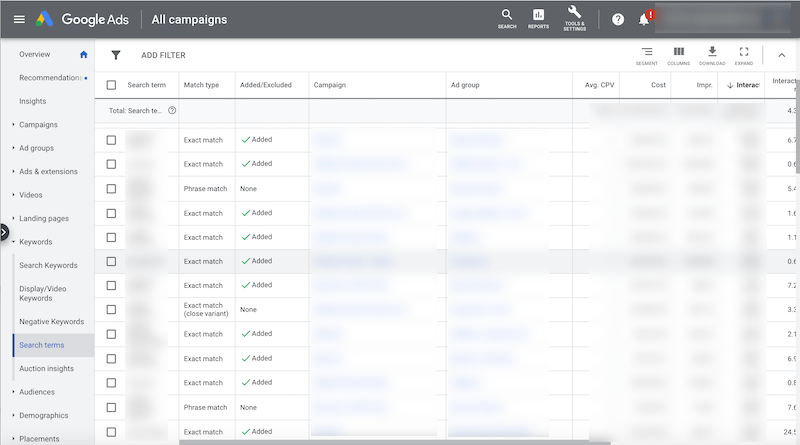
Notice the additional columns absent from the keyword screen, including:
- Search Term: The exact query entered into Google (or spoken to a virtual assistant) that triggered your biddable keyword.
- Match Type: The level of similarity between the search query and one of your keywords.
- Added/Excluded: Actions taken on a search query (added to your account or as a negative keyword). …and any other columns you wish to include for informed keyword decisions. Let’s explore how to add a negative keyword to your account.
Adding Negative Keywords to Your Google Ads Account
Suppose you want to prevent your ads from appearing for the search query keyword tools.
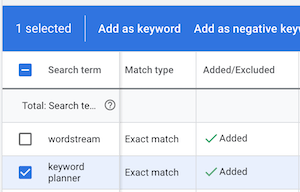
Check the box next to the query (as shown above) to reveal a blue option bar:

Since we’re adding a negative keyword, select “Add as negative keyword.” You’ll be prompted to choose the assignment level (account, campaign, or ad group) and the desired match type. Hit save, and your negative keyword goes live! Assigning your negative keyword to a negative keyword list (and applying that list across your account) involves a few extra steps. Let’s delve into those.
Leveraging Negative Keyword Lists
Let’s be realistic: an account relying solely on exact match keywords likely won’t be effective, even for giants like Ford or BMW. Therefore, you need broad and phrase match keywords for sufficient search volume and uncovering new opportunities. However, this approach has a drawback: potential for competing against yourself for impressions across campaigns. Imagine you sell cat and dog clothes through your eCommerce store.

Without negating “cat” (and all related queries) in your dog clothes campaigns, Google might match a broad match “cat” keyword to a dog-related query. The results would be irrelevant to the searcher. Low click-through rates occur if they don’t click; clicking leads to a landing page misaligned with their intent. A lose-lose situation. The only way to prevent this wasteful scenario is through negative keywords. Reacting to queries individually is inefficient; proactively creating lists of undesirable search terms is key. In the scenario above, negative keyword lists prevent Google from displaying a “dog clothes” ad for a “cat clothes” query, as only ads from your dog clothes campaign are eligible. Pretty neat, right? This applies beyond pet fashion. Imagine needing to exclude a keyword account-wide. Perhaps you only sell new cars and want to avoid spending on used car queries. Or, you’re an agency managing multiple clients in the same vertical, likely sharing common negative keywords. Negative keyword lists are your solution. To create one, click the tool icon at the top of the Google Ads UI and select “Negative keyword lists” under “Shared Library.”
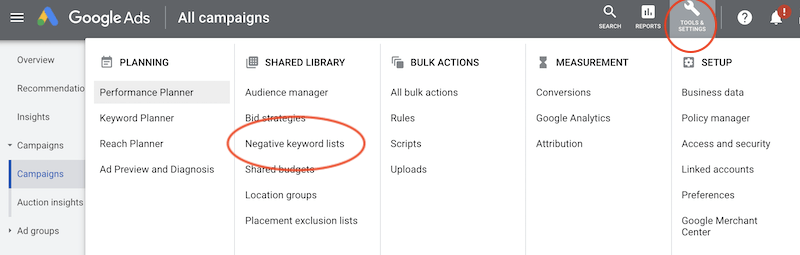
Click the blue plus sign, name your new list, and add the terms you want to negate (ensuring accurate match types)…
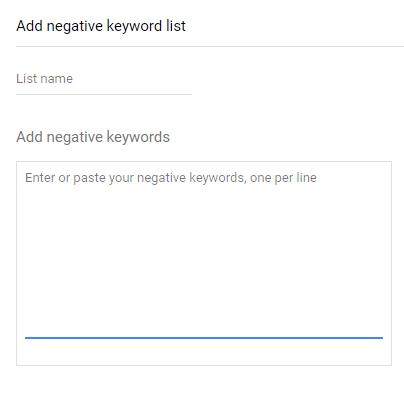
To apply your list to existing campaigns, go to the campaign, navigate to the keywords tab, then the negative keywords section.
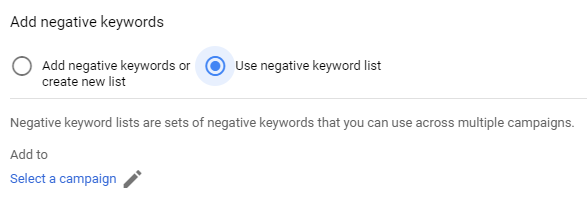
Choose “use negative keyword list,” select the appropriate list, hit save, and you’re all set! Add any irrelevant search queries directly to your negative keyword lists. Enjoy the satisfaction of Google displaying the right ads for the right queries. This concept extends to the ad group level for even greater control. Here are some techniques for uncovering costly negatives often missed with superficial analysis, especially when scaling your account.
Mastering Advanced (Negative) Search Query Mining
Ignoring search queries while bidding on broad match keywords for maximum impressions is a recipe for wasted spending. It’s the hard truth. Failing to manage negative keywords alongside new opportunities leads to overlooking costly search queries hindering your ability to convert valuable searchers into customers. We covered adding negative keywords; now, let’s identify which queries deserve negation.
Keywords vs. Search Queries
Repeat after me… Keywords are not search queries. Keywords are assumptions. Search queries reflect actions. They represent your perceived customer search terms; search queries reveal the reality. One keyword can often match hundreds or even thousands of actual search queries.
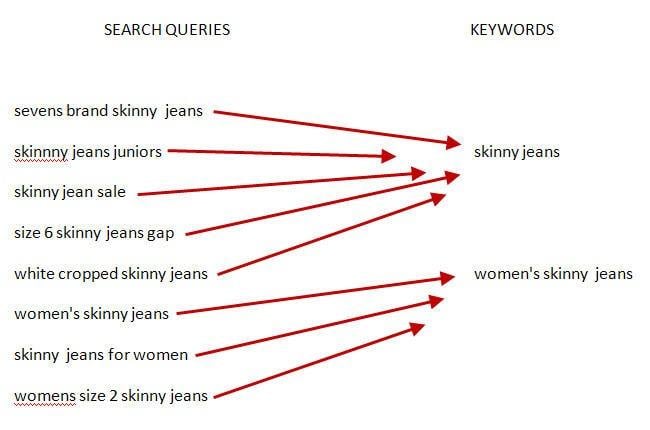
While this is great for uncovering new, long-tail opportunities (highly relevant, low-volume keywords to target), it inevitably leads to wasted spend. Hence, efficiently analyzing seemingly endless search query lists is crucial.
Efficiently Identifying the Right Negative Keyword Opportunities
Inexperienced or busy account managers often rely on qualitative methods for adding negative keywords. This means… Alphabetizing the query list and reviewing each entry, asking, “Is this relevant to my business?” While not inherently wrong—it helps eliminate irrelevant queries—it ignores valuable quantitative data and is highly inefficient at scale. Determining whether a query should become a negative keyword hinges on three questions:
- Does it have a below-average CTR?
- Does it have a below-average conversion rate?
- Does it have an above-average cost per conversion? The reasoning behind these questions is straightforward.
- A below-average CTR signifies that people seeing the triggered ad aren’t clicking. If the query is irrelevant to your business, make it a negative keyword. If it’s relevant and has volume, consider a new ad group with a more targeted ad.
- A below-average conversion rate or above-average CPA implies unmet expectations post-click. This might be due to a non-mobile-optimized landing page, insufficient conversion paths, or poor intent-objective alignment. Regardless, non-converting queries shouldn’t trigger your ads. To answer these questions (and any others you might have regarding query value), master the art of filters. In the “Search Terms” interface, click the small funnel icon to filter by specific parameter names or select them from a list.

Ensure you’ve enabled the necessary columns to view the metrics you’re filtering by; click the three vertical bars to do so. Each filter requires you to set parameters using “greater than,” “less than,” or “equal to” alongside an open field.
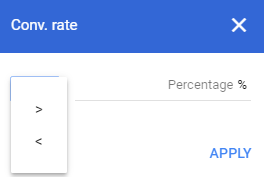
Note that you can layer filters to find queries meeting specific criteria across multiple metrics.

For example, you might seek queries with both exceptionally high CTRs and CPAs, indicating ads that are being clicked but generating no conversions. Once identified, check the desired queries, select your match type, and stop wasting ad spend.
Embracing the Power of Negative
Why is this time-consuming process so valuable? Effective negative keyword management ensures your keyword research remains refined and highly relevant. This allows you to deliver compelling, targeted messages to the exact audience segment you want to reach. Plus, your budget is spent on impressions and clicks highly likely to drive relevant traffic, qualified leads, and ultimately, sales. Boring? Perhaps. Time-consuming? Definitely. Necessary? Absolutely.