Managing your money is a necessary evil. It doesn’t matter if you’re barely scraping by or building a digital empire (or juggling both!), budgeting is a headache for everyone.
While there’s no way to avoid it completely, there are ways to make it less painful. This is especially true for Google Ads (previously Google AdWords) where each click either grows your business or burns your hard-earned cash.
Sadly, finding comprehensive PPC budgeting advice is like searching for a unicorn. No magic app, no secret discounts, you just have to roll up your sleeves and figure it out.
To guide you through building a solid Google Ads budget strategy, we’ve created this guide, split into 3 digestible sections:
- Figuring out your initial Google Ads budget
- Splitting your budget across different campaign types
- Introducing new campaigns
Hate reading as much as you hate budgeting? No worries! We’ve boiled each section down to bite-sized, tweet-length bullets.
Find out where your Google Ads budget is going to waste. Get a free account audit with our Google Ads Performance Grader today!
Part 1: Figuring Out Your Initial Google Ads Budget
You’ve taken the plunge, entered your credit card info, and funded your account. You’ve even downloaded Google Ads Editor (and hopefully your computer hasn’t exploded yet). So, what’s next?
You need to decide how much you’re willing to spend in the beginning - be it for the quarter, the month, the week, the day, or even your very first click.
When figuring out your initial Google Ads budget, ask yourself these four crucial questions:
- How does Google Ads fit with my current marketing strategy?
- What are my competitors spending on and where?
- What are the cost of the CPCs (costs per click) for the keywords I’m bidding on?
- Which KPI (key performance indicator) is most important to me?
Once you have these answers, you’ll be ready to dive into campaign types, optimization, and eventually, expansion. So, let’s tackle those questions!
(Oh, and by the way, you can now set monthly spending limits in Google Ads!)
How Does Google Ads Fit With My Current Marketing Strategy?
If your business is a local favorite or has a strong online presence (driving organic traffic through killer SEO and top-notch content), chances are leads will come knocking, ready to buy. Similarly, a new business can achieve this through a dedicated social media following. Besides the time and effort involved, this organic traffic is essentially “free.”
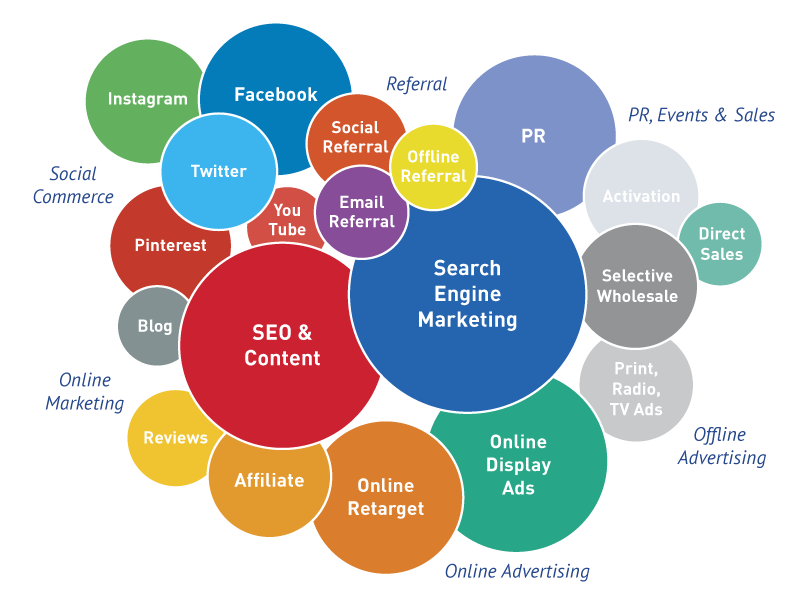
Think about the other marketing avenues you’re using to grow your business. Billboards, flyers, purchased leads, radio ads, bench ads, TV commercials, events, branded… everything!
List them all out and ask yourself: Is my Google Ads account meant to support my existing efforts (like giving people a way to use a promo code) or replace them entirely?
What (And Where) Are My Competitors Spending?
Google your company’s name. I’ll wait. Now, what’s the first thing you see on the search results page?
If you’re a Google Ads pro, it should be your perfectly optimized branded ad. If you’re new to this, you’re probably staring at a wall of your competitors.
Besides your branded keywords, tools like Keyword Planner or SEMRush can reveal where your competitors are putting their Google Ads money (don’t worry too much about the extra details, focus on the keyword lists and example ads).
Armed with this knowledge, you can strategize to outrank their ads and discover affordable keywords they haven’t thought of yet.
 Want more Google Ads budgeting tips?
How Much Do The Keywords I’m Bidding On Cost?
Remember those tools we just talked about? Time to use them again.
A simple way to figure out a budget is to consider the cost of the keywords you want. Should this be your only factor? Absolutely not. But it’s a good place to start.
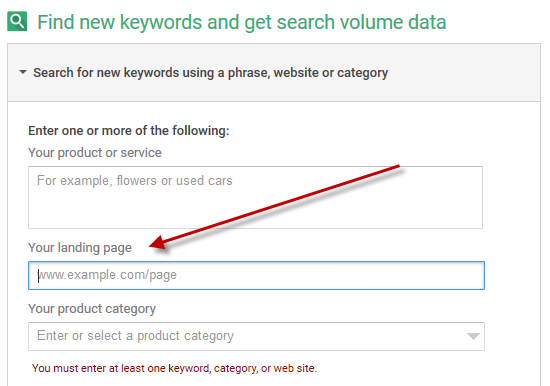
Open the Google Ads Keyword Planner and enter one of your landing pages into the left side. Adjust the settings (industry, location, terms to avoid, etc.) and get ready to sift through potential keywords along with their popularity and competition.
Do the same for each product or service page on your website. You’ll uncover hidden keyword gems that are undervalued. Your goal? Find high-traffic, low-competition keywords (that also signal buying intent) - that’s your sweet spot.
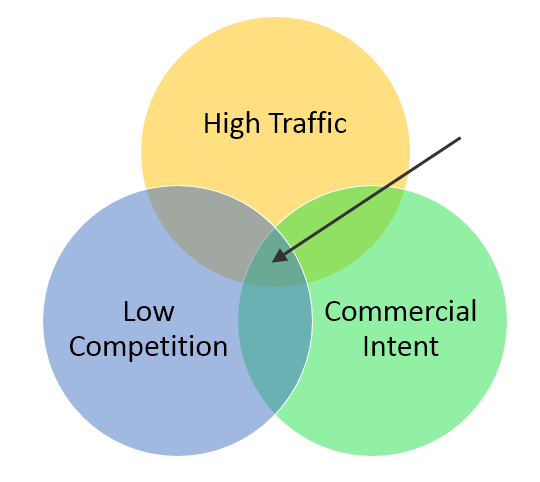
We’ll dive deeper later, but essentially: Keywords that show urgency or familiarity convert better than those that don’t. A branded keyword is stronger than a competitor keyword. “Limo from Logan to Nashua midnight” is far more urgent (and valuable) than “limo service,” even if it gets fewer searches.
Which KPIs (Key Performance Indicators) Matter Most To Me?
We saved the most important question for last. A KPI is a measurable value that tells a business or individual how well they’re performing. What matters most varies from business to business.
For some, CPA (cost per acquisition) is king. So many times, I’ve seen businesses pluck a CPA from thin air. If this is your chosen KPI, make sure your goal is based on logic. For a more concrete approach, figure out how many conversions tracked through Google Ads it takes to gain an actual customer, and calculate your true CPA. You can also use your existing CPA from other channels as a starting point for paid search, and adjust as you gather more data.
Many other KPIs exist for measuring Google Ads success. If you’re unsure which suits your business best, check out these resources on performance indicators:
- Google Ads Metrics: How to Make Sense of Your PPC Data - A basic look at the main Google Ads KPIs including impressions share, clicks and CTR, CPC, CPA, and wasted budget.
- Easy Google Ads Bidding Strategies for Newbies & Math Haters - Includes strategies and formulas for setting initial Google Ads bids and figuring out your CPA.
- Hacking Google Ads: Winning at Google Ads the Weird Way - Larry Kim’s data-driven approach to maximizing results through Quality Score.
***
After answering these four key questions, analyze your findings. To pinpoint your ideal budget, consider:
- The KPIs you’ll use to measure success.
- The number of sales or leads you aim for with Google Ads.
- Relevant goals from your other marketing channels.
- The cost of keywords, both those your competitors are using and those they’ve overlooked.
TL;DR:
- Let data from your existing marketing efforts guide your Google Ads structure and budget.
- Use competitor analysis and keyword research to shorten your learning curve and hit the ground running.
- Determine your budget by identifying your most important KPIs and working backward from the numbers that signify profitability.
Part 2: Splitting Your Budget Across Search Campaigns
Broadly speaking, your Google Ads search campaigns will fit into five categories: research, branded, competitor, high-intent, and top performers. Keep in mind these categories are flexible and can overlap.
Logically, your top-performing keywords should get the lion’s share of your budget, but what about the rest? Here are some tips for managing your Google Ads budget:
Research-Stage/Top-of-Funnel Keywords
Beginners to paid search often target broad, top-of-funnel keywords. For example, a new personal injury lawyer might bid on “personal injury lawyer”. Sounds logical, right?
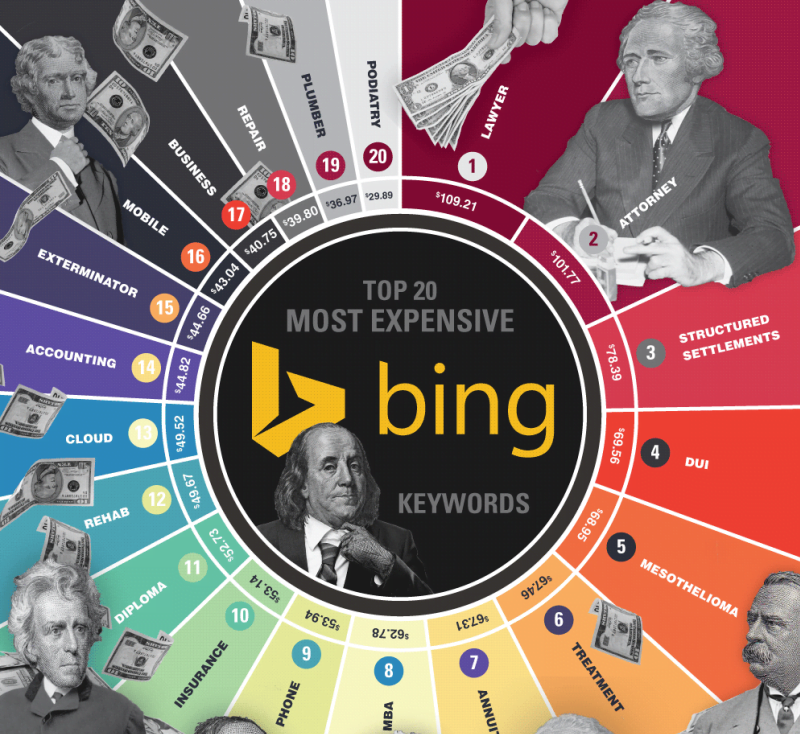
The problem? In most industries, these keywords cost a fortune. Google suggests a bid of over $97 per click for that example. Ouch.
While my example was extreme, your industry might have high CPCs too. But the real issue with these keywords isn’t cost, it’s intent.
Let’s imagine we’re a small business in the competitive world of business cards. Consider these keywords:
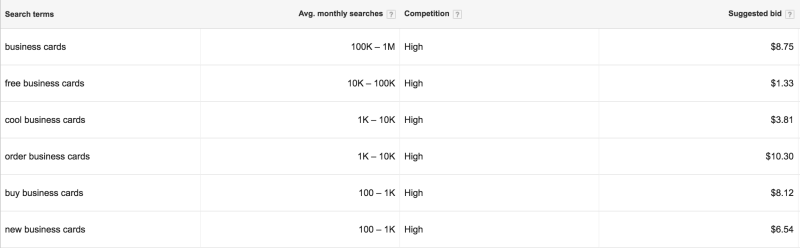
“Business cards” gets the most searches, but think about the searchers themselves: dreamers who’ll never order, students working on projects. At a suggested $8.75 per click, it’s a no-go. I’d rather invest that $8 in keywords with clear intent, like “buy business cards” or the pricier but more commercial “order business cards.”
This doesn’t mean all top-of-funnel keywords are useless or overpriced. They’re great for building awareness and growing your remarketing lists. But if you bid on them, do it strategically. Spend $1.33 per click on “free business cards” and relentlessly remarket to those prospects. When they’re ready to upgrade from the coffee shop to a fancy office, guess who they’ll remember?
 Free guide >> PPC 101: The Beginner’s Guide to PPC
Branded Keywords
Some people avoid bidding on their own brand terms. This is a mistake.
Even if your website ranks first organically for your brand name, there’s a valuable space above those listings that your competitors can snatch if you’re not careful.
Here’s a real-world example. After watching the first NFL game of the season, I decided to win big money playing daily fantasy football. I searched for DraftKings (whose ads were everywhere) and clicked the first result:
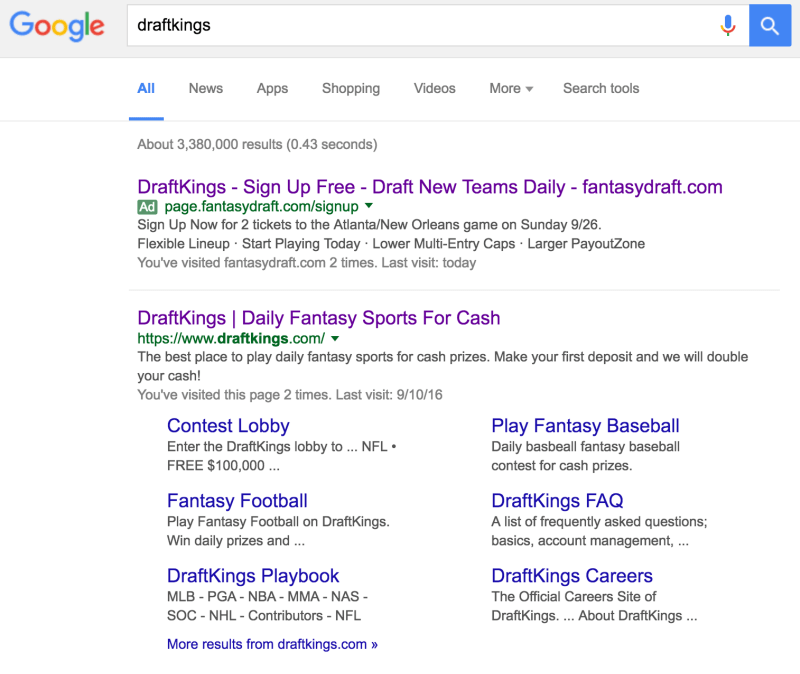
I was shocked to see a competitor’s ad instead of DraftKings’ usual branding. So shocked that I gave DraftKings some free advice:
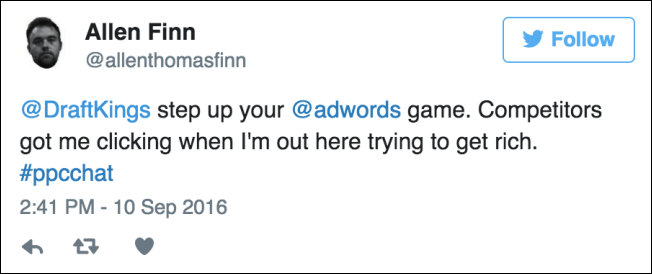
If my story isn’t convincing enough, consider this: Your competitors pay a premium to bid on your brand, but those same keywords will be significantly cheaper for you. Your website and ad copy will be super relevant, resulting in high Quality Scores and lower costs.
While branded terms shouldn’t be your only focus, allocating budget to dominate the search results for your brand is crucial.
RELATED: How to Use the Google Ads Budget Report (+10 Can’t-Miss Budgeting Tips)
Competitor Keywords
Remember what we said about branded terms? The opposite applies to bidding on your competitors. Just like with top-of-funnel terms, use research and common sense to avoid wasting money on keywords that won’t convert.
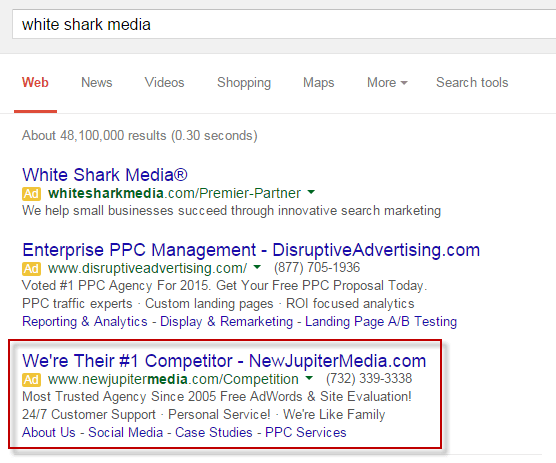
A common mistake is bidding on the wrong competitors. Only target companies you actually compete with, those you have an advantage over, whether it’s price, selection, or something else. In other words: don’t be like fantasydraft.com
High-Intent Keywords
If top-of-funnel keywords are a gamble, high-intent keywords are like winning lottery tickets.
These keywords come in two flavors: “buy now” and “product.” Make sure these keywords get the biggest chunk of your search budget (and if you find keywords that fit both categories, even better!).
“Buy now” keywords signal a prospect’s readiness to purchase. They’ve done their homework and are ready to spend. These keywords often combine top-of-funnel terms with words like:
- Buy
- Discount(s)
- Deal(s)
- Coupon(s)
- Free shipping
To illustrate the difference between research and purchase intent, look at the keyword “candle” followed by some buy-now variations:
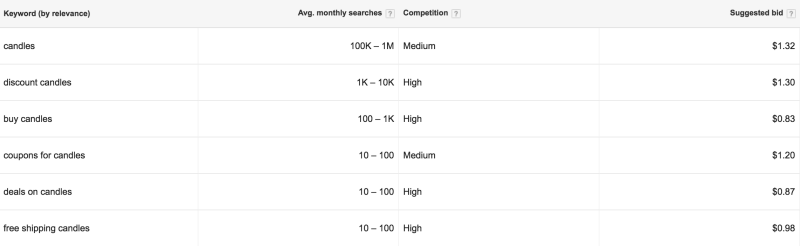
While “candles” has a significantly higher search volume, the other keywords indicate a stronger intent to buy.
Make sure your ad copy reflects the specific modifier you’re bidding on. If you sell natural cardamom candles and bid on “coupons for candles,” use expanded text ads or extensions to highlight your product’s quality and offer a coupon code within the ad.
Product/service keywords include:
- Branded searches (of course)
- Specific products or services (“iPhone 6,” “roof repair,” etc.)
- Product categories (“summer dresses,” “insect repellant,” “beach accessories,” etc.)
- Affordable
- Best
- Cheapest
- Comparison
- Review
- Top
This category is broad, and not every product keyword will be a winner. The only way to know is to test them strategically. If something drains your budget, pause it. If something converts at a low CPA, you’ve found a winner.
Top Performers
After running your Google Ads account for at least 30 days, you’ll know which keywords are worth your money. Middling keywords – those with consistent impressions but few clicks – represent an opportunity. Focus on writing compelling ad copy, tweaking your landing page, and perfecting your ad extensions. If they still aren’t performing after a few weeks, it’s time to say goodbye.
Moving your top-performing keywords into their own campaigns gives you more control over how much you spend on proven winners. This prevents a single converting keyword from being overshadowed by others that drain your budget. And who doesn’t love saving money on Google Ads?
A word of caution: moving a keyword out of its original ad group resets its data. Since we’re assuming a relatively new account, it’s wiser to move underperforming keywords into new campaigns.
***
So, how do you actually divide your budget among these campaigns?
Here’s a visual representation of how your search campaign budget breakdown might look:
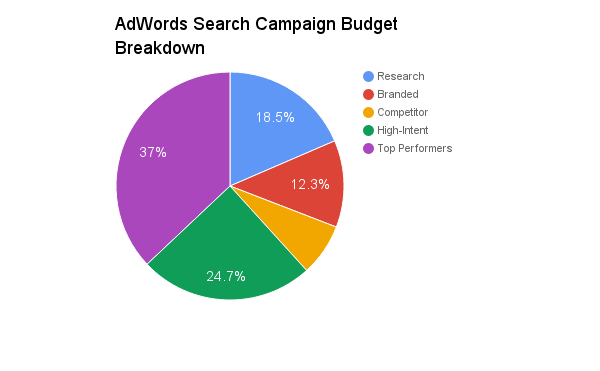
While the exact percentages in the pie chart are arbitrary, the relative distribution of spend between campaign types is certainly not.
As you can see, the majority of your budget should go towards keywords with the highest conversion potential. The exception is branded keywords. While they represent intent (familiarity), their volume is lower and they might not attract new customers. So, while dominating your branded terms is important, your budget should prioritize those high-intent “buy now” and product-focused keywords.
Remember, these categories are flexible. High-intent keywords should ideally be your top performers, but there are exceptions. I’ve seen accounts where a competitor’s brand name converted better than any other keyword. Every niche, every account is different. Always analyze your data and adjust accordingly.
TL;DR:
- Allocate the majority of your budget to high-intent keywords, including branded terms.
- Top-of-funnel keywords can be expensive; there are better, more cost-effective ways to reach a wider audience.
- Review and adjust your budget allocation weekly to ensure maximum ROI.
Part 3: Budgeting for Everything Else Google Ads Offers
Search campaigns are the foundation of most Google Ads accounts, but the platform offers other options like display and remarketing (usually through display, although search remarketing can work too). Shopping campaigns are also an option, but that’s a topic for another time.
Depending on your industry, these alternatives can complement or even replace traditional search advertising, significantly impacting how you spend your Google Ads budget. Let’s delve deeper.
Display
Display ads offer cheaper clicks than search ads, but with significantly fewer direct conversions, is the Google Display Network (GDN) worth it?
Absolutely, without a doubt.
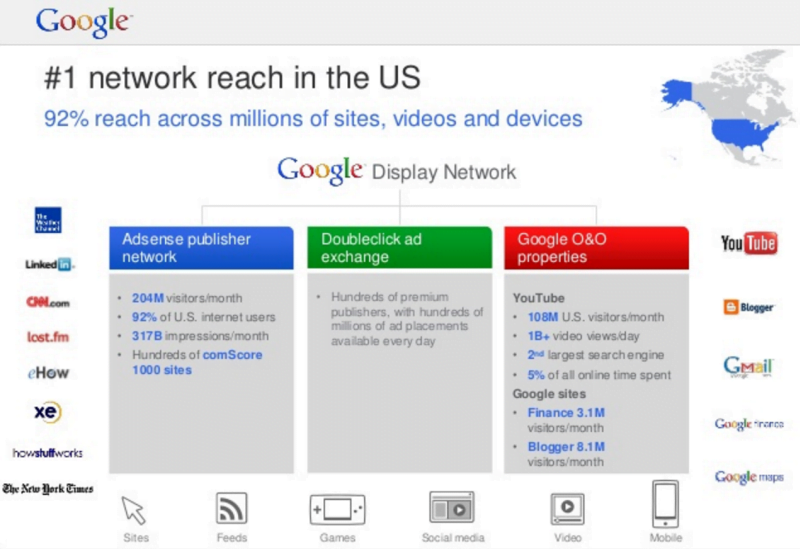
Remember “intent”? Well, users seeing your ads on the GDN don’t have much of it. Display advertising is more like traditional advertising (think billboards) but with better targeting and real-time analytics.
Besides remarketing, the GDN serves three primary purposes: brand awareness, showcasing your product, and nurturing leads through a longer sales process. It also offers a variety of targeting options. There has to be a downside, right?
The lack of directly attributable conversions can make the GDN hard to justify, especially for small businesses with limited budgets. However, you can test the waters without breaking the bank.
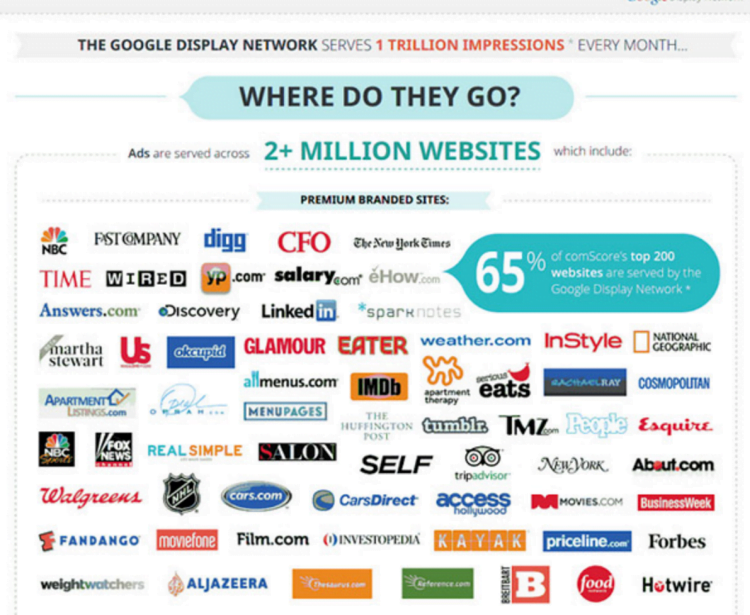
For clients new to Display, I recommend starting with managed placements or In-Market audiences. In short, this allows you to show banner ads on specific websites or to users who have shown interest in similar products or services.
If you see success, explore other strategies and increase your Display budget to create a complementary network strategy.
Remarketing
Let’s be clear: if you run an e-commerce business and haven’t set up dynamic remarketing (showing visitors ads for the exact products they viewed on your website), drop everything and follow this guide right now. Future you will be rolling in dough.
Seriously, remarketing is essential for Google Ads. Every business, regardless of industry, can benefit from it.
To determine your initial remarketing budget, calculate the percentage of conversions from returning visitors and allocate that same percentage of your budget to remarketing. Still too abstract? Let’s use an example.
Imagine your online candle store received 1,000 clicks last week, resulting in 100 sales. Of those sales, 10 came from returning visitors. Allocating 10% of your search budget to remarketing gives you another shot at converting the remaining 900 visitors.
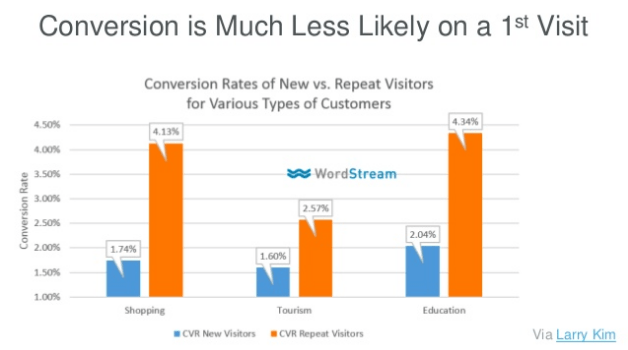
Some marketers dislike remarketing because you’re paying to bring the same user back to your website. But isn’t that better than them never converting or, even worse, buying from a competitor? Plus, repeat visitors are statistically more likely to convert!
TL;DR:
- Remarketing, particularly dynamic remarketing, is a must-have. Maximize your budget by enticing more visitors to convert.
- Let the Display Network handle brand awareness and top-of-funnel marketing so your search budget can focus on qualified leads.
A Final Word: Expanding to Other Platforms
Congratulations, you’ve completed your Google Ads budgeting bootcamp!
You’ve established your starting point, carefully allocated your search budget, and started exploring other Google Ads features. If your index finger is cramping, walk it off. You’re doing great, but your journey isn’t over.
Beyond continuous optimization (essential for maximizing your paid search budget), consider expanding to other platforms. Bing Ads is the natural next step, but Facebook (lead ads, anyone?) or LinkedIn (but seriously, Facebook) can also deliver great ROI.
What are you waiting for?