In today’s digital age, integrating video into your content marketing strategy is no longer optional, it’s essential. The online world is increasingly shifting towards video content, and ignoring this trend could be detrimental. Research from invideo reveals that online videos constitute over 82% of all consumer internet traffic, with 79% of individuals admitting that watching a video has influenced their decision to purchase or download software.
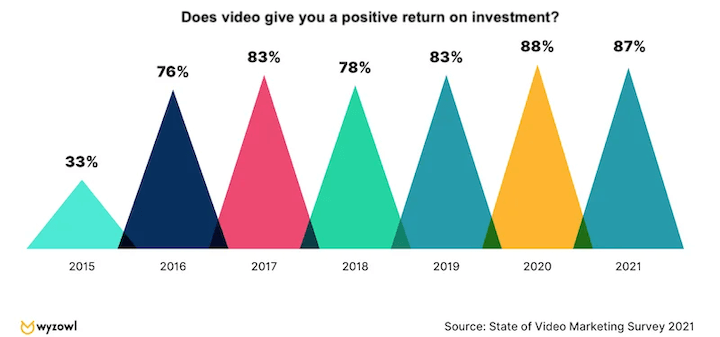
You might be thinking: “I’m not a video editing expert! I don’t have fancy equipment or a dedicated team.” And that’s perfectly okay! This blog post aims to demonstrate that by utilizing the right video editing software, anyone, regardless of their experience level, can produce polished, professional video content, ensuring their content strategy remains cutting-edge.
Let’s delve into our top recommendations for the best video editing software and applications suitable for beginners, categorized from the most budget-friendly (yes, even free!) to the pricier options.
Top Video Editing Software for Beginners in 2024
Here’s a curated list of the best video editing software designed with beginners in mind for 2024:
- Apple iMovie
- Lumen5
- Animaker
- Nero Video
- Corel VideoStudio
- Filmora from Wondershare
- CyberLink PowerDirector
- InVideo
- Adobe Premiere Elements
- Pinnacle Studio
- Adobe Premiere Pro
- Apple Final Cut Pro
1. Apple iMovie
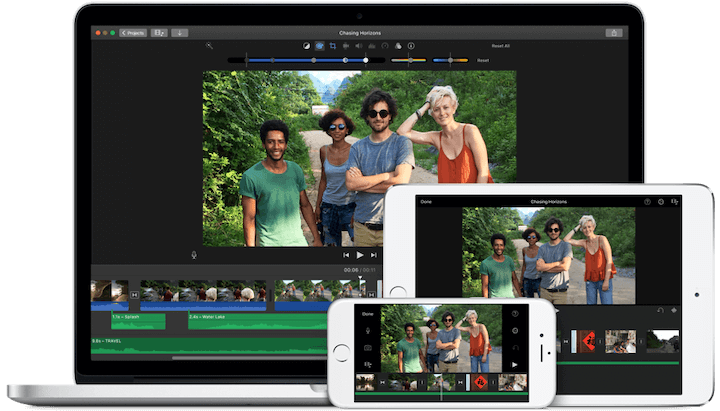
It’s important to acknowledge that this option is exclusively for Mac users, but excluding it from the list would be a disservice. If you prioritize simplicity and elegance in your editing software, look no further than Apple iMovie. Its ten high-fidelity filters are among the most refined in the industry. Moreover, if you’re capturing footage on your iPhone or editing on an iPad, transferring your project to your Mac is effortless with AirDrop.
A standout feature of iMovie is its green-screen, or “chroma-key,” tool. This allows for seamless placement of characters in diverse settings, such as a tropical Hawaiian backdrop. Need to set the scene with a classic tune like “Somewhere Over the Rainbow”? iMovie’s direct integration with iTunes and GarageBand facilitates easy incorporation of custom audio tracks. Once your masterpiece is complete, sharing it is a breeze through platforms like iMessage, Facebook, YouTube, and more, thanks to iMovie’s seamless connectivity.
- Key Features: Effortless integration with Apple products; green-screen functionality; audio and social platform integration.
- Pricing: Complimentary with the purchase of a Mac computer. Free download: Enhance your skills with our free comprehensive online advertising playbook.
2. Lumen5
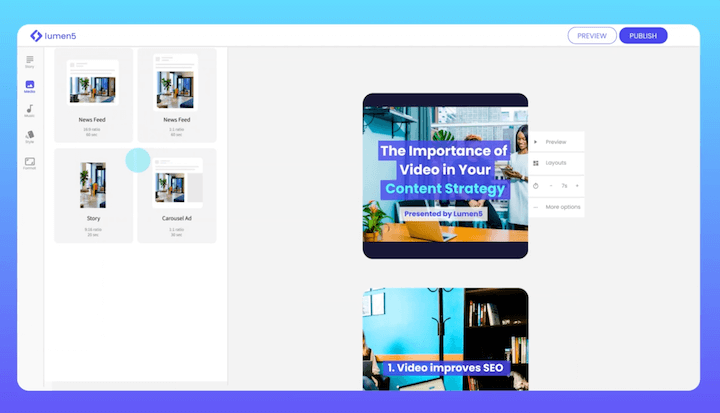
Lumen5 is positioned as a tool that transforms blog articles into captivating social media promotions. While the process may require some fine-tuning to achieve your desired visual aesthetic, the overall video creation experience is incredibly user-friendly. Simply refine the text that entices readers to check out your blog post, seamlessly drag and drop elements like GIFs, screenshots, or video snippets, add a musical touch, and voilà! Your engaging social video is ready to captivate audiences on Facebook and Twitter.
- Key Features: Blog-to-social-promo content creation; intuitive drag-and-drop interface.
- Pricing: Enjoy unlimited 720p video creation with the free plan. Remove the watermark for $11 per month, or upgrade to 1080p resolution for $59 per month.
3. Animaker
Animaker stands out with its unique online video editor, enabling anyone to effortlessly create videos using their own video clips, photos, text, and audio – no prior video editing expertise needed! This lightweight application functions directly within your web browser, eliminating the complexities of intricate timelines, layers, or confusing interfaces. Experience the ease of storytelling with its intuitive drag-and-drop functionality.
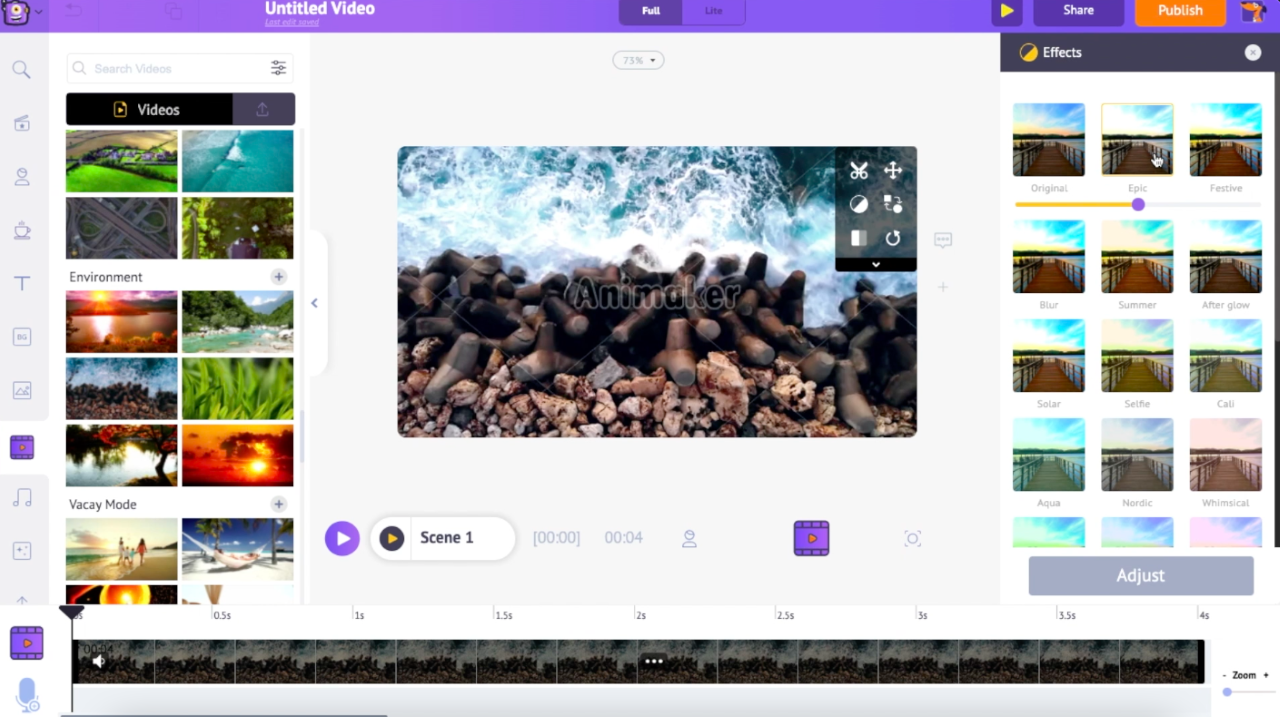
- Key Features: Lightweight application without the burden of a complex timeline, simple drag-and-drop options, and real-time collaboration features.
- Pricing: Plans begin at $10 per month and go up to $49 per month.
4. Nero Video
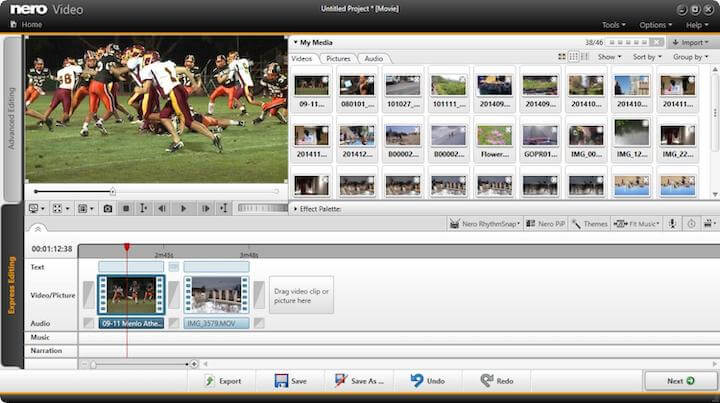
As one of the more budget-friendly options available at $49.99, Nero Video secures its place on our list. It boasts an impressive array of tools and effects comparable to more expensive competitors vying for dominance in the video editing realm. If your goal is to learn the ropes of video editing without breaking the bank, there are certainly less desirable alternatives out there. However, if you’re serious about investing in your video editing journey, proceeding with caution is advised. Nero’s speed and functionality fall short compared to some of the other contenders on this list, and while its value proposition lies in its affordability, $50 isn’t exactly a steal.
- Key Features: Attractive price point.
- Pricing: A one-time purchase of $39.95.
5. Corel VideoStudio
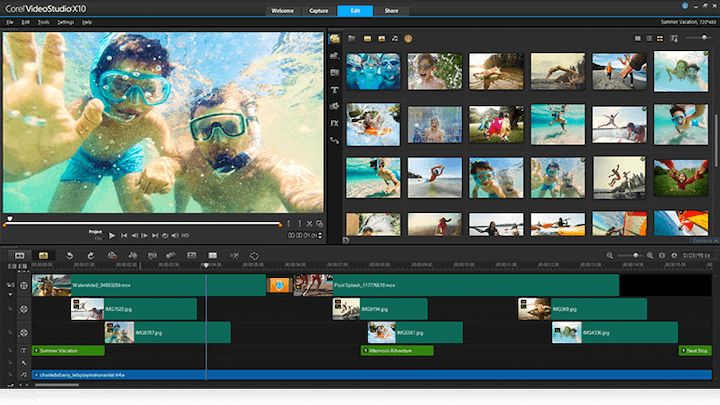
Corel VideoStudio possesses all the hallmarks of a top-tier video editing software, including 360-degree VR and 4k support. But what truly sets it apart is its pioneering inclusion of motion tracking in a consumer-grade video editing software. For those unfamiliar, this remarkable feature enables you to track specific objects within your footage, allowing for actions like pointing an arrow at a character, blurring a face, or even adding a humorous hat. While most contemporary video editing software now offer motion tracking, VideoStudio continues to boast one of the most robust systems available.
One minor drawback of VideoStudio is its speed, which noticeably trails behind competitors like CyberLink PowerDirector and Pinnacle Studio. Nonetheless, for a one-time payment of $99.99, it remains a solid choice, offering excellent value for its price.
- Key Features: Powerful motion tracking capabilities.
- Pricing: A one-time payment of $99.99.
6. Filmora from Wondershare
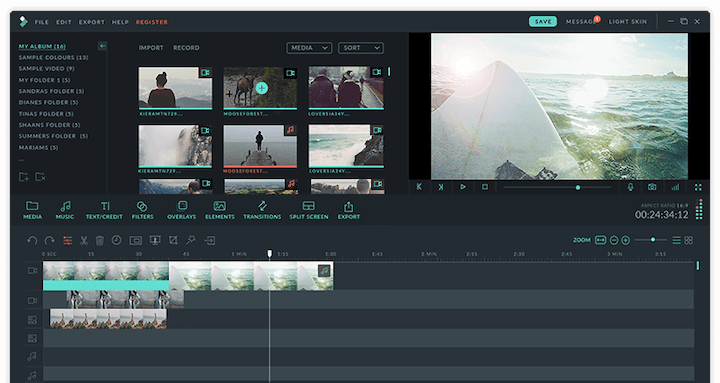
When it comes to versatility in video editing software, Filmora emerges as a strong contender. Filmora is Wondershare’s flagship offering, providing a user-friendly yet powerful video editing experience. Additionally, Wondershare offers FilmoraGo (designed for mobile editing) and Filmora Scrn (catering to screen recording and editing). Filmora boasts an intuitive design, making it easy to navigate and utilize its plethora of features, including filters, overlays, motion elements, transitions, and a curated selection of royalty-free music. Let’s explore some of Filmora’s fundamental features:
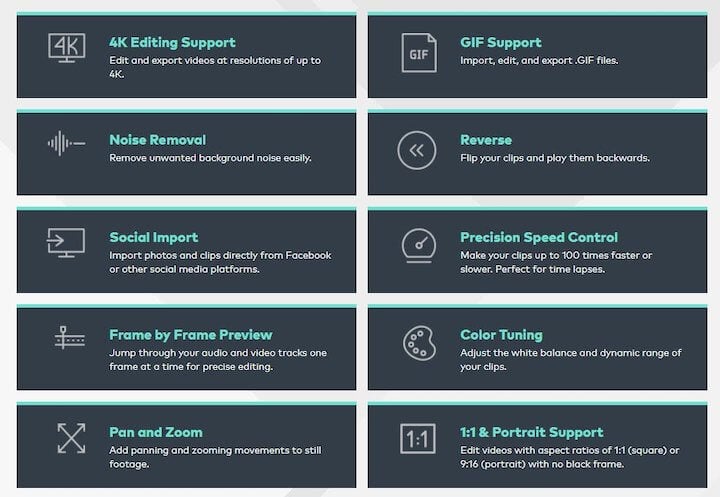
While 4k and GIF support have become standard features in most modern video editing products, Filmora excels in its title tools. This feature is gaining traction in video editing software, and while Filmora’s capabilities might not match the complexity of, say, Apple Final Cut Pro X (which allows for 3D title superimposition and three-axis rotation), it still offers impressive titling features considering its price point.
Another noteworthy Filmora feature that beginners will appreciate is its “Easy Mode.” This mode simplifies the editing process, enabling users to create polished edits effortlessly. Simply drag and drop clips, choose a theme, select your desired music (learn how to effectively use music in your marketing here), and let Filmora handle the rest.
- Key Features: Robust title tool; mobile and screen editing capabilities; beginner-friendly “Easy Mode.”
- Pricing: Starts at $68.98 for a perpetual license.
7. CyberLink PowerDirector
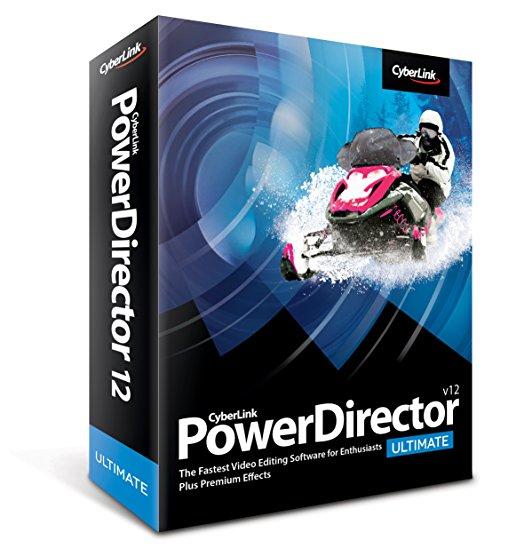
We previously stretched the definition of “software” slightly, and now, we’ll do the same with “beginner.” CyberLink PowerDirector earns its place on this list due to its surprisingly straightforward interface. By navigating to the product page and investing time in the available tutorials, even those new to video editing can quickly grasp its functionalities. However, it’s worth noting that the interface offers a vast array of options and effects that might feel overwhelming for users who aren’t prepared to delve deeper.
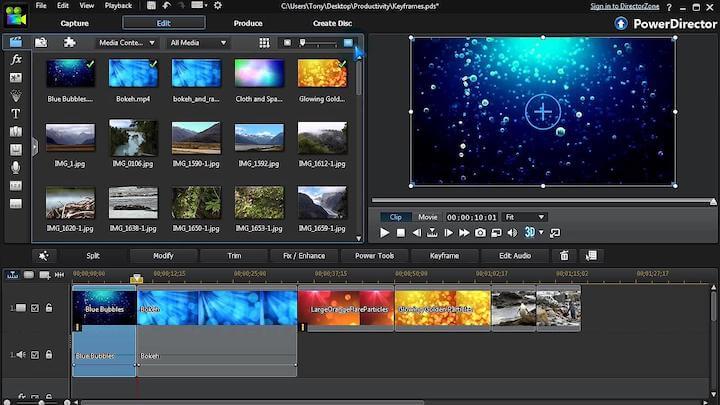
Embrace CyberLink’s extensive features, but be mindful of your commitment level!
PowerDirector shines in its rendering speed, widely recognized as one of the fastest video editing systems available. It consistently pushes the boundaries of innovation, being an early adopter of 4k resolution and now one of the pioneers in supporting 360-degree virtual reality footage.
As for pricing, you get what you pay for! For $79.99, you gain unlimited access to one of the most powerful video editing software solutions on the market.
- Key Features: Remarkably fast rendering speeds; a comprehensive suite of effects.
- Pricing: A one-time payment of $79.99.
8. InVideo
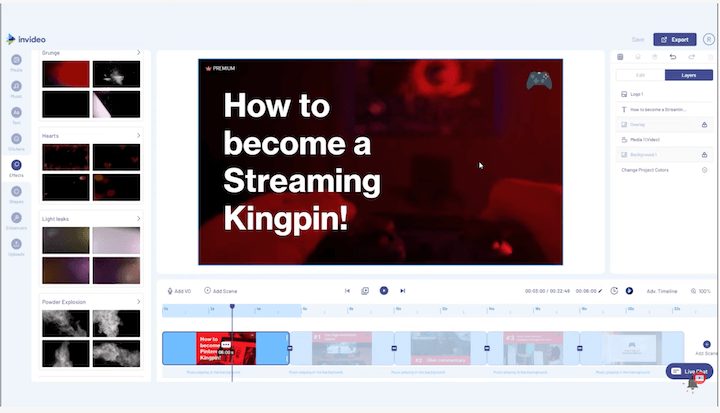
What truly sets InVideo apart is its entirely cloud-based nature. This eliminates the need for software downloads and alleviates worries about losing progress. As a browser-based editor, it performs admirably, even with its extensive library of transitions, stickers, frames, and other creative tools.
InVideo caters to both beginners and seasoned professionals. Beginners can leverage its vast collection of over 4,000 templates, while experienced users have the freedom to start from scratch. Additionally, its integration with the 8 million+ iStock catalogue empowers users to enhance their creations further.
A unique advantage of InVideo is the absence of watermarks on videos, even with the free plan. This makes it an excellent option for those starting and seeking to avoid hefty software expenses.
- Key Features: No watermarks, over 4,000 pre-designed templates, and access to 8 million+ iStock images & videos.
- Pricing: The Business plan is available for $15 per month, while the Unlimited plan costs $30 per month.
9. Adobe Premiere Elements
[

](https://raw.githubusercontent.com/Nexusdecode/images-549143589519/main/1722558999688.webp)
Premiere Elements earns its spot on this list primarily due to its long-standing reputation as an industry leader in the video editing arena. While its $79.99 price tag might not seem exorbitant, it’s worth noting that a significant portion of that cost can be attributed to brand recognition. Since its inception, numerous competitors have emerged, surpassing Premiere Elements in terms of speed and capabilities, making it difficult to position it among the absolute best.
However, this is not to discredit Premiere Elements’ user-friendliness, particularly for novice users. Its “Guided Edits” feature significantly enhances its appeal to beginners, offering step-by-step assistance for both quick edits and more intricate projects.
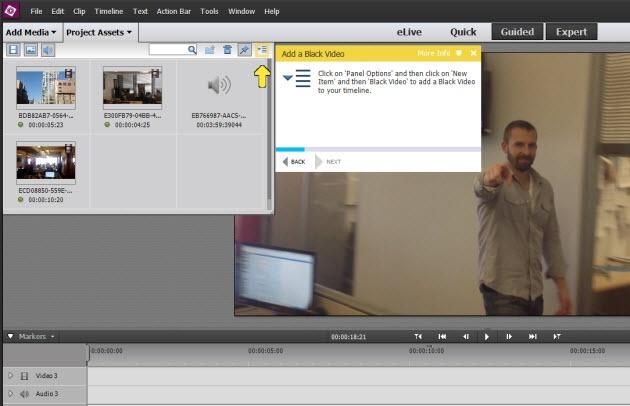
Uncertain about a particular editing technique? Don’t underestimate the value of Guided Edits!
Despite lagging behind competitors in areas like rendering speed, 3D editing, multi-cam functionality, and other advanced features, Premiere Elements remains a solid option for beginners seeking a comprehensive suite of effects and helpful guidance on their implementation.
- Key Features: Beginner-friendly Guided Edits; intuitive and easy-to-navigate interface.
- Pricing: A one-time payment of $79.99.
10. Pinnacle Studio
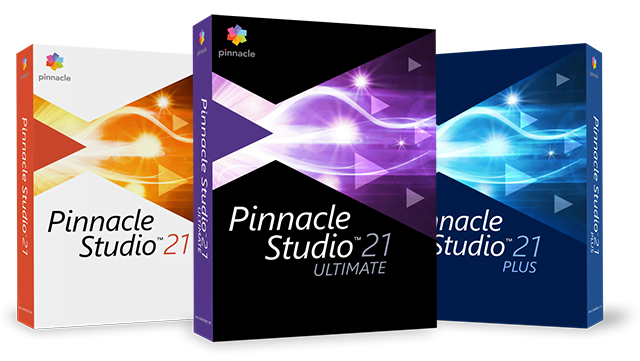
Positioned at the higher end of Corel’s product lineup is Pinnacle Studio. Priced at $129.95 for the “Ultimate” version (which unlocks 360-degree and 4k editing capabilities), it’s over twice the cost of VideoStudio. So, what justifies the premium price tag? Pinnacle not only comes fully equipped with all the features expected from a top-tier video editing software – motion tracking, 360-degree VR support, 4k support, multi-cam functionality, and more – but also boasts some of the fastest rendering speeds in the industry.
Remarkably, even with its extensive feature set, Pinnacle manages to maintain a user-friendly and intuitive interface comparable to other user-friendly options on this list. Therefore, if speed is a top priority and you’re willing to invest a bit more, Pinnacle might be the ideal choice for you.
- Key Features: Industry-leading rendering speeds; a comprehensive range of features and support.
- Pricing: A one-time payment of $129.95.
11. Adobe Premiere Pro
With an unparalleled collection of features, support for both 360 VR and 4k resolution, and a recently implemented cloud-based collaboration feature for seamless asset storage, organization, and sharing, Adobe Premiere Pro arguably reigns supreme in the world of video editing software. As a testament to its capabilities, we used Premiere Pro to create a recent video promoting our free AdWords account structure guide.
One of Premiere Pro’s most impressive tools is its Lumetri Color panel. This tool offers color adjustment and manipulation capabilities comparable to the renowned Adobe Photoshop. Another standout feature is its multi-cam functionality. Unlike many systems that limit the number of camera angles you can work with, Premiere Pro’s latest iteration allows for an unlimited number of angles.
Factor in its extensive titling options, seamless integration with other Adobe Creative Cloud applications (such as Photoshop and After Effects), and its intuitive interface, and Premiere Pro emerges as a clear winner for professionals and aspiring video editors alike.
- Key Features: Extensive multi-cam and color grading options; powerful title tool; effortless integration with Adobe Creative Cloud products; user-friendly interface.
- Pricing: $19.99 per month.
12. Apple Final Cut Pro X
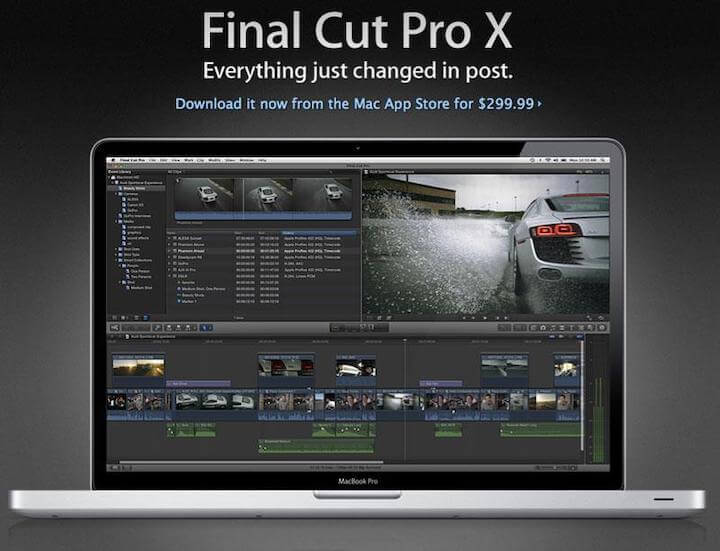
For the most ambitious, budget-unconscious beginners, there’s Apple Final Cut Pro X. Its $299.99 price tag might seem steep for a product that could initially pose a learning curve, but for those who embrace challenges and aspire to achieve professional-level video editing, it’s worth considering. Apple has streamlined the transition from iMovie to Final Cut Pro, making it more intuitive than ever. So, if you’re an avid Apple enthusiast comfortable with iMovie’s functionalities, taking the leap to Final Cut Pro might be a worthwhile investment. While its expansive capabilities can feel daunting at first, its interface is surprisingly approachable.
- Key Features: Innovative Magnetic Timeline; intuitive Touch Bar support.
- Pricing: A one-time payment of $299.99.
Best Video Editing Software for Beginners: A Recap
If you’re a content or social media marketer eager to incorporate video editing into your skillset to stay ahead of the ever-evolving video trend, there’s no need to stress! Any of the software applications listed above would serve as an excellent starting point for beginners.
When making your decision, consider factors such as your budget, current expertise level, and the amount of time you’re willing to dedicate to mastering this new skill. Whether your goal is to conquer YouTube with exceptional video content or to elevate your team’s video marketing strategy, there’s no time to waste deliberating! Invest in one of these remarkable video editing products and unlock your creative potential.
P.S. If editing isn’t your cup of tea and you prefer working with live, unedited footage, explore platforms like YouTube Live, Facebook Live, or Instagram Live to share your stories, product demos, how-to guides, and more.
Here’s a final recap of our top video editing software recommendations for beginners:
- Apple iMovie: Effortless Apple product integration; intuitive green-screen functionality; seamless audio and social platform connectivity.
- Lumen5: Effortless blog-to-social-promo content creation; user-friendly drag-and-drop interface.
- Animaker: Create custom characters and collaborate with ease.
- Nero Video: Budget-friendly option for getting started with video editing.
- Corel VideoStudio: Stands out with its powerful motion tracking capabilities.
- Filmora from Wondershare: Feature-rich title tool; mobile and screen recording/editing capabilities; beginner-friendly “Easy Mode.”
- CyberLink PowerDirector: Known for its lightning-fast rendering speeds and comprehensive suite of effects.
- InVideo: Enjoy watermark-free video creation, a vast library of templates, and access to millions of iStock images & videos.
- Adobe Premiere Elements: Offers helpful “Guided Edits” and a simplified interface for beginners.
- Pinnacle Studio: Delivers industry-leading rendering speeds and a comprehensive set of features and support.
- Adobe Premiere Pro: Professional-grade video editing software with advanced multi-cam and color grading tools, a powerful title tool, seamless Adobe Creative Cloud integration, and a user-friendly interface.
- Apple Final Cut Pro: Aimed at Apple users seeking a professional editing experience, featuring an innovative Magnetic Timeline and Touch Bar support.