Small businesses can really benefit from Instagram ecommerce. Why? Because it’s a rapidly growing platform with a massive user base of over 1 billion people worldwide, and a staggering 500 million of them engage with Instagram Stories every single day. This makes video content a must-have for your strategy.
And there’s more! According to HootSuite, a whopping 80% of Instagram users follow at least one business, and 70% are more likely to make purchases on their mobile devices. This means your business could be attracting those sales!

Intrigued by the potential of this platform? This guide to Instagram ecommerce will walk you through:
- Setting up Instagram Shopping for your business
- Generating sales organically and through strategic ad campaigns
- Measuring the success of your Instagram ecommerce endeavors
- Planning ahead for exciting new features
This profitable ecommerce channel is teeming with opportunities to boost your sales and revenue. So let’s dive in!
Setting Up Your Instagram Shop
Before you start selling, you’ll need an Instagram ecommerce storefront. First, confirm your eligibility and complete the account setup. Ensure that:
- Your business operates in a supported market.
- Your business sells physical products.
- Your business adheres to Instagram’s commerce policies.
- Your Instagram account is configured as a business account.
- Your Instagram account is linked to your Facebook business page.
1. Catalog Creation and Connection
Once you’ve checked off the requirements, it’s time to sync your Facebook shopping catalog with your Instagram business profile. You can do this in a couple of ways:
It’s important to note that while setup is usually quick, processing by Facebook’s Catalog Manager and Instagram Shopping can take a few days. So, start this process early, especially if you have a product launch or promotion on the horizon.
DIY with Catalog Manager
If you don’t have a catalog, you can create one. If you already do, you can connect it!
To start from scratch, go to Facebook’s Catalog Manager and select the “E-Commerce Catalog” option, unless your business falls under real estate, auto, or travel, in which case choose the appropriate category. For detailed instructions on creating a catalog, refer to Facebook’s Catalog set up details in their help section.
Assistance from Facebook Partners
We know your time is valuable, and sometimes you need a helping hand. If you prefer assistance with setup, Facebook’s certified partners, Shopify or BigCommerce, can streamline the process.
To use this option, connect your business Facebook account (the one linked to your Instagram business account) to one of these partners. You can find instructions on how to connect your Facebook account to a certified partner here:
- Shopify
- BigCommerce After connecting, submit your account for review. The process can take a few days, so be patient. Once reviewed and approved, Instagram will notify you through the app.
2. Instagram Shopping Signup
With your Instagram account and catalog successfully connected, it’s time to enroll in Instagram Shopping. Navigate to your profile, then Settings > Business > Shopping, as shown below:
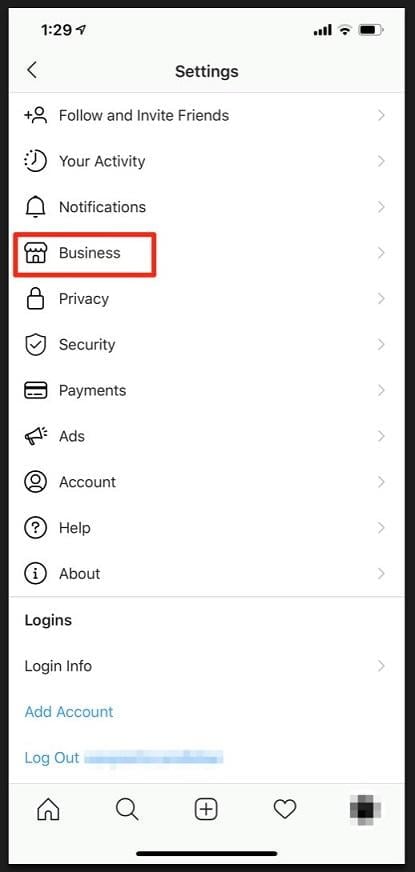
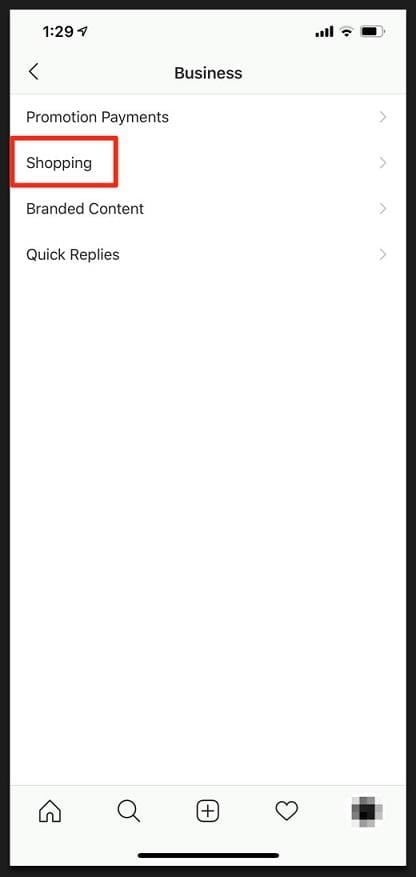
Now, another waiting period. Account review for Shopping can take a few days. Once approved, Instagram will notify you, allowing you to finalize your Shopping settings and start tagging products in your posts and stories.
3. Product Tagging
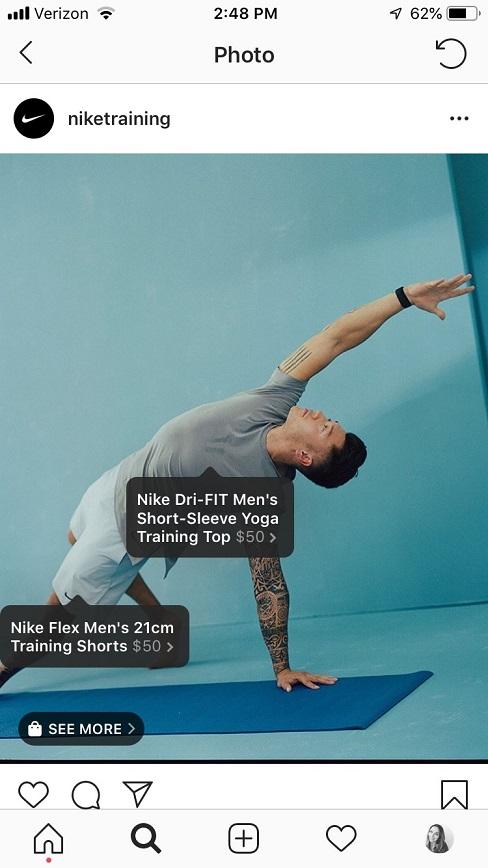
Make your products shoppable by tagging them in both your feed posts and Instagram Stories. Here’s how: Tagging in Posts You can tag up to five products in single image or video posts and up to 20 products in multi-image or carousel posts. Don’t forget to go back to older posts featuring available products and tag them too, for a potential sales boost! Tagging in Stories Currently, you can only tag one product per story. If you want to showcase more products, create a series of Stories. Consider a sequence of three stories highlighting new product lines, individual products, or designs. You can even customize the tag’s text and color for better visibility.
Engaging Your Audience with Organic and Paid Posts
Having your Instagram ecommerce setup is only the beginning. Engage your audience with a mix of Shopping content, paid promotions for wider reach, and organic posts to build trust and community.
Leverage User-Generated Content
Sharing user-generated content is a fantastic way to connect with your audience. It not only expands your reach and potentially drives sales but also builds credibility for your brand.
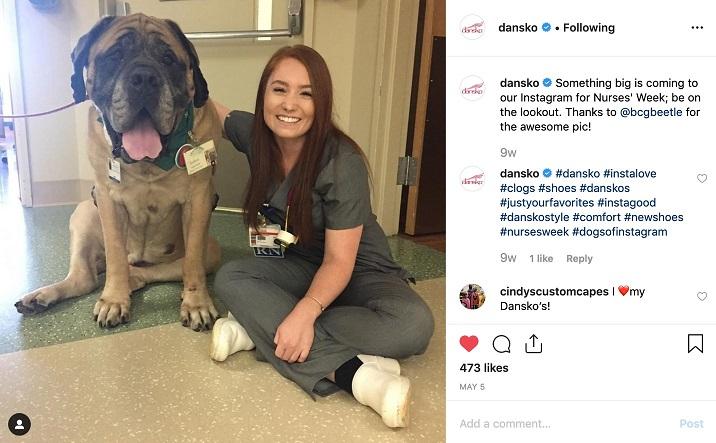
If you’re just starting, reach out to customers for product reviews and ask if they can share a photo on Instagram, tagging your business account. Reshare their content on your profile, giving them credit. This not only makes customers feel valued but also portrays your brand as trustworthy and engaged with its community, attracting more views.
It’s essentially free content! Plus, it helps manage customer expectations about your products and brand, leaving a positive impression on your followers. You can also encourage user-generated content by inviting people to “tag us to be featured!” in your bio.
Explore Instagram Ads
Organic reach can be limiting. Expand your visibility by allocating part of your budget to Instagram Ads. If you’re aiming to connect with your target audience based on interests, behaviors, and demographics, paid promotion on Instagram offers an effective solution.
For those new to Facebook and Instagram Ads, our recent article, “Facebook Ecommerce: The Complete Beginner’s Guide,” provides valuable insights applicable to Instagram ad placements.
Measuring Your Instagram Ecommerce Success
Posting and tagging are crucial, but how do you gauge their effectiveness? Your Instagram business account’s Insights tab holds the key. Analyze likes, comments, and purchases to understand what resonates with your audience. This data reveals popular posts, product preferences, and inventory needs.
Beyond these insights, your Instagram business account offers valuable demographic data about your audience, including gender, age range, and location. Once you start running Instagram Ads, you can access on-the-go performance data, including reach, impressions, and more. For a more comprehensive view, refer to Facebook Ads Manager reporting on your computer.
Staying Ahead of the Curve
Like all social media platforms, Instagram is constantly changing. While many updates are minor, some significantly impact advertisers and ecommerce businesses. Here are some noteworthy developments in the Instagram ecommerce landscape.
Instagram Checkout
Checkout launched on March 19th of this year but remains in a closed beta program, accessible to a select group of larger brands, as listed here. Currently limited to organic posts, Checkout is expected to roll out for ads in the future, mirroring past beta progressions. This feature benefits both businesses and Instagram.
Checkout posts mimic organic shopping posts but enhance the shopping experience by keeping users within the Instagram app. Available in the Feed, Stories, and Explore tab, these posts streamline the purchase process.
Instead of charging consumers, a selling fee will be applied to merchants, encouraging businesses to leverage this feature for potentially higher conversion rates. The exact selling fee is undisclosed but expected to be reasonable, making it a worthwhile investment for ecommerce brands.
Here’s how the Checkout process works:
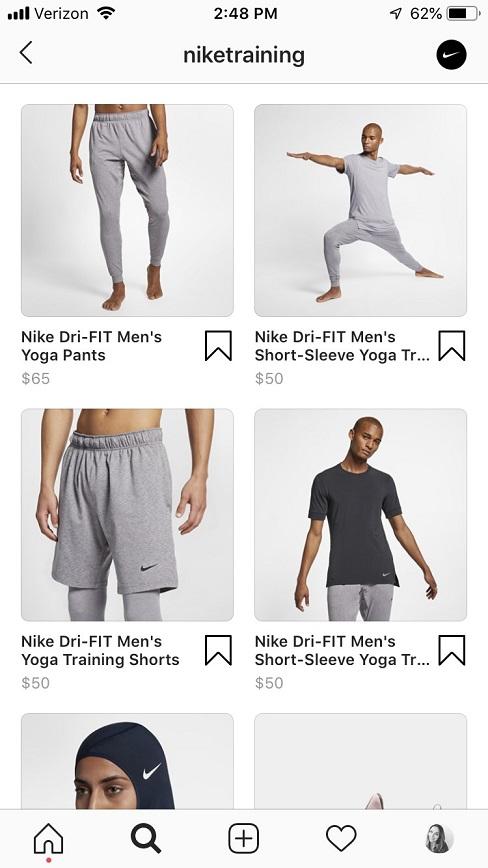
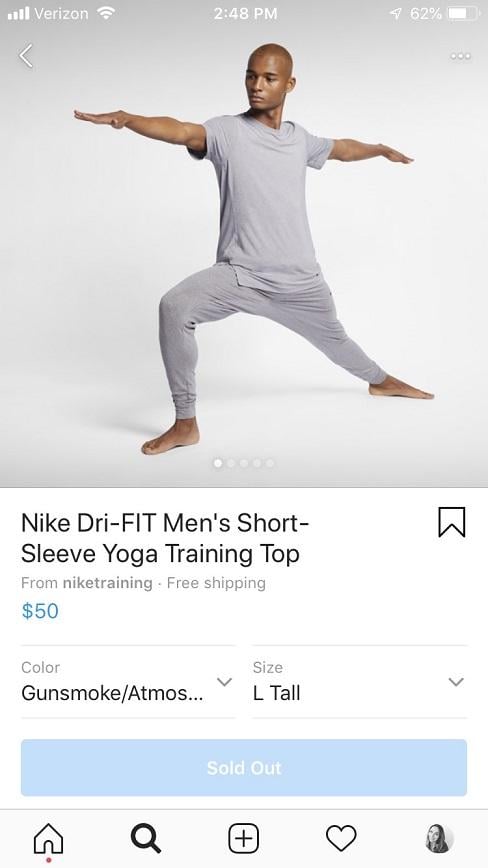
Eager to be notified when Checkout becomes widely available? Let Instagram know by here..
Branded Content
Another feature to watch is Branded Content on Instagram. Although not yet available on the platform, it’s highly successful on Facebook, particularly for ads. Branded Content offers a way to amplify your exposure and build trust with potential customers through posts from other brands that tag you.
For instance, imagine you’re a new tool company partnering with a well-established and trusted home improvement retailer. When they post about your products for a special promotion, tagging your business, it appears in the Branded Content tab. You can then promote this post as an ad to your target audience.
We’ve witnessed the success of Facebook Branded Content firsthand, both for our agency, our clients, and other brands. Its arrival on Instagram seems imminent.
Here’s a successful example from our work with Indow, a manufacturer of custom window inserts, and Old House Journal, a respected publication. With minimal spending, this and similar posts effectively expanded our client’s reach to the publication’s readership, driving website traffic, engagement, leads, and sales while promoting the publication and offering helpful homeowner tips. We’re eager to test Branded Content on Instagram as soon as it’s available.

You can find Branded Content within Facebook Ads Manager at the ad level:
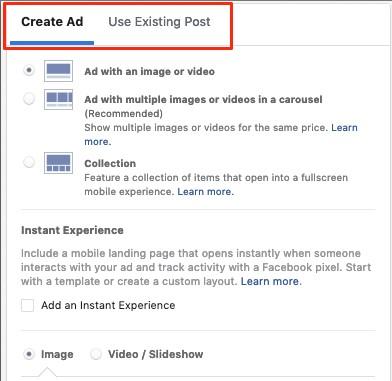
Choose “Use Existing Post” instead of “Create Ad,” and you’ll see a third tab for “Branded Content” alongside your business Facebook and Instagram posts.
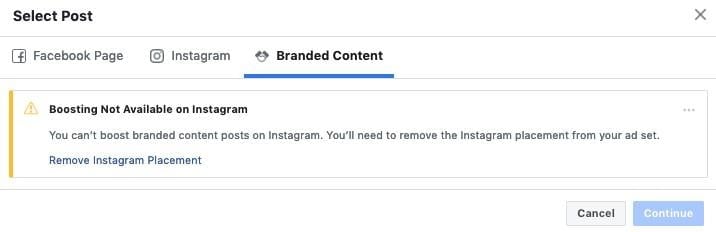
After testing Branded Content with influencers earlier this year, Instagram has started rolling it out to more accounts. Check your account periodically to see if you have access.
Get Ready to Sell!
With your Facebook and Instagram assets linked, your catalog operational, and a strategy in place for your Instagram posts and advertising, you’re ready to launch your Instagram ecommerce journey! By combining organic content with paid promotions, you’ll be well on your way to increased sales, higher revenue, and a deeper understanding of your customer base. Embrace creativity, explore the opportunities available, and watch your ecommerce business thrive on Instagram!