Let’s be real: If paid social media campaigns are part of your world, your boss will constantly ask about your social media metrics. “Are they improving?” “What are we tracking?” “What should we be tracking?” “Why?” Feeling overwhelmed by all these questions? You’re not alone! The sheer number of metrics can make it tough to identify the crucial ones.
For online advertisers, tracking social media performance isn’t just for your boss; it’s for you too. Grasping key metrics not only makes you look sharp but also refines your strategy, boosting your fan base and potentially your entire business via social media marketing’s power.

With most consumers glued to platforms like Instagram, Facebook, and Twitter for hours daily, a dynamic strategy is vital, adapting to new features, tools, and platform enhancements. Social media is a constantly evolving beast, and your strategy must mirror that. Effective tracking of crucial metrics is your first step to conquering the social world, dazzling your boss, and snagging that coveted raise.
If paid social media campaigns are your game, here are the top eight social media metrics to track, along with tips on how and why. Let’s jump right in!
#1: Social Media Reach

Understanding Reach in Social Media
Reach measures how many people encounter your brand and content. Think of it as the number of eyes on your social media presence. More is generally better. While reach doesn’t tell the whole story, it’s a vital metric to monitor.
Why Reach Matters
Reach is a top-of-funnel metric, yet crucial for every social media marketer to watch and strive to improve. Strong reach signals strong brand awareness, and without a brand, what do you have? Building a recognizable, respected, and influential brand makes achieving other goals – leads, subscribers, conversions – smoother.
Bottom line: stagnant reach is a red flag! You invest significant time in social media, so reaching a substantial audience is paramount.
Measuring Reach
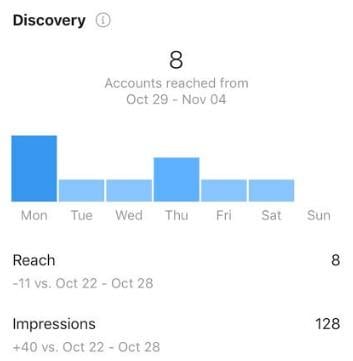
Track reach across all your social platforms. Observe follower growth, individual post reach, overall campaign reach, and audience growth rate on each platform. Your campaigns should boost reach over time.
Here’s how to track reach on Instagram via your profile’s Insights page. If this were my business account, I’d be worried – my reach is down 11 from the previous week!
#2: Engagement
Demystifying Engagement
Engagement reveals how many people interact with your content on social platforms. It takes various forms: comments, shares, likes, clicks, and saves.
The Importance of Engagement
Excellent reach coupled with dismal engagement is problematic. If people aren’t engaging, what’s the point of posting? Your engagement rate indicates audience interest, revealing what resonates and what falls flat. Use this to tweak your copy and overall strategy. If dog pictures get ten times more engagement than cat pictures, you know what to do.
Measuring Your Engagement Rate
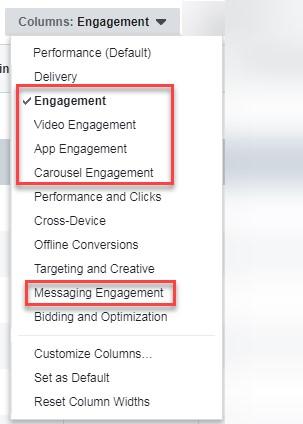
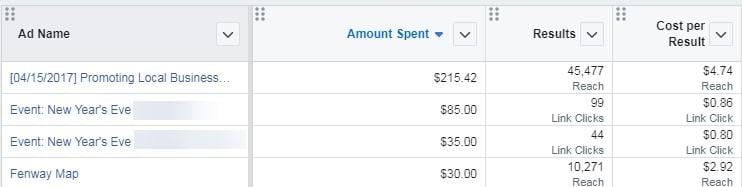
How do you gauge content engagement? Each platform where you run ads should display engagement rates for individual ads. Experiment with multiple ads to establish a baseline engagement rate for your account. Ads below average need tweaking or discarding; those above average deserve attention to replicate their success.
Facebook, for example, lets you analyze engagement for each ad type:
For deeper engagement tracking insights, read on to metric #4…
#3: Amplification Rate
Amplification rate’s importance has grown on me. It’s a metric social media marketers should prioritize.
Defining Amplification Rate
Author and Google digital marketing evangelist Avinash Kaushik first defined it as “the rate at which your followers share your content through their networks.” Essentially, it’s the ratio of shares per social post.
Why Amplification Rate is Key
While likes and comments are encouraging, they don’t guarantee expanded reach. Amplification, however, exposes your content to new audiences organically, without additional cost. A high rate signifies followers actively choosing to associate your brand with their own networks, acting as brand ambassadors.
Measuring Amplification Rate
To calculate, monitor the number of shares or reposts, divide that by your total followers, and multiply by 100. Sadly, this valuable metric isn’t typically provided directly on social platforms.

#4: Social Media Referrals
Understanding Social Media Referrals
Referrals, or referral traffic, measure how many visitors arrive at your site from social media. Each click on a social media link leading to your site counts as a referral visit. For many, it’s a significant website traffic source.
Why Social Referral Visits Matter
Engagement is good, but website visits are better. It shows genuine interest in your content and offerings when people leave social platforms to explore your site.
Numerous methods on social media encourage website visits. Whether through Instagram stories or video ads with website CTAs, tracking who takes the bait is vital. Understanding what content resonates most helps refine your social strategy.
Measuring Social Referrals
Google Analytics is your friend here. Navigate to Acquisition > Social to see which networks drive traffic and how much.
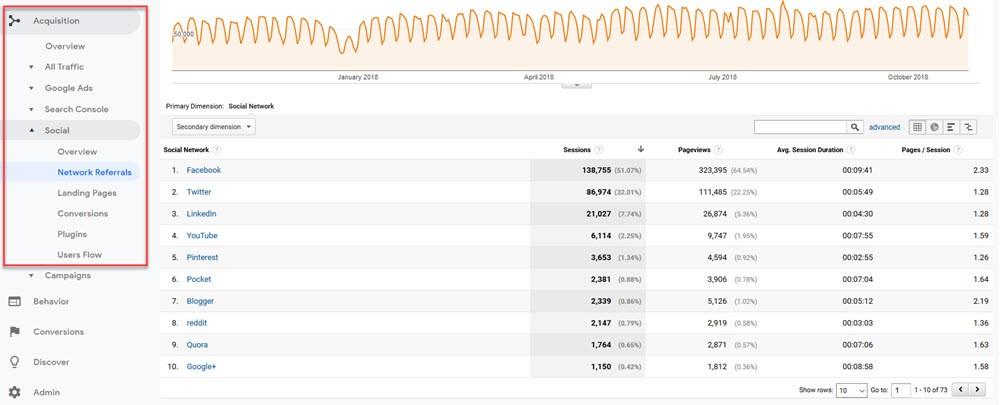
Using UTM parameters on social links is recommended. This separates organic from paid referrals, clearly showing which campaigns drive the most traffic.
#5: Click-Through-Rate
What is Click-Through-Rate (CTR)?
CTR tracks how many people click your ad or content, usually directing them to a page on your site with more information. Ads should lead to landing pages where users, hopefully, convert.
The Significance of CTR
Clicks signify interest (unless accidental!). Tracking CTR is crucial because low rates indicate content that isn’t resonating. But there’s more. Like in Google Ads, CTR influences ad costs. Social platforms favor high-CTR ads, granting them more impressions, better placements, and lower costs per click.
Measuring CTR
CTR is calculated as clicks divided by impressions, multiplied by 100. Fortunately, major platforms automatically calculate this for each ad. To view a Facebook ad’s CTR, go to the “Ads” tab and select the “Performance and Clicks” column view:

#6: Bounce Rate
One of the few metrics where lower is better.
Understanding Bounce Rate
Bounce rate measures how many people immediately leave your website or landing page after arriving. Reasons vary, including accidental clicks. However, an unusually high bounce rate for social media traffic suggests your site isn’t delivering what users expected.
Why Bounce Rate Matters
A low rate indicates your site provides value; visitors stick around and, ideally, convert. Conversely, a high rate signals something is amiss.
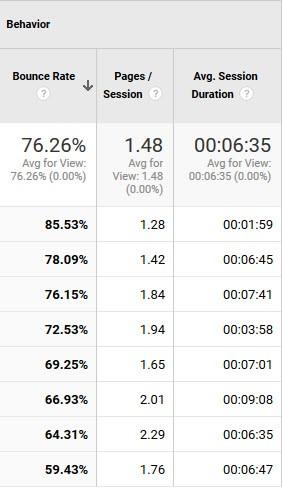
The beauty of bounce rate lies in comparison. Compare social traffic bounce rate to other sources like search. A much lower rate from Facebook than Bing indicates an effective social strategy on that channel.
Measuring Bounce Rate
Use tools like Google Analytics. Under Acquisition > All Traffic, segment by Channels. Look for the “Bounce Rate” column. Click the heading to sort channels from lowest to highest bounce rate.
#7: Conversions and Conversion Rate
This one seems obvious, but are you effectively tracking it for your social media efforts? How do you define social conversions?

Defining Conversions in Social Media
Conversions are specific to your business model, so define them based on your social media strategy and industry. A conversion could be a direct purchase, a newsletter subscription, a gated content download, or an event registration. Conversions are the business goals you’re ultimately after, the ones that impact your bottom line.
Conversion rate measures how many people who click your ad complete the conversion process.
Why Conversion Rate Matters
In social media advertising, conversion rate is paramount due to its direct link to ROI (return on investment). A strong conversion rate and a low cost per conversion are essential for a worthwhile ad investment.
Measuring Conversions
Once you’ve defined your conversion, work with your website team to ensure proper conversion tracking is set up. Here are resources for tracking conversions and conversion rates on specific platforms:
- Using the Facebook Pixel to Track Conversions on Facebook (applicable to Instagram ads as well, since they run through Facebook)
- How to set up conversion tracking for Twitter ads
Even without paid campaigns, when posting on social media, have a method for tracking user journeys through shortened URLs or call-to-action links that collect data. This reveals which organic posts lead to conversions down the line.
#8: Cost per Conversion
Understanding Cost Per Conversion
Cost per conversion, or cost per action, is the expense of securing a conversion after factoring in individual ad click costs, not all of which convert. If each click costs $0.10 and it takes 100 clicks for a single conversion, your cost per conversion is $10.
Why Cost per Conversion Matters
This one’s a no-brainer. Cost per conversion directly affects your ROI, regardless of the channel. If a product sold on your website for $50 costs $75 to convert through Instagram ads, that’s negative ROI. Achieving a low cost per conversion is crucial to profit from your social ads.
Measuring Cost per Conversion
Like most advertising metrics, platforms where you manage campaigns usually calculate this for you. Monitor it closely to ensure your social media campaigns generate ROI.
Social Media Metrics, Simplified
It’s easy to get lost in the data deluge. Focus on effectively tracking these top social media metrics, and you’ll be in good shape. Remember, tracking isn’t just about impressing your boss; use the data to make impactful changes that benefit your business.