Pay-per-click (PPC) advertising on Black Friday presents a unique opportunity for businesses. While typical campaigns can be meticulously crafted over time, Black Friday demands immediate impact within a limited timeframe. Errors in ad design, bidding strategies, or campaign settings can severely hinder results. Whether your approach is comprehensive or focused, the following advice can help you achieve optimal outcomes. This guide covers bid and budget adjustments, ad copywriting and extensions, display and remarketing tactics, keyword strategies, Shopping campaigns, and more.
Important: References to Black Friday encompass the entire weekend, including Thanksgiving through Cyber Monday. Some advertisers differentiate their strategies for each day, while others view it as a single five-day event.
Guide Outline:
- Preparing Your Google Ads for Black Friday
- Budget and Bidding Strategies for Black Friday PPC
- Black Friday PPC Ad Copywriting Tips
- Maximizing Your Black Friday Google Shopping Results
- Optimizing Your Google Shopping Feed for Black Friday
- Black Friday Display Remarketing Strategies
- Effective Black Friday Google Ads Keyword Strategies
- Anticipating Black Friday Scenarios in Google Ads
- Post-Black Friday Actions for Google Ads
- Black Friday Google Ads Recap
Getting Your Google Ads Campaigns Ready for Black Friday
A successful Black Friday campaign hinges on a clear understanding of the promotions you intend to run. This involves outlining the specifics of your offers and ensuring sufficient inventory.
Start by answering these key questions:
- What promotions will you offer?
- Do you have adequate stock to support these promotions?
If inventory is limited, consider a less aggressive bidding approach or prioritize product visibility through Shopping or Search campaigns, depending on your optimal channel. Always have a backup offer in place for general keywords if your primary promotion stock runs out.
 Find more holiday marketing tips here!
Analyze Previous Year’s Performance
Drawing insights from past performance is crucial, and there are numerous lessons to be gleaned from previous Black Friday campaigns. While the digital advertising landscape constantly evolves, historical data provides valuable benchmarks:
- What insights did your previous ad campaigns reveal? Did generic messaging outperform specific messaging?
- Did ads emphasizing product features and advantages outperform those focused on pricing, shipping, or other details?
- What bid levels were required to secure the top advertising position?
- Were there specific keywords or product categories that proved challenging to advertise?
- How did campaign segments without dedicated promotions perform?
- Did you experience a notable increase in ad spending? (Important to review, especially if your budget was limited).
- Did your Display Remarketing efforts prove successful or fall short?
- What trends emerged in the days following Black Friday and Cyber Monday? To what extent should you adjust your bids downward to prevent unnecessary spending? By reflecting on previous experiences and data, you can extract valuable insights to enhance this year’s Black Friday efforts.
Set Clear Operational Guidelines
Prior to delving into the intricacies of Black Friday PPC, it’s crucial to establish clear operational guidelines. This is particularly important if you report to a higher authority or are responsible for making critical decisions.
Consider the following: You’ve allocated $5,000 for Black Friday, targeting an 800% return on ad spend (ROAS). However, by 1 p.m., you’ve exhausted your budget with a ROAS of 1,100%. What course of action do you take?
While the immediate response from PPC specialists might be to increase the budget, determining the appropriate amount requires careful consideration of various factors, such as:
- What can your business realistically afford?
- How much inventory remains?
- What if the ROAS dipped to 700%? Would increasing the budget still be a viable option?
- Do you have a backup promotion ready if specific items sell out?
Having predefined operational guidelines for Black Friday is invaluable. While you might envision handling situations as they arise, unforeseen circumstances can complicate matters. What if your website experiences slow loading times due to increased traffic? What if your decision-maker is unavailable due to unforeseen circumstances?
Pre-established operational guidelines can alleviate these potential stressors, allowing you to navigate challenges efficiently and capitalize on opportunities as they emerge.
Budget and Bidding Strategies for Black Friday PPC
Bidding strategies often pose a significant challenge, not just during Black Friday but also in its aftermath. If you rely on automated bidding systems, manual bid adjustments for at least 1-2 weeks post-Black Friday might be necessary due to data fluctuations.
Currently, no bidding system allows for excluding data from specific timeframes in their algorithms. This presents a challenge as Black Friday conversions typically outpace those in subsequent weeks. To address this, consider the following approaches:
Download Your Bids the Week Before Black Friday
For those using automated bidding in Google Ads, it’s recommended to download your existing bids and cross-reference them with the Google Ads interface. However, be aware of potential discrepancies. Depending on the day and time of the download, the bids you retrieve might differ from those actively running. This is particularly relevant for Google’s ROAS and CPA bidding, where automation dynamically adjusts based on various factors including day, time, and other variables. While there’s a chance the reinstated bid might not be completely accurate, it’s a safer approach than continuing with Black Friday bid levels. It’s better to have a slightly adjusted bid than one significantly influenced by the Black Friday period.
Increase Your Budget Substantially
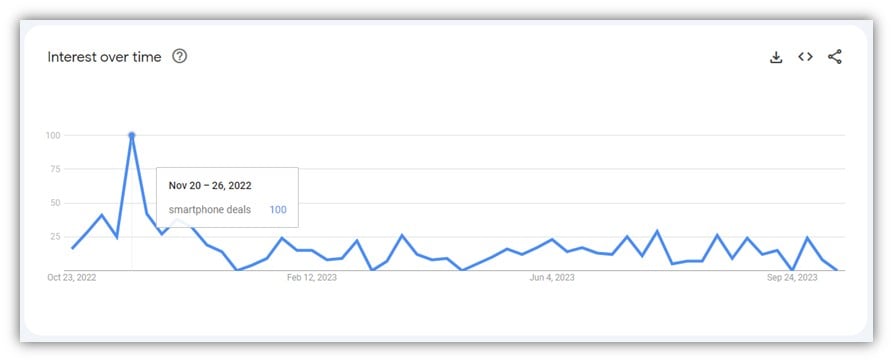
Increasing your Black Friday budget is crucial, as search interest sees a significant uptick. For instance, searches for smartphone deals see a tenfold increase.
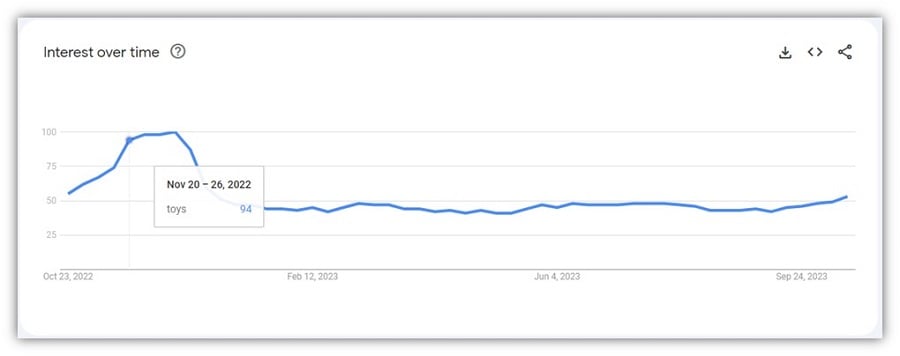
Similarly, searches for toys experience a 50% surge.
Black Friday PPC Ad Copywriting Tips
Crafting effective Black Friday ads shares similarities with general promotional ad copywriting. Relevance to the sale event and clear communication about promotions are essential.
For Black Friday, specific considerations should be kept in mind.
This guide categorizes tactics as either Mandatory or Recommended. If you’re new to Black Friday advertising, focusing on the mandatory tactics is a good starting point. However, for seasoned advertisers, investing extra time in the recommended tactics is advised.
Mandatory for all advertisers:
- Implement a Promotion asset.
- Integrate Black Friday references in your ad copy.
Recommended for intermediate and advanced advertisers:
- Tailor sitelinks to highlight in-demand products.
- Consider incorporating Inventory References.
Implementing Google Ads Promotion Assets
Promotion assets are invaluable for ad campaigns, especially during Black Friday. These assets provide an additional line of text, distinguishing your ads from competitors and highlighting your Black Friday promotions.
Promotion assets appear as follows:
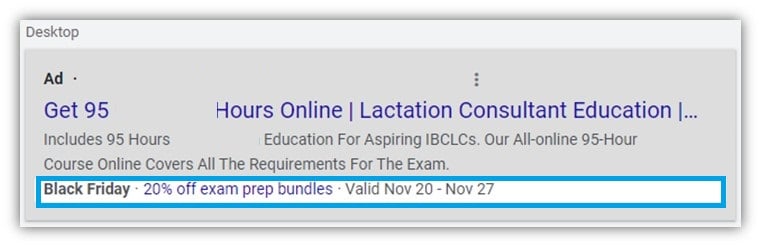
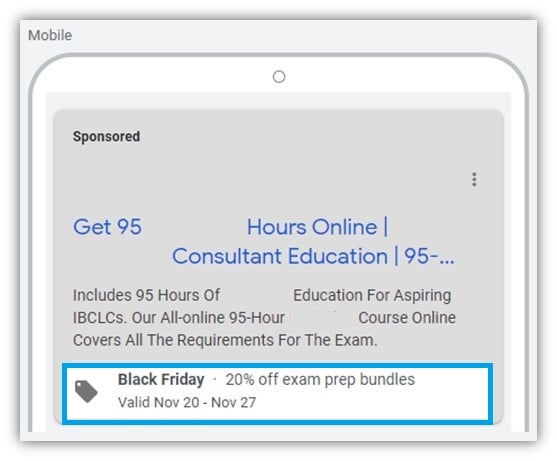
This extra ad space effectively emphasizes your offer and creates a sense of urgency by setting a defined timeframe for the promotion, such as Friday through Sunday.
However, keep in mind that ad assets aren’t always guaranteed to show. Relying solely on promotion assets to communicate your offer might not be sufficient.
Incorporating Black Friday References in Your Ads
Maintaining ad relevance is crucial, and referencing timely events like Black Friday is a great way to achieve this. Even a simple approach can be effective:
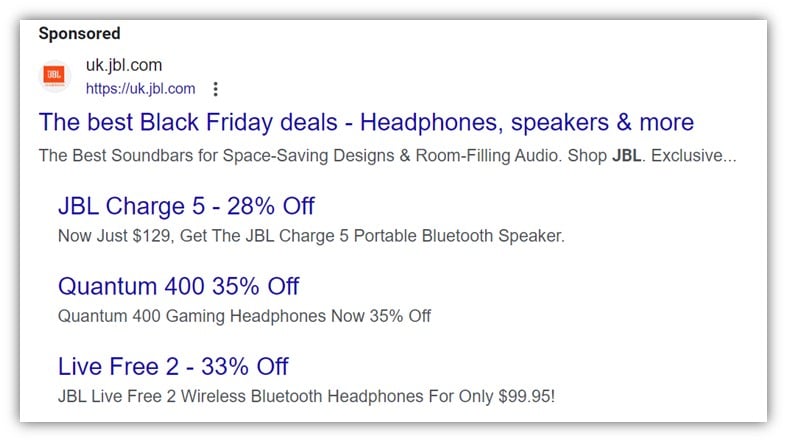
For maximum impact with minimal effort, consider updating the second headline across all your ads to mention your Black Friday offer. This can be accomplished quickly within the Google Ads interface.
To further enhance your click-through rate (CTR), conversion rate, and ROI, crafting more specific ad copy for high-priority products and categories is recommended. Investing time in refining your ad copy, even for a single day like Black Friday, can yield significant returns, especially considering the increased traffic volume.
Customize Sitelinks to Feature High-Demand Products [Recommended]
Often overlooked, sitelinks deserve attention during Black Friday. While many advertisers opt for generic sitelinks, Black Friday presents an opportunity for strategic optimization.
For instance, if you typically promote Bluetooth speakers with sitelinks like:
- Bestselling Bluetooth speakers
- Latest Bluetooth speaker models
- Bluetooth speakers on sale
- All Bluetooth speakers
Consider Black Friday-specific sitelinks that directly highlight your promotions:
- Soundlink: 33% Off Now
- 20% Off All Bose Products
- 25% Off Bose Headphones
- All Black Friday Deals
This broader approach is effective because Black Friday shoppers are more likely to make impulsive purchases. By featuring specific product deals, you can entice consumers who might not have initially considered them.
Leverage Inventory References [Recommended]
Imagine having an incredibly enticing promotion for Bose speakers—a highly sought-after product at a compelling price point with an exceptional discount. You begin selling and realize you’re projected to be sold out by noon—an incredible success.
However, you could amplify this success further by incorporating inventory references in your ads. By indicating the limited availability, you introduce a sense of scarcity, prompting quicker purchasing decisions.
Ensure you have backup promotions ready to roll out once a specific product sells out.
Tag Existing Ads with an “Evergreen” Label
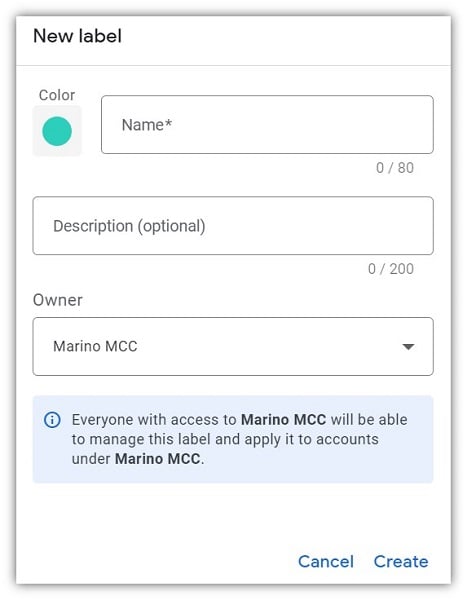
Efficient PPC management involves streamlining processes, especially during peak seasons like Black Friday. Before launching your Black Friday ads, label all ads within ad groups slated for Black Friday promotions with an “Evergreen” tag. This allows you to easily pause these ads and reactivate them once the sale concludes.
Similarly, tag all Black Friday-specific ads with “BF” and the corresponding year (e.g., “BF-2024”). This prevents accidental activation of outdated ads in the future.
Prepare Your Ads at Least a Week in Advance
We’ve all encountered those Google Ads notifications about paused ads being disapproved. While these might seem trivial, they serve a crucial purpose, especially during high-traffic periods like Black Friday.
By preparing and uploading your ads to your Google Ads account well in advance, you ensure ample time for the approval or disapproval process. This prevents last-minute scrambling and potential ad downtime.
Utilize Automated Rules to Pause and Activate Ads
While manual ad management is possible, automated rules provide a more streamlined approach:
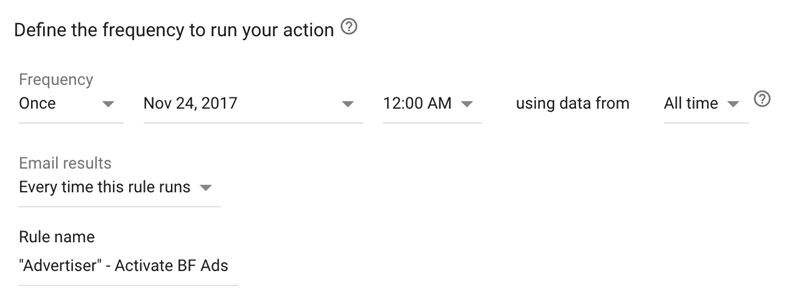
However, it’s recommended to double-check that your ads are running as intended, both within your account and on live search results. While automation offers convenience, occasional glitches can occur.
While minor ad display issues might be tolerable on regular days, Black Friday demands peak performance. You can’t afford to lose precious hours due to technical hiccups.
Maximizing Your Black Friday Google Shopping Returns
Google Shopping campaigns, responsible for over half the revenue in many e-commerce Google Ads accounts, require careful consideration during Black Friday. While offering less control compared to Search campaigns, their impact is undeniable.
Create a Dedicated Shopping Campaign
There are several approaches to Black Friday Google Shopping campaigns. A recommended strategy is:
- Create a new Shopping campaign focusing on your top-performing products.
- Structure your campaign using Single Product Ad Groups (SPAGs), where each product has its own ad group.
- Launch the campaign at least one week, preferably two, prior to Black Friday.
Even with robust Shopping campaigns, individual product performance can be overlooked. By creating a dedicated campaign, you can closely monitor those anticipated to perform well during Black Friday.
Remember, if you’re using a specific tactic like segmenting your Shopping campaigns based on search query, maintain consistency with this new campaign. Abrupt strategy changes for key products can negatively impact your ROI.
Integrate Storewide Promotions into Your New Shopping Campaign
Even with a storewide discount (e.g., 20% off), certain products will inevitably outperform others. Analyzing your sales data for the past 60 days can reveal those top-selling items. Prioritize these high-performing products by including them in your new Shopping campaign.
Optimizing Your Google Shopping Feed for Black Friday
A crucial decision for your Black Friday strategy is whether to offer promotions requiring coupon codes or directly adjust pricing in your feed. This decision often depends on your overall business strategy or platform limitations.
If you opt for coupon codes, ensure you’ve set up Promotions in your Google Merchant Center. Failure to do so will result in inaccurate pricing in your Google Shopping ads, potentially harming your CTR.
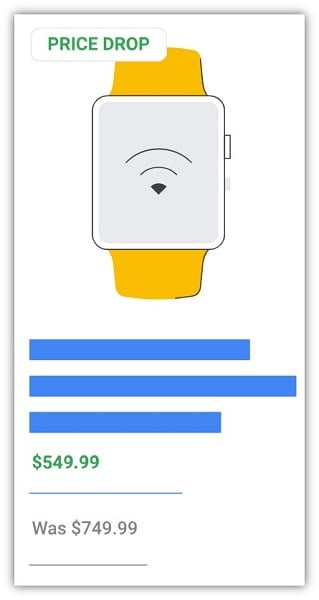
Reflect Lowered Prices in Your Feed
Maintaining price consistency between your website and your product feed is crucial. Two key reasons for this are:
- If your feed doesn’t reflect the discounted price, your ads will display the original price, significantly impacting your Black Friday performance.
- Google’s algorithms might flag the price discrepancy, leading to product disapproval, which can take several hours to resolve—time you can’t afford to lose, especially if the issue goes unnoticed.
It’s recommended to regenerate and update your feed immediately after adjusting prices on your website, ensuring the Merchant Center receives the most up-to-date information. This is particularly crucial as product availability fluctuates throughout the day.
Increase Feed Update Frequency on Black Friday
While the standard practice is to update your Shopping feed every 24 hours, typically at night, Black Friday necessitates a more frequent update schedule. As product availability changes and promotions evolve, real-time accuracy is essential.
Black Friday Tips for Remarketing
While Dynamic Remarketing is a popular strategy for e-commerce stores, generic messaging might not be effective during Black Friday’s heightened competition.
Consider establishing a new audience list specifically for Black Friday, excluding previous visitors:
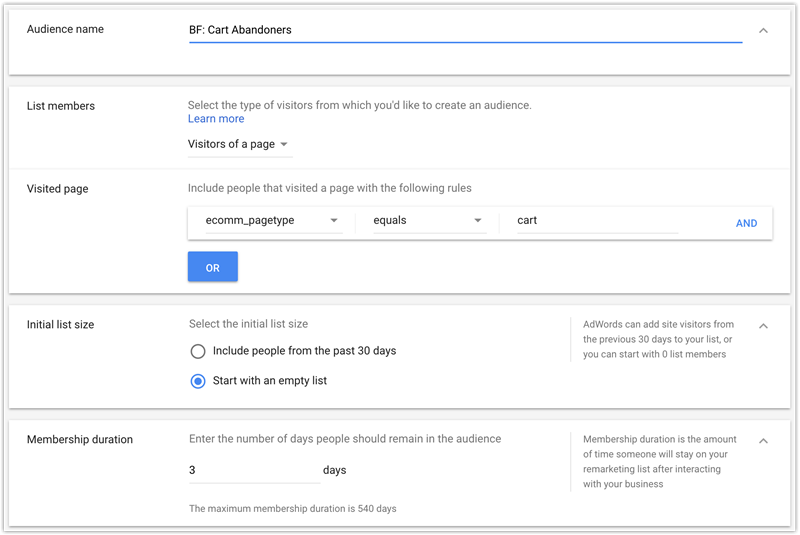
This segmentation allows for more aggressive bidding for users who visited your site on Black Friday, while maintaining a separate bid for those who visited prior.
Bonus Tip: Reduce Remarketing Bids Post-Black Friday
In the days following Black Friday, consider lowering your remarketing bids. Most consumers would have already made their purchases, and continued aggressive targeting might not yield optimal results.
Incorporate Static Image Ads in Your Remarketing
Integrating static images into your Black Friday remarketing mix is highly recommended. While dynamic display remarketing ads are generally effective:

Black Friday necessitates a more impactful approach to cut through the noise. Consider designing banners in the most popular sizes. This cost-effective strategy can be achieved through platforms like Upwork or by leveraging in-house design resources.
For enhanced effectiveness, segment your retargeting efforts. For instance, display Black Friday ads showcasing speaker promotions to users who previously visited the speaker section on your website.
While generic banners are an option, targeted ads generally yield better results. However, for larger businesses, this level of granularity might not be feasible.
Black Friday Google Ads Keyword Strategy Tips
Your core keywords should generally remain consistent for Black Friday. However, consider reactivating previously paused keywords related to products you’re promoting. With increased conversion rates during Black Friday, you can afford to reintroduce these keywords. Conversely, due to the three to four times increase in search volume, consider pausing campaigns or ad groups for products without active promotions. Here’s an example of a search term that experienced a significant surge in volume compared to the same day the week before Black Friday:
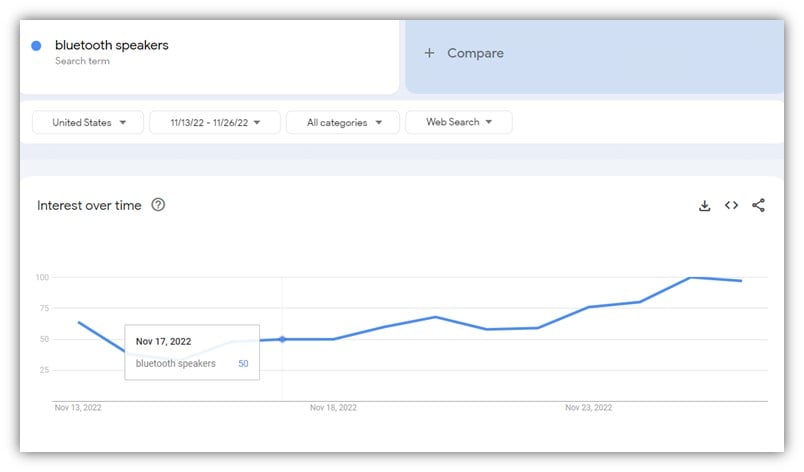
Given the heightened competition and consumer focus on deals, products with standard pricing might not attract as many clicks.
Bidding on “black friday + your keyword”
Bidding on “black friday” variations of your keywords is recommended, especially in competitive markets. While you’ll naturally rank for your core keyword, adding “black friday” allows for greater control.
For instance, if you sell Bose speakers and rank well for “bose speakers” but are in sixth position for “bose speakers black friday deal,” capturing that top spot for the latter, potentially higher-converting term, becomes crucial.
Avoid Bidding on the Keyword “black friday”
Targeting the broad keyword “black friday” is generally not recommended due to its lack of specificity.
However, an exception to this is creating a campaign targeting your remarketing list with the keyword “Black Friday.” Select your broadest remarketing list—for example, all visitors from the past six months or all-time buyers. Create a Remarketing List for Search Ads (RLSA) campaign with the following targeting setting:
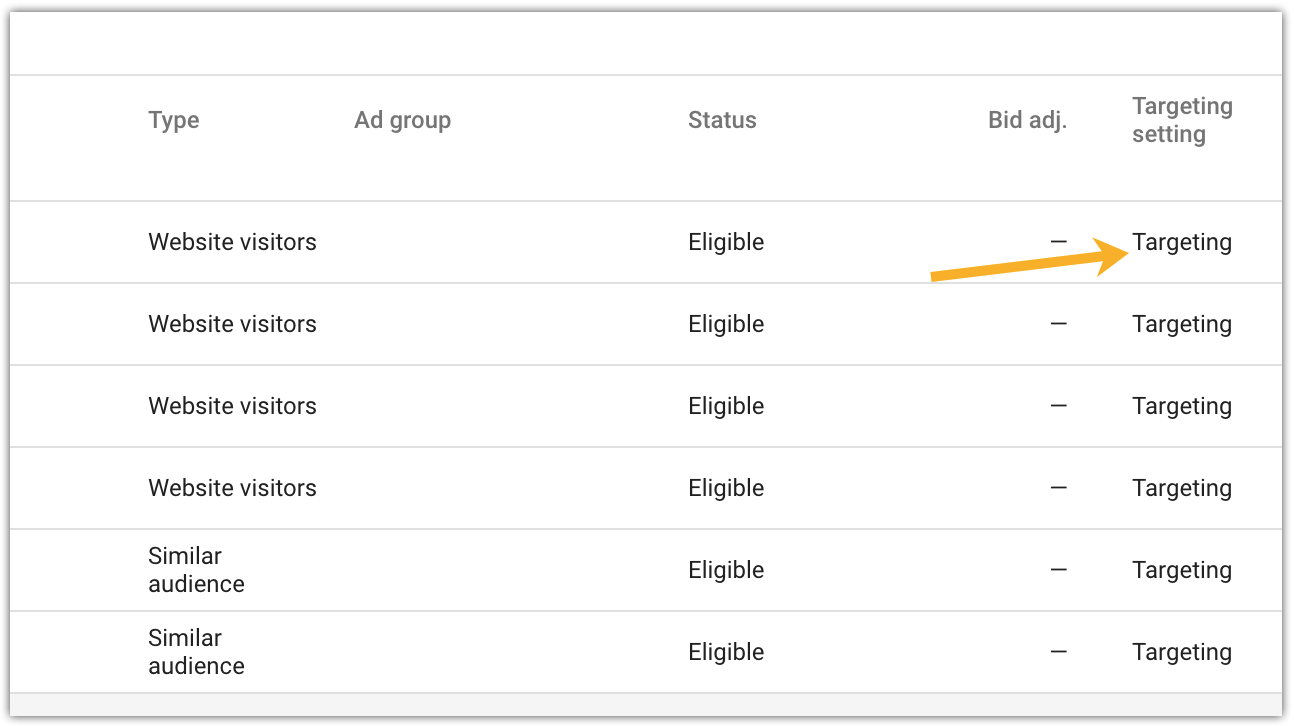
This strategy allows you to target users already familiar with your brand who are actively searching for Black Friday deals. Leveraging brand affinity can significantly improve your CTR and conversion rates.
Black Friday Scenarios to be Prepared for
Scenario #1: Low Average Position for Key Products
Consistently monitor your average position for key products, especially during the early hours of Black Friday. If you’re ranking lower than desired, consider increasing your bids.
While you can adjust bids throughout the day based on ROAS, ensure your keywords have a competitive edge by securing a good position, ideally within the top two to three spots. A higher position leads to increased visibility, ad extension impressions, and higher CTR, ultimately resulting in more sales.
Scenario #2: Poor Sales Performance for Key Products
If certain products aren’t performing as expected, honestly assess the situation and identify areas for improvement. Consider whether competitors are offering more compelling deals.
If so, you might need to adapt your promotions or adjust your strategy. Competing solely on price during Black Friday can be incredibly challenging, especially if your competitors have a significant advantage.
If your Black Friday campaigns aren’t yielding the desired results, consider focusing on remarketing. This approach targets users already familiar with your brand, leveraging existing awareness to drive conversions.
Scenario #3: Maxed-Out Budget
Regularly monitor your budget to avoid unexpected depletion. If you’re close to hitting your limit, refer to your pre-established operational guidelines to determine the appropriate course of action, which might involve allocating additional budget.
Post-Black Friday Actions for Your Google Ads Campaigns
After the Black Friday frenzy subsides, remember to:
- Reinstate pre-Black Friday bids.
- Pause all Black Friday-specific ads.
- Reactivate evergreen ads.
- Conduct a thorough performance analysis.
- Relax, celebrate, and fulfill those orders!
When analyzing post-Black Friday performance, remember that the days immediately following Black Friday might not reflect typical results and should be evaluated separately.
Managing Black Friday in Google Ads
Managing your Google Ads campaigns during Black Friday might seem overwhelming, but this guide provides a comprehensive roadmap to navigate the intricacies of this crucial shopping event. For simplified reference, you can download a checklist version of this guide here.
Here’s a recap of the most actionable Black Friday PPC tips:
Bidding:
- Download your current bids a week in advance to easily reinstate them post-Black Friday.
- Significantly increase your budget to accommodate the surge in search volume and competition.
Ads:
- Utilize promotion extensions to highlight your Black Friday offers.
- Incorporate Black Friday references in your ad copy for increased relevance.
- Optimize sitelinks to direct users to specific deals and high-demand products.
- Consider adding inventory references to create a sense of urgency and scarcity.
Shopping Campaigns:
- Create a dedicated campaign featuring your top-performing products or those with special promotions.
- Use Merchant Center promotions or directly update your feed to reflect sale prices.
- Upload your updated product feed with sale prices around midnight to ensure accurate pricing from the start.
Remarketing:
- Focus your remarketing bids on recent website visitors for higher intent.
- Decrease your bids significantly or pause remarketing efforts in the days following Black Friday to avoid unnecessary spending.
Keywords:
- Reactivate previously paused keywords that align with your Black Friday promotions.
- Increase bids for keywords with low average positions that are relevant to your sale products.
Approaching Black Friday with a proactive mindset is crucial. This is not the time for complacency. Embrace the opportunity to step outside your comfort zone and make necessary adjustments to your Google Ads campaigns.
Looking for additional Black Friday tips? Learn how to optimize your Black Friday Facebook ads for maximum results!