While Google’s presence spans the globe, some local searches demand a reliable, nearby solution, and fast! Imagine a flooded kitchen – a homeowner needs an immediate fix, not a plumber from miles away. Similarly, someone locked out of their car in the dead of night wants local, trusted help. For businesses offering such services, converting these urgent leads using just text ads can be challenging. That’s where Google’s Local Services Ads (LSAs) step in. This article covers everything you need to know about LSAs and how to leverage them for maximum business impact.
Table of contents
- What are Google Local Services Ads?
- What businesses can run Google LSAs?
- Google Local Services Ads benefits
- How to get started with Google LSAs
What are Google Local Services Ads?
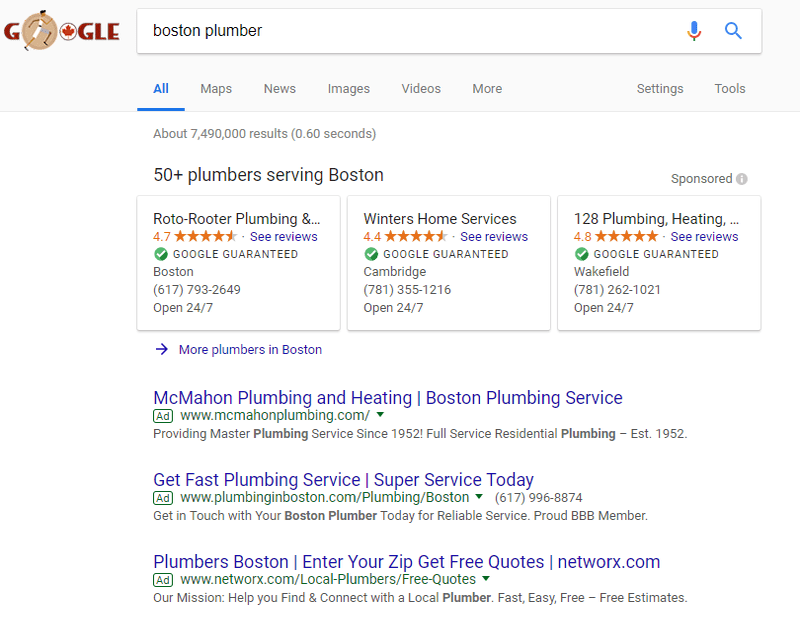
A powerful addition to the local SEO strategy for specific sectors like locksmithing, plumbing, garage door repair, electrical work, legal services, real estate, and more, LSAs offer a unique advantage. When a user initiates a local search (like the example below), they might see a list of trusted professionals in their vicinity displayed prominently above traditional paid ads. These ads highlight essential information, including the business number, operating hours, ratings, and reviews.
When a user clicks on an LSA listing, Google asks them to confirm the service needed and their location. If your business matches the job description and service area, you’re connected with the potential customer. They can then review your credentials, ratings, and Google reviews before reaching out. If your business isn’t a good fit for the job or location, Google spares you unnecessary expenses and connects the user to a more suitable LSA.
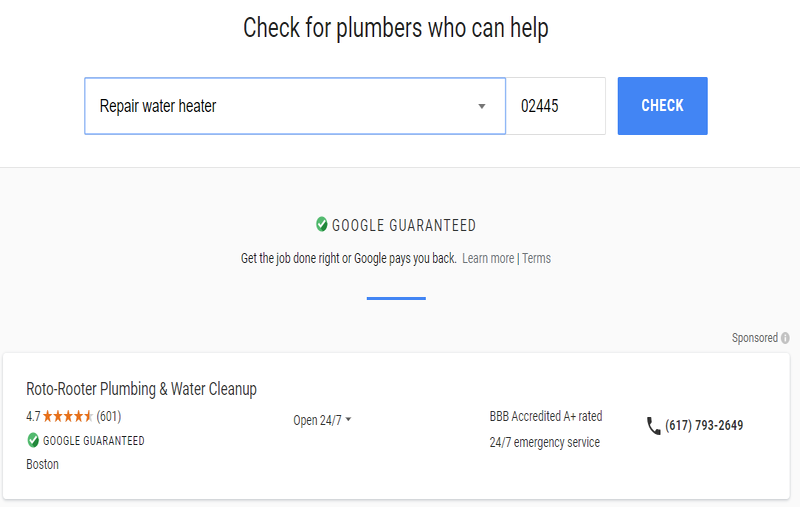
Google’s LSAs are versatile, appearing on desktops, tablets, and mobile searches, as shown above. Their reach goes beyond conventional search ads. Local Services Ads are integrated into Google Assistant’s responses to relevant voice search requests. The Google Assistant confirms the job type and location with the user to ensure a good match for the advertiser.
Local Services Ads industries
For certain industries, Local Service Ads are a game-changer. Currently, Google fully supports LSAs across the United States for more than 70 industries, including:
- Appliance repair
- Carpenter
- Carpet cleaning
- Cleaning service
- Electrician
- Foundation pro
- Garage door pro
- Home inspector
- Home security
- HVAC
- Landscaper
- Mover
- Pest control
- Plumber
- Pool cleaning
- Tree service
- Window repair
- Financial planner
- Tax specialist
- Real estate agent
- Bankruptcy lawyer
- Business lawyer
- Estate lawyer
- Beauty school
- Dance instructor
- Driving instructor
- First aid training
- Massage school
- Preschool
- Tutoring
- Child care
- Funeral home
- Animal shelter
- Pet adoption, boarding, grooming, and training
- Veterinarian
- Dental
- Acupuncturist
- Personal trainer
- Yoga studio
- Weight loss center
Benefits of Google Local Services Ads
Still on the fence about Google LSAs? Here are some compelling advantages:
Pay per lead, not per click!
PPC advertisers understand the frustration of paying for clicks that don’t convert, especially in industries with high cost-per-click, like legal or dental services. Google LSAs address this by connecting the right job with the right business, minimizing mismatches that occur when users search using broad terms for a specific task or outside their service area. Businesses using LSAs are only charged for valid leads. Based on the job and location, these leads cost a mere $6-30 each. If a lead turns out to be fraudulent, spam, or a poor match, you can dispute the charge.
Build trust with the Google Guarantee or Google Screened badge
LSAs stand out on search results pages with the “Google Guarantee” green checkmark.
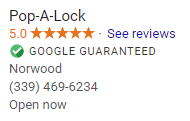
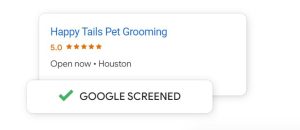
Besides grabbing attention, this badge signifies Google’s powerful endorsement. Users trust Google, and this trust is backed by more than just reputation; the Google Guarantee safeguards unsatisfied customers for jobs booked via LSAs, offering coverage up to a lifetime cap of $2,000. Similarly, businesses in care, learning, or wellness can qualify for a “Google Screened” badge, indicating that Google has thoroughly vetted and licensed your business.
Boost your paid search ad reach
You’ll notice that LSAs appear above both paid search ads and organic listings.
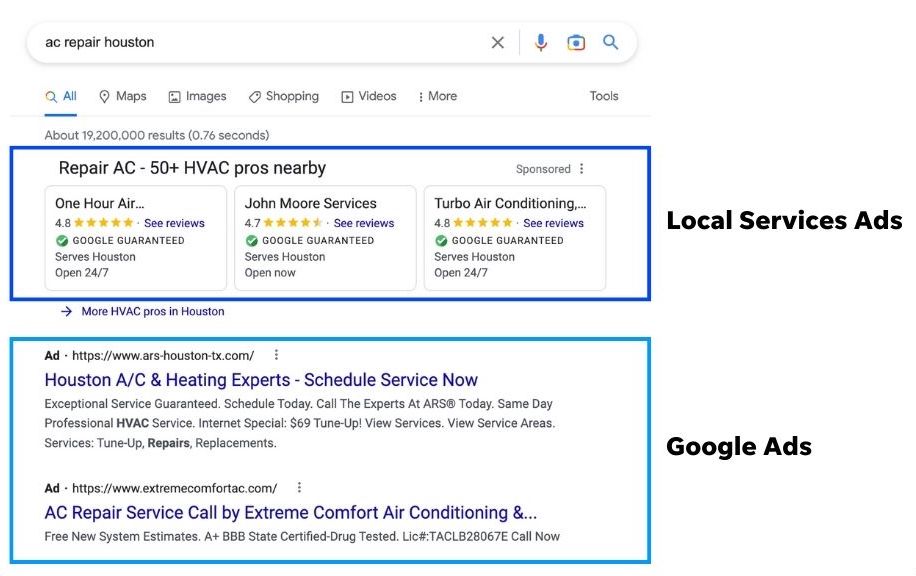 This strategic positioning emphasizes that Google Local Services Ads don’t aim to replace traditional search ads or even your organic local listings. Some users still prefer to research a business website before making a decision. While they may not convert directly through LSAs, their prominent position on the search results page and the presence of user reviews can influence their decision-making later.
Tap into voice search responses
Imagine a customer elbow-deep in a clogged sink – they’re unlikely to stop and type a search query! With over 20% of searches now voice-based, LSAs are a crucial way to ensure your business is discoverable on the 400 million devices powered by Google Assistant.
No need to manage ads or keywords
Managing keyword research and ad testing for paid search can be an ongoing challenge. Thankfully, Google LSAs require neither! They automatically trigger when a potential customer uses any of the thousands of relevant search terms, from broad terms like “Plumber” to specific phrases like “leaky faucet under sink.” Your ad is automatically generated using information from your business profile.
Getting started with Google Local Services Ads
Ready to try Google LSAs? Here’s how:
1. Check your eligibility
Google LSAs are currently available for specific industries, as outlined earlier. To determine if your business qualifies, confirm your business type and location here. If you’re eligible, you’ll be guided through creating an account to manage your LSAs. Keep in mind that LSA management is separate from Google Ads, requiring a new account.
2. Create your business profile
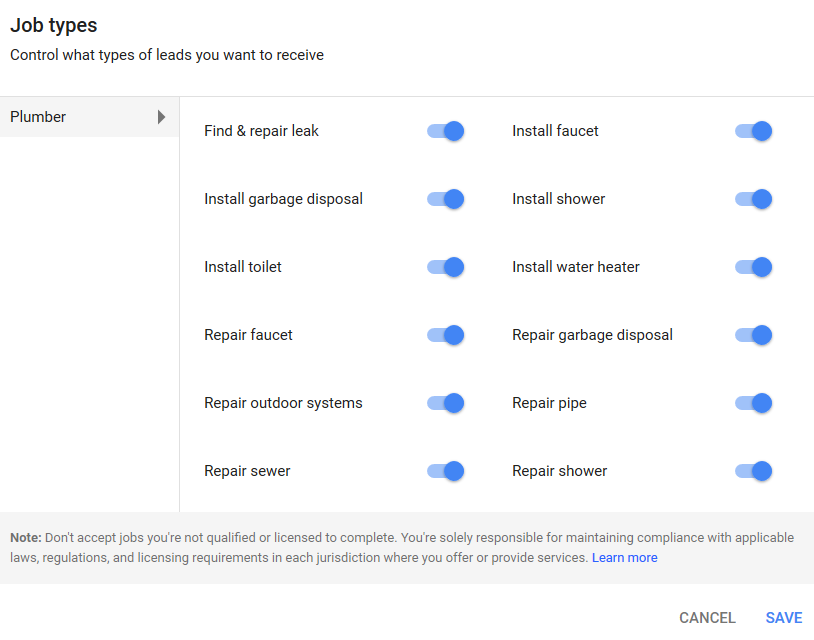
Your Google LSA profile differs from your Google Business Profile, which is linked to your Google listing (creating and optimizing this account is highly recommended if you haven’t already). Your LSA profile dictates which jobs your business is matched with. Be accurate about the services you provide and your desired service areas, as you’ll be charged for leads generated through LSAs. Through your business profile, you can modify:
- Your weekly budget
- Your business hours
- Your service areas
- Your job types
Consider adding highlights to your profile, which can appear alongside your LSAs on search results pages and your business details page. Use them to emphasize unique attributes (“Locally owned & operated”) or special offers (“Military discount available”) to differentiate your business. While optional, Google suggests including 2-5 highlights.
3. Provide license and insurance details
Earning the Google Guarantee or Google Screened designation and running LSAs requires proof of licensing and insurance. Ensure your paperwork is current and submit your general liability insurance information along with relevant professional licenses.
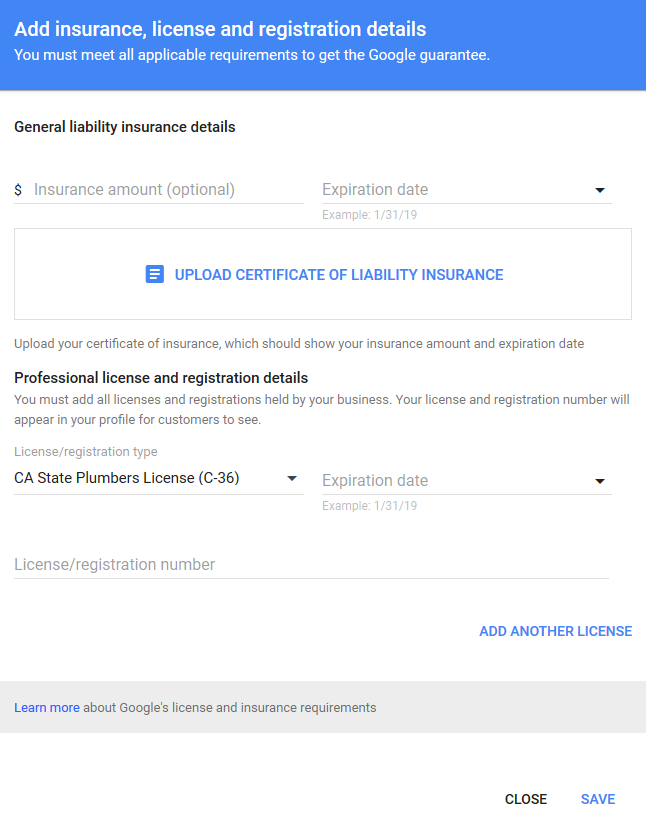
If your city or state mandates additional licenses, include those to ensure compliance.
4. Undergo a background check
Ensuring user safety and trust is paramount, especially when connecting them with businesses for in-home, office, or vehicle services. Google requires businesses and their field personnel to undergo a background check via their partners, Pinkerton and Evident. These background checks are free of charge and can be managed here.
5. Manage your leads
With your profile set up, you can launch your LSAs and start generating leads. You can view and manage these leads through your LSAs dashboard. Access the “Leads” tab from the top right-hand dropdown menu. You can also manage leads through the dedicated LSA app on your Android or iOS.
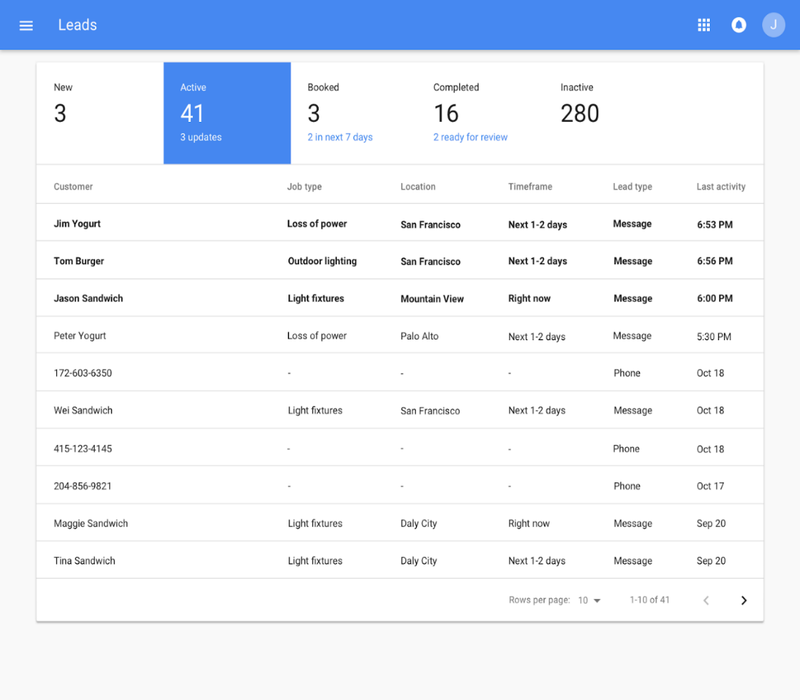
Remember, leads are not guaranteed bookings! Follow up diligently. When reviewing a lead, you can check details like job type, location, and even listen to the call recording. You have three options for each lead:
- Reply: Send an email or text message directly to the customer.
- Call: Use the provided phone number to contact the customer.
- Decline: This removes the request and notifies the customer. You can include a message explaining the decline. Declined requests can be recovered if needed. After review, mark a lead as “booked” to track upcoming jobs, schedule appointments, send confirmation emails, and collect reviews. This helps determine your LSA ROI and profitability.
6. Manage your LSA budget
Your LSA budget can be adjusted through your business profile. Increase or decrease your average weekly spend to control ad expenditure. Like Google Ads, Google may slightly overspend or underspend on a weekly basis but will never exceed your monthly maximum. Since you’re charged per lead, adjusting your LSA budget directly impacts the number of leads generated. A starting budget of at least 20 leads per week is recommended to maximize your new ads’ effectiveness.
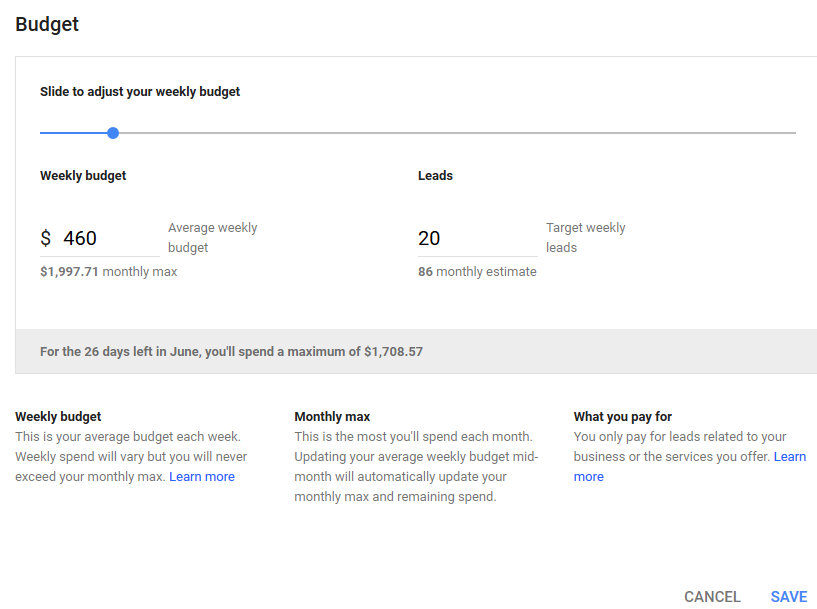
Remember, your LSA budget is separate from your Google Ads budget. Manage them independently to control overall campaign spending. For budget optimization, explore these seven tips to enhance your LSA ROI.
7. Monitor your LSA rankings
Even with LSAs, space on the search results page is limited. A maximum of three LSAs appear on desktops, two on mobile, and just one via Google Assistant. Like PPC campaigns, a high Ad Rank is crucial for visibility. However, unlike search ads where Quality Score (determined by ad CTR, relevance, and landing page) is paramount, LSAs use different ranking factors. Google calculates your LSA Ad Rank based on:
- Your review score and the number of reviews
- Your responsiveness to customer inquiries
- Your business hours
- History of serious or repeated complaints filed against your business
Start using Google LSAs today for a busier tomorrow
Google LSAs are simple to set up and manage, making them a valuable addition to any service-based business’s marketing strategy. Allocate time for proper setup and lead management. If you need further assistance navigating Google LSAs, explore our solutions designed to help service businesses maximize their potential. Here’s a recap of getting started with Google LSAs:
- Check your eligibility
- Create your business profile
- Provide license and insurance details
- Complete a background check
- Manage your leads
- Manage your budget
- Monitor your ad ranking