It’s essential for any PPC agency to have a system for evaluating potential clients. Working with the wrong clients can cause unnecessary stress for your team and the clients themselves. Many PPC agencies are skilled at performing Google Ads audits to help potential clients understand why their current accounts are not meeting their expectations. The solution often involves examining the account and identifying areas for improvement. However, Google Ads often overshadows Facebook Ads when evaluating a prospect’s potential. Facebook tends to be treated as an afterthought or an additional service. The truth is, Facebook can be the primary driver of growth for many businesses, particularly those looking to expand significantly. It’s crucial to have a process for auditing Facebook ad accounts so your agency can create compelling proposals that win over future clients.

One of the most common misconceptions in digital marketing is that “Facebook ads won’t work for our target market.” As a seasoned professional in this field with experience across various clients, primarily in B2B, I can confidently say that this statement is inaccurate in almost all cases. In reality, some agencies and advertisers need to improve their optimization strategies. This presents an opportunity for you to intervene and help their accounts achieve success. This article will guide you through seven straightforward steps to conduct a Facebook ads account audit for prospective clients.
Step #1: Examine Spending Patterns Over Time
When approached by a new prospect, I always try to understand their current spending habits and their spending history. Facebook’s optimization algorithm is highly sensitive to spending patterns. For instance, launching a conversions campaign and spending $1,000 in a single day will result in a much higher cost per conversion compared to spreading the same budget over five days.
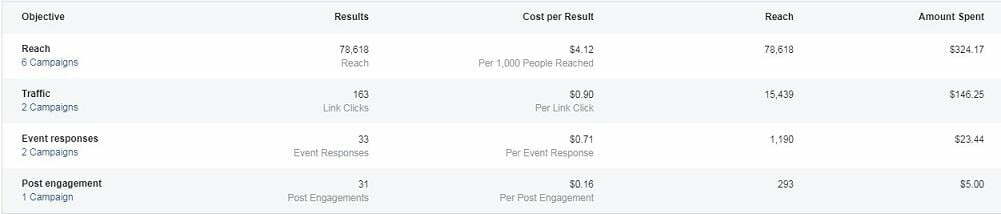
Evaluating a client’s budget allocation strategy is one of the first things I assess to gauge their potential. As mentioned earlier, many businesses hastily spend a large sum in a short period and blame Facebook when they don’t see results. Giving Facebook’s algorithm sufficient time to optimize for a specific audience is crucial. Budget allocation can also reveal the expertise of the previous account manager. Many agencies inherit accounts with subpar performance, and the responsibility for this could lie with other agencies, former employees, or the clients themselves. Understanding the account’s history provides insights into the level of expertise involved and the client’s patience. Will they be understanding and give you time to deliver results, or will they leave after just 30 days? It’s valuable to uncover this information through your Facebook account audit before signing them on.
Step #2: Evaluate Account Structure
The organization of the account is something I immediately notice when performing a Facebook audit. Here are some prevalent mistakes I come across:
- Campaigns named after the target audience, indicating an organization based on audience rather than objectives or ad content.
- Structures resembling paid search campaigns, with ad sets focused on themes instead of audiences.
- Ad sets utilized across multiple campaigns, leading to competition and delivery issues.
- Unstructured ad testing. For a comprehensive Facebook account structure template, I recommend referring to this post. The key is to structure the campaign around its objective. If the client aims for conversions but has numerous website clicks campaigns running, you have your work cut out for you. Before offering suggestions, it’s essential to understand the client’s goals for paid advertising. You’ll likely provide more value by saying, “You want to achieve this, but your current approach is different, which explains why it’s not working,” instead of simply stating, “You should be doing this.” A strong foundational structure is crucial for effectively scaling any Facebook account. Audit your Facebook ads account instantly with our FREE Facebook Ads Performance Grader!
Step #3: Verify Pixel Placement and Conversion Tracking
Prospects inquiring about Facebook ads are likely looking to drive specific outcomes through their website. Similar to Google Ads, ensure they have the Facebook pixel implemented correctly. To check the pixel’s setup and tracking, navigate to the “Pixels” section in the Ads Manager dropdown:
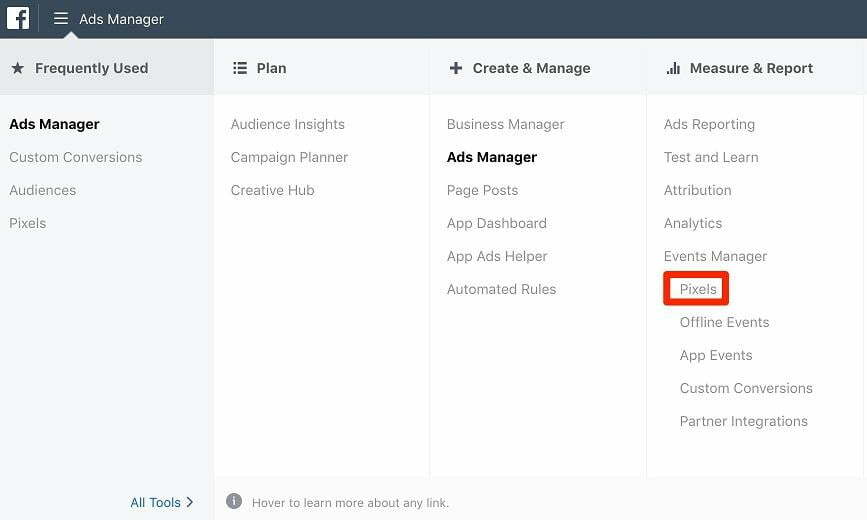
Here, you can see if the pixel is active and firing correctly and if any standard events beyond “PageView” are in place.

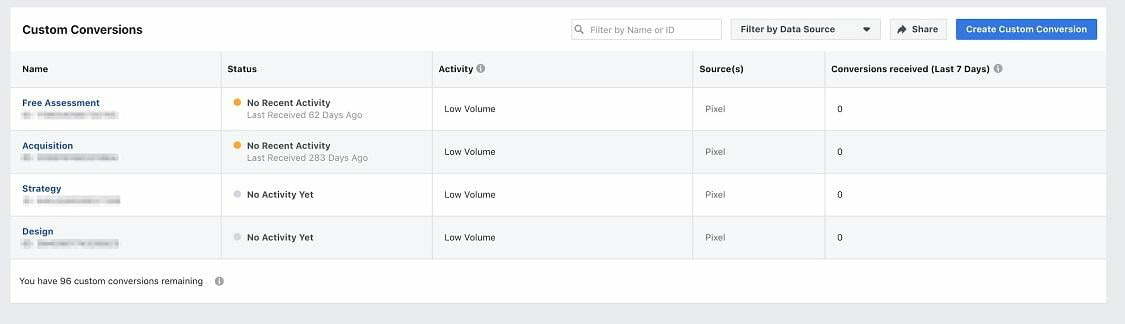
This information is vital for your audit as you’ll need to check if remarketing audiences have been built using pixel data. If the prospect hasn’t installed the pixel, that becomes the first step. If they have, examine the “Audiences” section to determine if remarketing audiences have been created. This reveals the prospect’s understanding of leveraging readily available data. It also gives you a rough idea of their website traffic, which is essential for the scalability of remarketing and nurturing campaigns later on. Another area to review is the “Custom Conversions” section. If the pixel is installed and functioning properly, go to this section from the main menu:
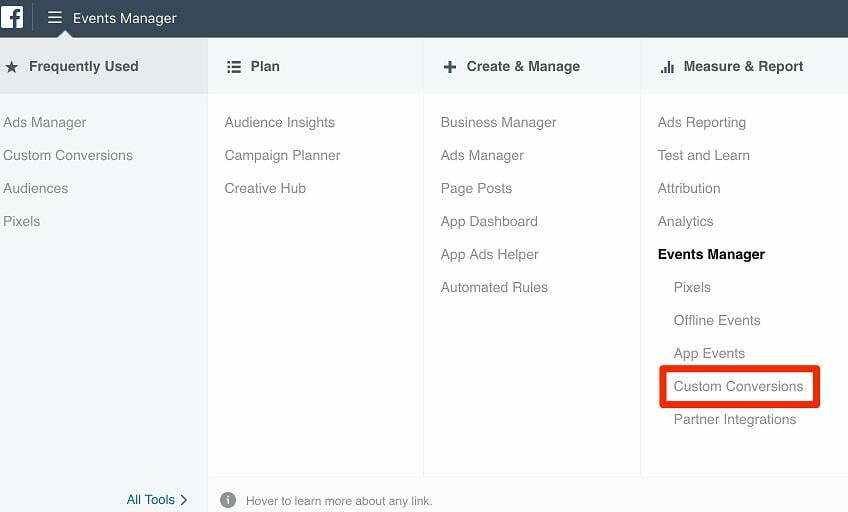
This section shows if the potential client has established any URL-based conversions. This is valuable for running conversions campaigns in the future, as it helps you understand the traffic volume for each URL.
Step #4: Assess Target Audiences and Placements
A thorough understanding of the prospect’s target audience is paramount, as it directly impacts your audit approach. Knowing the ideal age, location, gender, behaviors, and interests of their target audience allows you to examine the existing setup within each ad set. You can then pinpoint any inconsistencies between the prospect’s goals and the current account configuration. Another frequently overlooked aspect is where ads are displayed to users. Considering the prospect’s ideal customer profile, carefully analyze each campaign’s placement history:
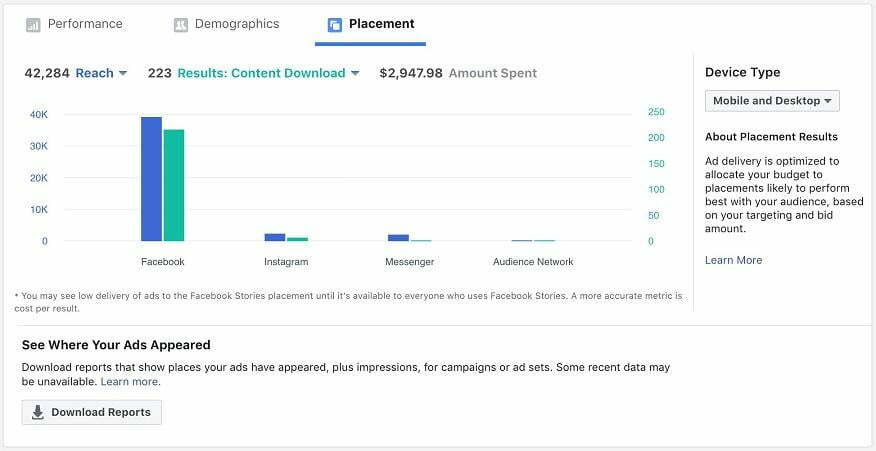
By understanding what the prospect is promoting or aiming to achieve, you can determine which placements to eliminate to optimize costs. For instance, if the prospect is a tech startup running ads to promote free trials but the trial isn’t compatible with mobile devices, removing non-converting mobile placements would be a quick win for your agency. Similarly, take note if the Audience Network is active in any campaigns, as it’s known for wasting ad spend in most accounts I’ve encountered.
Step #5: Compare Manual and Lookalike Audiences
Analyze the variety and types of audiences within the Facebook ads account. Pay attention to how ad sets are structured with audiences. Look for the following:
- Does the account utilize custom audiences?
- Are lookalike audiences being used?
- Are there manually created audiences based on interests, behaviors, etc.?
- How are ad sets organized? Do they combine lookalike and manual audiences? The last question is crucial because it relates to the account’s overall structure. Flag any ad set that combines custom audiences (including lookalikes) with manually created ones. Audiences should be separated into their own ad sets to effectively compare the performance of different lookalike audiences.
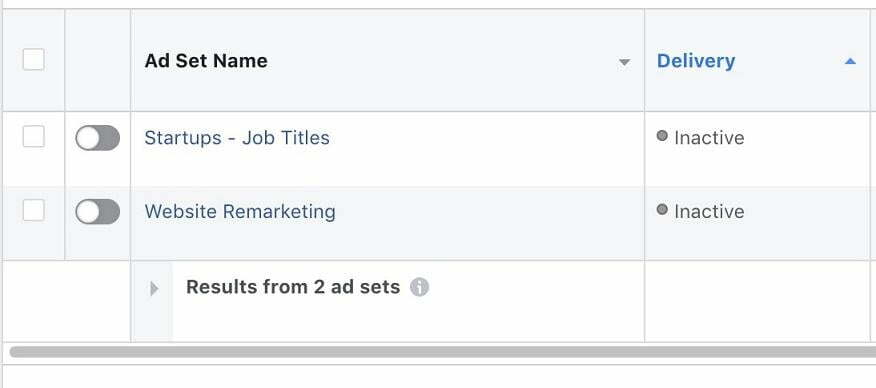
Furthermore, check if the prospect uses custom audiences as exclusions. For example, are they excluding existing customers or individuals who have already converted on their website? If not, explaining or implementing these exclusionary audiences presents a significant opportunity to provide value.
Step #6: Evaluate Facebook Ad Quality
Note the number of ads within each ad set. A single ad per ad set limits Facebook’s algorithm, as it has no basis for comparison within the audience, making it harder to optimize for desired results. Having multiple ads (ideally two to four) provides Facebook with more data to optimize based on what’s effective and what isn’t. Determine if there are variations in specific ads or promotions to identify specific attributes: CTA vs. no CTA, long-form vs. short-form copy, and so on.

I’ve observed that many prospects create one or two versions of the same promotion without considering the overall user experience. Seamlessly connecting the value proposition to the copy and creative is a skill marketers develop over time. Consequently, there are often areas for improvement in a prospect’s creative. Here are some questions to address during your account audit:
- Is the promotion’s message crystal clear in the ad’s text and headline?
- Is the headline auto-generated from the landing page or thoughtfully crafted?
- Do the creative and copy align?
- What creative formats are used? Image, video, or others?
- Does the image or video contain excessive text?
- Does the ad remain visually appealing across different placements? My process for assessing Facebook ad quality revolves around this question: Can you grasp the value proposition within three seconds? If the answer is yes, meaning it takes less than three seconds (which is generous considering today’s short attention spans), the account is on the right track. If comprehension takes longer or requires multiple reads, the ad’s performance is likely to suffer.
Step #7: Organize Your Audit for Delivery
Finally, structure your Facebook ads account audit in a way that’s both efficient for you and impactful for the prospective client. There are numerous methods to achieve this. My preferred approach involves using two separate Google Docs: one for general notes and another to synthesize your notes into a compelling narrative. This narrative acts as a sales tool, allowing you to present your analysis persuasively. After completing the audit, invite the prospect to edit the Google Doc containing your persuasive analysis. This allows them to add their own notes and questions for each section. Your initial notes should contain all the necessary information to estimate the workload and determine the pricing for your proposal. As you conduct more audits, you can develop your own template to streamline the process.
Bonus Tool: The Facebook Ads Grader
For a one-step audit solution, consider using our Facebook Ads Grader. This free tool analyzes your prospect’s account to evaluate performance and pinpoint areas for improvement, delivering a comprehensive report.