As a tester, enhancing efficiency and speed in your work can be significantly aided by automating the application under test. Relying solely on manual testing is impractical, as it would require running a complete set of tests daily, sometimes multiple times, for every code change.
This article outlines our team’s journey in selecting Google’s EarlGrey 1.0 as our optimal iOS Toptal Talent app automation tool. Our choice doesn’t imply EarlGrey’s universal superiority but rather its suitability for our specific requirements.
Transitioning to EarlGrey: Our Rationale
Our team has developed various mobile apps for both iOS and Android over time. Initially, we explored cross-platform UI testing tools to write a single test suite executable on multiple operating systems, opting for the popular open-source Appium.
However, Appium limitations became increasingly apparent. Appium presented two major drawbacks in our context:
- Frequent test flakes stemming from the framework’s questionable stability.
- A sluggish update process that hindered our workflow.
We tried mitigating the stability issues with code tweaks and workarounds, but the slow updates remained unresolvable. New iOS or Android versions often took considerable time for Appium to support, with initial updates frequently unusable due to bugs. This forced us to either test on older platforms or halt testing until a stable Appium update arrived, an undesirable situation.
These and other unmentioned issues prompted us to seek alternatives, prioritizing enhanced stability and faster updates. Our research led us to adopt native testing tools for each platform, transitioning to Espresso](https://developer.android.com/training/testing/espresso) for Android and EarlGrey 1.0 for [iOS development. This decision proved beneficial; the effort of maintaining separate test suites was offset by reduced flaky test investigations and version update downtimes.
Our Local Project Structure
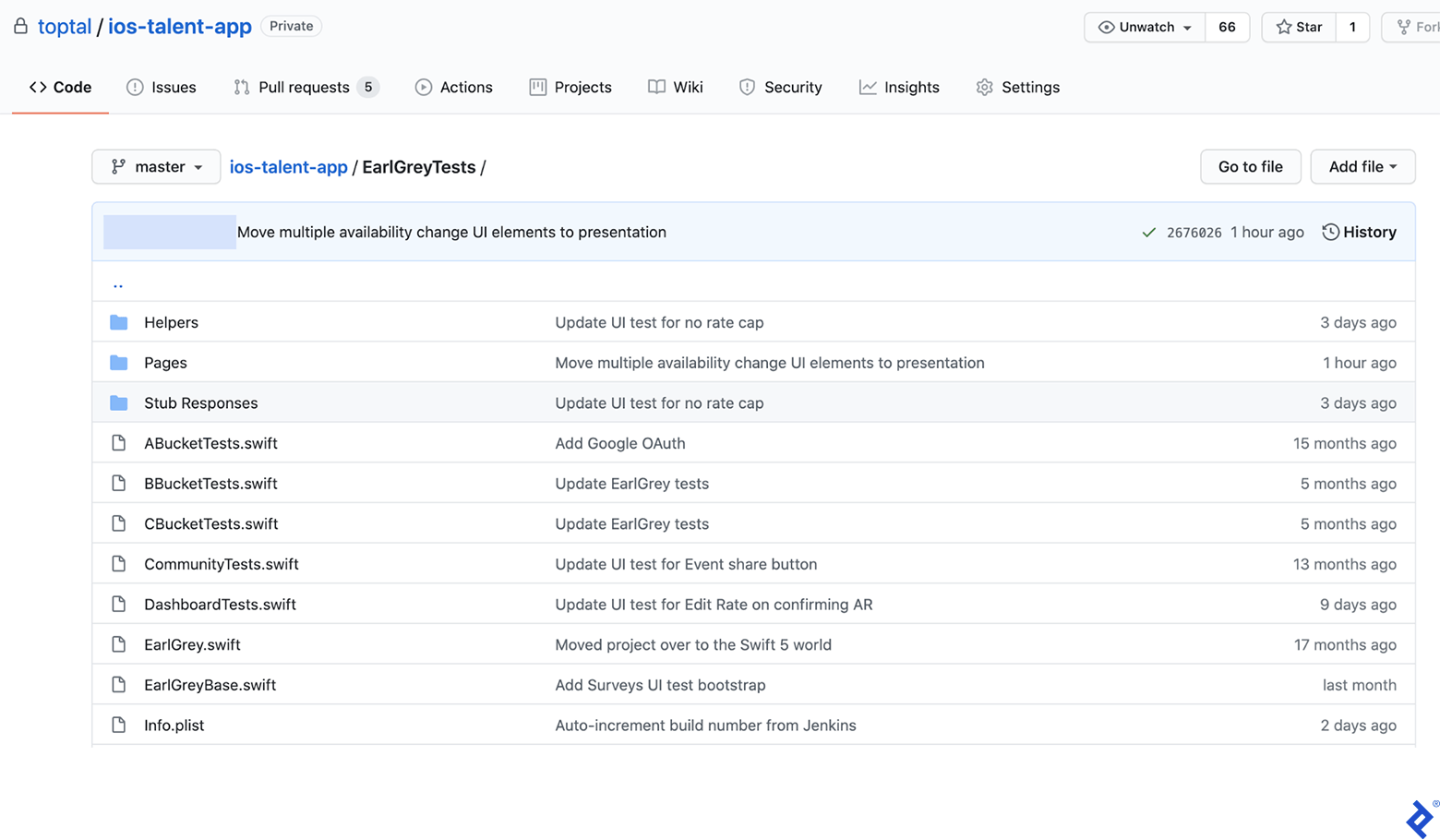
The framework needs integration into the app’s Xcode project. We created a root directory folder for UI tests, with the mandatory EarlGrey.swift file containing predefined content.
EarlGreyBase acts as the parent class for all test classes, housing general setUp and tearDown methods inherited from XCTestCase. We use setUp for loading commonly used stubs and setting configuration flags for enhanced test stability:
1
2
3
4
| // Turn off EarlGrey's network requests tracking since we don't use it and it can block tests execution
GREYConfiguration.sharedInstance().setValue([".*"], forConfigKey: kGREYConfigKeyURLBlacklistRegex)
GREYConfiguration.sharedInstance().setValue(false, forConfigKey: kGREYConfigKeyAnalyticsEnabled)
|
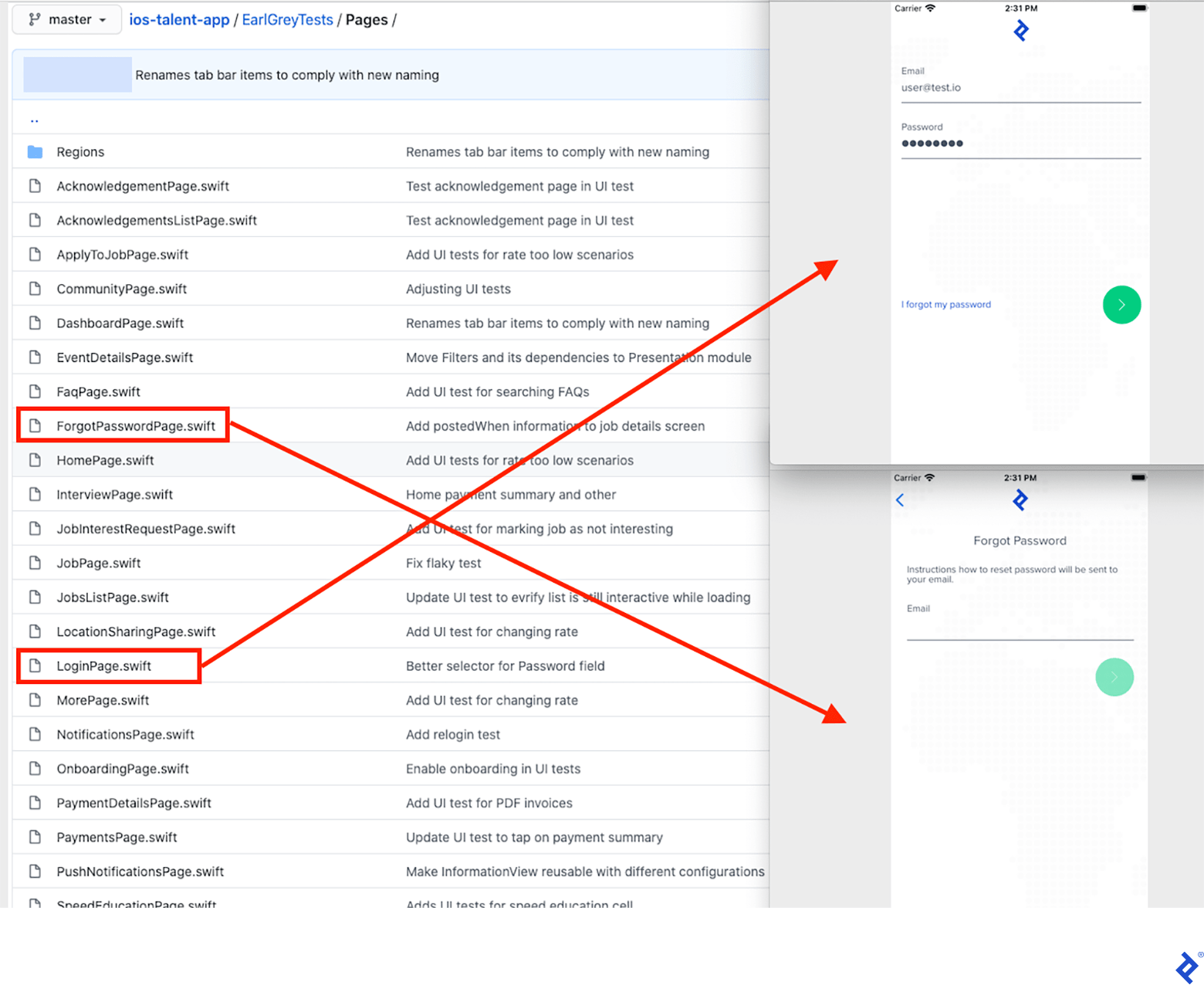
We employ the Page Object pattern, where each app screen has a corresponding class defining its UI elements and interactions, termed a “page.” Test methods are grouped by features in separate files and classes.
To illustrate, here’s how the Login and Forgot Password screens are represented as page objects:
The Login page object’s code will be detailed later.
Tailored Utility Methods
EarlGrey’s test action synchronization with the app isn’t flawless. Clicking a button not yet loaded in the UI hierarchy, for instance, can cause test failures. To prevent this, we created custom methods that wait for elements to reach the desired state before interaction.
Examples:
 1
 2
 3
 4
 5
 6
 7
 8
 9
10
11
12
13
14
15
16
17
18
19
20
21
| static func asyncWaitForVisibility(on element: GREYInteraction) {
// By default, EarlGrey blocks test execution while
// the app is animating or doing anything in the background.
//https://github.com/google/EarlGrey/blob/master/docs/api.md#synchronization
GREYConfiguration.sharedInstance().setValue(false, forConfigKey: kGREYConfigKeySynchronizationEnabled)
element.assert(grey_sufficientlyVisible())
GREYConfiguration.sharedInstance().setValue(true, forConfigKey: kGREYConfigKeySynchronizationEnabled)
}
static func waitElementVisibility(for element: GREYInteraction, timeout: Double = 15.0) -> Bool {
GREYCondition(name: "Wait for element to appear", block: {
var error: NSError?
element.assert(grey_notNil(), error: &error)
return error == nil
}).wait(withTimeout: timeout, pollInterval: 0.5)
if !elementVisible(element) {
XCTFail("Element didn't appear")
}
return true
}
|
Additionally, EarlGrey lacks built-in screen scrolling to bring desired elements into view. Our solution:
 1
 2
 3
 4
 5
 6
 7
 8
 9
10
11
12
13
14
15
16
17
18
19
20
21
22
23
24
25
26
| static func elementVisible(_ element: GREYInteraction) -> Bool {
var error: NSError?
element.assert(grey_notVisible(), error: &error)
if error != nil {
return true
} else {
return false
}
}
static func scrollUntilElementVisible(_ scrollDirection: GREYDirection, _ speed: String, _ searchedElement: GREYInteraction, _ actionElement: GREYInteraction) -> Bool {
var swipes = 0
while !elementVisible(searchedElement) && swipes < 10 {
if speed == "slow" {
actionElement.perform(grey_swipeSlowInDirection(scrollDirection))
} else {
actionElement.perform(grey_swipeFastInDirection(scrollDirection))
}
swipes += 1
}
if swipes >= 10 {
return false
} else {
return true
}
}
|
Further utility methods we added include element counting and text value reading. The code for these is available on GitHub: here and here.
Mocking API Calls with Stubs
To eliminate false positives due to back-end issues, we utilize OHHTTPStubs library for mocking server calls. While their documentation is clear, we’ll demonstrate stubbing responses in our GraphQL API app.
 1
 2
 3
 4
 5
 6
 7
 8
 9
10
11
12
13
14
15
16
17
18
19
20
21
22
23
24
25
26
27
28
29
30
31
32
33
34
35
36
37
38
39
40
41
42
43
44
45
46
47
48
49
50
| class StubsHelper {
static let testURL = URL(string: "https://[our backend server]")!
static func setupOHTTPStub(for request: StubbedRequest, delayed: Bool = false) {
stub(condition: isHost(testURL.host!) && hasJsonBody(request.bodyDict())) { _ in
let fix = appFixture(forRequest: request)
if delayed {
return fix.requestTime(0.1, responseTime: 7.0)
} else {
return fix
}
}
}
static let stubbedEmail = "fixture@email.com"
static let stubbedPassword = "password"
enum StubbedRequest {
case login
func bodyDict() -> [String: Any] {
switch self {
case .login:
return EmailPasswordSignInMutation(
email: stubbedTalentLogin, password: stubbedTalentPassword
).makeBodyIdentifier()
}
}
func statusCode() -> Int32 {
return 200
}
func jsonFileName() -> String {
let fileName: String
switch self {
case .login:
fileName = "login"
}
return "\(fileName).json"
}
}
private extension GraphQLOperation {
func makeBodyIdentifier() -> [String: Any] {
let body: GraphQLMap = [
"query": queryDocument,
"variables": variables,
"operationName": operationName
]
// Normalize values like enums here, otherwise body comparison will fail
guard let normalizedBody = body.jsonValue as? [String: Any] else {
fatalError()
}
return normalizedBody
}
}
|
Stub loading is done via the setupOHTTPStub method:
1
| StubsHelper.setupOHTTPStub(for: .login)
|
Integrating All Components
This section demonstrates a practical end-to-end login test incorporating the described principles.
 1
 2
 3
 4
 5
 6
 7
 8
 9
10
11
12
13
14
15
16
17
18
19
20
21
22
23
24
25
26
27
28
29
30
31
32
33
34
35
36
37
38
39
40
41
42
43
44
45
46
47
48
49
50
51
52
53
54
55
56
57
58
59
60
| import EarlGrey
final class LoginPage {
func login() -> HomePage {
fillLoginForm()
loginButton().perform(grey_tap())
return HomePage()
}
func fillLoginForm() {
ElementsHelper.waitElementVisibility(emailField())
emailField().perform(grey_replaceText(StubsHelper.stubbedTalentLogin))
passwordField().perform(grey_tap())
passwordField().perform(grey_replaceText(StubsHelper.stubbedTalentPassword))
}
func clearAllInputs() {
if ElementsHelper.elementVisible(passwordField()) {
passwordField().perform(grey_tap())
passwordField().perform(grey_replaceText(""))
}
emailField().perform(grey_tap())
emailField().perform(grey_replaceText(""))
}
}
private extension LoginPage {
func emailField(file: StaticString = #file, line: UInt = #line) -> GREYInteraction {
return EarlGrey.selectElement(with: grey_accessibilityLabel("Email"), file: file, line: line)
}
func passwordField(file: StaticString = #file, line: UInt = #line) -> GREYInteraction {
return EarlGrey.selectElement(
with: grey_allOf([
grey_accessibilityLabel("Password"),
grey_sufficientlyVisible(),
grey_userInteractionEnabled()
]),
file: file, line: line
)
}
func loginButton(file: StaticString = #file, line: UInt = #line) -> GREYInteraction {
return EarlGrey.selectElement(with: grey_accessibilityID("login_button"), file: file, line: line)
}
}
class BBucketTests: EarlGreyBase {
func testLogin() {
StubsHelper.setupOHTTPStub(for: .login)
LoginPage().clearAllInputs()
let homePage = LoginPage().login()
GREYAssertTrue(
homePage.assertVisible(),
reason: "Home screen not displayed after successful login"
)
}
}
|
Executing Tests in CI
We use Jenkins for continuous integration, running UI tests for every pull request commit.
Test execution and report generation are handled by fastlane scan. Screenshots for failed tests are crucial but unsupported by scan, so we created a custom solution.
Our tearDown() function saves a screenshot of the iOS simulator upon test failure:
 1
 2
 3
 4
 5
 6
 7
 8
 9
10
11
12
13
14
15
16
17
18
19
20
21
22
23
24
| import EarlGrey
import XCTest
import UIScreenCapture
override func tearDown() {
if testRun!.failureCount > 0 {
// name is a property of the XCTest instance
// https://developer.apple.com/documentation/xctest/xctest/1500990-name
takeScreenshotAndSave(as: name)
}
super.tearDown()
}
func takeScreenshotAndSave(as testCaseName: String) {
let imageData = UIScreenCapture.takeSnapshotGetJPEG()
let paths = NSSearchPathForDirectoriesInDomains(.documentDirectory, .userDomainMask, true)
let filePath = "\(paths[0])/\(testCaseName).jpg"
do {
try imageData?.write(to: URL.init(fileURLWithPath: filePath))
} catch {
XCTFail("Screenshot not written.")
}
}
|
Screenshots are saved in the Simulator folder, requiring retrieval for build artifacts. Our CI scripts use Rake for management. Artifact gathering:
1
2
3
4
| def gather_test_artifacts(booted_sim_id, destination_folder)
app_container_on_sim = `xcrun simctl get_app_container #{booted_sim_id} [your bundle id] data`.strip
FileUtils.cp_r "#{app_container_on_sim}/Documents", destination_folder
end
|
Key Takeaways
For fast and reliable iOS test automation, consider EarlGrey, a Google-developed and maintained tool surpassing many alternatives.
Some framework customization with utility methods is necessary for test stability. Start with our custom method examples.
Testing on stubbed data is recommended to isolate tests from back-end dependencies. Utilize tools like OHHTTPStubs or similar local web servers.
Incorporate screenshots for failed tests in your CI setup to facilitate debugging.
Regarding our yet-to-be-migrated EarlGrey 2.0, the newer version, released last year, promises improvements. However, its instability during our initial adoption prevented a switch. We anticipate a bug-fixed version for future migration.
Online Resources
For those considering EarlGrey, the Getting Started guide on the GitHub homepage is invaluable. It offers installation instructions, API documentation, and a convenient cheat sheet for test writing.
Further insights into iOS test automation can be found in one of our previous blog posts.