Want to increase your sales both online and in physical stores? Who doesn’t! If you’re not using Facebook offer ads yet, now is the perfect time to start. Facebook offer ads present potential customers with a tempting deal to encourage purchases. These ads are designed specifically for mobile devices and can be tailored to your needs. They’re a great option for both physical stores and online businesses, as they allow customers to redeem offers either in person or online.
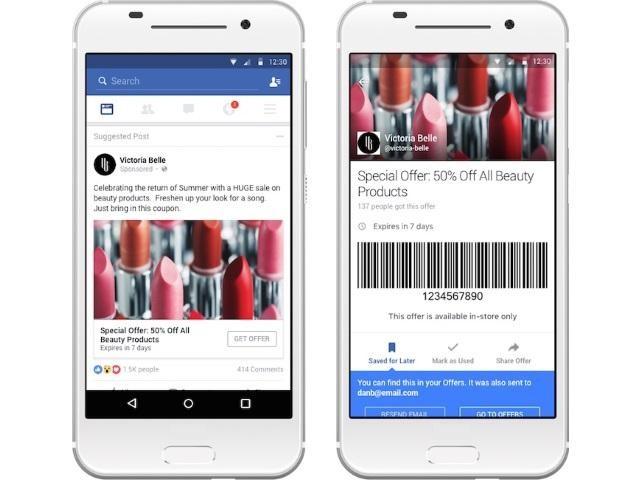
Facebook Offer Ad Example via adweek This guide to Facebook offer ads will provide you with all the information you need to get started. We’ll cover how to create these ads, how to set up your Facebook offer campaign, and provide tips on optimizing your ads for maximum impact. Let’s dive in!
Creating Your Facebook Offer Ads
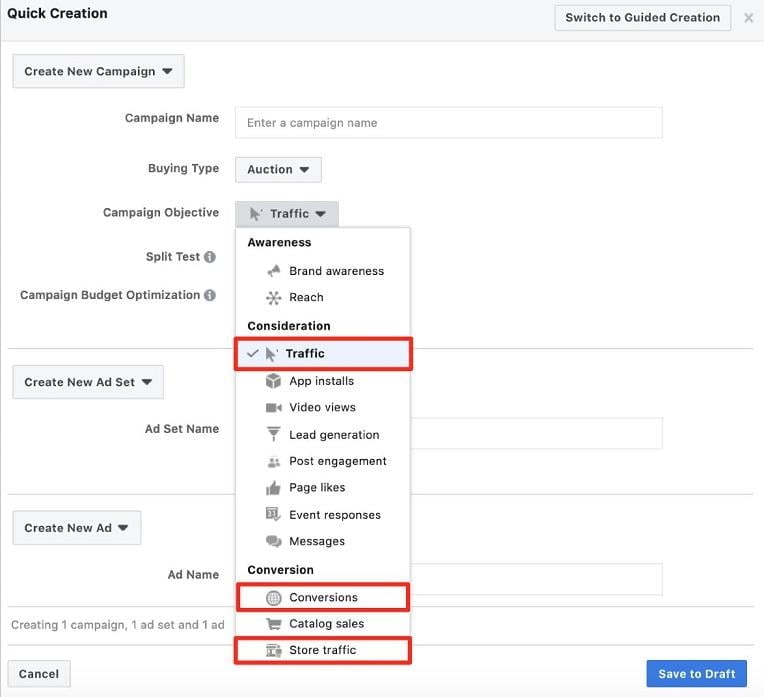
Start by navigating to Ads Manager and selecting either Traffic, Conversions, or Store Traffic as your campaign objective. If a user claims an offer online, they’ll receive a discount code and be directed to your website to make their purchase. For in-store offers, users will receive a barcode or QR code to be scanned at checkout using their mobile device.
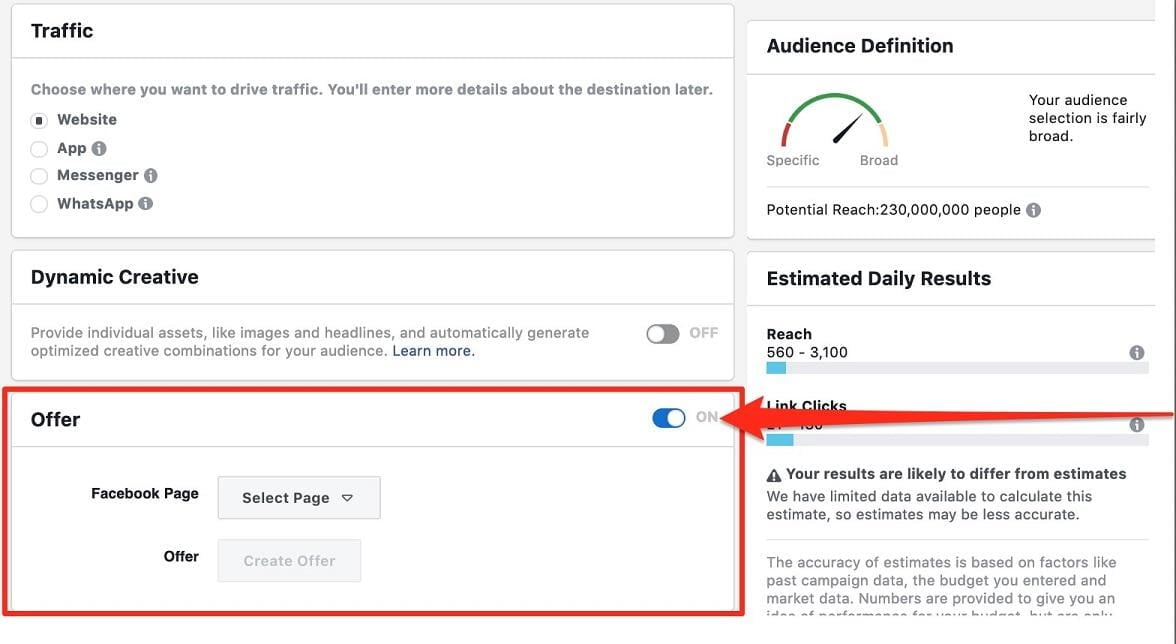
Next, go to the ad set level and find the section labeled “Offer.” You’ll see a toggle button there; switch it to “ON.”
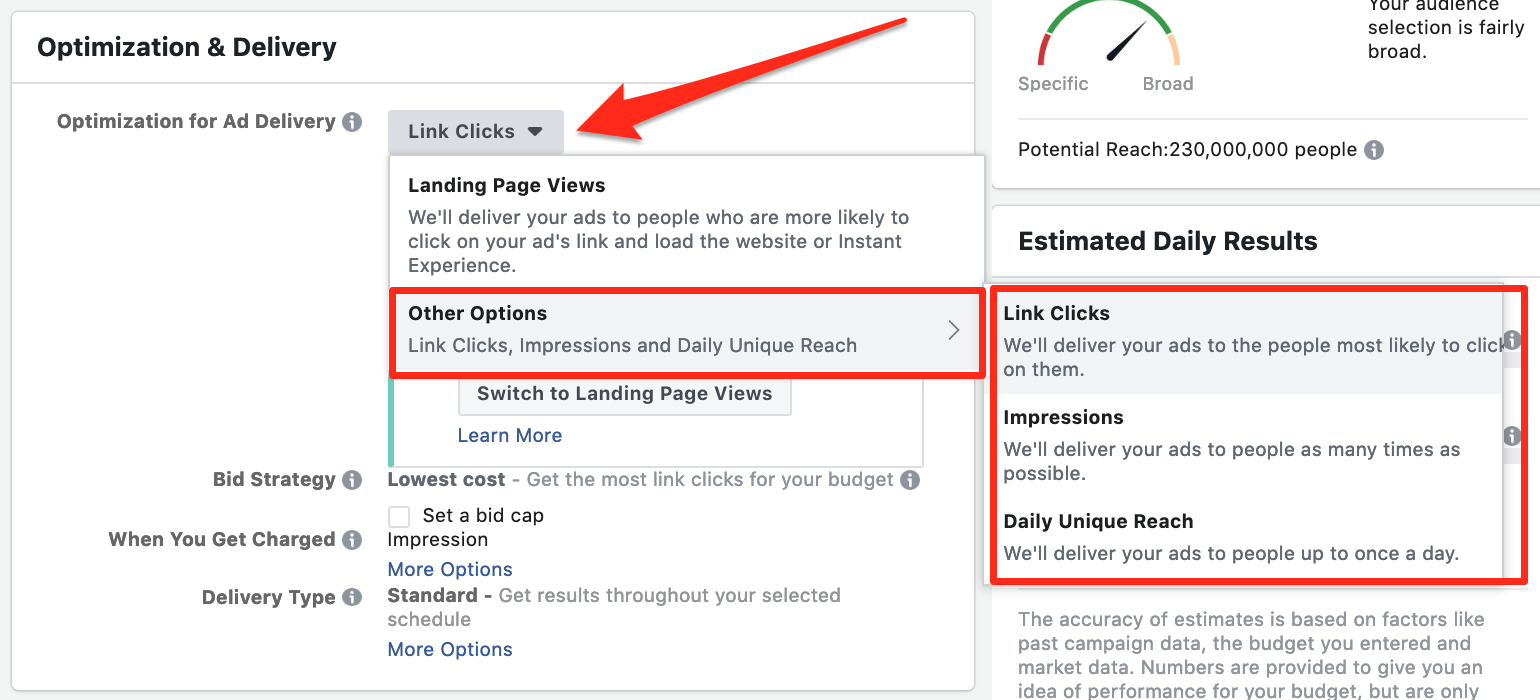
It’s important to note that if you choose Traffic as your campaign objective and are optimizing for landing page views (the default selection), this section will appear grayed out. To fix this, scroll down to the Optimization & Delivery section and select “Link Clicks” as your Optimization for Ad Delivery.
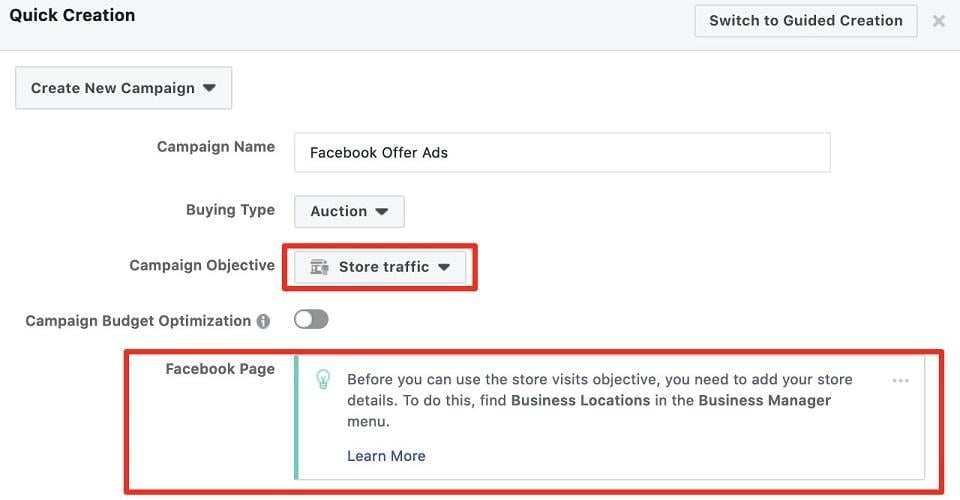
If you have a physical store and are using the Store Traffic campaign objective but encounter an error message, you’ll need to add your business location(s) from your Facebook Business Page. You can find instructions on how to do this here.
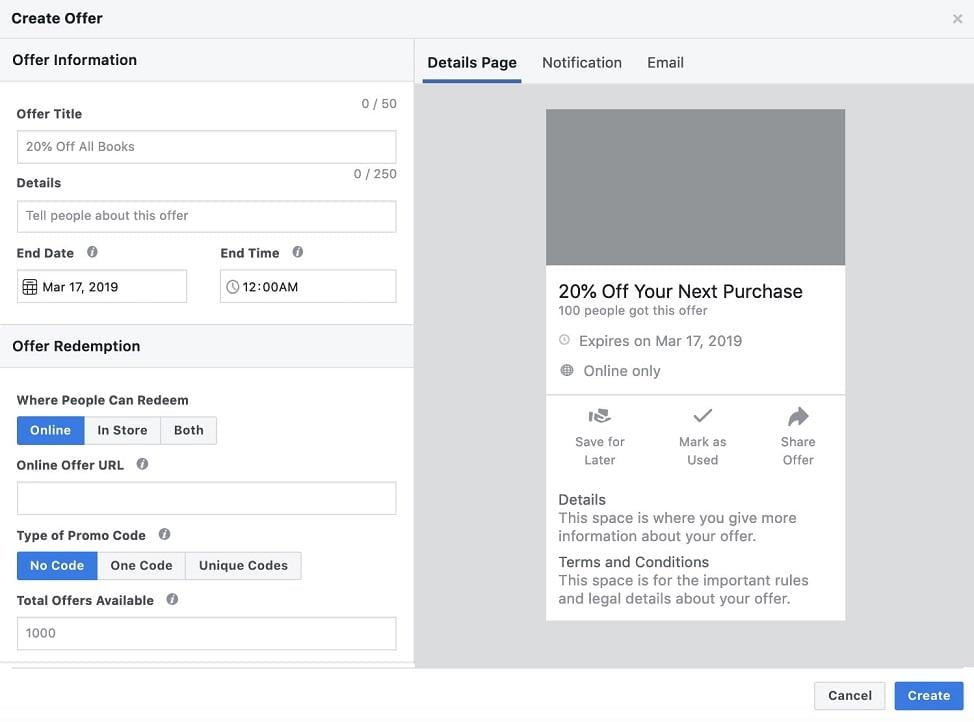
After enabling Offers and selecting the correct optimization feature, click “Create Offer” in the ad set level. This will open a new window where you can specify the offer details, duration, redemption type (online, in-store, or both), type of promo code, and the total number of offers available. This level of control allows you to tailor the terms of your promotion to your liking.
Now, determine your budget, target audience, and ad placements. When you reach the ad level, you can choose from static images or video creatives for your Facebook offer ads. If you have video content that aligns with your campaign and resonates with your audience, we highly recommend testing it out – subtle motion can be very effective in grabbing users’ attention as they scroll through their feeds. Capture the attention of potential customers on mobile, showcase your ad, and entice them with compelling copy and a special offer to encourage clicks and potential conversions.
Understanding Facebook Offer Ad Specs
When designing your Facebook offer ad, you have the flexibility to present it to your target audience as a single image, a single video, or a carousel of images and videos. As a result, the specifications for Facebook offer ads encompass elements from all these ad formats. Here’s a quick reminder of the specifications for image ads, video ads, and carousel ads:
Specifications for Facebook Image Ads (With Link)
- File type: .jpg or .png
- Image ratio: 1.91:1 to 1:1
- Maximum file size: 30 MB
- Recommended resolution: at least 1080px x 1080px
Specifications for Facebook Video Ads
- Recommended file type: MP4 or MOV
- Video ratio: 9:16 to 16:9
- Maximum file size: 4 GB
- Recommended resolution: highest supported by file type and size
Specifications for Facebook Carousel Ads
- Static image file type: .jpg or .png
- Recommended static image ratio: 1:1
- Maximum static image file size: 30 MB
- Recommended static image resolution: at least 1080px x 1080px
- Recommended video file type: MP4 or MOV
- Recommended video file size: 1:1
- Maximum video file size: 4 BG
- Recommended video file resolution: at least 1080px x 1080px Regardless of your chosen visual elements, you are always limited to a headline of 50 characters and a description of 250 characters.
How to Utilize Promo Codes with Facebook Offer Ads
While planning your offer campaign and moving on to ad creation, consider the type of promo code you’ll use. Factors like your goals, target audience, and preferred tracking method for promo code usage should guide your decision. Here are three types of promo codes to consider:
- Generic Promo Codes: These codes can be used by anyone, making them effective and easy to implement. For example, you could create a code like “BOGOFB” for a buy-one-get-one-free deal or “FB25OFF” for a 25% discount. Be creative and aim for short, memorable codes.
- Unique Promo Codes: Want to prevent your promo codes from being shared online and potentially affecting source tracking? Consider using unique promo codes and barcodes for your Offer Ads. With this method, each user who saves your offer receives a unique code. Set these up using a .csv or .txt file—you can find instructions and specifications here.
- Barcodes and QR Codes: If you’re using the Store Visits campaign objective, this option is worth exploring. Users can save your offer and redeem it later during an in-store visit. Refer to Facebook’s Ads Help Center for more information on offer ads barcode formatting guidelines.
Automatic Reminders for Offer Redemption
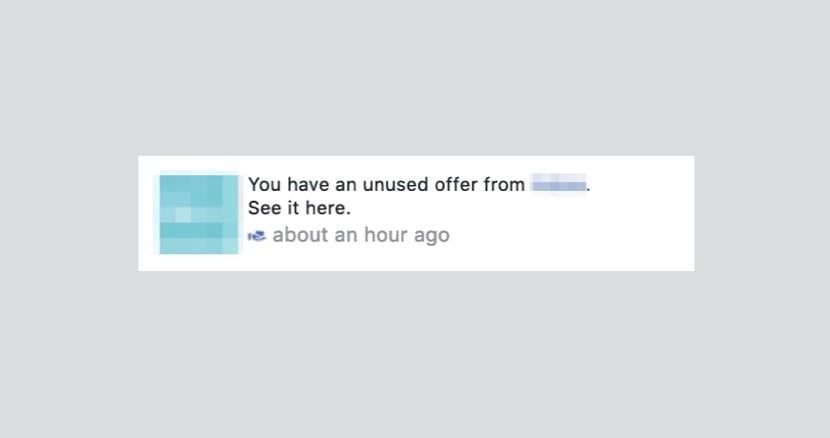
Concerned about claimed offers going unused? No worries! Facebook offers a gentle nudge solution. As the offer’s expiration date approaches, Facebook will automatically remind users who claimed the offer but haven’t used it yet. This convenient feature can help boost your conversion rates by highlighting the sense of urgency and the value of the discount. Users will receive a notification similar to this:
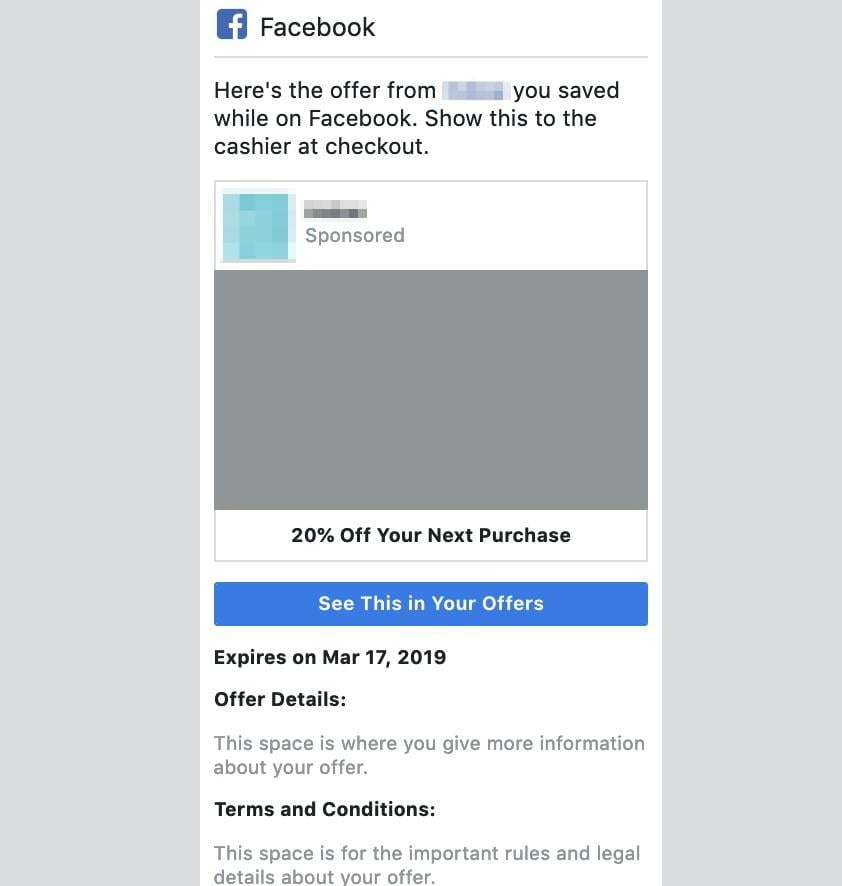
Upon setting up an offer ad and having a user save it, they’ll receive an email that might look like this:
Tips & Best Practices for Facebook Offer Ads
Testing is key to determining what resonates with your audience when it comes to Facebook Offer Ads. However, there are some standard best practices that you should always keep in mind.
1. Edit Your Ads Carefully
Thoroughly review your work before publishing, as offer ads cannot be edited once they’re live. If changes are needed after publishing, you’ll need to disable the existing ad and create a new one with the revisions.
2. Set Limits on Offer Availability
Setting a lower limit on the Total Offers Available has proven very effective for clients using Facebook offer ads. More often than not, these limited-quantity offers sell out due to the perception of scarcity driving higher demand. We recommend experimenting with different increments to find the sweet spot where offers sell out without having too many left unclaimed. It’s a simple economic principle that yields positive results. To set a limit on the number of available offers, enter a specific quantity in the Total Offers Available option to establish a maximum. If you’re using unique promo codes and setting limits, the Total Offers Available cannot exceed the number of unique codes you upload.
3. Utilize Geotargeting
When running an in-store offer, pay close attention to your location targeting. For businesses with a physical location, focusing on users within a specific radius of your city or zip code might yield better results than showcasing your offer to a broader audience. It’s easy to overlook, but by narrowing down your targeting, you can concentrate your budget and increase the likelihood of offer claims and sales conversions.
4. Experiment with Ad Copy
While the possibilities for creative ad copy are endless, if you’re facing writer’s block, consider testing ad copy that conveys a sense of being treated, such as “enjoy 10% off on us” or “treat yourself to $25 off on us.” This approach has worked well for numerous ecommerce clients.
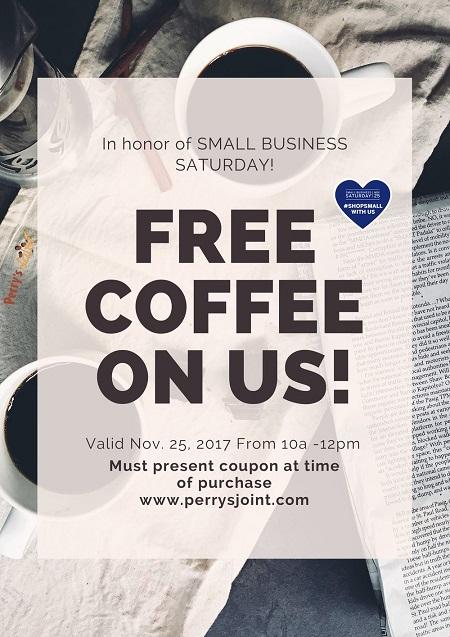
Make your audience feel valued and be sincere about it - because you are treating them to something special.
5. Target New Users
Explore the potential of well-timed Facebook offer ads with cold audiences as a way to introduce them to your brand and guide them into your sales funnel. What better way to incentivize first-time customers than by offering them a special deal to try your products and experience their quality? Unfamiliarity with your brand and pricing can be major deterrents for potential customers. If you have higher-priced products or are struggling to encourage early conversions, test out Offer Ads to see if they can positively impact sales volume and shorten your conversion window.
6. Prioritize Remarketing
If you’d rather not offer discounts to cold audiences upon first contact and potentially create misaligned price expectations, focus on other campaign types to drive conversions at full price. If warmer audiences show interest but hesitate to convert, Facebook offer ads can be a valuable tool to push them towards making a purchase. With remarketing, you have the flexibility to get creative with Facebook’s targeting options. If you’re unsure who to target, consider custom audiences like website visitors, visitors to specific landing pages, newsletter subscribers, leads, or existing customers you’d like to upsell or cross-sell other products to. By providing a valuable deal, you can make it easier for your audience to overcome any hesitation to spend. Keep in mind that “valuable” doesn’t necessarily equate to a massive discount. Offers shouldn’t devalue your products. Instead, they serve as an additional tool to experiment with at the right time. Try different types of deals to see how small of a discount effectively converts users, creating a win-win situation for both your business and your customers.
 Image via giphy
Facebook Offer Ads Case Study
If you’re still not convinced—and it’s hard to imagine why you wouldn’t be—let’s wrap up with a case study demonstrating the effectiveness of Facebook offer ads in action. GoWireless, an official Verizon partner with over 700 stores across the US, sells smartphones, tablets, headphones, and monthly Verizon service plans. With the holiday season approaching last year, they set an ambitious goal: to finish the year strong by driving in-store traffic and boosting sales of Verizon-backed smartphones. By leveraging the power of Facebook offer ads, they did just that.
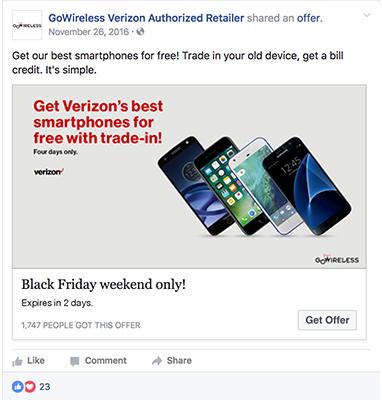
Between November and January, almost 50,000 Facebook users claimed an offer promoted by GoWireless. This represented a tenfold increase compared to the number of claims they had generated using standard link ads. Moreover, switching from link ads to offer ads resulted in a remarkable 65% reduction in their cost per in-store sale. Those are some seriously impressive results. Now you’re equipped with the knowledge of Facebook offer ads—how to set them up, use them effectively, and reach your target audiences throughout the sales funnel to drive business growth. So go ahead, implement what you’ve learned, craft compelling offers, and watch your online and offline sales soar!