At our company, which specializes in managing pay-per-click (PPC) advertising, we’ve seen remarkable success using contextual display campaigns to enhance the performance of our client accounts. Almost all our clients have benefited, either through highly targeted, budget-friendly campaigns or broader campaigns with higher spending. From online stores to software companies, contextual targeting on Google’s Display Network has consistently delivered impressive results.
This article will delve into the mechanics of contextual display advertising campaigns and showcase a real-life example of an account that experienced outstanding results using this strategy.
Closing the Gap Between Search and Display: Why Contextual Display Ads Deliver
Traditional display campaigns excel at building brand visibility among a wide audience cost-effectively, but they often struggle to drive direct conversions.
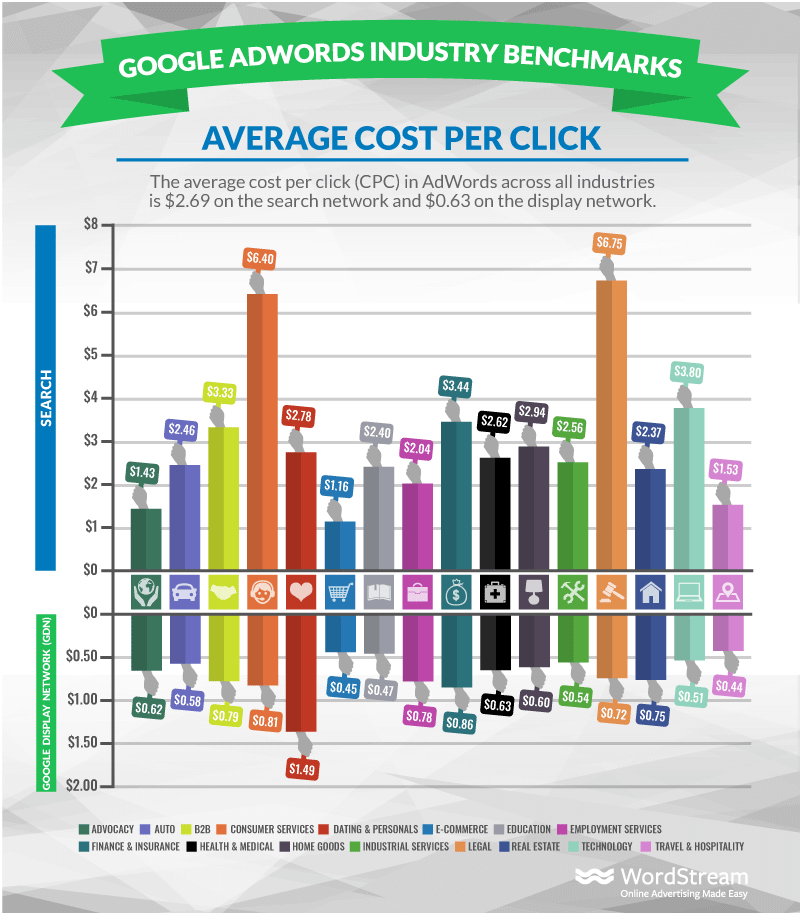
Display ads, on average, have a cost per click that’s roughly one-fourth the cost of a click on the search network. Similar to many social media advertising platforms, display campaigns don’t rely on search terms to show your ads. This means while you might be reaching a relevant audience, there’s no way to ensure you’re showcasing your product or service when they actually need it.
This is where the strength of search ads lies. By concentrating on keywords, you can reach individuals actively searching for what you offer, eliminating the need to hope you come to mind when they have a need.
That’s where contextual display comes in. It bridges the gap by enabling you to reach a broad audience while incorporating keywords into your campaigns. This ensures your ads appear in front of the right people precisely when they’re most receptive.
Deconstructing Contextual Display: How It Works
Contextual campaigns leverage websites within Google’s Display Network and offer a wide range of display ad sizes and responsive ad formats, just like other display campaign types.
When you’re choosing where to display your ads, Google utilizes the keywords you’ve specified in your targeting parameters and places your ads on web pages that contain those keywords. By strategically placing your ads on pages relevant to your keywords, you can be more certain of the user’s intent on that page, as their presence indicates an interest in the subject matter.
The functionality of this approach mirrors that of broad match keywords in search ads. This makes it crucial to employ placement exclusions and negative keywords within your campaigns.
Case Study: Contextual Display in Action - A Numerical Perspective
One of our recent success stories with contextual display involves a client offering a desktop and mobile application designed for small businesses.
By leveraging the same high-converting keywords from our search campaigns, we achieved a remarkable 1,600% increase in conversions while maintaining the same budget. This accomplishment led to a significant drop in our cost per conversion, plummeting from $825 to $53.
The landing pages and conversion goals remained identical throughout the campaign. These high-intent conversions consisted of free trials and software demos. The competitive landscape for search ads was fierce, resulting in a cost per click that was over three times higher than our display campaigns.
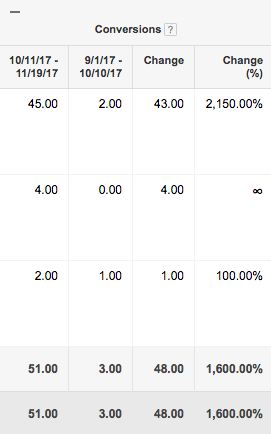
The intense competition our client faced in search made exploring display advertising essential. With a limited monthly budget of $2,000, our objective was to drive significantly more than a handful of free trials each month. In essence, contextual display enabled us to elevate our conversion rate while simultaneously achieving a 155% boost in paid traffic.
*Note: Data reflects the 40-day periods before and after launching the contextual display campaign.
Intrigued to explore this campaign type for yourself? Let’s delve into the setup process.
Creating Your Contextual Display Campaign
Setting up a contextual display campaign mirrors the process of setting up any other type of display campaign. However, when you reach the targeting section, you’ll opt for “Display Keywords” instead of using topics, remarketing lists, placements, affinity audiences, or in-market audiences. You’re then presented with the option to target by “Audience” or “Content.”
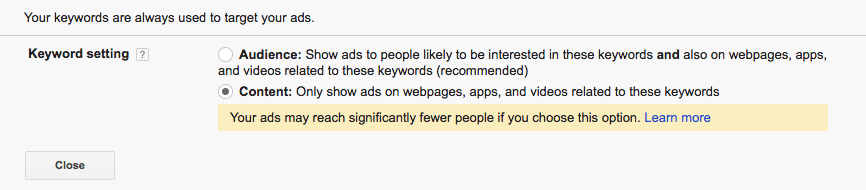
Choosing “Audience” significantly expands your reach, making this targeting approach akin to a topic-based campaign. Conversely, targeting by “Content” refines your audience, minimizing irrelevant clicks.
The most effective ad groups are those that employ a concise list of keywords coupled with highly targeted ads. By segmenting your contextual display campaigns into multiple ad groups, you gain greater control over management and can readily identify the terms that warrant further attention.
Identifying the Optimal Keywords for Contextual Display
If you have an account with a history of conversions, keyword selection becomes straightforward. Simply choose some of your top-performing keywords from your search campaigns, maintain consistent messaging in your ads, and you’re likely to see favorable results with your new contextual campaign. Both responsive ads and custom-designed display ads can perform exceptionally well within the context of contextual display, so leverage the format that aligns with your resources.
For those starting fresh, structure your ad groups similarly to your search campaigns. Contextual display empowers you to carry over the messaging and intent from your search efforts while introducing a visual component. Capitalize on this by incorporating visually appealing images that stand out against the backdrop of most website ad placements.
Refining Your Contextual Display Campaign
Placements are paramount. Regularly review your placements to ensure your keywords are generating favorable impressions for your ads. If certain placements aren’t delivering, you have several options: exclude the placement, incorporate negative keywords, or remove keywords from the ad group altogether. Implementing this type of campaign filtering early on is crucial for accelerating results.
Certain keywords might contribute to undesirable placements. Proactively adding negative keywords can help prevent these low-quality placements from appearing.
Furthermore, experiment with different display ads. Occasionally, a user’s intent might not align perfectly with your ad due to the placements where it’s being shown. This presents an opportunity to fine-tune your ad, whether it’s designed or responsive, to address the specific pain points of that individual. Employing well-defined ad groups enhances the effectiveness of this strategy.
For instance, our client ran display ads for several months without seeing conversions (refer to the example below). The ads themselves weren’t the issue; the targeting was. By simply replacing the existing broad keywords with keywords that directly aligned with the ad’s message, we observed substantial improvements.

Scaling Your Budget While Maintaining Cost Per Conversion
The size of your campaign might be constrained by your targeting parameters, particularly if you’re targeting a niche audience. If you’re seeing promising outcomes, consider increasing your budget or expanding your reach by incorporating additional keywords. Here’s how to do so without negatively impacting your cost per conversion.
Introduce ad groups that mirror what’s working.
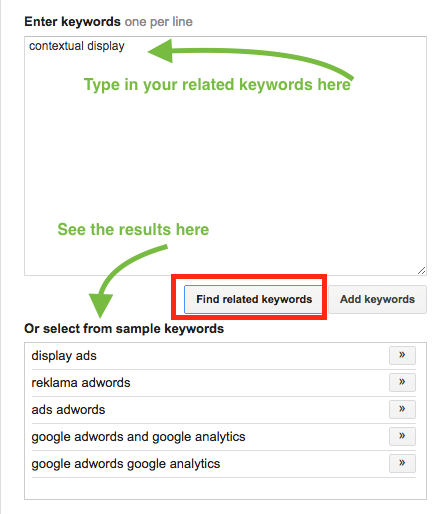
While not always the case, Google’s keyword suggestions can be useful. When adding contextual keywords, conduct thorough research as you would for search campaigns. Pay close attention to the audience size estimates provided by Google each time you add a keyword. Don’t shy away from keywords with estimates of 0-1k, as these can still yield impressive results. In fact, some of our highest-performing ad groups have impression estimates ranging from 30k to 60k.
Incorporate top-performing keywords from your search campaigns.
Keywords that are driving conversions in your search campaigns, regardless of their cost per conversion, should be tested within the realm of contextual targeting. Often, you can repurpose the same or similar ad copy from your search ads within your display ads and witness immediate success.
Don’t hesitate to experiment with keywords that were converting at a higher cost than others in your search campaigns. It’s possible that the lower cost per click associated with display advertising, combined with a compelling display ad, will result in these keywords converting at a more favorable cost.
Achieving Success in the Ecommerce Domain
As competition intensifies, your cost per click tends to rise. One of our clients in the ecommerce sector experienced this firsthand. We had been running highly effective search campaigns, consistently generating hundreds of conversions each month. However, mounting competition gradually pushed our cost per conversion upward. To address this, we opted to allocate a portion of the budget toward display advertising, a strategic move that yielded exceptional outcomes.
Not only did we surpass our previous best-performing months, but we also achieved a 67% increase in website traffic, further fueling our already successful remarketing campaigns. Remarkably, all of this was accomplished without any adjustments to the overall budget.
Over a four-month period, three new major competitors entered the bidding landscape for our keywords, exerting upward pressure on our cost per conversion.
July-August:
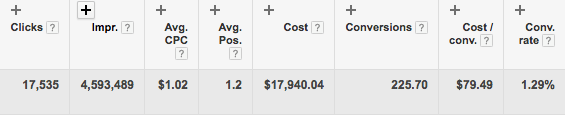
(September marked the transition phase.)
October-November:

By strategically reallocating budget from search to display, we were able to significantly amplify our impression volume, substantially increase clicks, and nearly double our conversions during a period that typically experiences a decline in traffic for this particular industry.
I highly recommend experimenting with contextual display in your own or your clients’ campaigns, regardless of the industry. Feel free to share any questions you may have in the comments below.