Introduction
In recent times, there’s been a significant surge in the use of JavaScript single-page application frameworks and mobile apps. Consequently, the demand for robust server-side APIs has also skyrocketed. Ruby on Rails, being a leading web development framework, has naturally become a popular choice for building these back-end API applications.
However, while Rails’ architecture makes crafting back-end APIs straightforward, relying solely on Rails for this purpose can be excessive. The Rails team themselves have acknowledged this, leading to the introduction of a dedicated API-only mode in version 5, simplifying API-only application development in Rails.
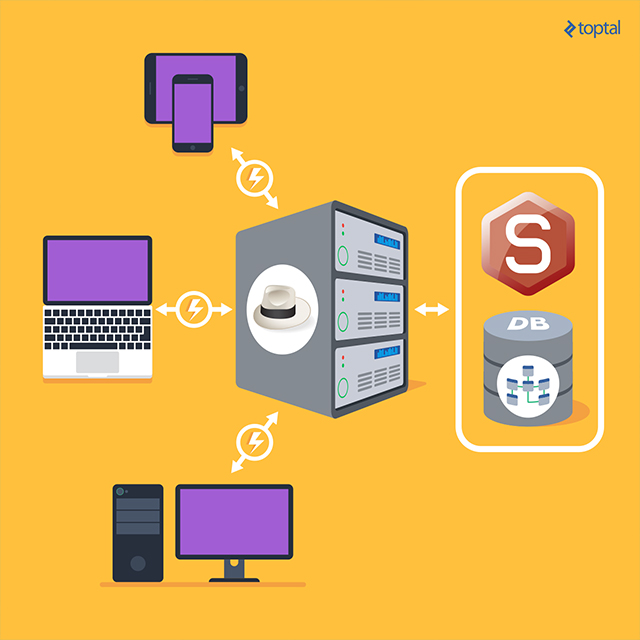
However, there are alternative approaches worth considering. Two well-established and powerful gems, Sinatra and Sequel, provide a compelling toolkit for creating server-side APIs.
Both gems come packed with features: Sinatra acts as the domain-specific language (DSL) for web applications, while Sequel serves as the object-relational mapping (ORM) layer. Let’s delve into each of them briefly.
Sinatra
Sinatra, built on the Rack interface, is a web application framework for Ruby. Widely used by frameworks like Ruby on Rails, Rack supports numerous web servers such as WEBrick, Thin, and Puma. Sinatra provides a streamlined interface for crafting web applications in Ruby and boasts a powerful middleware component system. Positioned between the application and the web server, these components can intercept and manipulate both requests and responses.
Leveraging this Rack functionality, Sinatra implements an internal DSL for building web applications. Its philosophy is elegantly simple: routes are defined by HTTP methods followed by a pattern for matching. A Ruby block handles request processing and response generation.
| |
Route matching patterns can incorporate named parameters. When a route’s block is executed, the corresponding parameter value is passed to it via the params variable.
| |
The splat operator * in matching patterns captures multiple values, accessible through params[:splat].
| |
Sinatra’s route matching capabilities extend further with support for sophisticated logic using regular expressions and custom matchers.
Sinatra seamlessly handles standard HTTP verbs essential for RESTful APIs: Get, Post, Put, Patch, Delete, and Options. Route precedence is determined by definition order, with the first matching route handling the request.
Sinatra applications can be structured in two ways: classical or modular. The primary difference lies in the classical style permitting only one Sinatra application per Ruby process. Other distinctions are generally minor and can often be disregarded, allowing for default settings.
Classical Approach
Implementing a classical application is straightforward. Simply load Sinatra and define route handlers:
| |
Saving this code as demo_api_classic.rb allows direct application startup with:
| |
However, for deployment with Rack handlers like Passenger, starting with a Rack configuration file (config.ru) is preferable.
| |
With config.ru in place, the application is launched using:
| |
Modular Approach
Modular Sinatra applications are created by subclassing either Sinatra::Base or Sinatra::Application:
| |
Similar to the classical approach, run! starts the application directly with ruby demo_api.rb. Conversely, for Rack deployments, the rackup.ru file should contain:
| |
Sequel
Sequel, the second tool in our arsenal, is a database library with minimal dependencies, unlike ActiveRecord, which is tightly coupled with Rails. Despite its lightweight nature, Sequel is remarkably feature-rich and handles various database operations effectively. Its intuitive DSL simplifies database interactions, abstracting away connection management, SQL query construction, and data retrieval and persistence.
For instance, establishing a database connection is remarkably simple:
| |
The connect method returns a database object, in this case, Sequel::Postgres::Database, for executing raw SQL.
| |
Alternatively, a new dataset object can be created:
| |
Both statements generate a dataset object, the fundamental entity in Sequel.
A noteworthy feature of Sequel datasets is their deferred query execution. This allows for storing and chaining datasets before interacting with the database.
| |
If datasets don’t immediately query the database, when does it happen? Sequel executes SQL when “executable methods” are invoked, such as all, each, map, first, and last.
Sequel’s extensibility stems from its core architectural principle: a small core augmented by a plugin system. Features are seamlessly integrated through plugins, essentially Ruby modules. The most crucial plugin is the Model plugin. This plugin acts as a foundation, including other plugins (submodules) that define class, instance, or model dataset methods. This enables Sequel’s use as an ORM tool, often referred to as the “base plugin”.
| |
The Sequel model automatically analyzes the database schema and sets up appropriate accessor methods for columns. It assumes plural, underscored table names derived from the model name. To accommodate databases deviating from this convention, table names can be explicitly specified during model definition.
| |
We’re now equipped to start constructing our back-end API.
Building the API
Code Structure
Unlike Rails, Sinatra doesn’t enforce a specific project structure. However, for maintainability and ease of development, we’ll adopt the following structure:
| |
Application configuration will be loaded from a YAML file based on the current environment:
| |
By default, Sinatra::Applicationsettings.environment is set to development, modifiable via the RACK_ENV environment variable.
Our application needs to load files from the other three directories. A simple approach is:
| |
While seemingly convenient, this approach lacks flexibility in skipping files, as it loads everything within the specified directories. We’ll opt for a more efficient single-file loading approach, utilizing a manifest file (init.rb) within each folder to load other files in that directory. Additionally, we’ll add a target directory to the Ruby load path:
| |
This necessitates maintaining require statements in each init.rb file. However, it grants greater control, allowing for easy exclusion of files by removing them from the corresponding init.rb.
API Authentication
Authentication is paramount in any API. We’ll implement it as a helper module within helpers/authentication.rb.
| |
We’ll load this file by adding a require statement in the helper manifest (helpers/init.rb) and invoke the authenticate! method in Sinatra’s before hook, ensuring execution before any request processing.
| |
Database
Let’s prepare our database. While various methods exist, we’ll leverage Sequel’s migrators. Sequel offers two types: integer-based and timestamp-based, each with its pros and cons. Our example will use the timestamp-based migrator, which prefixes migration files with timestamps. This migrator is versatile, supporting multiple timestamp formats, but we’ll stick to the year-month-day-hour-minute-second format. Here are our migration files:
| |
Now, let’s create the database and tables:
| |
Finally, we have sport.rb and player.rb model files in the models directory.
| |
Here, we define model relationships the Sequel way, with Sport having many players and Player belonging to one sport. Each model defines a to_api method, returning a hash for serialization. This generic approach accommodates various formats. For JSON-only APIs, Ruby’s to_json with the only argument can restrict serialization to specific attributes, like player.to_json(only: [:id, :name, :sport_i]). Alternatively, a BaseModel inheriting from Sequel::Model could define a default to_api method for inheritance.
With models in place, we can define API endpoints.
API Endpoints
Endpoint definitions will reside in files within the routes directory. Utilizing manifest files for loading, we’ll group routes by resources (e.g., sports.rb for sports-related routes, players.rb for player routes).
| |
Nested routes, like /sports/:id/players for fetching players within a sport, can be defined alongside other routes or in separate resource files dedicated to nested routes.
With routes defined, our application is ready to handle requests:
| |
As per our authentication in helpers/authentication.rb, credentials are passed directly in request parameters.
Conclusion
The principles showcased in this example extend to any API back-end. While not strictly MVC, it maintains a clear separation of concerns. Business logic resides within model files, while request handling occurs in Sinatra’s route methods. Unlike MVC, where views render responses, this application handles it directly within route methods. Adding helper files can easily introduce features like pagination or rate-limiting information in response headers.
In conclusion, we’ve built a complete API using a minimal toolset without sacrificing functionality. Limited dependencies ensure faster loading, startup, and a smaller memory footprint compared to a Rails-based equivalent. For your next Ruby API, consider Sinatra and Sequel; they’re powerful tools for the job.