
1. WordPress Vulnerabilities
- Common Vulnerabilities and Exposures (CVE) *
- WPScan Vulnerability Database *
- WordPress Security Category Archive *
- Dxwsecurity *
Repercussions of Using Outdated WordPress
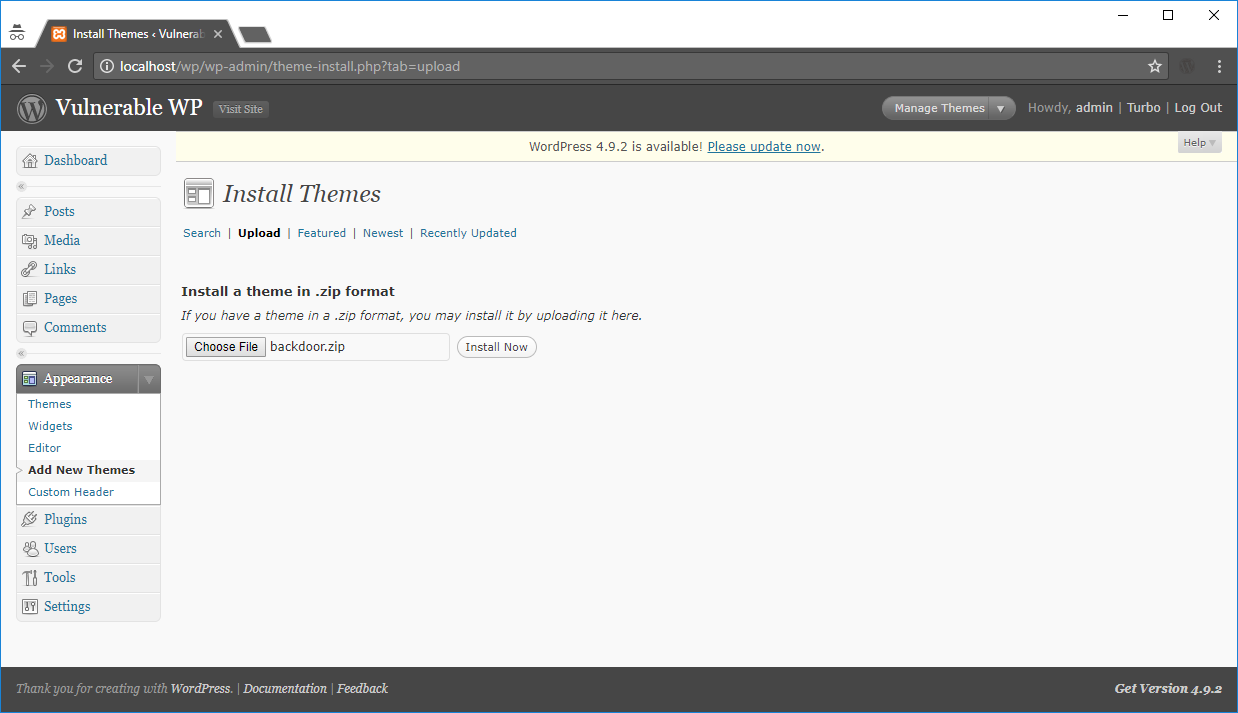
Generating a zip file containing a backdoor file

WordPress displaying “Theme installed successfully”

Accessing the path revealed during installation

Compromised!
- WordPress Security Issues & Threats
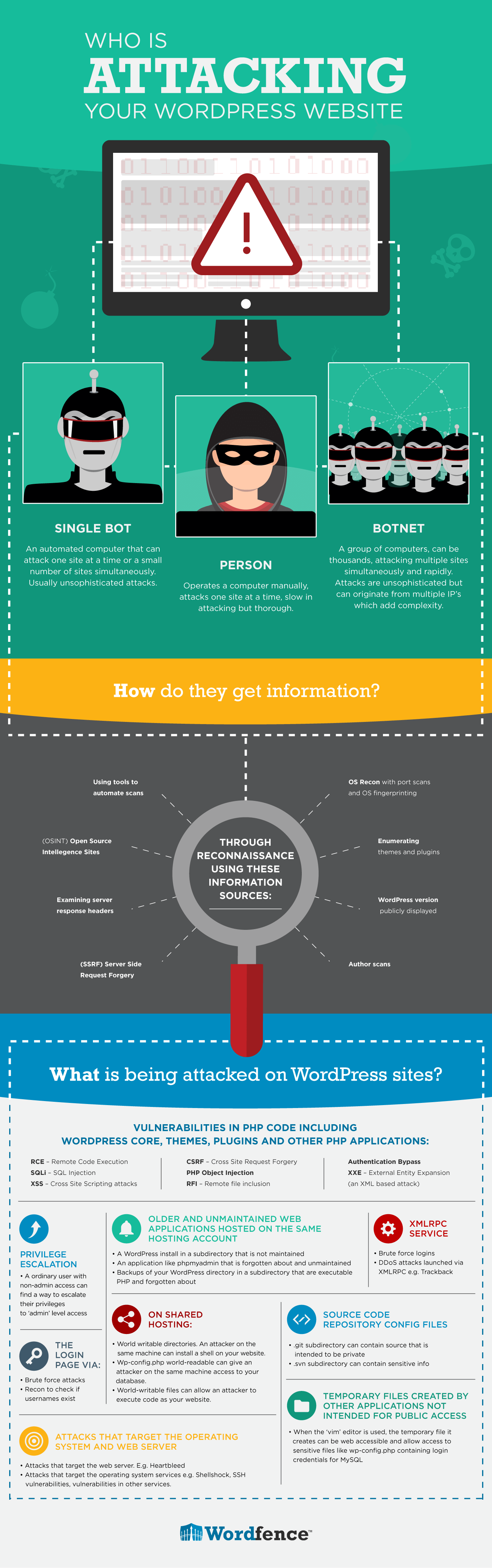
2.1 WordPress Release Archive
https://wordpress.org/download/release-archive/
2.2 WordPress Username Enumeration *


2.3 Disabling User Registration When Unnecessary

2.4 Removing readme.html and install.php

- WordPress Hardening Suggestions
3.1 Data Backups
3.2 Access Control
3.2.1 Two-Factor Authentication

- Rublon Two-Factor Authentication
- Two-Factor
- Duo Two-Factor Authentication
- Authy Two Factor Authentication
3.2.2 Passwords
3.3 Core Directories/Files
3.3.1 File Permissions


Directory: 775 (drwxr-xr-x)
Files: 644 (-rw-r–r–)
| |
Refrain from setting any file or directory to 777!
3.3.2 WP-* *
Restricting Access to the wp-admin Directory
- Use the Htpasswd Generator to create passwords for .htpasswd files.
- Transfer the generated text to the .htpasswd file.
- Place a .htaccess file in the /wp-admin/ directory with the following code:
| |

Preventing General Site Visitors from Accessing /wp-admin/admin-ajax.php
Insert the following code into the .htaccess file.
| |
Preventing General Site Visitors from Accessing WP-Includes
Add the following code to the .htaccess file.
| |
Note:
Position this code outside the # BEGIN WordPress and # END WordPress tags in the .htaccess file, as WordPress might overwrite anything within these tags.
WP-Content/Uploads
Insert the following code into the .htaccess file.
| |
WP-Config.php
Add the following code to the .htaccess file.
| |
Disabling File Editing
Add the following two lines to the end of your wp-config.php file
| |
3.4 Security Plugins
- Sucuri Security – Auditing, Malware Scanner and Security Hardening *
- Wordfence Security *
- iThemes Security *
- Loginizer *
- NinjaFirewall (WP Edition) *
- WordPress Security Guideline
- OWASP Wordpress Security Implementation Guideline *
- Hardening WordPress *
- Wordpress Security Functions for paranoid folks *
5. Checklist for Securing a WordPress Website
Download the PDF:
https://www.wordfence.com/learn/wordpress-security-checklist/
6. Testing WordPress Security and Misconfiguration
6.1 WPScan: A Black Box WordPress Vulnerability Scanner *
Executing All Enumeration Tools
| |


6.2 Nikto *
| |

References:
Hardening WordPress *
The WordPress Security Learning Center *
Top Tips to Avert WordPress Hacks *
WordPress Security News:
June 2018
Vulnerable WordPress Plugins Expose E-Commerce Websites to Hackers