This guide provides a basic illustration of hot module replacement (also known as HMR) within a Redux application. The accompanying demonstration code is accessible on GitHub. We’ve streamlined the configuration to include only the settings vital for HMR, simplifying its integration into your Redux projects.
Eager to get started? Head to this section for a five-minute setup guide to incorporate HMR into your project!
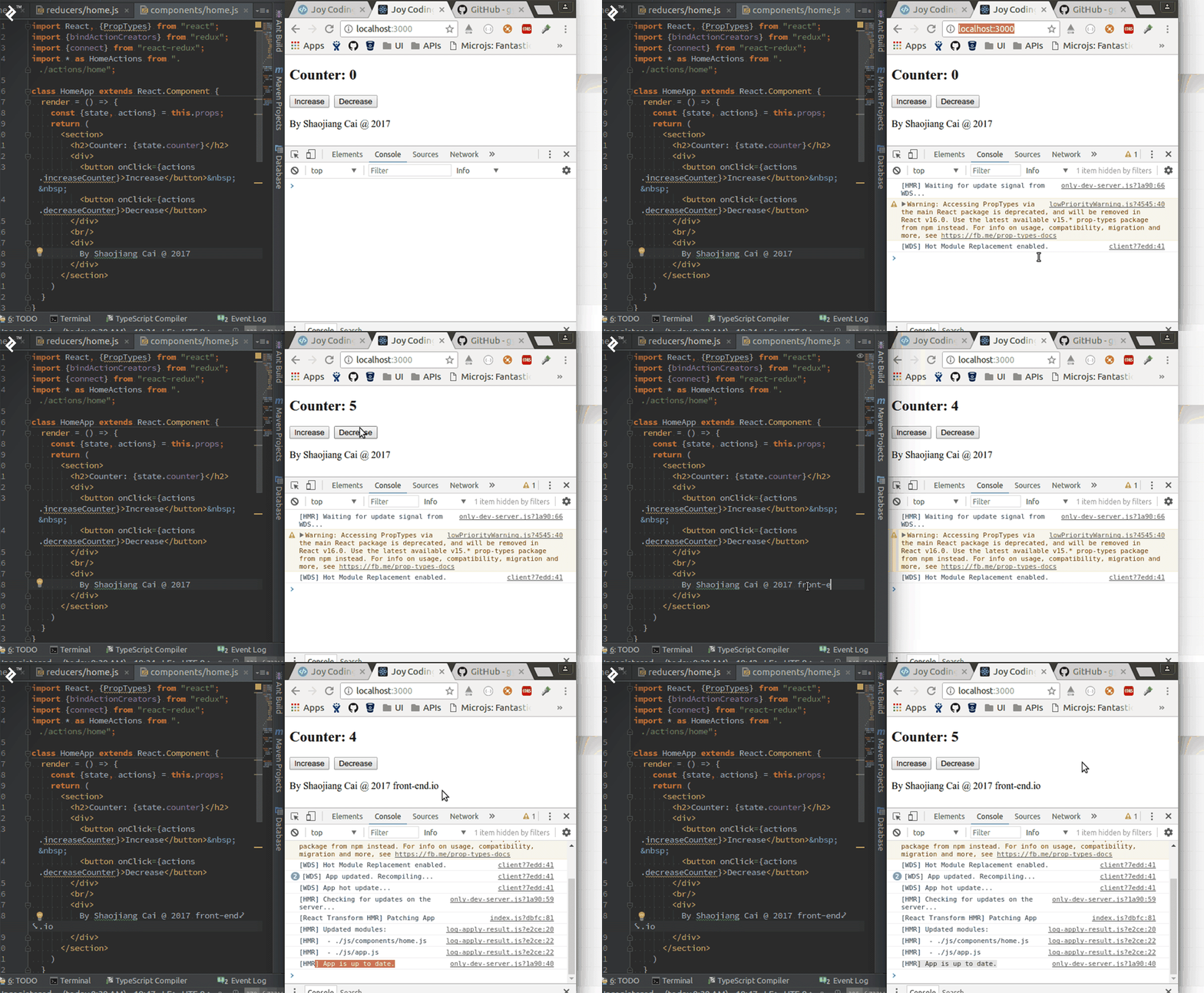
Running the Example
Dive right in! Before launching the application, make sure you have Git, Node.js, and Yarn properly installed.
| |
Now, open http://localhost:3000/ in your browser to check if everything is working as expected.
As you modify your code, hot module replacement dynamically updates the page without requiring a full browser refresh. What’s remarkable is that the Redux state persists, even as other resources are seamlessly updated.
Exploring Hot Module Replacement
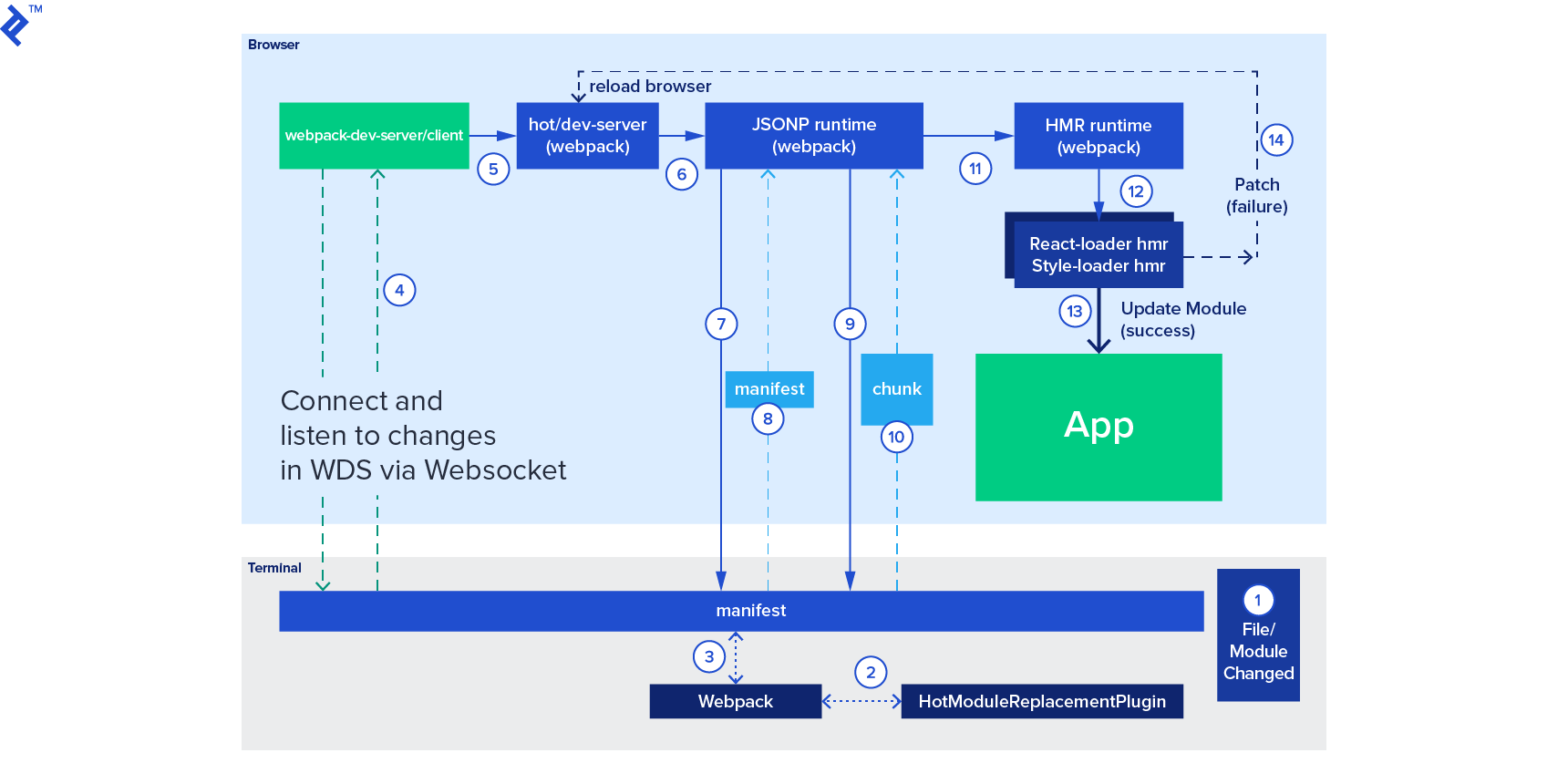
Hot module replacement stands out as one of the most powerful features of Webpack. It empowers various module types, such as JSON, CSS, and JS files, to be updated on the fly, eliminating the need for full page reloads.
Let’s delve into the inner workings:
- The application queries the HMR runtime to check for any available updates.
- The runtime retrieves the updates asynchronously and notifies the application upon completion.
- The application then instructs the runtime to implement the downloaded updates.
- The runtime applies the updates synchronously.
HMR significantly enhances productivity during Redux application development. Redux serves as a predictable state container for JavaScript apps and has gained immense popularity as a state-of-the-art framework built upon React. Redux, adhering to its first principle, acts as a unified, shared data repository, referred to in its documentation as the “Single source of truth.” The data store (essentially a plain JavaScript object modified by reducers) evolves as users interact with the application. User actions, like button clicks or data fetching, typically trigger multiple updates to the store. Debugging becomes challenging when an issue arises only under a specific state configuration.
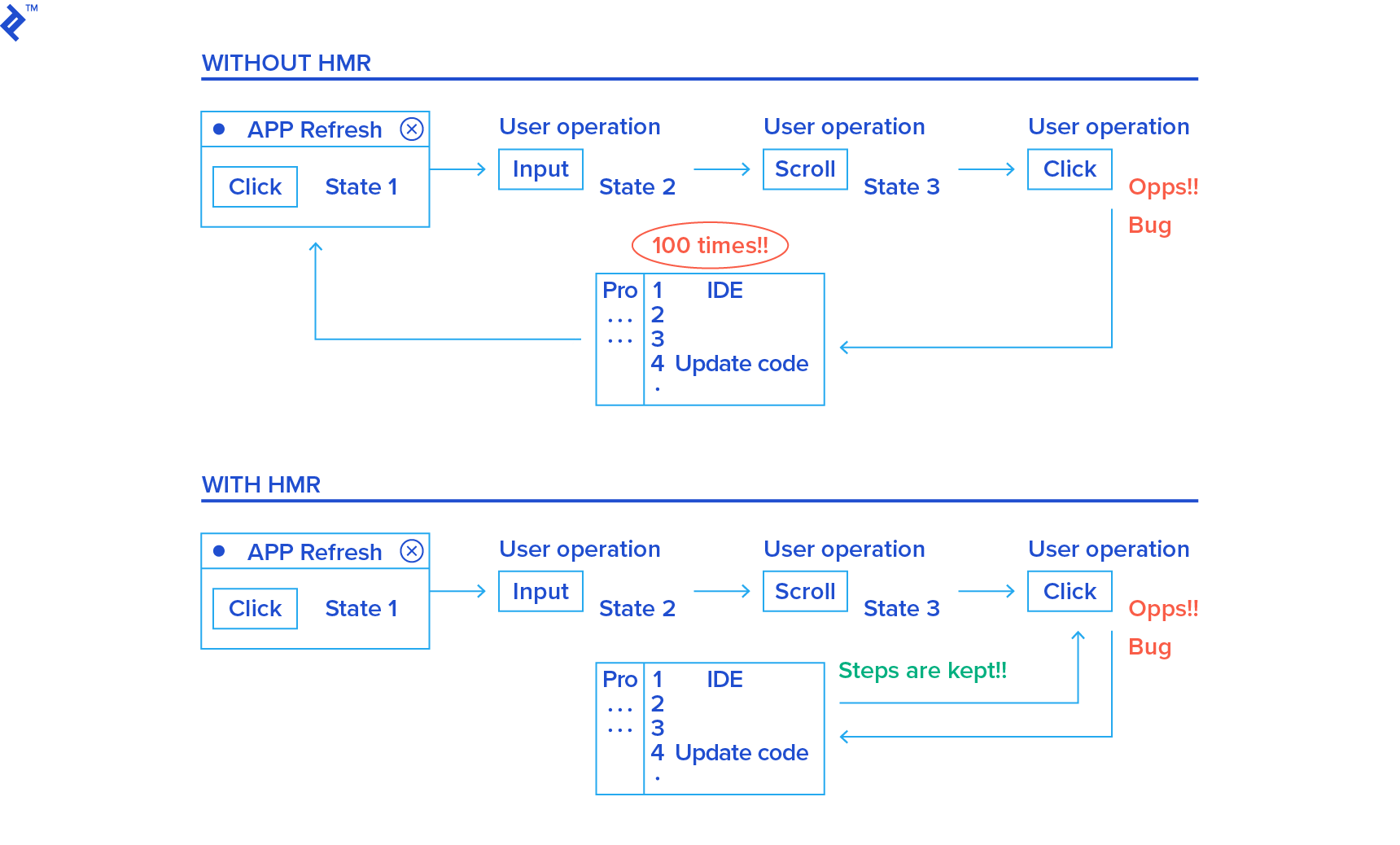
HMR allows us to update the page without resetting the global store. When working with Redux, we often need to examine the store after a sequence of operations. Imagine a bug surfacing only after adding a specific (perhaps complex) item to the store. Without HMR, we’d have to:
- Edit the code suspected to be responsible for the bug.
- Refresh the page, and add the problematic item to the store again.
- If the bug persists, repeat step 1.
This cycle could go on endlessly, especially with elusive bugs. Realistically, bugs might only manifest after even more intricate user interactions. HMR enables us to compile and apply code changes without affecting the current store’s state, eliminating the need to constantly repeat step 2 and significantly streamlining the development process.
Feature Highlights in This Example
For clarity and conciseness, this example focuses solely on demonstrating HMR capabilities. Therefore, it omits common features found in typical React applications, such as redux-logger, react-router-redux, redux-thunk, redux-devtools, and so on. We’ve also simplified the structure to include just one reducer, two actions, and a single page.
This application maintains a single counter value within the store. We have a single page named home, displaying the counter value alongside two buttons for incrementing and decrementing it.
To verify that HMR is functioning correctly, try incrementing or decrementing the counter a few times. Then, modify some code, such as changing the title from Counter to Counter in store. You should observe the following:
- The page doesn’t refresh.
- The displayed counter value remains UNCHANGED.
- The title successfully updates to Counter in store.
Setting Up HMR in Five Easy Steps
Follow these steps to enable HMR:
Essential Libraries
These libraries are crucial for HMR support:
- react-hot-loader@^4.2.0: Enables real-time compilation and updates for your React application.
- webpack-dev-server@^3.1.4: Serves your Webpack application and automatically refreshes the browser when changes occur.
ES6
If you’re using ECMAScript6 (which is highly likely these days), you’ll need additional tools for real-time ES6 compilation. Here’s a minimal ES6 config file (.babelrc):
| |
For real-time compilation, install this library:
Webpack.config.js
Configure HMR within your Webpack configuration file, webpack.config.js.
First, enable the HMR plugin within the plugins section:
| |
This plugin generates a Manifest, a JSON file enumerating updated modules, and an Update, a JSON file holding the data to be applied. It’s important to note that HMR is a feature provided by Webpack. Loaders like style-loader, which adhere to the HMR interface, receive updates through HMR and subsequently replace outdated code with the latest version.
If you’re using webpack-dev-server, activate the “hot” flag within the devServer section:
| |
Hot Reloading Redux Reducers
Since Redux version 2.0.0, reducers aren’t hot reloaded by default to prevent potential issues. If your Redux state resets to its initial values after a hot update, enable hot reloading for reducers:
| |
Advanced Settings
For more fine-grained control over HMR, consult the HMR API.
Run
Finally, launch your application using:
| |
Troubleshooting
HMR Not Applying Changes
Occasionally, HMR might fail silently. After saving code changes, the page might not update at all. This usually happens when your system restricts the number of file changes it can monitor.
On Ubuntu, check the current value of user.max_inotify_watches with: sysctl -a | grep inotify. Increase this value by running: sudo sysctl fs.inotify.max_user_watches=524288. Alternatively, add the line fs.inotify.max_user_watches=524288 to /etc/sysctl.conf (use sudo vim /etc/sysctl.conf) and apply the change with: sudo sysctl -p /etc/sysctl.conf.