Ensuring apps run smoothly is crucial for developers. Research by Akamai https://web.archive.org/web/20220628123606/https://www.akamai.com/site/en/documents/white-paper/how-web-and-mobile-performance-optimize-conversion-and-user-experience-white-paper.pdf reveals that a one-second delay in loading times can decrease conversion rates by a significant 26%. Utilizing React memoization is crucial for achieving a faster user experience, even if it slightly increases memory usage.
Memoization, a programming technique where calculation outcomes are stored and linked to their input, allows for faster retrieval when the same function is called again. This technique forms a fundamental aspect of React’s architecture.
React developers can choose from three types of memoization hooks based on the parts of their applications they aim to optimize. Let’s explore memoization, these React hook types, and their ideal use cases.
A Closer Look at Memoization in React
Memoization, a time-tested optimization technique, is often employed at the function level in software and the instruction level in hardware. Although it benefits repetitive function calls, memoization has limitations and should be used judiciously due to its memory usage for storing results. Applying memoization to a simple function called numerous times with varying arguments proves counterproductive. It’s most effective for functions with computationally intensive tasks. Memoization’s nature restricts its application to pure functions, which are entirely deterministic and lack side effects.
A Generic Memoization Algorithm

Memoization always necessitates at least one cache, typically a JavaScript object in JavaScript. Other programming languages use similar methods, storing results as key-value pairs. Memoizing a function involves creating a cache object and then populating this cache with the various results as key-value pairs.
The unique parameter set of each function determines a key within our cache. We execute the function and store its result (value) along with the corresponding key. When a function takes multiple input parameters, its key is constructed by concatenating its arguments, separated by dashes. This storage approach is straightforward and enables swift retrieval of cached values.
Let’s illustrate our generic memoization algorithm in JavaScript using a function that memoizes any function provided as input:
| |
The elegance of this function lies in its simplicity when applied to increasingly complex calculations within our solution.
React Functions for Memoization
React applications usually boast highly responsive user interfaces with rapid rendering. However, performance issues can emerge as programs grow. Just as with general function memoization, we can leverage memoization in React to achieve faster component re-rendering. React provides three primary memoization functions and hooks: memo, useCallback, and useMemo.
React.memo
Wrapping a pure component with memo allows us to memoize it. This function memoizes the component according to its props; React will store the wrapped component’s DOM tree in memory. When the same props are encountered again, React returns this stored result instead of re-rendering the component.
It’s essential to note that the comparison between previous and current props is shallow, as demonstrated in React’s source code. This shallow comparison might not accurately trigger memoized result retrieval if dependencies beyond these props need consideration. memo is best suited for cases where an update in the parent component triggers unnecessary re-renders in child components.
An example clarifies React’s memo. Suppose we have a users array of 250 elements, and we want to enable user searches by name. We first render each User on our application page, filtering them based on their name. We then create a component containing a text input for the filter text. Note: We’ll focus on the memoization advantages without fully implementing the name filter functionality.
Here’s our interface (note: the name and address information is fictional):

Our implementation comprises three primary components:
NameInput: A function responsible for receiving filter informationUser: A component that handles rendering user detailsApp: The main component containing our overall logic
NameInput, a functional component, accepts an input state, name, and an update function, handleNameChange. Note: We don’t directly apply memoization to this function because memo operates on components; we’ll employ a different memoization approach later for functions.
| |
Similarly, User is a functional component. We render the user’s name, address, and image here. A string is also logged to the console whenever React renders this component.
| |
For simplicity, we’ll store user data in a basic JavaScript file, ./data/users.js:
| |
Now, let’s set up our states and invoke these components from App:
| |
We’ve also applied simple styling to our app, defined in styles.css. Our sample application, as it stands, is live and can be viewed in our sandbox.
Our App component initializes a state for our input. Each update to this state causes the App component to re-render with the new state value, prompting all child components to re-render as well. Consequently, React re-renders the NameInput component and all 250 User components. The console will display 250 outputs for every character added or removed from the text field. This signifies excessive rendering. The input field and its state are independent of the User child component renders and shouldn’t trigger such computational overhead.
React’s memo can prevent this unnecessary rendering. We simply import the memo function and wrap our User component with it before exporting User:
| |
Re-running our application, we observe no re-renders for the User component in the console. Each component renders only once. This behavior, when visualized on a graph, resembles:
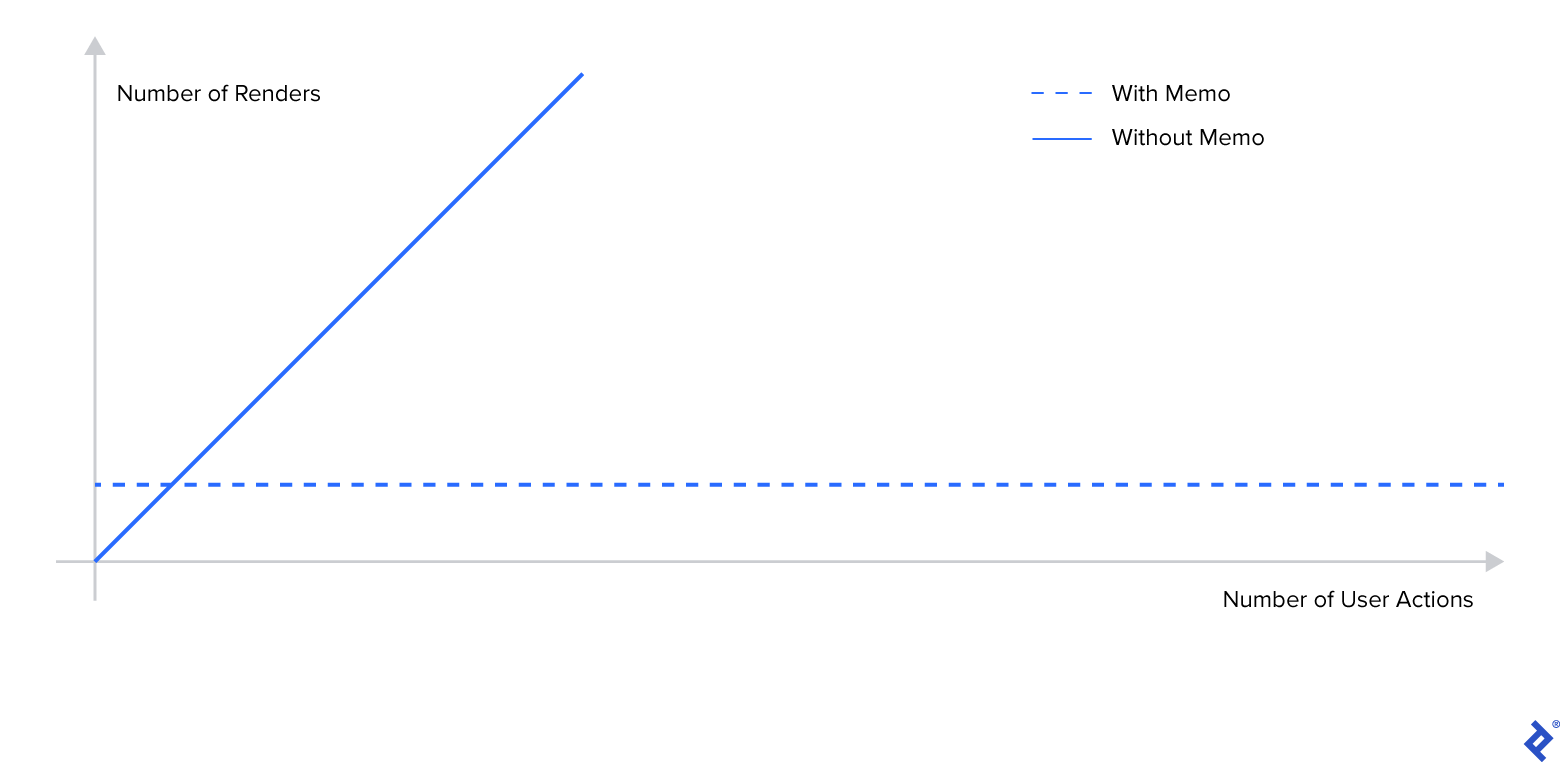
Renders vs. Actions With and Without Memoization
Furthermore, we can compare the rendering time in milliseconds for our application with and without using memo.

These times show a significant difference, which would only become more pronounced as the number of child components increases.
React.useCallback
As mentioned, component memoization relies on props remaining unchanged. React development often involves using JavaScript function references, which can change between component renders. Including a function as a prop in our child component while its reference changes would disrupt our memoization. React’s useCallback hook ensures that our function props remain consistent.
The useCallback hook is most effective when we need to pass a callback function to a moderately to highly complex component where we aim to avoid re-renders.
Continuing our example, let’s introduce a function that updates the filter field to display a specific component’s name when a user clicks on a User child component. We achieve this by passing the handleNameChange function to our User component. The child component executes this function in response to a click event.
We update App.js by adding handleNameChange as a prop to the User component:
| |
Next, we listen for the click event and update our filter field accordingly:
| |
Upon run this code, we notice that our memoization is no longer effective. Every input change triggers re-rendering of all child components because the handleNameChange prop reference keeps changing. To rectify child memoization, let’s pass the function through a useCallback hook.
useCallback takes our function as its first argument and a dependency list as its second argument. This hook stores the handleNameChange instance in memory, creating a new instance only when any dependencies change. In our case, the function has no dependencies, ensuring that our function reference never updates:
| |
Now, our memoization is back in action.
React.useMemo
In React, we can also employ memoization to handle expensive operations and calculations within a component using useMemo. These calculations are usually performed on a set of variables called dependencies. useMemo accepts two arguments:
- The function responsible for calculating and returning a value
- The dependency array required to compute that value
The useMemo hook invokes our function to calculate a result only when any of the specified dependencies change. If these dependency values remain constant, React will utilize its memoized return value instead of recomputing the function.
Let’s incorporate an expensive calculation into our example by computing a hash on each user’s address before rendering them:
| |
Currently, the expensive computation for newUsers occurs on every render. Each character entered into our filter field forces React to recalculate this hash value. We can introduce the useMemo hook to achieve memoization for this calculation.
The only dependency in this case is our original users array. Since users is a local array, we don’t need to explicitly pass it because React recognizes it as constant:
| |
Once again, memoization works to our advantage, sparing us from redundant hash calculations.
To recap memoization and its appropriate usage, let’s revisit the three hooks. We use:
memofor memoizing a component by shallowly comparing its properties to determine if rendering is necessary.useCallbackto pass a callback function to a component where we want to prevent unnecessary re-renders.useMemofor handling expensive operations within a function based on a defined set of dependencies.
Should We Memoize Everything in React?
Memoization isn’t without its costs. Implementing memoization in an app introduces three primary overheads:
- Increased memory usage as React stores all memoized components and values in memory.
- Excessive memoization can lead to memory management issues for our app.
memo’s memory overhead is minimal because React stores previous renders for comparison with subsequent renders. Additionally, these comparisons are shallow, making them inexpensive. Companies like Coinbase and memoize every component prioritizememodue to its minimal cost.
- Higher computation overhead as React compares previous values with current values.
- While this overhead is typically lower than the combined cost of extra renders or computations, memoization might prove costlier than beneficial if numerous comparisons are performed for a small component.
- Slightly increased code complexity due to the additional memoization boilerplate, potentially affecting code readability.
- However, many developers prioritize user experience when choosing between performance and readability.
Memoization is a potent tool that should be applied strategically during the optimization phase of application development. Indiscriminate or excessive memoization may not yield worthwhile benefits. A comprehensive understanding of memoization and React hooks will empower you to maximize the performance of your next web application.
The Toptal Engineering Blog expresses gratitude to Tiberiu Lepadatu for reviewing the code samples presented in this article.