
In the ever-evolving world of online advertising, finding ways to make ads stand out is crucial. While many advertisers on other platforms have embraced ad extensions to boost their visibility and click-through rates, a surprisingly large number haven’t yet capitalized on the power of Bing Ads extensions. Many are unaware of the variety of extensions Bing offers, some of which are unique to the platform. The good news is that these extensions are free to implement and can significantly enhance ad performance.
Ready to take your Bing ads to the next level? Let’s explore the range of Bing Ads extensions available:
SiteLink Extensions
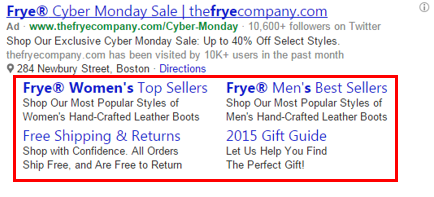
What are they?
SiteLink extensions allow advertisers to incorporate additional links to various pages on their website beneath their ads. To make these links even more enticing, advertisers can enhance them with two lines of descriptive text.
Who should be using them?
SiteLink extensions are beneficial for almost any advertiser. By adding SiteLinks to an ad, its visibility on the search results page increases significantly, often doubling or even tripling its size. This increased prominence can lead to a substantial boost in click-through rates, with some advertisers seeing up to a 30% increase.
The effectiveness of SiteLinks hinges on providing links to genuinely useful and relevant pages. Irrelevant links can distract and deter potential customers. When setting up SiteLinks, prioritize the searcher’s intent and provide links that enhance their experience. For a step-by-step guide on enabling Sitelink Extensions in Bing Ads, click here.
Call Extensions
What are they?
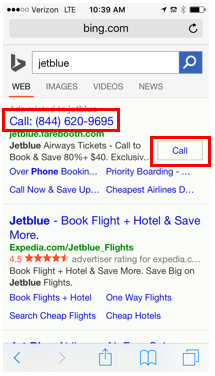
Call extensions provide a direct line of communication with potential customers by prominently displaying a phone number and a clickable call button within the ad itself. Bing offers two types of call extensions:
- Display on ALL devices: This option uses a dynamic forwarding number, enabling call tracking and providing valuable data such as call duration and type for all calls generated through the ad.
- Display on Smartphones only: This option displays your business phone number in a clickable format, allowing for click tracking but without detailed call information.
Who should be using them?
For many businesses, phone calls are far more likely to convert into sales than website visits because they facilitate a more direct and personal interaction. By receiving a phone call, businesses can understand the caller’s needs in real time and offer tailored solutions, fostering a stronger customer relationship from the get-go. Studies show that these calls can be three times more valuable than simple website clicks.
Any business that relies on phone communication with customers should leverage call extensions, especially when targeting mobile users. Visit here for detailed instructions on adding a clickable phone number to your Bing Ads.
Location Extensions
What are they?
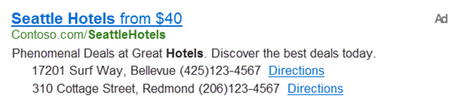
Location Extensions provide searchers with essential information about a business’s physical location, including the address, phone number, and a convenient link to directions. Clicking on the link directs users to Bing Maps with the advertiser’s address pre-populated.
Who should be using them?
Location extensions are essential for businesses aiming to attract customers to their physical stores. These extensions not only drive foot traffic but also enhance the ad’s visibility on search engine results pages (SERPs), leading to higher click-through rates. Bing reports a 7% to 10% increase in click-through rates for ads using location extensions.
Businesses with multiple locations can set up individual location extensions for each store. Bing’s system intelligently displays links for the two closest stores based on the user’s location.
Image Extensions

What are they?
Image extensions allow advertisers to complement their ad copy with visually appealing images. Up to six unique images can be uploaded per campaign or ad group, each with its own specific URL. This feature enables directing users to different landing pages based on their interests. Currently, image extensions are displayed on desktop and tablet devices only. While ads typically show one image extension, Bing is actively testing various formats, including multi-image carousels and combinations of images with descriptive text.
Who should be using them?
While product ads might be more effective for product-based businesses due to their highly targeted nature, image extensions offer a valuable alternative, especially when product ads are not shown. Service-based businesses such as hotels, spas, and restaurants can utilize image extensions to showcase their offerings or highlight customer experiences.
The inclusion of images in search ads is highly impactful, making ads more visually appealing and conveying more information than text alone. When the displayed image aligns with the searcher’s needs, click-through rates are likely to increase. Conversely, irrelevant images can deter unqualified clicks, leading to a more efficient use of advertising budget. Overall, image extensions have the potential to positively impact your return on investment.
App Extensions
What are they?
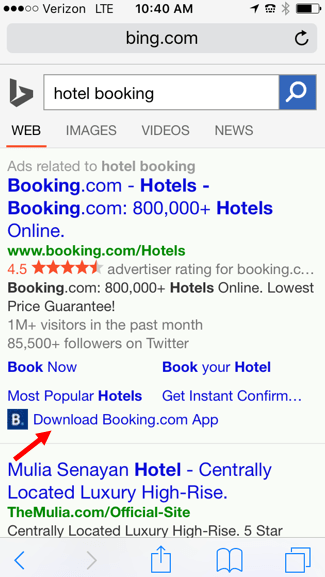
App extensions provide a direct and streamlined way to promote your business app. These extensions include a link within the ad text that encourages users to install the app. Upon clicking, Bing automatically detects the user’s device and operating system, redirecting them to the appropriate app store.
Who should be using them?
If your business has invested in developing a mobile app, promoting it through app extensions is a no-brainer. With Think With Google indicating that nearly a quarter of app users discover new apps through search, this presents a valuable opportunity to drive downloads and increase app usage. Additionally, mobile apps often offer a more sophisticated and engaging user experience compared to mobile websites, potentially leading to higher conversion rates. If your app is performing well, don’t miss out on promoting it through app extensions.
Action Link Extensions (Coming Soon!)
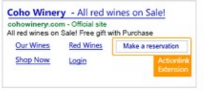
Ok, I know this is blurry, but there’s limited examples in the wild and this is the only one Bing had to offer!
What are they?
Action link extensions empower advertisers to incorporate a compelling call to action within their ads, leading users to a specific landing page. Bing offers a pre-approved list of action phrases like “Reserve,” “Buy Now,” “Sign Up,” and “Contact Us,” while also allowing for the submission of unique calls to action for review. Since this feature is currently in a pilot phase, advertisers need to reach out to their Bing Ads representatives for access.
Who should be using them?
While action link extensions seem particularly well-suited for e-commerce businesses, their versatility allows businesses across various industries to benefit. The prominent placement and clear directive of action links encourage users to take the desired action. Given their ability to highlight calls to action, action link extensions are expected to drive higher click-through and conversion rates.
This new feature closely resembles Facebook’s CTA buttons, which have shown promising results for many advertisers, suggesting similar potential for success on Bing.
*Note: This extension is currently in pilot and Bing is no longer recruiting testers.
Review Extensions (Coming Soon!)
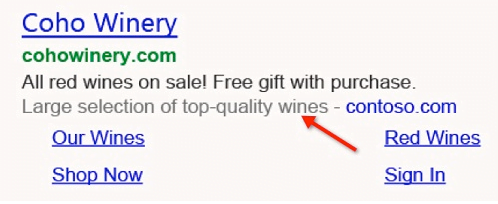
What are they?
Review extensions provide a powerful way to build credibility and trust by showcasing positive third-party endorsements directly beneath your ad. These reviews must originate from reputable sources and reflect the overall business, not individual customer feedback.
Who should be using them?
For businesses, especially newer or smaller ones still establishing brand recognition, review extensions offer a valuable opportunity to leverage social proof and increase user confidence. Displaying positive endorsements from trusted sources can significantly influence user perception and encourage engagement, even if they are unfamiliar with the brand.
*Note: This extension is currently in pilot and Bing is no longer recruiting testers.
Callout Extensions (Coming Soon!)
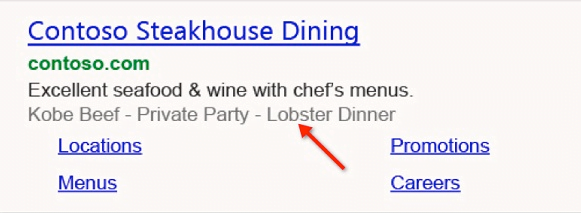
What are they?
Callout extensions provide advertisers with additional space to highlight up to four key selling points or unique features of their products or services. Unlike clickable SiteLinks, callouts are purely textual and serve to enhance the ad copy.
Who should be using them?
Think of callout extensions as a way to add valuable text to your ad copy. Regardless of the industry, callout extensions provide an opportunity to highlight what sets your business apart. Simply identify your unique selling propositions and include them at the account, campaign, or ad group level. Similar to AdWords’ callout extensions, which have demonstrated positive results, Bing’s callout extensions are expected to increase click-through rates.
*Note: This extension is currently in pilot and Bing is no longer recruiting testers.
Video Extensions (Coming Soon!)
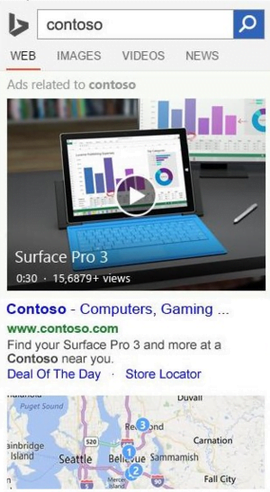
What are they?
Video extensions provide a highly engaging way to connect with potential customers by allowing advertisers to embed 15 to 30-second videos within their text ads. As a limited-release pilot program, access to this feature requires collaboration with Bing Ads representatives.
Bing’s introduction of video extensions is a testament to the platform’s innovative approach, especially considering the projected growth of video content consumption in the coming years. Cisco predicts predicts that consumer video traffic will constitute 80% of all consumer internet traffic by 2019.
Who should be using them?
Video extensions offer benefits for businesses across various industries, even if users don’t directly interact with the video. By significantly increasing the ad’s size on the search results page, videos enhance visibility and attract attention. Additionally, the dynamic nature of video content makes ads more appealing, especially for businesses promoting visually captivating products or experiences like luxury goods or travel packages.
The true power of video extensions lies in their ability to convey richer and more compelling information compared to text-only ads. Forrester Research suggests that a 30-second video is equivalent to 900,000 words. For businesses with complex offerings, video extensions can be a game-changer, providing a more engaging and informative way to communicate value to potential customers.
Searchers who watch the video before clicking through to the website are likely to be more informed and ready to convert, leading to higher conversion rates as reported by Bing. If you have video content that aligns with Bing Ads’ guidelines, experimenting with video extensions is highly recommended. For those without existing video assets, monitoring the performance data of early adopters before investing in video production might be a prudent approach.
*Note: This extension is currently in pilot and Bing is no longer recruiting testers.
Choosing Your Ad Extensions
With such a wide range of extensions available, determining which ones to implement might seem daunting. Paul Apodaca, a principal Product Manager at Microsoft, encourages advertisers to use as many relevant extensions as possible. He emphasizes that Bing personalizes the displayed extensions based on user context and behavior.
The key takeaway is to prioritize extensions that genuinely enhance the user experience. Once the extensions have been running for a while, analyzing the performance data will reveal which ones resonate most with the target audience.
This blog post originally appeared on the Bing Ads Blog__. It has been republished with permission.