With the “late-August” deadline for switching from Product Listing Ads (PLAs) to Shopping Campaigns now passed, online retailers are rushing to adjust to this new campaign format. The AdWords team worked hard to inform account managers about these changes. They published numerous articles on the AdWords Insights blog, sent emails, displayed alert messages within the platform, and hosted regular webinars to guide users through the transition. They even called users still using the old PLA format, explaining the new campaign type and offering help with the switch.
This significant push created a buzz around Shopping Campaigns. Now that e-commerce advertisers are highly focused on them, competition is expected to increase.
So, how can you differentiate your ads? The answer is simple: Shopping Campaign Ad Extensions! Extensions are a no-brainer; they’re free and improve click-through rates. While extensions are standard for traditional Search Campaigns, few advertisers utilize them with Shopping Campaigns. Gain an advantage before everyone realizes their impact!
Not sure which extensions are right for you? Here’s a concise guide to help you choose the most suitable Shopping Campaign Ad Extensions for your needs!
Google Merchant Promotions
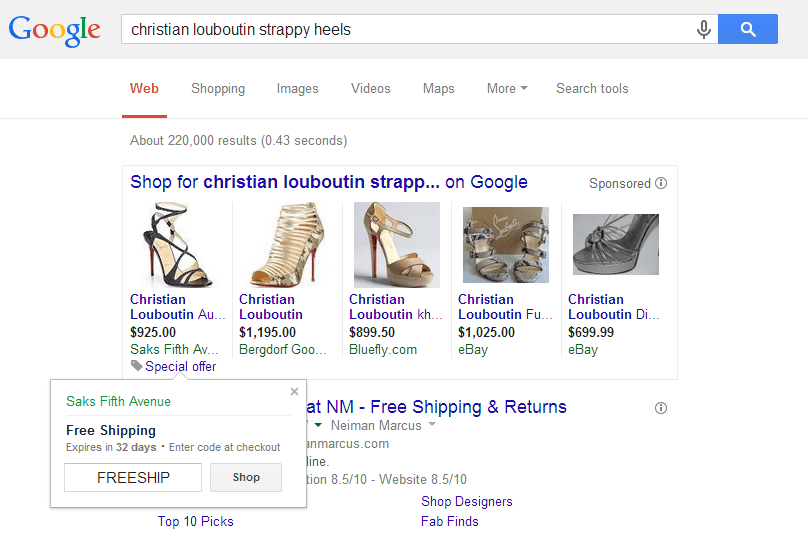
What are they?
Google Merchant Promotions allow e-commerce advertisers to showcase special offers alongside their Shopping Ads. These extensions help differentiate their products from competitors and encourage potential customers to visit their websites. We’ve observed that these extensions boost click-through and conversion rates, while significantly reducing cost-per-acquisition (CPA).
Who should be using them?
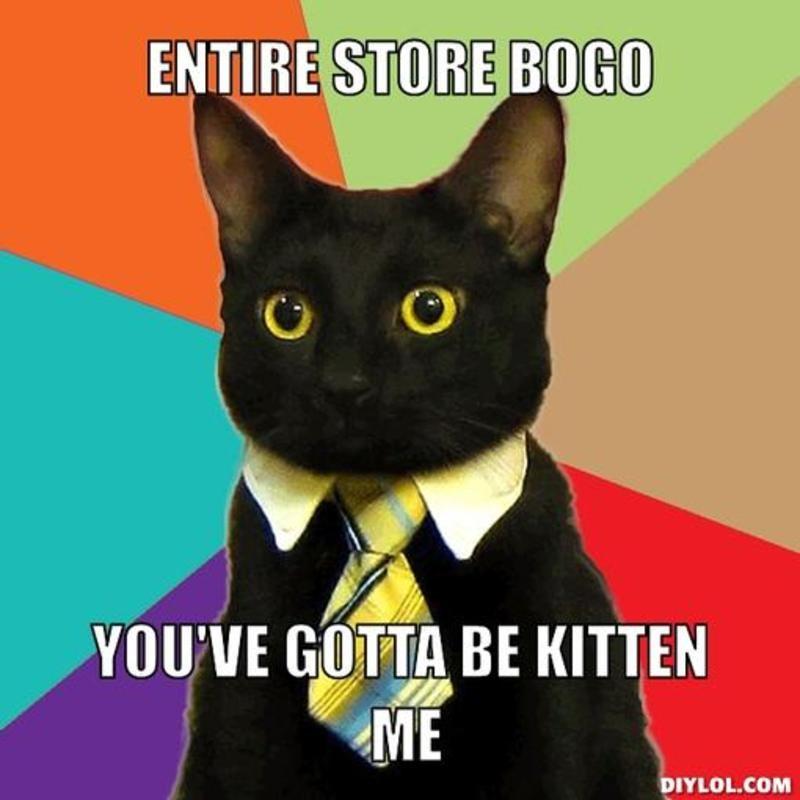
If you offer online promotions—from simple free shipping to more complex deals like buy-one-get-one-free (BOGO)—you should utilize these extensions. Currently in beta and available only to US-based advertisers, international account managers should watch for the global launch. To get started, follow our Google Merchant Promotions Guide.
Local Inventory Ads
What are they?
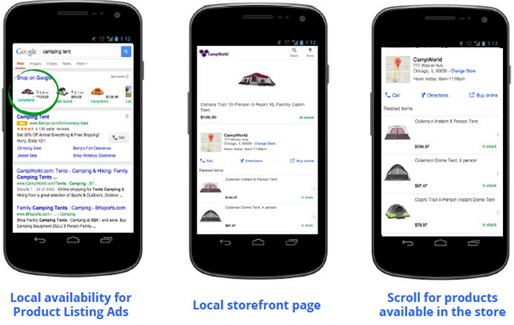
Local Inventory Ads (formerly Local Product Listing Ads) enable retailers to display real-time local inventory details, like in-store availability and pricing, alongside their Shopping Campaigns ads. As shown in the example above, the ad not only features the tent the searcher is looking for but also includes its price and distance to the nearest store. Clicking the ad directs the searcher to the local storefront page with store details, additional product information, and related products offered by the retailer.
With the rise of tablets and mobile devices, consumer behavior has changed. Shoppers no longer visit multiple stores to check product availability and compare prices. Instead, they conduct online searches before and during shopping trips. Local Inventory Ads effectively bridge this gap by displaying in-store availability, driving foot traffic to physical stores, and ensuring shoppers arrive ready to buy (potentially even more, thanks to the “related products” list).
Who should be using them?
Currently, this program is limited to US-based advertisers with online product feeds, active Google My Business accounts, and physical stores in the US. These stores must be open to the public and offer physical goods without requiring additional service purchases. If you qualify, contact your AdWords representative to confirm eligibility and adjust your interface to support a more comprehensive feed structure. If not, don’t worry! Google plans to expand this program in the future.
For those interested in Local Inventory Ads, be aware of the demanding maintenance process. For these ads to function correctly, retailers must diligently update their feed data to reflect store pricing and inventory. Failure to do so could backfire, leading to frustrated customers!
PLA Product Ratings
What are they?
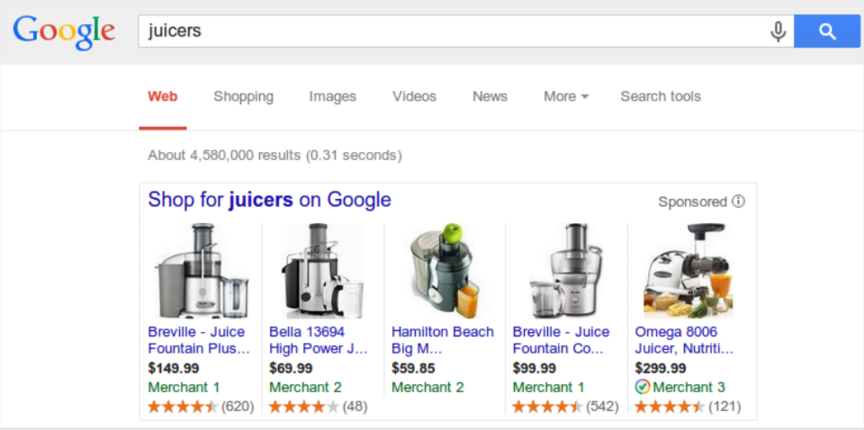
This new extension gathers product reviews from various websites and presents their “star ratings” (on a 5-star scale) below your ads. This is an excellent opportunity to stand out from competitors, showcase positive customer feedback, and build trust as a reputable retailer (assuming you have numerous reviews).
Who should be using them?
If you have plenty of satisfied customers willing to leave positive reviews, this extension is for you! Currently available only to merchants targeting US consumers, Google plans to expand its availability internationally in the coming months. To utilize this, you’ll need to share your product review content directly through Google (using an XML formatted feed) or a pre-approved third-party aggregator (like bazaarvoice, reevoo, shopperapproved, feefo, yotpo, and many others). To participate, express your interest to Google by completing this form.
Note: Your ratings might already be appearing with your ads! Until October 2014, merchants targeting the US market with at least 3 online reviews are automatically enrolled in this program. If this applies to you but you prefer not to display your ratings (perhaps they’re not as high as you’d like), you can opt out. To do so, simply complete this form.
How do Shopping Campaign extensions interact with each other?
Similar to standard search ads, Google determines which extensions appear alongside your Shopping Campaigns’ ads and how often. According to Melissa Rowland at RKG, Local Inventory Ads and Merchant Promotions currently take precedence over Product Ratings extensions. However, this could change based on future performance. As always, Google is constantly experimenting with ad display methods.

With the official launch of Shopping Campaigns, Google is likely developing new features to make them even more attractive to searchers. It’s only a matter of time before we see even more extension variations. Stay tuned!