Microsoft’s recent embrace of open source and interoperability (in case you missed it, take a look at the 2012 spin-off Microsoft Open Technologies, which was revamped in 2015) made it clear that alternatives to their flagship products, like Visual Studio, were only a matter of time.
Enter Project Rider. And no, it’s not some cool dude on a motorcycle like in Mad Max (my initial thought), but the codename for IDE powerhouse JetBrains’ answer to Visual Studio. This new offering is also a response to numerous requests from the developer community. JetBrains is no longer content with just their ReSharper plugin for VS; they’ve upped their game.
Hadi Hariri, Jetbrains’ Developer Advocacy Lead, unveiled the in-development C# and Visual Basic .NET IDE in mid-January at NDC London, amidst playful jabs at Jar Jar Binks and Javascript - you can catch his engaging presentation on JetBrains blog.
Here’s the rundown on Project Rider, the latest addition to the IntelliJ platform family: standalone, cross-platform, and ReSharper powered.

A True Competitor Emerges
Visual Studio currently holds a monopoly as the sole viable IDE for .NET and C#, which, as we know, necessitates Windows. This situation compels OSX and Linux users to resort to virtual machines running Visual Studio for their development work.
The arrival of a genuine alternative injects healthy competition, pushing Microsoft to continuously improve Visual Studio while Project Rider strives to attract customers.
“But Kate, can anyone really rival the creators of C#?”
If there’s a company up to the task, it’s JetBrains. Their IntelliJ platform boasts a 16-year track record, while ReSharper, their .NET extension for Visual Studio, has been around for a decade. Their impressive portfolio of popular and successful IDEs (and corresponding plugins) speaks volumes about their expertise.
Not Here to Replace ReSharper
Project Rider leverages JetBrains’ .NET extension for Visual Studio behind the scenes, so it’s not intended to replace ReSharper. Instead, think of it as a mutually beneficial companion. Enhancements to ReSharper now carry double the impact, improving both the .NET extension (and by extension, the experience for Visual Studio users – talk about a complex relationship) and Project Rider.
“But Kate, ReSharper is slow.”
My mentor, Charles Gibson, voiced this concern when I brought up Project Rider, and it’s a sentiment I’ve encountered elsewhere. Fortunately, I had the opportunity to discuss this directly with Hadi Hariri, the presenter at NDC London.
Good news! He assured me, “We’re laser-focused on improving performance with each release, and we frequently see positive results in both our internal testing and customer feedback.”

Hadi also highlighted that having their own platform (which, crucially, doesn’t carry the weight of Roslyn) gives JetBrains greater control over factors that could hinder ReSharper’s speed, resulting in a situation where, “We’re already likely faster than VS in a number of areas.”
Liberation from OS Constraints
The advantages here are self-evident; developers, whether they’re Mac devotees, Linux enthusiasts, or Windows…users (what’s a playfully teasing yet polite term for those folks?), are famously opinionated about their preferred operating systems.
Sure, there might be some expected hiccups in achieving flawless performance across the multitude of Linux distributions, but it’s still a significant improvement over firing up a VM.
Having a cross-platform IDE is practically a fundamental right these days. As Hadi aptly put it, “Perhaps the most exciting aspect is no longer needing to rely on a VM for C# development, and having access to everything I valued in ReSharper on a Mac.”
Yes, cross-platform choices already exist, like Visual Studio Code and MonoDevelop, but the former feels like a lightweight afterthought from Microsoft, and the latter is rather niche (think Unity debugging).
Your One-Stop Shop for .NET Projects
Whatever your preferred .NET flavor, Project Rider has you covered. It handles projects in Mono, the .NET framework, and DNX, with debugging support spanning all of the above and, eventually, CoreCLR.
…except for visual designers
However, Project Rider won’t offer certain visual designers found in Visual Studio, such as XAML, Web Forms designer, and Entity Framework Designer. Hadi Hariri confirmed that there are currently no plans to include them. But hey, there’s always the option to outsource.
Inheriting IntelliJ’s Strengths
Being a JetBrains creation, Project Rider will inherit all the intelligence and functionality of the IntelliJ platform (in this case, courtesy of ReSharper). An entire article could be dedicated to those advantages alone: effortless navigation through code and file structure, code cleanup, intelligent auto-completion, code smell detection and resolution, safe and reliable refactoring, and seamless integration with build tools, version control, testing, debugging, and the list goes on. Decades of industry experience truly shine through.
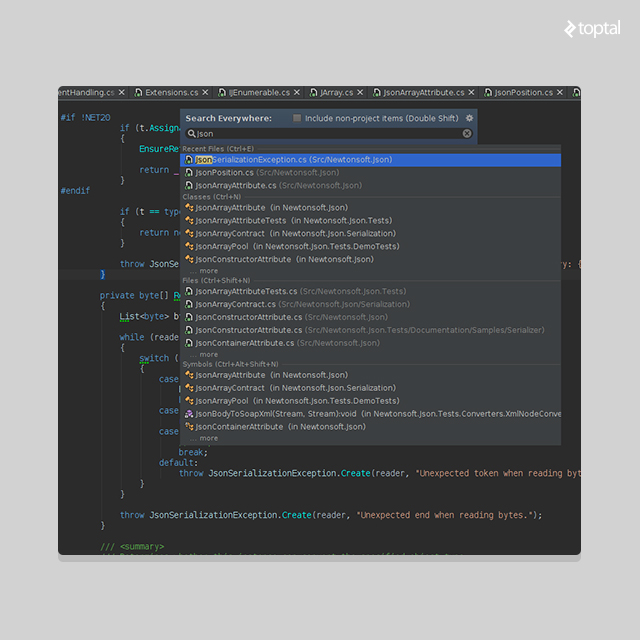
Tapping into IntelliJ Plugins
As JetBrain’s latest progeny, it will also support the existing library of ~1,000 downloadable IntelliJ IDEA plugins. VIM enthusiasts, rejoice! (And before you scoff, IdeaVim currently ranks as the seventh most downloaded IDEA plugin.)
A Licensed Offering
While somewhat ironic considering Project Rider owes its existence to Microsoft’s open-source shift, it’s understandable that JetBrains intends to adopt a licensing fee model.
Specific pricing remains under wraps, but based on JetBrains’ current pricing strategies for comparable products (CLion personal license at $89/yr) and acknowledging the challenges of convincing users to switch or requiring them to use both (quoting their Project Rider blog post: “We will take into account the many usage scenarios that might occur when establishing pricing, such as someone wanting to use both tools, etc.”), we can anticipate a price point competitive with the $539/year individual license for Visual Studios.
Built with an Open Source Language
The front end is developed in Kotlin (with the backend in C# via ReSharper). For those unfamiliar with Kotlin (myself included until recently), let me shed some light: Kotlin is a language conceived and developed by JetBrains as a replacement for Java, born out of dissatisfaction with the limitations of existing languages. Kotlin development commenced in 2010, was announced in 2011, and saw its release as open source under the Apache 2 license in 2012. It boasts full interoperability with Java and versatility for front-end, server-side, or Android applications.
Now that you grasp the geeky coolness of Kotlin, let me reiterate: The front end is written in Kotlin! Even if the product itself is licensed, at least the underlying language (and the IntelliJ platform) is open source. Pretty neat, right?

Project Rider Scheduled for Fall 2016 Release
Project Rider is slated for release in fall 2016, following both private and public Early Access Programs. However, it’s worth noting that the EAP outcomes could potentially lead to delays (as they should, if necessary). Eager to test out early builds? sign up!
Overall, I’m quite excited about JetBrains’ foray into the previously unchallenged realm of C# IDEs, if not solely for the benefits that competition brings. While I couldn’t pry any hints about the official name from Hadi Hariri, I’m personally hoping for “MadSharp,” playing off my initial mental image evoked by “Project Rider.”
A big thank you to Hadi Hariri for patiently fielding my barrage of questions and offering valuable fact-checking guidance!