We’ve become accustomed to desktop page speed as a Google ranking element, and now we must also acknowledge mobile page speed is a ranking factor in the same way. When the search giant revealed its plan to launch the Speed Update, it also modified its method for evaluating page speed using the Google PageSpeed Insights tool.

Our team was curious about the relationship between a page’s speed and its ranking in mobile search results, so we conducted some tests to find out. We performed one before and another right after the Speed Update. The findings? Unexpected. Here are the top three strategies to leverage page speed to boost your ranking based on our observations.
1. Prioritize Page Speed, Just Like Google Does.
The Google Speed Update makes it abundantly clear that page speed is a major consideration in today’s online environment. We should have anticipated this, though. Google introduced mobile-first indexing in 2018 and has put money into a number of speed-related initiatives and resources: PageSpeed Insights, Accelerated Mobile Pages, Progressive Web Apps, Lighthouse, Impact Calculator,, and Mobile Speed Scorecard. Regardless of whether you could have foreseen the Speed Update, aligning your priorities with Google’s is essential if you want to improve your search engine rankings. To capitalize on this opportunity, you must comprehend how page speed is measured, the elements that affect it, and how it affects your results.
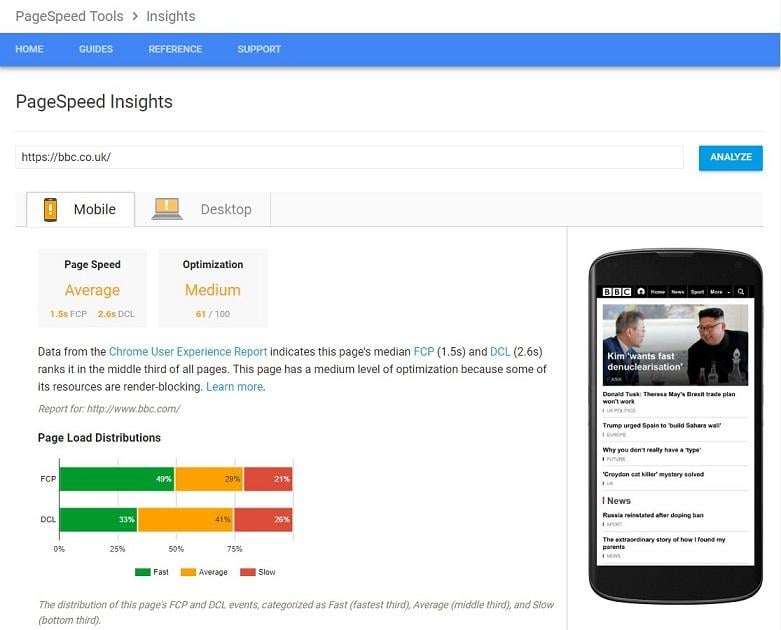
PageSpeed Insights makes it simple to gauge the speed of your website, on both desktop and mobile devices. The definition of page speed measurement has altered since Google announced the update. Now, URLs are assessed based on two factors: Optimization is merely a new term for the current list of technical improvements. Page Speed is a new factor with two metrics:
- First Contentful Paint (FCP) – measures when a user sees the initial visual response from a page.
- DOM Content Loaded (DCL) – measures when an HTML document has been fully loaded and parsed. Later on, we’ll go into more detail about the significance of these metrics.
2. Adapt to the Transition from Lab Data to Field Data.
Google’s move from lab data to field data is reflected in the Page Speed metric. Google considers data from the CrUX database (field data) in addition to your site’s actual speed (lab data) when determining a Speed score. This implies that even if your website loads quickly, your users’ sluggish internet connections could hurt your overall score. Chrome User Experience Report, also known as CrUX, is a tool that examines web performance information gathered from millions of websites by real users. It examines data points such as how people use your page, the devices they use, how long it takes for your content to load for them, and more.
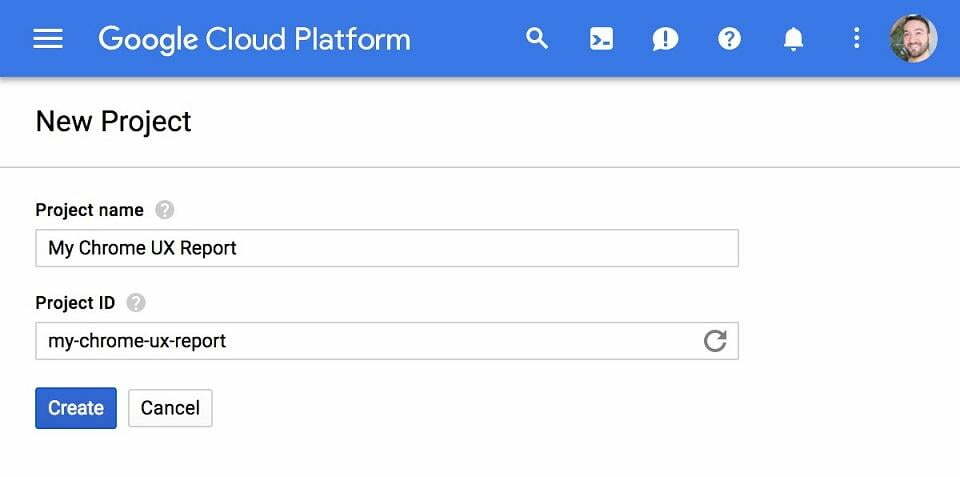
Image Source This metric cannot be obtained through your own internal testing. However, since it is freely available on the Google BigQuery Platform, you can still view and examine the CrUX data. You can obtain information about connection types, device use, in-depth information about FCP, DCL, and more by using CrUX. All you need is a basic understanding of SQL and a project set up in Google Cloud Platform (which you can access once it’s created in CrUX public project page). Even better, because CrUX offers information on the functionality of three million distinct websites, you can use this tool and its direct data for competitive analysis.
3. Improve Your Optimization Score.
The results of our experiment are intriguing: while we discovered no link between a mobile site’s position and its FCP/DCL metrics, we did discover an incredibly strong link (0.97!) between a mobile site’s position in search results and its typical Optimization Score.
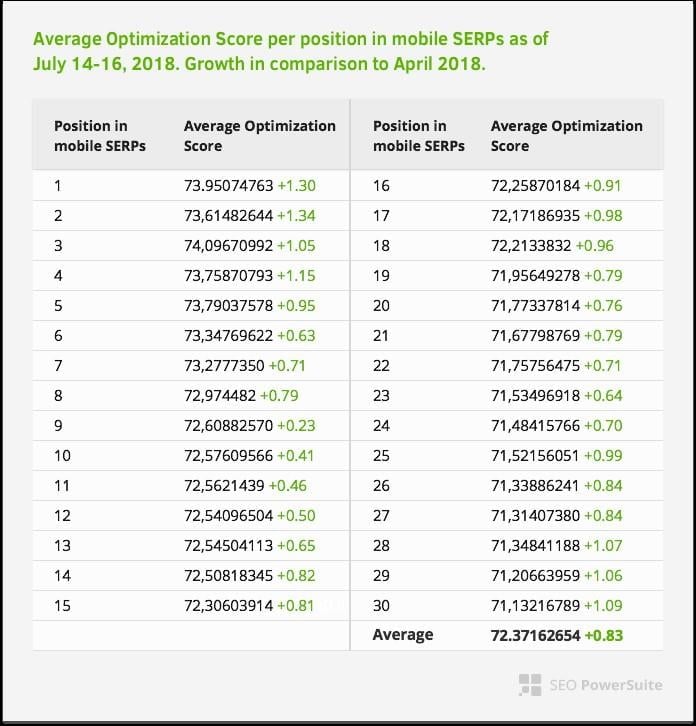
While we have little control over FCP/DCL parameters (because they depend on the user’s connection speeds and devices as well as the actual speed of your site), raising your Optimization Score is essential. The good news is that it is also completely manageable. Google offers advice on how to handle the factors that can lower your Optimization Score in PageSpeed Insights. Here is a brief rundown of what you can do:
- Steer clear of redirects on landing pages. They hinder page rendering, which has a detrimental effect on the desktop and mobile user experience.
- Turn on compression. Reducing image size shortens the time it takes to download the resource, reduces client data usage, and speeds up page loading times.
- Speed up server response times. 53% of mobile users will leave a page if it takes longer than 3 seconds to load.
- Establish a caching system. Its absence results in a large number of client-server roundtrips during the resource fetching process, which causes delays, prevents pages from rendering, and increases visitor expenses.
- Reduce the size of your HTML, CSS, and JavaScript resources. It aids in removing extraneous data from resources provided to visitors.
- Improve your images. Since images make up roughly 60% of a page’s total size, using large images can significantly slow down a website’s rendering.
- Streamline CSS delivery. A page must first process CSS before it can be rendered. The process necessitates a large number of roundtrips that postpone rendering when CSS is replete with external stylesheets that block rendering.
- Make visible content a priority. It takes numerous roundtrips between the server and the user’s browser to load and render content if the above-the-fold content is larger than 14.6kB compressed.
- Get rid of any JavaScript that prevents rendering. Every time a browser encounters it in a website’s HTML, it must pause to run the script, which slows down the rendering process. Consult your website developer or look at more tips here if you’re not sure how to put any of the aforementioned page speed optimizations into practice.
Be Patient: Improving Page Speed Is a Marathon, Not a Sprint.
It is clear that the Page Speed upgrade is a significant one, therefore you must fully embrace it; there is no other option. Just keep in mind that increasing page speed is a continuous process. It cannot be done permanently. Spend some time looking over these areas for development, and give a few of them a shot. Then continue experimenting! Additionally, because Google has recently been obsessed with speed, keep up with all the latest page-speed-related information. There will likely be many more opportunities in the future.