Picture this: you’re on the moon, gazing at a crater from your lunar rover, listening to mission control chatter. Or, skip the daydream and grab a cheap Google Cardboard VR set. Pop your phone in, and voila! Explore the solar system, museums, tourist traps, coral reefs, and more. Let your phone’s Imagination Technologies GPU, aptly named, handle the imagining for you.
Google Cardboard isn’t exactly new; it debuted at Google I/O 2014 about 18 months ago. Google has refined the reference design since then, but the core idea remains: the cheapest Virtual Reality (VR) solution available, unmatched in affordability.
The recent buzz about Oculus Rift shipping might have caught your eye. Even mainstream media like CNN covered it, interviewing Oculus execs about the future of their product and VR. Demand seems high, as their pre-order site crashed during CES. At $599 for the Rift and $1,000+ for a capable computer, the price tag didn’t deter eager consumers.
While explaining Oculus’s distinctions is tempting, it’s not our focus. It’s a niche product for enthusiasts willing to pay a premium for top-notch gaming or specialized applications. Compared to Google’s VR platform, Oculus is a technological marvel, but you could buy over 50 pre-made Google Cardboard sets for the price of one Rift. And I’m not even talking about DIY cardboard kits, but plastic headsets with padding and straps.
With Google Cardboard-compatible sets costing a mere $10 to $20, you’d expect widespread adoption and booming VR development. Not quite. Let’s delve into Google’s platform and see why.
2016: VR’s Year? Not So Fast
71,000: besides being Sarajevo’s ZIP code, it’s the number of users who rated the official Google Cardboard app app. Downloads range from one to five million. That’s low by any measure, let alone for a Google product after 18 months. Even popular VR apps struggle to surpass 100,000 to 500,000 downloads.
Is Cardboard just a hyped-up fad then? Is the user experience awful? What’s the deal?
This might sound harsh, but I believe Google just can’t crack hardware. No matter the quality, they struggle to market their hardware effectively. As a Nexus fan who appreciates their hardware, I acknowledge most consumers don’t share this sentiment (many aren’t even aware of it). The lackluster sales of Cardboard, a dirt-cheap product, and the reluctance of companies to build upon this free platform, supports my point.
There’s just one snag: Google Cardboard is a solid idea that works.

Skeptical but curious, I gave Cardboard a shot. The concept is sound, and the user experience is decent. Once again, though, Google’s marketing missed the mark, failing to resonate beyond techies. Consequently, adoption is dismal, at least for now.
What about VR’s overall popularity? Wasn’t 2015 supposed to be “The Year of VR”? Or was it 2016? I swear CNN declared it so.
It depends on whose marketing spiel you believe. In reality, 2016 won’t be remembered as VR’s breakthrough year. It’s a catchy narrative for investors, but not grounded in reality. And this isn’t just my opinion. Industry insiders, namely GPU executives, suggest things will pick up in 2017, but it’ll take time.
Keep in mind, this applies to both affordable solutions like Cardboard and high-end sets like Oculus Rift: VR won’t explode this year, so don’t buy into the hype!
Google Cardboard: VR for the Masses
How does Google Cardboard work? What makes it unique?
Its allure lies in its simplicity and affordability. It relies on existing hardware; just slip your smartphone into a Cardboard headset, and you’re good to go.
As the low cost suggests, there’s no technological wizardry or pricey components. Just a couple of lenses, a cardboard or plastic body, and magnets that act as a button. Pressing the button triggers the phone’s magnetic sensor, or e-compass, which detects the change in the magnetic field. That’s all there is to it.
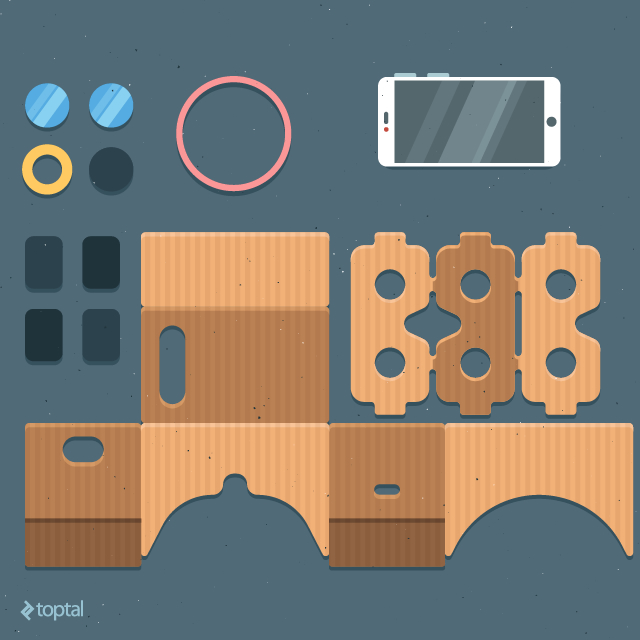
There are a few catches: Google Cardboard doesn’t work with every phone. It relies on specific sensors, like gyroscopic sensors, which are uncommon in budget phones. A high-resolution display is also crucial, which shouldn’t be a major hurdle thanks to the obsession with pixel density. More pixels on a bigger screen enhance the experience. While 1080p on a 5-inch phone seems sufficient, individual pixels become noticeable in Cardboard. I haven’t tried it with a 720p display, but I’m convinced it wouldn’t be enough.
Other issues include battery drain and overheating. Let’s not forget about pesky calls or messages interrupting your VR escapades.
Despite these quirks, Google Cardboard has its merits. Firstly, it provides a taste of VR without breaking the bank. Secondly, it leverages one of the most ubiquitous software/hardware ecosystems, making it accessible to millions of users and developers.
However, this vast potential hasn’t translated into market success. With a paltry user base, it’s tempting to dismiss Cardboard as a niche curiosity, but I wouldn’t call it a failure just yet.
What Went Wrong?
Nothing, except for the fact that Google struggles with hardware.
To be fair, Google Cardboard wasn’t intended as a mass-market product. I see it more as a testing ground for technology than a polished product. It’s not the only VR concept utilizing a phone for display and processing; Samsung’s Gear VR employs a similar approach.
However, this seems to be part of the problem. Google doesn’t appear fully invested in Cardboard. Although launched 18 months ago, essential building blocks were missing. Progress has been slow, but there are signs of life: iOS compatibility since May 2015, improved OpenGL and WebGL support, and new VR initiatives like Jump and Expeditions. YouTube even launched a dedicated VR/360-degree video channel, which could become a VR video hub.
Cardboard’s biggest hurdle isn’t technological.
The platform lacks the scale to attract substantial third-party development. Understandably, app makers hesitate to invest resources in projects with uncertain returns. This dearth of content, coupled with negative reviews, made me question Cardboard’s future, which is why I decided to give it a try.
I won’t turn this into a full-blown review, but here’s a glimpse of what to expect:
Let’s start with Cardboard’s requirements. Note that these are not official Google requirements:
- Android 4.1 or iOS 8 device
- Gyro sensor
- NFC or magnetic sensor
- High-definition display (1080p minimum, higher is better)
- High-capacity battery is recommended
- Ample storage
- Fast internet/broadband access
The silver lining is the lack of software hoops to jump through. Since Cardboard utilizes standard smartphones, designers and developers shouldn’t face many hardware-related obstacles. The biggest compatibility issue lies with sensors. Many budget Android phones lack sensors crucial for certain Cardboard apps, like gyro and magnetic sensors.
Google Cardboard accommodates various phone sizes, from standard 5-inch models to 5.5- or 6-inch phablets. Display density is acceptable at 1080p, though higher resolutions would be ideal. Thankfully, the trend of 1600p and 4K/UHD displays on larger phones will address this. Sony already offers a flagship Android phone with a 4K display.
I previously discussed the arguably pointless pursuit of higher resolution phone displays in a Toptal blog post. However, VR is an exception. Individual pixels are invisible on modern high-definition phone displays, unless viewed through a Cardboard headset.
However, high-resolution displays are useless without corresponding content. Sadly, 1080p VR content is scarce, let alone 4K/UHD content.
The VR Video Resolution Dilemma
Higher resolution comes with trade-offs, leading to another challenge: even with ample 4K VR videos, how do we get them onto our devices? I quickly ran into bandwidth and storage limitations, even with 1080p content. Sure, streaming 1080p is possible on slower connections, but buffering interruptions, while always bothersome, are particularly frustrating with a VR headset strapped to your head.
You might think I live in a region plagued by poor internet infrastructure. While Bosnia isn’t exactly Silicon Valley, my broadband speed surpasses the average in the US, UK, Sweden, Japan, and many other developed nations. In other words, even residents of California and Tokyo often rely on slower internet. Recent studies show that only one-fifth of US households have sufficient bandwidth for 4K streaming.
“I’ll just download the videos and enjoy them locally,” you say. Not so fast. Firstly, much content is streaming-only, not available for download. Secondly, you’ll need a ton of storage. Mobile services have shifted towards streaming to utilize fast mobile broadband. Why store gigabytes of media locally when you have Netflix or Spotify? Relying on local storage for high-definition VR seems archaic, but it’s manageable with good 4G coverage or fast home broadband.
High-resolution content requires more than just bandwidth; it demands processing power. 1080p isn’t an issue, as even low-end hardware handles it effortlessly. However, 4K requires significantly more bandwidth and CPU/GPU muscle for data processing and stream decoding. This translates to increased power consumption, heat generation, and charging frequency. Smartphones, not designed for this type of workload, crumble under the pressure. With maximum screen brightness, demanding CPU and GPU loads, and constant data streaming, a standard phone will die within a couple of hours, all while getting unbearably hot. Remember, there’s no airflow inside the headset to dissipate heat.
I tested this on a Snapdragon 808 device, one of Qualcomm’s latest smartphone chips, built on a 20nm process and featuring powerful CPU and GPU cores. It’s the same chip found in the Nexus 5X. Despite being relatively powerful, it overheated rapidly.
But VR content isn’t limited to video. Let’s explore some alternatives.
Beyond Video: Exploring Other Google Cardboard Content
I focused on video earlier because I believe it’s the most captivating VR content, at least initially. However, limiting yourself solely to video would be a disservice.
VR video usually has a limited field of view. What you see is what you get; you can’t move around the scene, confined to a single virtual location, whether it’s a front-row seat at a Paul McCartney concert or the cockpit of a Swiss Air Force jet. My gripe with video and photos is their limited replay value, and there’s simply not much content available.
Don’t get me wrong, the experiences can be enjoyable. But what about venturing beyond the couch and exploring a real VR world? Interacting with dynamic, ever-changing environments?
On Google Cardboard, this is achieved by rendering content locally, immersing the user in a digital world. We’ve been doing this since the early ’90s, with games like Wolfenstein captivating audiences (and Descent inducing motion sickness without actual movement).
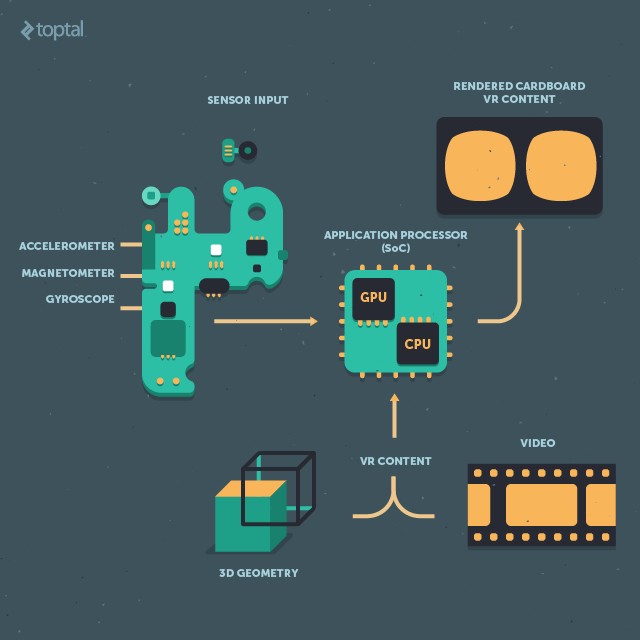
This fundamental difference is what sets Oculus Rift apart. It relies on desktop hardware to render 3D content and display it on the headset. The official Oculus Rift requirements highlight this disparity, resembling a gamer’s wish list: a powerful Haswell Core i5 processor, 8GB of RAM, and a high-end graphics card like the Nvidia GeForce GTX 970 or AMD Radeon R9 290. High-end PC components dwarf their mobile counterparts in transistor count and power consumption. Simply put, achieving comparable performance on mobile devices is years away.
While most smartphones can render decent 3D graphics in 1080p, they fall short of high-end PC graphics. Forget about fancy shaders, advanced anti-aliasing, or elaborate post-processing. Still, smartphones have come a long way, and this technology was unimaginable just a few years ago.
There’s more good news: Google provides two SDKs for Cardboard developers: an Android SDK with Java and a Unity SDK using C#. Both leverage OpenGL, and iOS gained Unity support earlier this year. Untethering from video unlocks VR’s true potential. A well-crafted artificial environment, even in simple demos, can be captivating.
Even if your focus is video or photos, you’ll need a functional UI. Chances are, it will incorporate 3D elements or at least 2D objects within a 3D space, adhering to Google Cardboard guidelines. Most apps relying on digitally generated imagery use Unity, a capable and popular engine.
As mentioned, Google Cardboard leverages existing hardware, minimizing technical hurdles. Adhering to Google’s Cardboard guidelines and best practices should set you on the right path.
3D: The Way Forward, With Caveats
So, what are the drawbacks of using Unity and 3D graphics? It sounds promising, offering an affordable way to experience true VR.
Not so fast. Let’s not get ahead of ourselves. Consider these challenges:
- Battery life
- Heat dissipation
- Limited GPU power
- Need for high-resolution assets (especially textures for 3D models)
- Different level of detail (LOD) approach
- Motion sickness
- Limited control over movement and environment interaction
We’ve already touched upon heat and power consumption. Enclosing a smartphone in an unventilated environment while pushing the GPU to its limits is a recipe for thermal throttling. This issue isn’t going away anytime soon. Phones weren’t designed for this.
This brings us to GPU performance. While smartphone processors have evolved rapidly, they’re not meant for sustained performance. A dedicated graphics card or an integrated GPU in your desktop can handle high loads for hours, even days. Your mobile GPU? Not so much. To prevent damage and conserve battery, the processor throttles performance as the device heats up. You can achieve decent graphics, but running a VR app with a virtual UI and complex 3D content will drain the battery and overheat any phone.
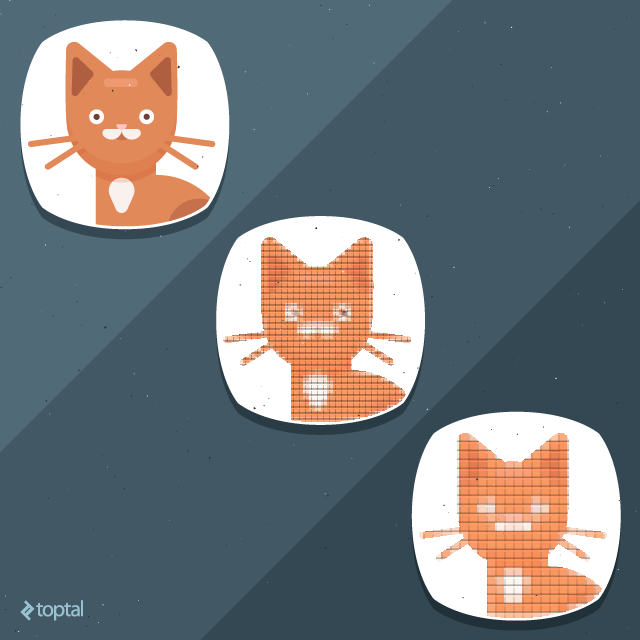
Mobile game developers are familiar with optimizing for these limitations. Unity’s been around for years, so creating good-looking 3D content shouldn’t be an issue, right? It depends. Photorealistic environments with advanced lighting and post-processing effects pose a significant challenge in VR. While the resolution remains the same, the field of view is significantly larger. Consequently, the VR experience on a 5-inch 1080p display appears pixelated, revealing far more detail than usual. Despite high pixel density, PPD (pixels per degree) is a more relevant metric in VR.
Essentially, the user sees more than anticipated, requiring optimization of 3D models and textures for a wider field of view. A few low-resolution textures might not be noticeable on a small phone display, but in VR, compression artifacts and other imperfections become glaringly obvious. Objects that look fine on a phone, even with low LOD, might require more complex geometry and textures in VR. It’s not just about resolution.
Finally, motion sickness remains a concern, often caused by lag. It takes time for the phone’s gyro sensor to detect movement, and even more time to process and render the next frame while compensating for that motion. Any hiccups in this process, like dropped frames or stuttering, shatter the VR illusion. This process needs to be seamless and invisible to the user.
Achieving this with complex 3D scenes and high-resolution textures is challenging, even for powerful smartphones. Attempting photorealistic 3D graphics on a phone operating near its thermal limit is simply not feasible. Furthermore, many techniques used to enhance visuals, like motion blur, depth of field effects, or high-quality anti-aliasing, are not available on mobile devices.
Google Cardboard for Developers: Opportunity or Time Sink?
So, Google Cardboard isn’t perfect. It has shortcomings, limited content, a small user base, and minimal developer interest. Why am I still convinced of its potential?
Why bother with Google Cardboard?
It’s a valid question, and the answer isn’t straightforward. It’s a niche market, and even a brilliant, flawlessly executed idea won’t move the needle significantly (financially or otherwise). The limited audience is a major obstacle.
Browse the Play Store for VR content, and this lack of interest becomes apparent. There aren’t many Google Cardboard apps, and most are subpar. Don’t take my word for it; check the reviews. Many aren’t even full-fledged apps, but rather tech demos.
Did Android developers drop the ball? Not really. Many of these lackluster apps are either works in progress or passion projects allowing developers to experiment with VR. Few apps come from major studios, which is understandable. With such a small user base, investing significant resources in an app with uncertain returns is risky.
However, this presents an opportunity. If you believe you can create something better, go for it. There’s little competition, and a quality product will stand out.
Not all Google Cardboard apps are bad. Here are a few examples of promising apps:
Jaunt VR is a well-regarded VR platform with one of the highest user ratings on the Play Store. Jaunt is a relatively big player in the VR space, and they have some impressive offerings. Pay attention to their UI design and content quality.
YouTube and Google Maps are obvious choices, being the only Google core apps with Cardboard functionality. They offer insights into Google’s approach, though I wasn’t blown away. Don’t underestimate YouTube’s potential; a surge in VR content could tip the scales in Google’s favor.
Fulldive is an ambitious app with a wide range of features. You can use it to view panoramic photos, watch local and YouTube videos, take VR photos, and more. Several similar apps exist, but Fulldive’s UI stands out as clean, fast, and intuitive.
Sites in VR showcases what an individual developer can achieve. This app lets users experience various VR environments, from the lunar surface to the Eiffel Tower, including stunning examples of Islamic architecture. I appreciated the ability to customize settings, which is often lacking in other VR apps.
VR Roller Coaster is a prime example of 3D VR. Roller coasters are a popular theme in VR apps. This concept also extends to VR tours of the solar system, such as Titans Of Space and VR Cosmic Roller Coaster.
Shadowgun VR and Sisters are excellent examples of VR games. If you’re into spooky experiences, check out the latter.
We’ll be publishing more content on VR design and development in the future, so stay tuned if you’re interested in this emerging field.
The Elephant in the Room
It’s bad for SEO, frowned upon by tech publications, and potentially controversial among team members and readers, but it needs to be addressed. What am I referring to?
Pornography. There, I said it. And no, I’m not kidding.
The adult entertainment industry has a history of driving the adoption of video standards, from VHS over Betamax to Blu-ray over HD-DVD. While these were physical storage formats, their impact was significant. Today, content distribution is primarily digital, on-demand, and accessible across multiple platforms.
The adult industry played a crucial role in shaping content standards for decades. It can do so again, though not through physical formats. It can generate demand for VR devices. Google Cardboard, an obvious candidate for accessible VR content distribution, could be many users’ first foray into VR.
And let’s be honest, for many, that first experience might be NSFW.
A Virtual World of Potential
Google Cardboard is a step towards widespread VR adoption. It’s not without flaws, but we can’t expect miracles, especially at this price point.
But that’s its allure: affordable, disposable, yet upgradeable. You can upgrade your headset as needed, and phone upgrades naturally enhance the hardware. Old phones, equipped with the necessary sensors, can even be repurposed.
Despite my optimism, Google Cardboard isn’t widely adopted, and I don’t foresee that changing drastically in the near future. However, I believe it will eventually attract a larger audience beyond tech enthusiasts. Mainstream adoption is the holy grail, and I’ve witnessed firsthand how impressed non-techies are with the Google Cardboard experience.
It all boils down to content. There’s simply not enough engaging VR content, and use-cases are limited. However, we’re bound to see a surge in VR video and other forms of content. As content production ramps up, so will adoption. I suspect many people will try VR in the next couple of years, and as it gains traction, price will become a deciding factor.
The fact that you can experience Cardboard VR for the price of a decent meal could make Google’s barebones approach incredibly appealing in a world clamoring for affordable VR experiences.