As any Ruby on Rails enthusiast knows, Rails 6 is just around the corner, packed with a slew of highly anticipated features and enhancements. This article aims to bring you up to speed on the most significant features introduced in Rails 6 and demonstrate how they can streamline your development process, ultimately saving you precious time.
Before we dive in, it’s crucial to note that Rails 6 necessitates Ruby 2.5+ and updated databases. So, if you haven’t already, ensure you have a plan in place to upgrade your systems accordingly.
Ready to explore the new additions? Let’s take a quick tour of the key features in Rails 6 that you’ll likely be leveraging moving forward:
Testing in Rails 6
As professional Ruby on Rails developers, we strive for maximum code coverage. However, testing can become a bottleneck when our test cases grow in complexity, leading to long wait times for execution.
Parallel Testing
Rails 6 tackles this challenge head-on. The ActiveSupport::TestCase now includes a parallelize method, enabling you to run your test suite concurrently using forked processes.
To parallelize your tests, simply add the following to your test_helper.rb:
| |
Alternatively, you can modify your existing test running commands. For instance, replace bin/rails test OR bin/rspec spec with PARALLEL_WORKERS=15 rails test OR PARALLEL_WORKERS=15 rspec spec.
This change can be replicated across different CI platforms like Travis, Gitlab, CircleCI, and others.
Hooks are also provided for process creation and destruction, which you can utilize like this:
| |
Note: For a deeper dive, check out Rails Guides for additional information.
Action Cable Testing
Speaking of efficient testing, let’s shift our attention to Action Cable, a standout feature from Rails 5. Rails 6 elevates Action Cable testing by allowing you to test at various levels: connections, channels, and broadcasts.
Connection tests focus on verifying that connection identifiers are assigned correctly and that invalid connection attempts are rejected:
| |
Channel tests can be written to confirm that users can subscribe to channels and that the channel has an active stream:
| |
Testing broadcasting to channels is now possible as follows:
| |
Note: Discover more testing tips here.
Bulk Insert and Upsert
We’ve all encountered scenarios where inserting multiple records simultaneously was necessary, often resorting to workarounds. Rails 6 introduces a new method, insert_all, mirroring the functionality of update_all.
This method bypasses callbacks and executes a single, efficient SQL query. Additionally, the upsert_all method leverages the upsert operation feature supported by modern databases like Postgres. This allows you to optimize your code by minimizing insert queries. Say goodbye to external gems like activerecord-import.
These methods generate a single INSERT SQL query, resulting in a single database call. They operate without instantiating models, triggering callbacks, or performing validations. You can even specify criteria to handle primary key, unique index, or unique constraint violations, with options to skip or execute upsert queries.
Here are a few examples:
| |
It’s worth noting that the methods insert, insert!, and upsert are essentially wrappers around insert_all, insert_all!, and upsert_all, respectively.
Note: For a comprehensive discussion on bulk queries across different databases, check it out.
Switching Between Multiple Databases
Large-scale applications will greatly benefit from this feature: Rails 6 finally introduces built-in support for multiple databases!
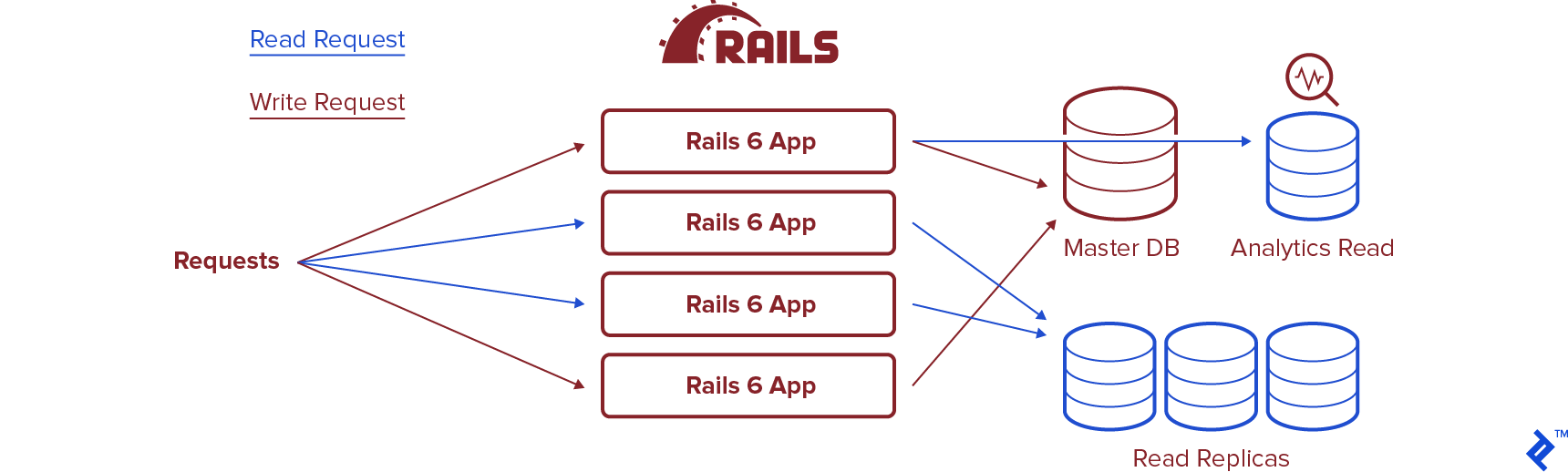
This empowers you to design your application architecture as per your needs, whether it’s splitting it into microservices with dedicated databases, maintaining a monolithic structure, or implementing read replicas.
Having this capability readily available has the potential to significantly expedite your development cycles.
Here’s a glimpse of the updated database.yml file structure:
| |
Switching between databases is made easy with these methods:
| |
For a deeper dive into this functionality, refer to the comprehensive official GitHub page. Looking ahead, it would be exciting to see database sharding capabilities, similar to this, in future Rails releases.
Action Mailbox
Another exciting addition in Rails 6 is Action Mailbox, which enables you to route incoming emails to controllers within your Rails application, much like mailboxes.
Action Mailbox comes equipped with ingresses for Mailgun, Mandrill, Postmark, and SendGrid. You can also directly handle inbound emails using the built-in Exim, Postfix, and Qmail ingresses. The possibilities are vast, from streamlining help desk processes by automatically creating support tickets to enabling customers to respond directly via email. This feature opens up a world of opportunities for you to explore and tailor to your specific needs.
Let’s illustrate the usage of Action Mailbox with a simple example:
| |
Configuring emails is also streamlined (using Sendgrid as an example):
| |
Securely store your password in your application’s encrypted credentials under action_mailbox.ingress_password using rails credentials:edit. Action Mailbox will automatically retrieve it from there:
| |
Within your SendGrid Inbound Parse, configure it to forward inbound emails to /rails/action_mailbox/sendgrid/inbound_emails with the username actionmailbox and the password you generated earlier. Assuming your application is hosted at https://example.com, your SendGrid configuration would include the following URL:
| |
To delve deeper into Action Mailbox, refer to the official Rails guide here.
Zeitwerk
Zeitwerk steps in as the new code loader for Ruby. With a conventional file structure, it dynamically loads your project’s classes and modules, eliminating the need for manual require calls. To enable it in Rails 6, add this to your configuration:
| |
Explore more about Zeitwerk here for a deeper understanding.
Optimizer Hints
Are slow-running queries causing you concern? You can now set timeouts for your queries.
The following statement will trigger a StatementTimeout exception if the query execution time exceeds the specified limit:
| |
While supported by MySQL, you’ll need to verify if your database supports this feature.
Truncate Database
Seeding data just got easier. The following statement will efficiently truncate all tables in your database, preparing it for fresh data:
| |
This elegant solution eliminates the need for manual database deletions prior to seeding.
Action Text
Applications leveraging WYSIWYG editors will appreciate the native support for Trix editor in Rails 6.
Trix, the underlying engine for Action Text, offers a robust and consistent editing experience across different browsers, abstracting away the complexities and inconsistencies of contenteditable.
Installation is straightforward:
| |
You can find comprehensive details about Action Text in the official documentation, here.
Security
No update is complete without security enhancements, and Rails 6 delivers. The first notable addition is support for Host Authorization.
This middleware acts as a safeguard against DNS rebinding attacks by explicitly whitelisting the hosts to which requests can be sent, enhancing your application’s security posture.
Another security improvement aims to prevent attacks that exploit signed/encrypted cookies by embedding the cookie name in the purpose field. This ensures that only cookies with matching names are processed on the server-side, mitigating potential vulnerabilities. Enable action_dispatch.use_cookies_with_metadata to activate this feature.
Webpack as the Default Bundler
Aligning with modern JavaScript development practices, Rails 6 adopts Webpack as the default JavaScript bundler through the webpacker gem, replacing the Rails Asset pipeline. This transition is designed to be straightforward and offers a more streamlined front-end development experience.
Preventing Race Conditions
To address SELECT/INSERT race conditions, a common challenge in scaling applications, Rails 6 introduces a new method. You can find more information in the GitHub thread.
This method requires unique constraints on relevant columns in the underlying table. While it effectively mitigates race conditions between SELECT and INSERT operations, it’s important to note that a race condition between INSERT and SELECT is still possible if another client performs a DELETE operation between those two statements. However, in most applications, this scenario is less likely to occur.
Credentials in Rails 6
Introduced in Rails 5.2, credentials provided a secure mechanism for managing sensitive information, aiming to replace the use of .env files. They allowed encrypted keys for third-party services to be stored directly in version control.
However, Rails previously used a single encrypted file for all environments, posing challenges when managing different keys across development and production, especially in larger projects.
Rails 6 addresses this limitation by introducing support for per-environment credentials, simplifying key management across different environments. For a more in-depth understanding, refer to the official GitHub thread.
Is Rails 6 a Good Update?
In short, yes. Rails 6 is a substantial update, even if not a complete overhaul. With its long history, Ruby on Rails isn’t expected to undergo drastic transformations. However, this sixth iteration brings a wealth of valuable additions.
While some features might appear incremental, others hold the potential to significantly reduce development time, bolster security, and improve overall robustness. The bottom line is that Rails remains a mature and well-supported framework, and Rails 6 makes it even better.
This list only scratches the surface of what’s new in Rails 6. For a comprehensive overview of changes, consult the official changelog. Additionally, there are several deprecations to be aware of. If you want a deep dive into every single update, refer to the detailed full release notes.