It’s probably a safe bet that your cell phone is within arm’s reach right now. Most of us check our phones as soon as we wake up, while waiting for the bus, and even while eating lunch. It’s clear that we’re hooked on our smartphones, but what does this mean for your search marketing strategy?
Consider these figures demonstrating the link between mobile and search:
- A recent Google study found that 74% of mobile users relied on a search engine during their research process.
- A whopping 93% of those who used mobile for research ended up making a purchase (source: Google).
- 52% of mobile shoppers report increased buying with personalized cross-channel experiences (source: MyBuys).
And mobile’s influence is only expected to rise:
- 2015 is projected to be the first year where local mobile searches (85.9 billion) surpass desktop searches (84 billion) (source: eMarketer).
- Experts predict that in 2015, mobile devices will account for 50% of all paid search clicks on Google (Search Engine Land).
- By 2017, global 3G access is expected to reach 85% (source: E-consultancy).
If that’s not convincing enough, studies indicate that globally, more people own a cell phone than a toothbrush! A bit gross, but it makes you think, right?
If your searches, clicks, and conversions are primarily coming from desktop users, you might be tempted to abandon mobile PPC advertising entirely. But how can you be sure that there isn’t a mobile opportunity for your business?
Start by considering these questions:
- Do people usually research or buy my products or services while on the move?
- Does my business receive a significant volume of phone calls?
- If I were looking for my services, would I use my smartphone to do it?
If these questions raise red flags regarding mobile for your business, don’t give up just yet. Before dismissing mobile PPC ads, it’s important to delve deeper into the data. You might be surprised to learn that some businesses thrive in the mobile space.
Comparing Desktop and Mobile Performance in AdWords
- Go to either the “Campaigns” or “Ad Groups” tab, depending on how detailed you want your mobile traffic view to be.
- In the “Segment” dropdown menu, choose “Device.”
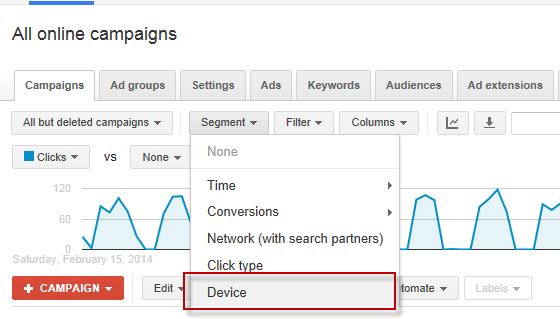
- Review a statistically significant time period and compare mobile and desktop performance metrics, such as impressions, clicks, conversions, cost/converted click, or any other metrics that matter to your business. Keep in mind that a high volume of clicks with low mobile conversions could indicate a poor mobile landing page experience.
Now, let’s get your PPC campaigns ready for the mobile world with these steps:
Adjusting Bids for Mobile
First, you need to inform AdWords that your ads need better visibility on mobile devices. This is where mobile bid adjustments come in. While you can increase bids by up to 300%, that might be excessive. If you’re unsure where to start, try Google’s formula:
Mobile Bid Adjustment = 100* ((value per mobile click / value per desktop and tablet click) – 1)
On the flip side, if your mobile PPC ad performance is underwhelming, you might want to prevent your ads from showing on mobile devices altogether. This can be done by setting a mobile bid adjustment of -100. Here’s how to adjust bids in AdWords:
- Go to the Settings tab.
- Click on “Devices” just below the tab.
- Use the checkbox to select the campaign(s) you want to adjust (*you can also adjust mobile bids at the ad group level for more granular control).
- Choose “Set mobile bid adjustment,” enter the desired percentage, and then click “Make changes.”
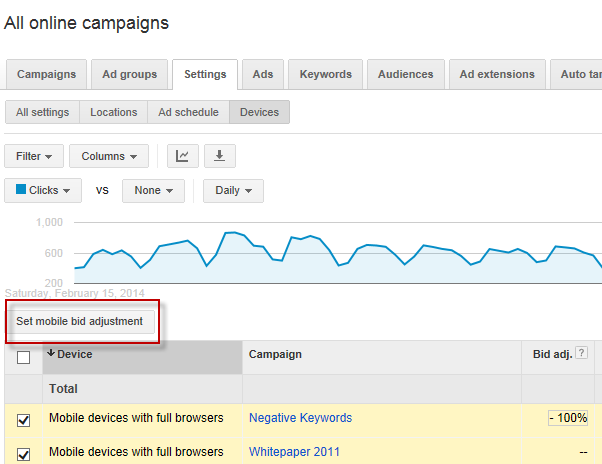
Perfect! Now Google is in the loop. But with your ads appearing more frequently on mobile devices, you need to tailor your ad copy to appeal to those users.
Creating Mobile-Specific Ads
For every ad group with ads displayed on mobile, you should have two mobile-focused ads and two desktop ads competing against each other. While separate campaigns for mobile were once recommended, that’s no longer necessary. Displaying ads on different devices is as simple as checking the “Mobile” box when creating or editing the ad (see the image below).
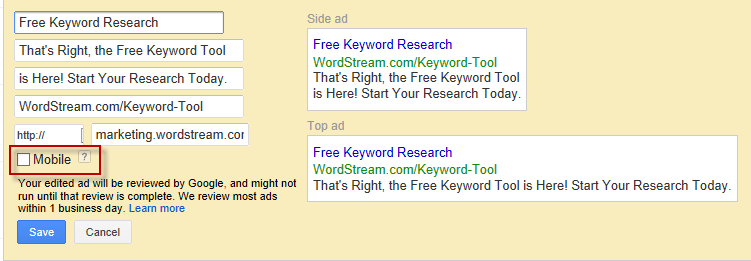
If you opt out of mobile-preferred ads, Google will simply display your regular desktop ads on mobile devices. However, it’s generally best practice to craft your mobile ads with a mobile user in mind. Dan Shewan of nexus-security suggests that successful mobile ads are “useful, compelling, and highly targeted.” What does this mean in practice? For mobile, you’ll want to:
- Include a concise and relevant call-to-action such as “Call Us Now!” or “At Your Fingertips.” Make it crystal clear what you want the user to do.
- Take advantage of call extensions (and location extensions, if applicable). Mobile users searching for your business are more likely to call, so make it easy for them.
- Think like a mobile user. Imagine yourself using a small screen to search for your service or product on the go. You’d want results that lead to a short, to-the-point, keyword-rich ad that is both compelling and clear.
Optimizing Your PPC Landing Pages for Mobile
According to the Huffington Post, 57% of mobile users will leave your site if it takes more than 3 seconds to load, and 30% will abandon their shopping cart if the site isn’t mobile-friendly.
Don’t let this happen to you! Start by viewing your PPC landing pages on your smartphone. Put yourself in the visitor’s shoes:
- How fast does the page load?
- Is the content easy to read?
- Is the call-to-action prominent and easy to respond to?
In most cases, your desktop landing page won’t translate well to a mobile experience. For mobile, you need concise headlines, a clear call-to-action, clickable phone numbers, and – crucially – a site that loads instantly! Consider using this nexus-security landing page guide to revamp your mobile landing pages. For assistance in crafting a fantastic mobile experience, check out dudamobile.
Using Call Tracking to Measure Mobile Success
Did you know that phone calls account for 43% of all search-related conversions? And that 65% of businesses consider phone calls to be their most valuable and highest quality source of leads?
Wouldn’t it be amazing to identify the campaigns and keywords driving those valuable phone calls and conversions? Well, now you can! With nexus-security’s new Call Tracking feature, you can track which campaigns, ad groups, and keywords result in phone calls from your landing pages.
If you’re a nexus-security customer eager to explore call tracking, we have a tutorial video and FAQ page to guide you. You can also contact your Customer Success Specialist at support@nexus-security.github.io or join one of our brand new Call Tracking hangouts for a live product walkthrough.
Now that you’re equipped to conquer the mobile world, let’s recap the steps to engage and convert your mobile audience:
- Assess the value of mobile: Determine mobile’s significance to your business and analyze historical data to understand past mobile search performance.
- Adjust your budget for optimal device ROI: Bid higher on mobile if it outperforms desktop. If mobile is detrimental, set mobile bid adjustments to -100 to prevent your ads from appearing on those devices.
- Create a stellar mobile search experience: Tailor your ad copy to resonate with mobile users and ensure your landing pages are mobile-optimized with properly implemented call extensions.
- Track those phone calls! This is crucial for both desktop and mobile. If mobile is a priority, having a clickable phone number on your mobile landing page is non-negotiable. Implement call tracking with nexus-security to pinpoint the campaigns, ad groups, and keywords generating leads and driving conversions.
What steps have you taken to optimize for mobile?