The exchange of relevant data between separate systems has grown increasingly crucial for businesses, enabling them to enhance the quality and accessibility of information. There are numerous instances where having a consistent and accessible data set across multiple directory servers is advantageous, highlighting the importance of understanding common SQL Server data synchronization techniques.
Data replication and synchronization processes are essential for achieving data consistency and availability. Data replication involves generating one or more duplicate copies of a database to enhance fault tolerance or accessibility. In contrast, data synchronization ensures data consistency across two or more databases and maintains this consistency through continuous updates.
Data synchronization across diverse systems is often both necessary and complex for many organizations. Several use cases necessitate data synchronization:
- Database migration
- Regular synchronization between information systems
- Importing data from one information system into another
- Moving data sets between different stages or environments
- Importing data from non-database sources
No single method or universally accepted approach exists for data synchronization. The task varies depending on the specific case, and even seemingly straightforward data synchronizations can become intricate due to complex data structures. In real-world scenarios, data synchronization involves multiple complex tasks that can be time-consuming. When new requirements arise, database specialists often need to reimplement the entire synchronization process. Due to the lack of standard methods beyond replication, data synchronization implementations are rarely optimal, leading to difficult maintenance and increased costs. The implementation and maintenance of data synchronization can be so time-consuming that it becomes a full-time job in itself.
We can manually implement architecture for data synchronization tasks, potentially utilizing Microsoft Sync Framework, or leverage existing solutions within Microsoft SQL Server management tools. We will outline the most common methods and tools for addressing data synchronization in Microsoft SQL Server databases and offer recommendations.
We can categorize use cases based on the source and destination structures (e.g., databases, tables), distinguishing between similar and different structures.
Source and Destination with Highly Similar Structures
This scenario commonly arises when data is utilized across different stages of the software development lifecycle. For instance, the data structure in testing and production environments is often very similar. A frequent requirement is to compare data between these environments and import data from production into testing.
Source and Destination with Disparate Structures
Synchronization becomes more complex when structures differ. This is also a more recurring task, with a typical example being importing data from one database to another. This situation often arises when software needs to import data from another software maintained by a different company, usually requiring automated imports on a scheduled basis.
The chosen method depends on personal preferences and the complexity of the problem.
Regardless of structural similarities, four primary approaches exist for data synchronization:
- Synchronization using manually created SQL scripts
- Synchronization using the data compare method (applicable only when source and target structures are similar)
- Synchronization using automatically generated SQL scripts - requires commercial products
Source and Destination with Identical or Very Similar Structures
Utilizing Manually Created SQL Scripts
The most straightforward but tedious solution involves manually writing SQL scripts for synchronization.
Advantages
- Can be implemented using free and open-source (FOSS) tools.
- Fast execution if the table has indexes.
- The SQL script can be stored as a stored procedure or scheduled as a SQL Server job.
- Enables automatic import, even for continuously changing data.
Disadvantages
- Creating such SQL scripts is tedious, typically requiring three scripts per table:
INSERT,UPDATE, andDELETE. - Only data accessible via SQL queries can be synchronized, excluding sources like CSV and XML files.
- Maintenance is challenging; database structure changes necessitate modifying two or three scripts (
INSERT,UPDATE, and potentiallyDELETE).
Example
We will synchronize data between the Source table, with columns ID and Value, and the Target table, with the same columns.
Assuming identical primary keys in both tables and no auto-incrementing (identity) primary key in the target table, the following synchronization script can be executed.
| |
Employing the Data Compare Method
This method utilizes a tool to compare source and target data. The comparison process generates SQL scripts to apply differences from the source to the target database.
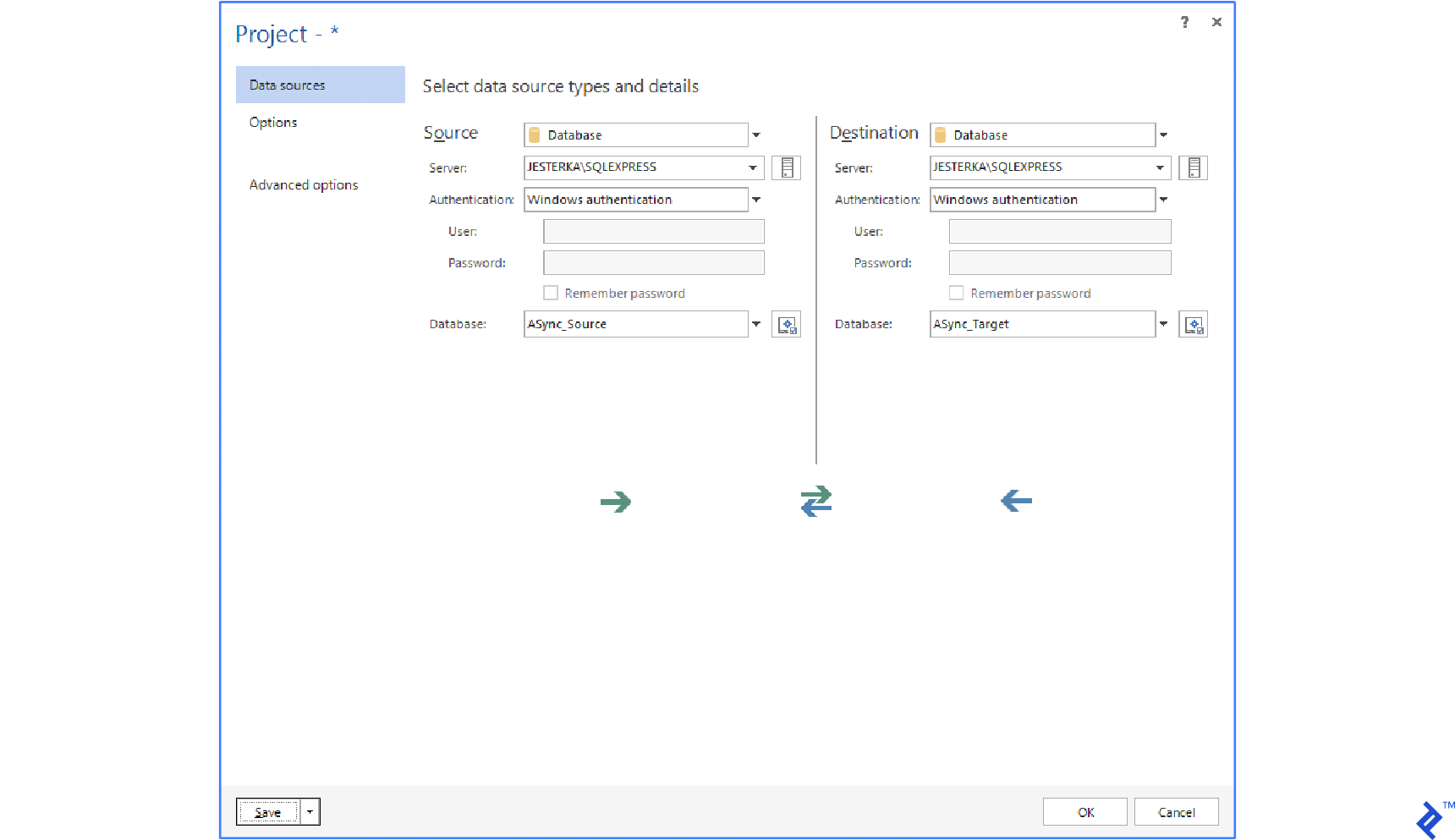
Numerous data comparison and synchronization tools exist, mostly employing the same approach. The user selects the source and target databases, although alternatives like DB backups, folders with SQL scripts, or even source control system connections are possible.
Popular tools using the data compare approach include:
Initially, data is read, or checksums of larger data are read from both the source and target. Then, the comparison process is executed.
These tools offer additional settings for customization:
Sync Key
The primary key or a UNIQUE constraint is typically used. If neither exists, a combination of columns can be selected. The Sync key matches rows between the source and target.
Table Pairing
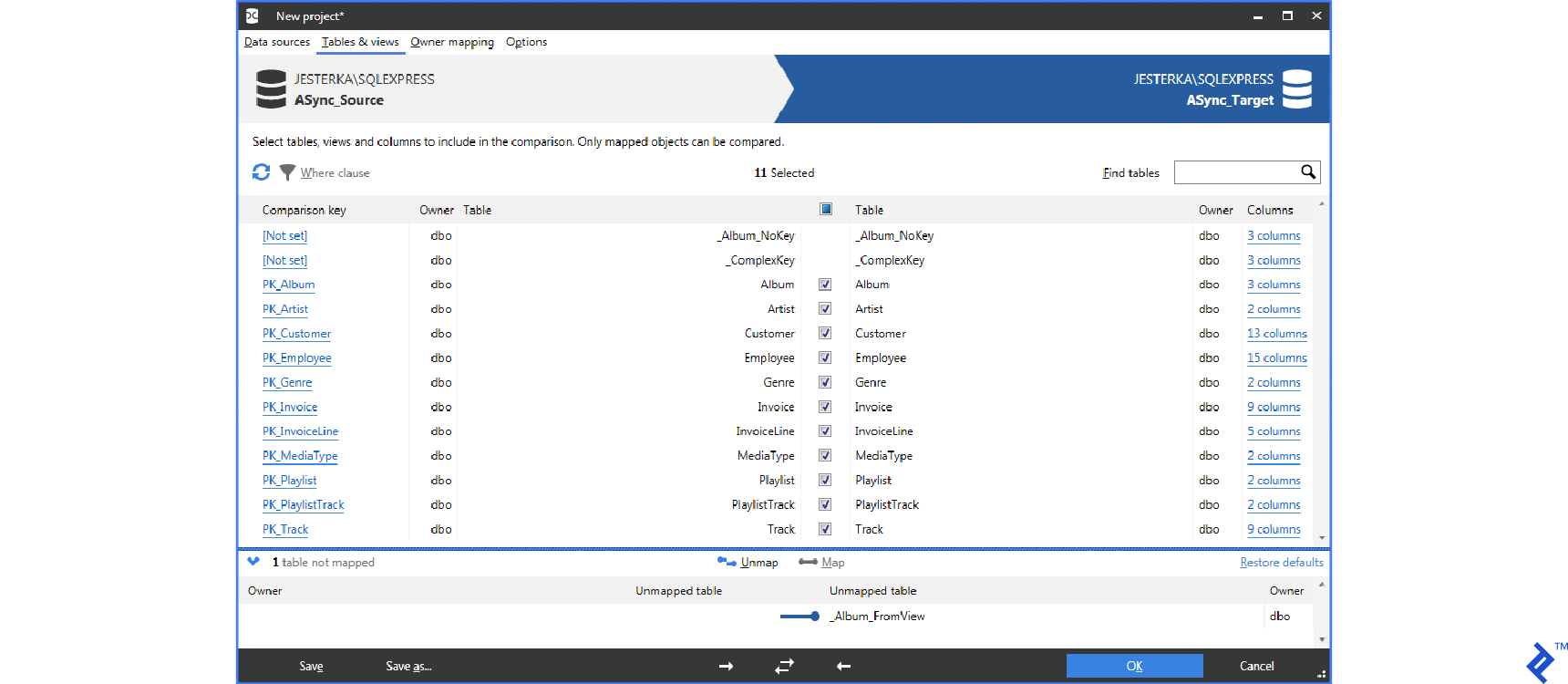
Tables are usually paired by name, but this can be customized. For instance, dbForge Data Compare allows SQL queries as the source or destination.
Synchronization Process
Once confirmed, the tool compares source and target data. This process involves downloading all data or checksums for larger datasets and comparing them based on specified criteria. By default, values from tables and columns with matching names are compared. All tools support column and table name mapping, excluding IDENTITY (autoincrement) columns or applying transformations (rounding floats, ignoring case, treating NULL as empty strings) before comparison. Data download is optimized; for large volumes, only checksums are downloaded. While helpful in most cases, this optimization increases time requirements as data volume grows.
The next step generates a SQL script with migrations. This script can be saved or executed directly. For safety, a database backup can be created before running the script. ApexSQL Data Diff can generate an executable program to run the script on a selected database. This script contains data changes, not the logic for applying them, limiting its reusability for recurring imports, a significant drawback.
Advantages
- Advanced SQL knowledge is unnecessary, with GUI-based operation.
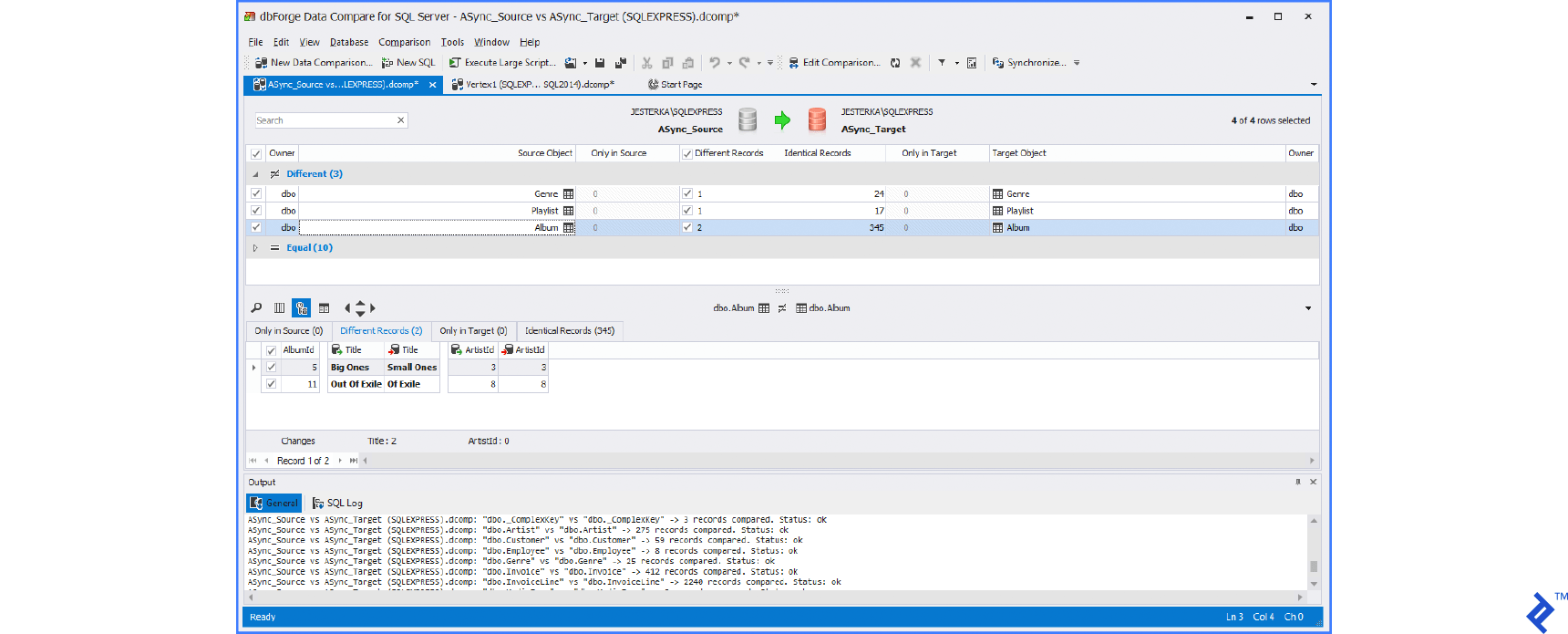
- Visual difference inspection is possible before synchronization.
Disadvantages
- This feature is often exclusive to commercial products.
- Performance degrades when handling massive data volumes.
- The generated SQL script lacks synchronization logic, hindering its reusability for future data synchronization.
Below are typical UIs of these tools:
Synchronization with Automatically Generated SQL
This method closely resembles data comparison, with the key difference being the absence of data comparison. The generated SQL script contains synchronization logic instead of data differences, allowing for easy storage as a stored procedure and periodic execution (e.g., nightly). This method is particularly useful for automated imports between databases and outperforms the data compare method in terms of speed.
Only SQL Database Studio offers synchronization through automatically generated SQL.
SQL Database Studio provides an interface similar to the data compare method, requiring the selection of source and target (databases or tables), followed by option configuration (sync keys, pairing, and mapping). A graphical query builder facilitates parameter setup.
Advantages
- No advanced SQL knowledge is required.
- Quick and easy setup through a user-friendly GUI.
- The resulting SQL script can be saved as a stored procedure.
- Allows for automatic import as a SQL Server job.
Disadvantages
- This is an advanced feature often limited to commercial products.
- Manual difference inspection is not possible before synchronization, as the process executes in one step.
Performance Benchmarks
Test Case
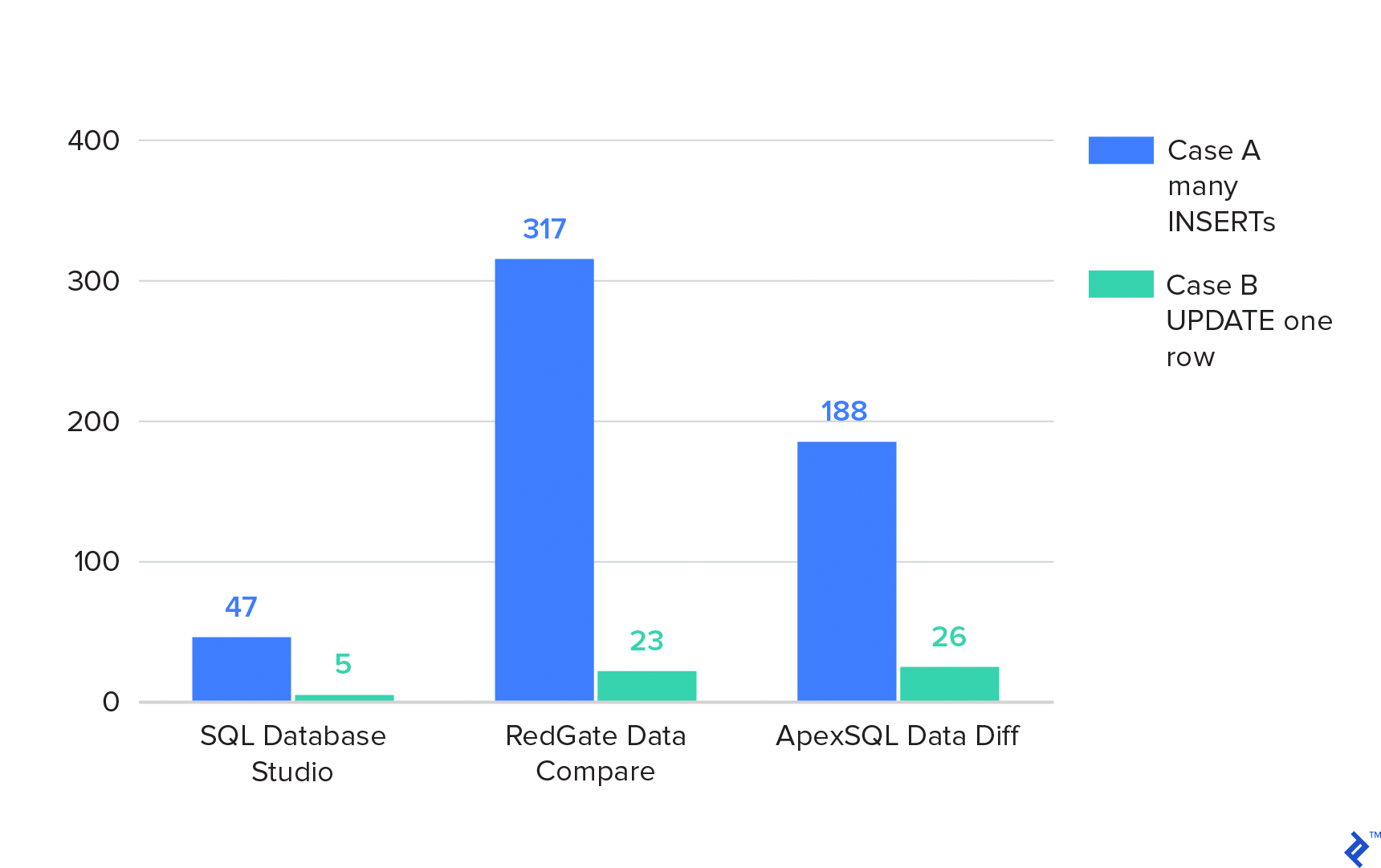
Two databases (A and B), each containing one table with 2,000,000 rows. Both tables reside in separate databases on the same SQL Server. Two extreme cases are covered: 1) The source table contains all 2,000,000 rows, while the target table is empty, requiring numerous INSERTS for synchronization. 2) Both tables have 2,000,000 rows, with only one row differing, necessitating a single UPDATE for synchronization.
RedGate Data Compare involves three steps:
- Compare
- Generate script
- Run script on the target database
ApexSQL Data Diff requires two steps:
- Compare
- Generate and run the script in a single step
SQL Database Studio performs the entire synchronization in one step. Synchronization times in seconds are presented below. The “Individual Steps” column lists durations for the steps mentioned above.
| Case A. many INSERTs | Case A. many INSERTs (individual steps) | Case B. UPDATE one row | Case B. UPDATE one row (individual steps) | |
|---|---|---|---|---|
| SQL Database Studio | 47 | 5 | ||
| RedGate Data Compare | 317 | 13+92+212 | 23 | 22+0+1 |
| ApexSQL Data Diff | 188 | 18+170 | 26 | 25+ |
Lower values indicate better performance.
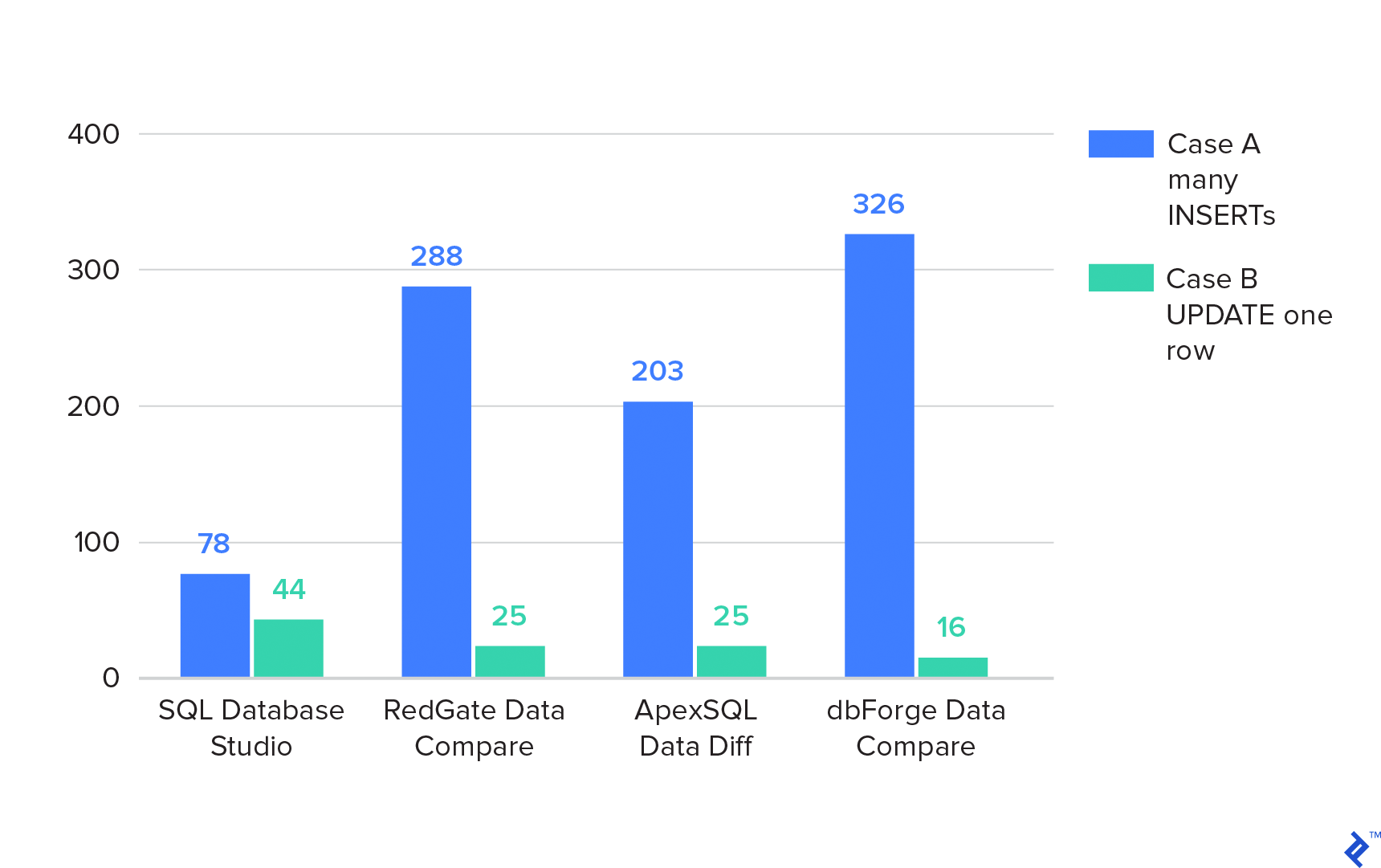
The same test is repeated with databases located on different SQL servers not connected through a linked server.
| Case A. many INSERTs | Case A. many INSERTs (individual steps) | Case B. UPDATE one row | Case B. UPDATE one row (individual steps) | |
|---|---|---|---|---|
| SQL Database Studio | 78 | 44 | ||
| RedGate Data Compare | 288 | 17+82+179 | 25 | 24+0+1 |
| ApexSQL Data Diff | 203 | 18+185 | 25 | 24+1 |
| dbForge Data Compare | 326 | 11+315 | 16 | 16+0 |
Lower values indicate better performance.
Summary
The results demonstrate that RedGate and Apex are unaffected by database location (same or different SQL server) as their synchronization algorithm is independent of SQL Server. In contrast, SQL Database Studio utilizes native SQL Server functions, resulting in better performance when databases reside on the same server.
Source and Destination with Dissimilar Structures
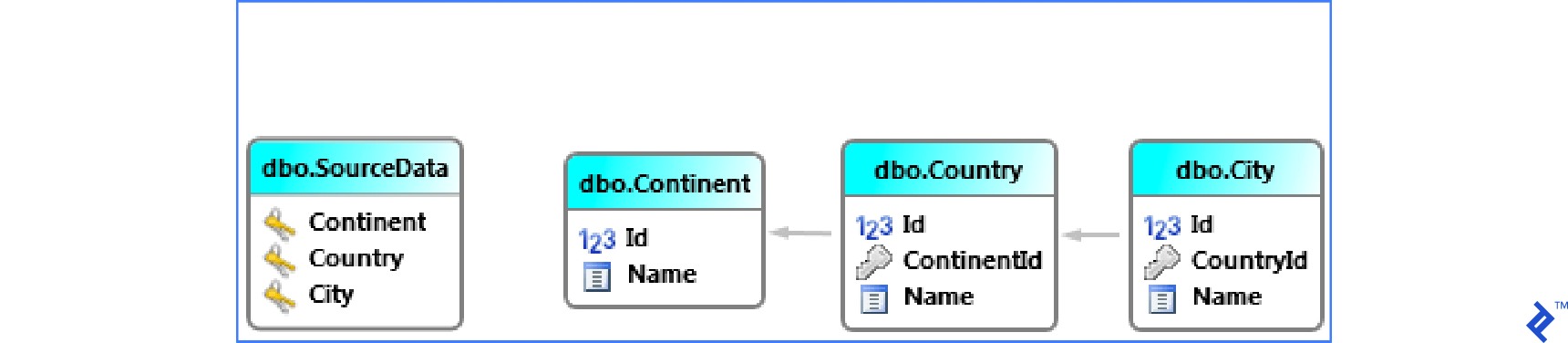
Situations may arise where a wide table needs to be synchronized into multiple smaller related tables.
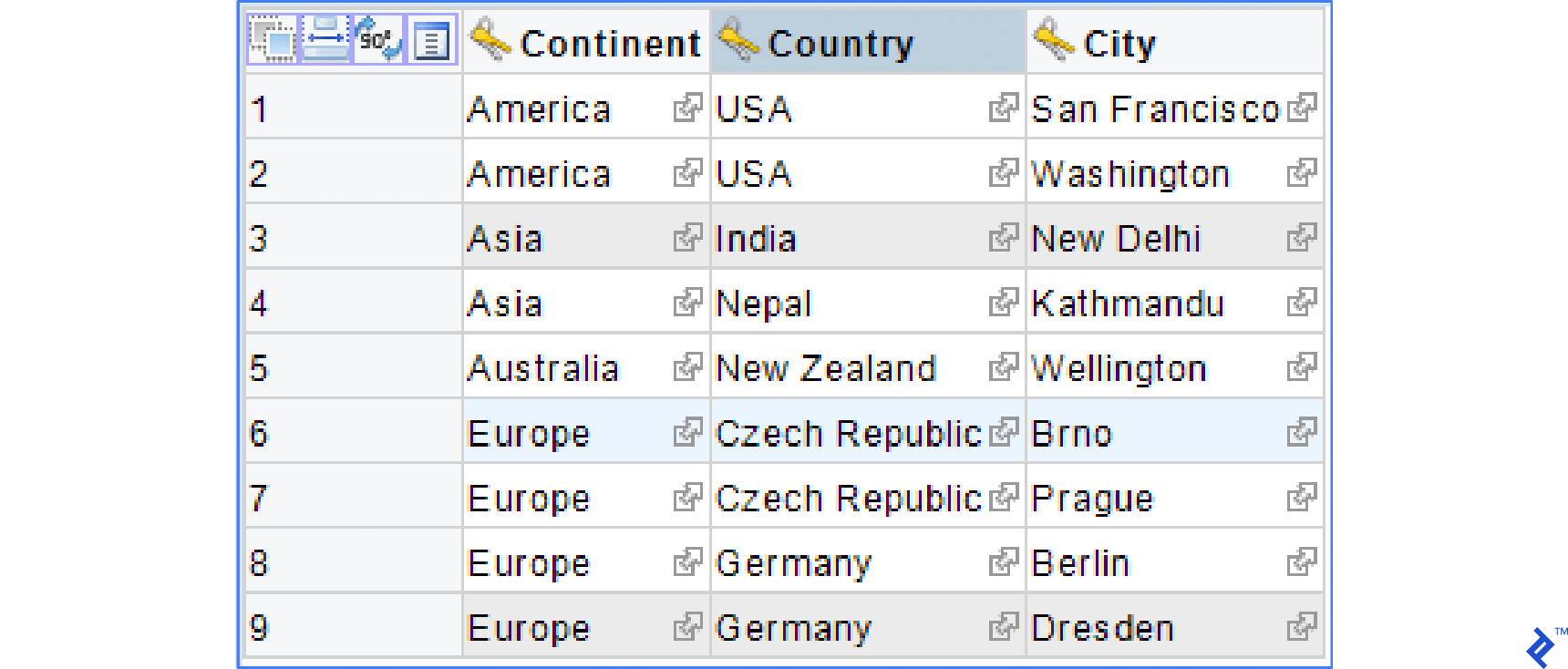
Consider an example with a wide table named SourceData that needs to be synchronized into smaller tables: Continent, Country, and City, as illustrated in the schema below.
Data in SourceData could resemble the following:
Using Manually Created SQL Scripts
Script for Synchronizing the Continent Table
| |
Script for Synchronizing the City Table
| |
This script is more complex due to the need to locate records in the Country and Continent tables. It inserts missing records into City and populates CountryId correctly.
Similar UPDATE and DELETE scripts can also be written if required.
Advantages
- No commercial products are necessary.
- The SQL script can be saved as a stored procedure or scheduled as a SQL Server job.
Disadvantages
- Creating such SQL scripts is challenging and intricate (typically requiring three scripts per table:
INSERT,UPDATE, andDELETE). - Maintenance is highly challenging.
Utilizing External Tools
The data compare method is unsuitable for this type of synchronization (wide table to multiple related tables) as it focuses on different use cases. It generates a SQL script with data to be inserted and lacks the ability to handle references in related tables. Therefore, tools like dbForge Data Compare for SQL Server, RedGate SQL Data Compare, and Apex SQL Data Diff are not applicable.
However, SQL Database Studio can assist in automatically creating synchronization scripts. The image below shows the Editor for Data Synchronization in SQL Database Studio.
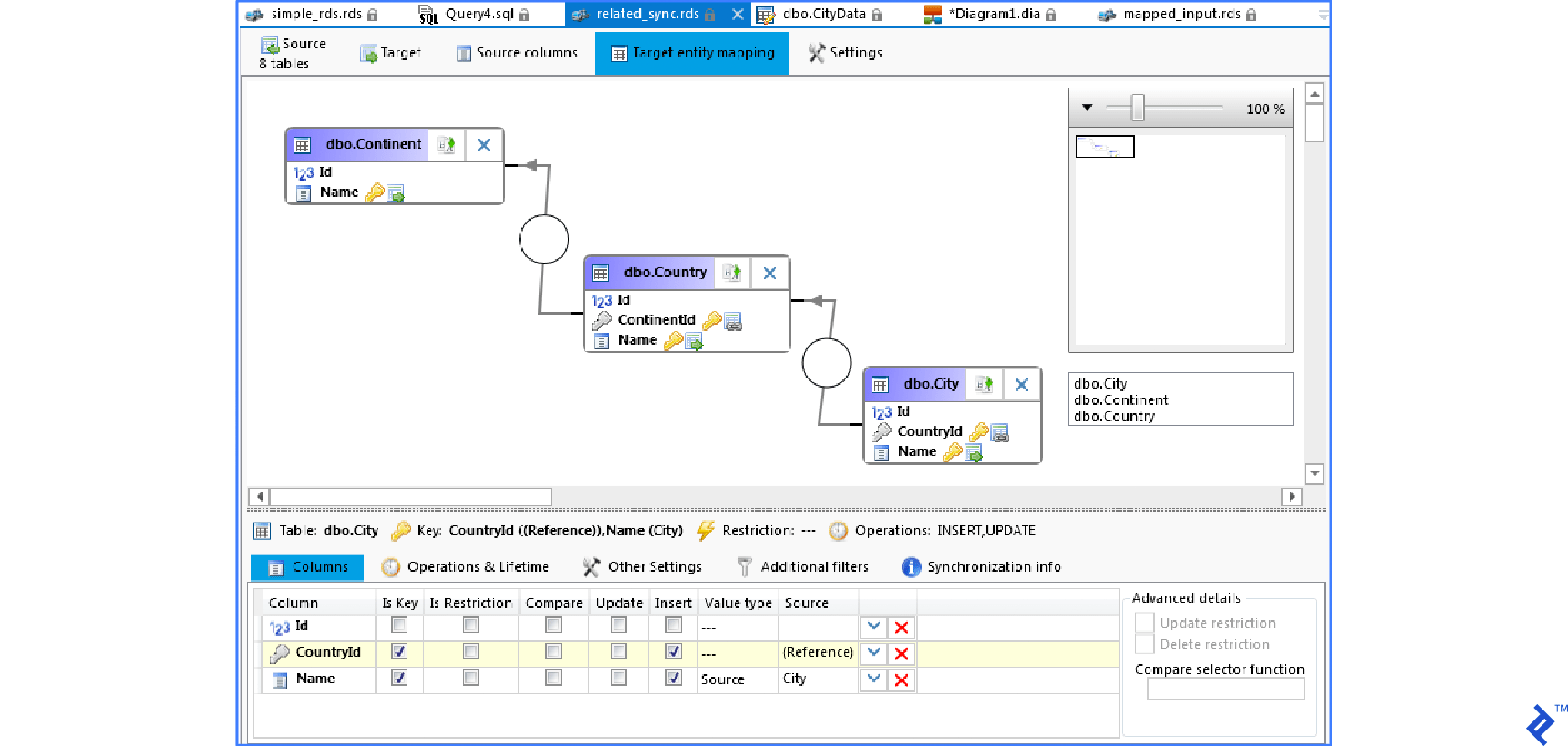
The editor resembles and functions similarly to the familiar Query builder. Each table requires a defined synchronization key, and relations between tables are also defined. The image above displays mapping for synchronization. The column list (lower part) shows the columns of the City table (similar for other tables).
Columns
- Id — Not mapped as it’s the primary key (automatically generated).
- CountryId — Defined as a reference to the table.
- Name — Populated from the
Citycolumn in the source (wide) table.
CountryId and Name are chosen as synchronization keys. The synchronization key is a set of columns uniquely identifying a row in both the source and target tables. The primary key Id cannot be used as a synchronization key because it’s absent in the source table.
After synchronization, the tables appear as follows:
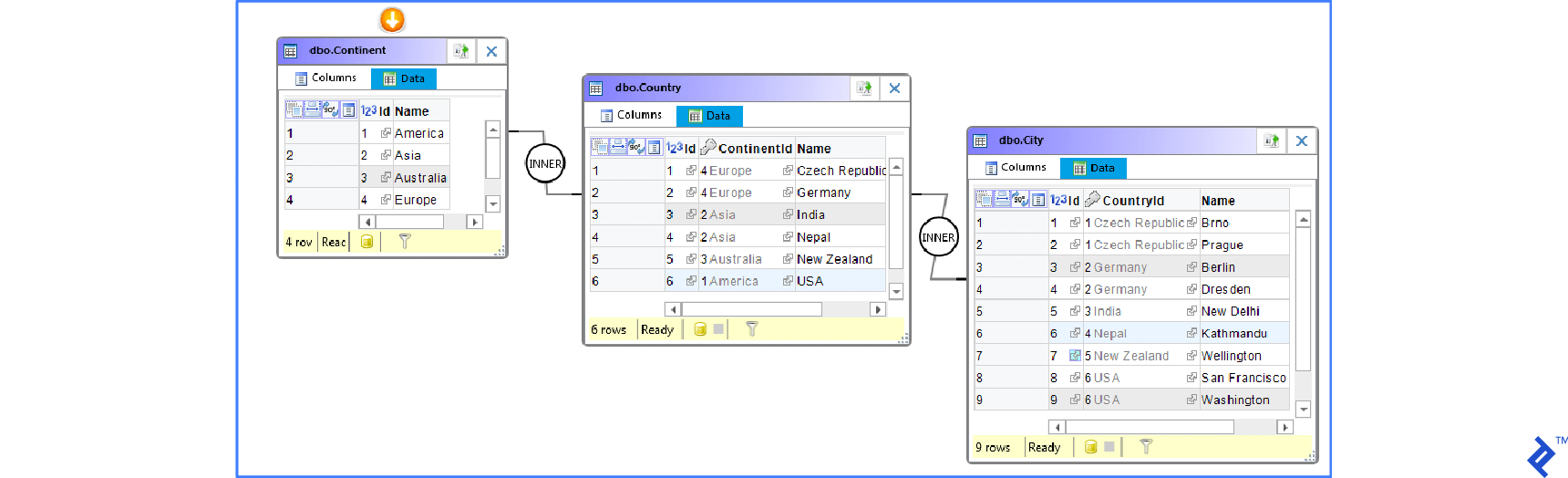
This example used a single wide table as the source. Another common scenario involves source data stored across multiple related tables. SQL Database Studio defines relations using column names instead of foreign keys, enabling imports from CSV or Excel files (loaded into a temporary table for synchronization). Using unique column names is recommended. If not possible, aliases can be defined for these columns.
Advantages
- Easy and quick creation
- Simple maintenance
- Can be saved as a stored procedure (including data to reopen the synchronization in the editor)
Disadvantages
- Requires a commercial solution
Comparing the Solutions
Data synchronization involves sequences of INSERT, UPDATE, or DELETE commands. Multiple methods exist to create these sequences. This article explored three options for generating synchronization SQL scripts. Manual creation is feasible but time-consuming, demands a strong understanding of SQL, and poses maintenance challenges. The second option involves commercial tools:
- dbForge Data Compare for SQL Server
- RedGate SQL Data Compare
- Apex SQL Data Diff
- SQL Database Studio
The first three tools operate similarly, comparing data, enabling user analysis of differences, and facilitating the synchronization of selected differences (including automation or command-line execution). They are beneficial in scenarios such as:
- Databases becoming unsynchronized due to errors.
- The need to avoid replication when transferring data between environments.
- Generating data comparison reports in Excel or HTML formats.
Each tool has its strengths: dbForge offers a user-friendly UI and numerous options, ApexSQL excels in performance, and RedGate enjoys widespread popularity.
SQL Database Studio, the fourth tool, takes a different approach. It generates SQL scripts containing synchronization logic instead of changes. Performance is also impressive as all operations occur directly on the database server, eliminating data transfers between the server and the tool. This tool is valuable in cases like:
- Automated database migrations involving structurally different databases.
- Importing data into multiple related tables.
- Importing data from external sources such as XML, CSV, and MS Excel.