Working with data often involves converting, translating, and mapping it. While these tasks are essential, they can be incredibly dull and repetitive, even for simple actions like importing data from a CSV file. Although they share similarities, each data conversion task often requires its own unique approach.
Data transformation is a constant in almost every system we create. Whether importing from existing databases, processing incoming data streams, translating between formats for internal use, or preparing data for output, the need to change data from one form to another is ever-present.
This constant need for data transformation can feel like a recurring frustration. Each task appears similar to previous ones, yet subtle variations force us to repeat the mapping process, often starting from scratch.
Adding to the challenge, technology is constantly evolving. New data formats, access methods, libraries, APIs, and frameworks emerge and become popular, requiring programmers to constantly adapt and learn. The rise of data science further fuels the demand for specialized data handling tools.
While tools like AutoMapper (for mapping data between objects) and Resharper (for code refactoring) can be helpful, they don’t completely eliminate the tedious nature of writing and maintaining data conversion code. Additional complexities arise when dealing with cross-domain translation, such as converting internal codes and keys for different layers or systems, handling null values and type conversions, and so on.
Similar challenges exist in data validation. Technologies like DataAnnotations and jQuery Validation plugin, along with custom validation code, address these issues, but understanding their nuances can be tricky.
As an experienced data scientist, you might be thinking, “There must be a better solution.” Fortunately, there is, and this data mapping tutorial will explore it.
Introducing MetaDapper: A Powerful Data Mapping Tool
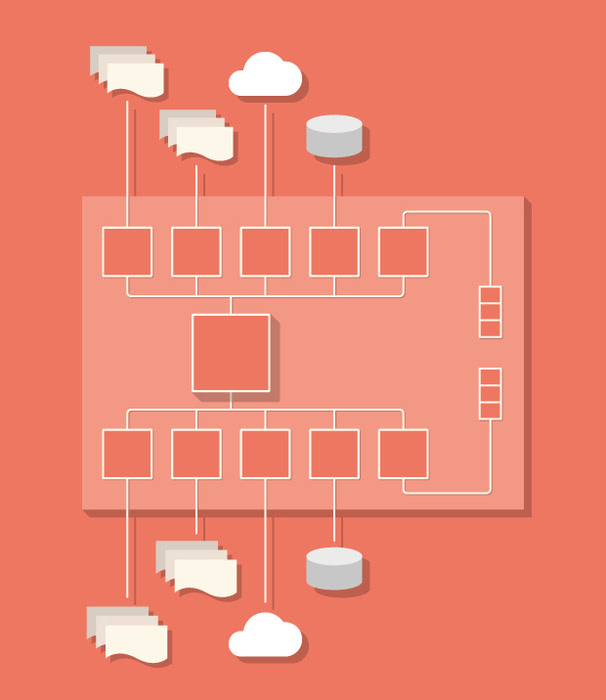
MetaDapper is a .NET library designed to greatly simplify the process of data conversion.
MetaDapper achieves this by:
- Separating the repetitive, boilerplate aspects of data conversion from those unique to each specific task.
- Providing a user-friendly interface for defining mapping and translation rules, regardless of complexity.
MetaDapper distinguishes between logical mapping (schema, data translation, validation) and physical data mapping (conversion between formats and APIs). The logical mapping features a comprehensive set of functions and even allows you to integrate your own methods to handle specific requirements. The physical mapping supports a wide range of formats, with more being added continuously. To configure mappings, MetaDapper provides the Configurator, a user-friendly Windows application for creating, editing, testing, and executing mappings for one-time conversions.
The same configuration file, often created in mere seconds, can be used to perform various tasks like converting class instances to XML or CSV files, populating SQL databases, generating SQL scripts for table population, creating spreadsheets, and much more.
Integrating MetaDapper into your .NET project is simple:
- Add a reference to the library.
- Instantiate the MetaDapper engine.
- Execute the mapping by providing the source reader (and parameters), the destination writer (and parameters), and your configuration file.
If successful, the writer outputs the transformed data. In case of errors, an exception provides detailed information, allowing you to either correct the data or refine the configuration.
Here’s a quick example demonstrating data mapping:
| |
Using the MetaDapper Configurator
The MetaDapper Configurator provides a visual guide for defining data structures and conversion/mapping rules. It allows you to create, modify, and execute configurations, useful for testing or one-time data conversions.
MetaDapper’s Configurator automates many parts of the process. For instance, during field mapping, it automatically matches source and destination fields based on their names whenever possible. When defining Record Definitions for data sources containing metadata, field definitions can be automatically populated by referencing the source.
Once created, a Record Definition retains its connection to the source data, allowing for automatic updates if the source schema changes. When configuring a Record Definition for a data source lacking metadata, copying a similar Record Definition (and its metadata) from a source with metadata can be beneficial. This copied definition can then be adjusted to reflect any differences between the sources. In cases where the schema and metadata are identical across multiple data sources, a single Record Definition can be used for all of them.
Simplifying Data Conversion: A Detailed Look
Let’s examine the inherent challenges of data conversion and how MetaDapper simplifies them for developers.
Streamlining Source-to-Destination Mapping
Changes to internal or external data structures during maintenance often necessitate adjustments to the mapping code that relies on them. This is a common area for maintenance efforts, making it crucial to consider the associated costs of any chosen solution. For instance, removing a TotalSale property from a Sale class would require modifying any related mapping assignments.
With MetaDapper, updating a mapping can be incredibly fast. For example, to update a class type, you simply click the “Import field definitions from class” button to refresh the field definitions to reflect the latest compiled version:

Simplifying Type Conversion
Certain type conversions, like those involving Date/Time and Number formats, can be affected by the host environment’s international settings unless explicitly defined in code. Deploying an application on a new server with different international settings can therefore lead to issues in code that doesn’t account for this. For example, a date value of “1-2-2014” would be interpreted as January 2, 2014, on a machine with U.S. settings but as February 1, 2014, on a machine with U.K. settings. MetaDapper supports all implicit .NET conversions and allows complex value reformatting during translation. Additionally, you can define separate international settings within MetaDapper for readers, writers, and the mapping engine.
Managing Complex Default Values
Sometimes, determining default values requires complex business logic, potentially involving interaction with other systems or intricate coding. MetaDapper allows you to register and utilize custom delegate methods for setting default values, performing custom data conversions, and implementing custom field validation.
Implementing Conditional Validation Rules
It’s not uncommon for field values to be required conditionally, or for their valid values to depend on other fields. For instance, a Partner Name and Partner Social Security Code might be optional, but providing a Partner Name could make the Partner Social Security Code (and potentially other fields) mandatory. Implementing such conditional validation in custom code can be complex and error-prone. In contrast, MetaDapper simplifies the configuration of these data mapping relationships. Specifically, fields within a Record Definition can be grouped as Conditional Mandatory Fields:
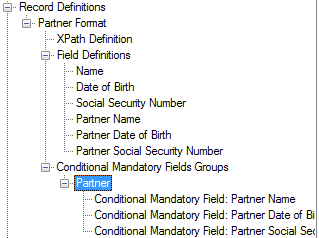
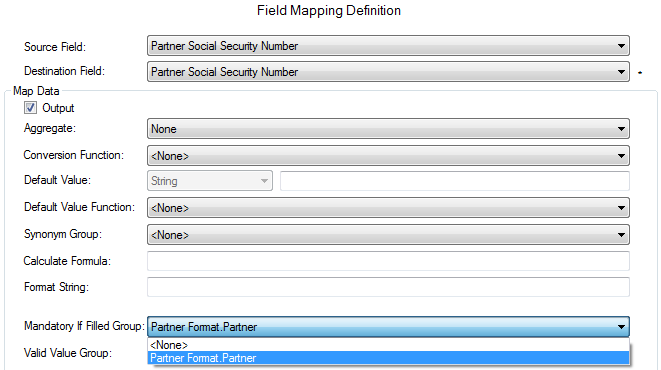
During mapping, this group can be linked to any field, making all fields within the group mandatory if the linked field is not empty. For example:
Translating Mapped Values Across Domains
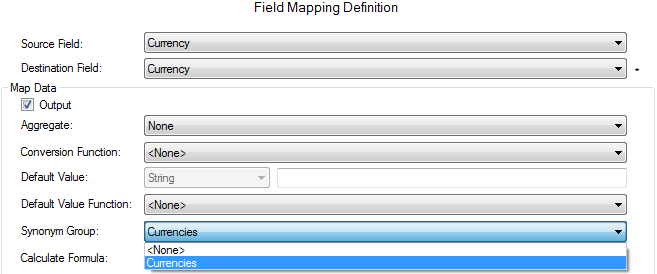
Source data might contain inconsistent values. For example, a salutation field could include variations like “Mr.”, “Mr”, “MR.”, “Mister,” or “M,” along with their female counterparts. Or a currency field might use “$” while the target format requires “USD”. Product codes are another example where conversion might be needed between systems. To address this, MetaDapper allows you to define reusable “synonym lists” for translating values during mapping.
Once a Synonym Group is defined, it can be applied to any relevant field mapping:
Handling Value Formatting and Complex Calculations
There are scenarios where values from one or more fields are used to format a new value. For instance, you might need to decorate the source value with constants (e.g., sale.PriceEach = "$" + priceEach;) or combine several fields to generate a value (e.g., sale.Code = code1 + “_” + code2;).
MetaDapper offers a formatting/templating feature that allows you to construct values using any field in the current record. This includes using substrings of fields or constant values. After formatting, the value is converted to the defined destination type, which doesn’t have to be a string.
Similarly, complex calculations can be performed during mappings using a comprehensive set of mathematical operators and functions on any combination of field values and constants.
Implementing Robust Validation Rules
MetaDapper allows the registration and use of custom validation delegates in mappings. Here’s an example demonstrating a custom method for validating that a field value is an integer (without setting the field’s data type to integer):
| |
This method would be registered when initializing MetaDapper and can then be effortlessly applied to any Field Mapping Definition:

Grouping, Sorting, and Filtering Data
While grouping and sorting can often be handled within database queries, not all data sources are databases. MetaDapper supports the configuration of complex grouping and sorting operations that can be performed in-memory.
When dealing with non-database sources, filtering only the required portion of data can be complex to implement and maintain. MetaDapper allows the configuration of advanced filters using Boolean operators for evaluating any number of fields per record, with support for arbitrarily deep nesting of operations. For example:
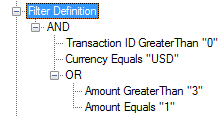
The filter above is equivalent to the following C# code:
| |
Working with Nested Mappings
Some data conversion processes require multiple passes, necessitating nested mappings. Examples include data needing prefix or summation records, data mapped differently based on field values or document structure, or simply breaking down complex mappings into manageable stages (e.g., name translation, type conversions). To address this, MetaDapper supports nested mappings of any depth.
Separating Format from Structure
As a data mapping and conversion tool, MetaDapper is designed to read and write virtually any data format through its internal reader and writer interfaces. This allows for the creation of lightweight reader/writer classes that focus solely on format-specific details.
These readers and writers are also designed for intelligence and flexibility. For instance, the XML reader and writer use XPaths to determine where to read from and write to in an XML file. The same configuration can be used to read and write from non-XML formats like CSV files, where XPath values are simply ignored. Similarly, using a configuration without XPath settings with an XML reader or writer would result in an error.
Real-World Success Stories: MetaDapper in Action
You’re right to be skeptical. Software often falls short of its promises. So, let’s look at real-world scenarios where MetaDapper has delivered tangible benefits.
A medical insurance management software provider had customers who preferred submitting data through spreadsheets instead of web forms. Using MetaDapper, they could read uploaded spreadsheets into memory, cleanse the data, validate records, and store the results in their database. They were able to accept Excel files from their clients without manual validation, thanks to MetaDapper’s easy-to-create configuration files tailored to each published spreadsheet template.
A large gas company, seeking to provide their management users with downloadable Excel reports from their internal application, found a solution in MetaDapper. The tool enabled them to generate Excel sheets directly from their database. Updating report formats simply required modifying the MetaDapper configuration files, eliminating the need for code changes or recompilation.
An asset management software company needed to generate financial data in various accounting package formats for their clients. They developed a generic accounting data query using an ORM wrapper and utilized MetaDapper to sort, filter, and map data into the specific schema and format required by each customer. By creating one or more MetaDapper configurations per customer, they transformed this capability into a key selling point, enabling seamless integration with existing systems by simply configuring MetaDapper to support the desired accounting package format. The same company leverages MetaDapper in other software integration projects for data mapping, conversion, and internal code translation between their systems.
A major auto reseller quickly added Excel-based sales reports to their application using MetaDapper, completing the entire process in under an hour.
A developer needing a table of U.S. states identical to one on another website used MetaDapper to extract the data and generate a SQL script for populating his table within minutes.
These are just a few examples showcasing the practical value and effectiveness of MetaDapper as a data mapping tool.
Conclusion
Thinking about data conversion more generically, as sets of data with business rules and limitless potential, requires a shift in perspective. MetaDapper provides a framework that encourages and facilitates this mindset.
Whether you choose MetaDapper, another technology, or develop your own solution, we hope this tutorial has provided valuable insights into the complexities and often-hidden costs associated with data conversion projects.
(For more on MetaDapper, reach out to the team at info@metadapper.com.)