As a Google Ads expert, I’ve recently seen more Meta Ads specialists wanting to provide Google Ads services to their customers. Businesses are discovering that running PPC campaigns on both platforms allows them to grow faster and achieve better outcomes.
Although Google and Meta’s ad platforms share many features, there are also significant distinctions that can be confusing when switching between them.
 Here’s a breakdown of the main distinctions I’ve found between Meta Ads and Google Ads during the campaign setup process, organized by:
- Campaign objectives
- Platforms and placements
- Budgets
- Creative
- Targeting
- Reporting Let’s get this show on the road!
Meta Ads vs. Google Ads: Campaign objectives
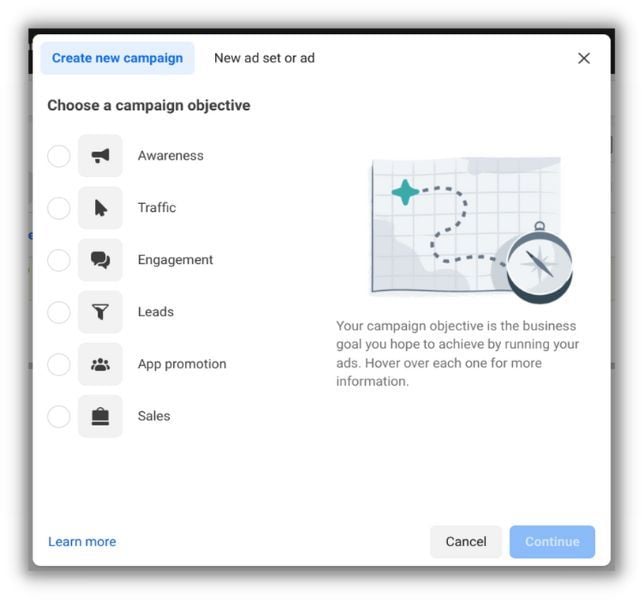
Choosing a campaign objective is the initial step when setting up a new campaign on either ad platform. The campaign objective in Meta Ads Manager determines the campaign type. As an illustration, the setup procedures and campaign features of a Traffic campaign and an App promotion campaign will be very different.
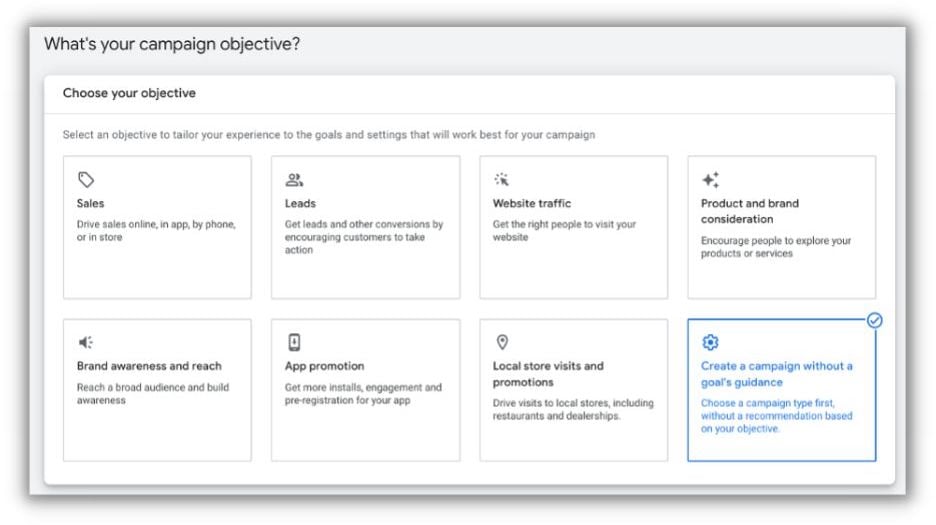
 Choosing a campaign goal in Google Ads is optional, and in my experience, unnecessary. This option enables Google to limit your options further down the setup procedure. As an illustration, Google Ads will only allow you to choose between a Display and a Video campaign type in the following step if you choose “Brand awareness and reach” as your goal.
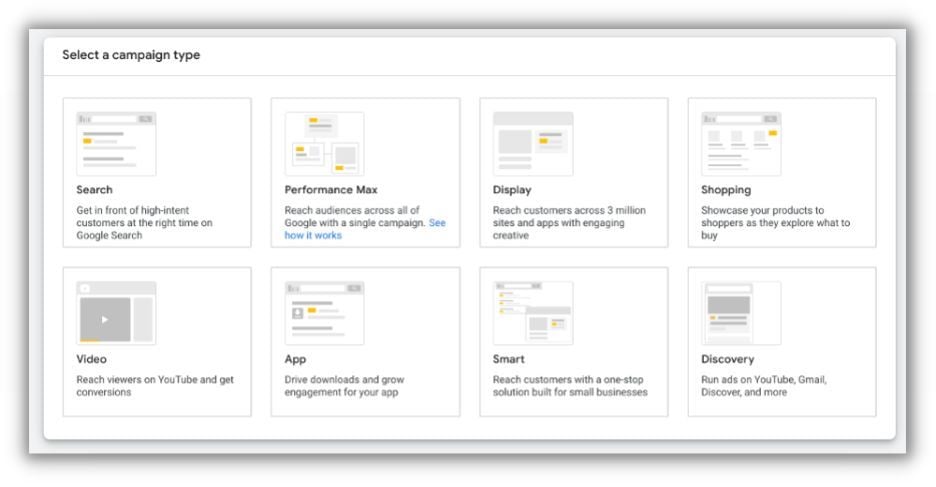
 The second step is to choose a campaign type, regardless of whether you selected a campaign goal. Here, you’ll choose between Search, Display, Performance Max, Discovery, and other options.
Meta Ads vs. Google Ads: Platforms and placements
You are probably aware that Google Ads allows you to create Search campaigns that display advertisements based on users’ search terms. On networks like Facebook, Instagram, and WhatsApp, Meta Ads does not provide a Search equivalent.
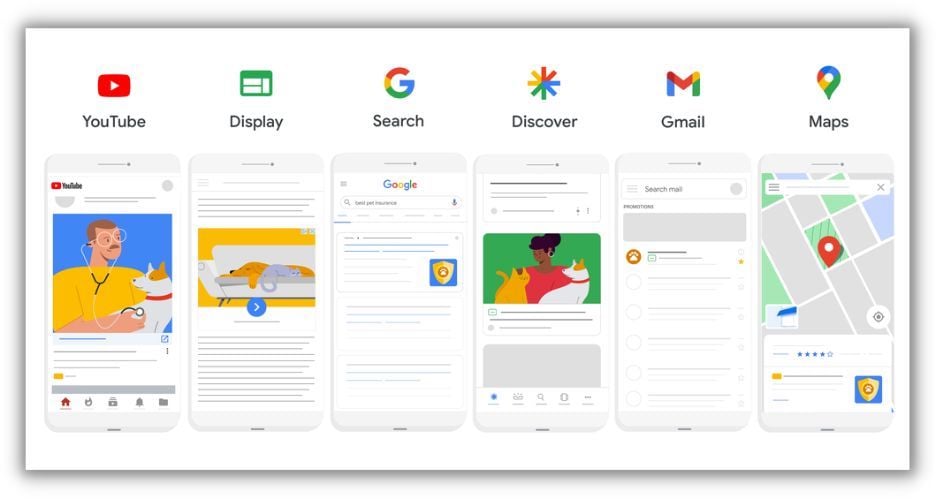
However, it is untrue that Google Ads solely display on Google’s own platforms, such as Search, YouTube, and Gmail. Additionally, Google Ads can appear on search partner websites, which are independent websites that employ Google’s technology to power their internal search. Video Ads can also display on websites of video partners (same idea). And of course, there is the Google Display Network, which is used by millions of websites to generate revenue.
 The Meta Audience Network is Meta’s equivalent of the Google Display Network, and it functions similarly. In a Meta Ads campaign, you can either manually choose your platforms and networks or let Meta handle the optimization for you.
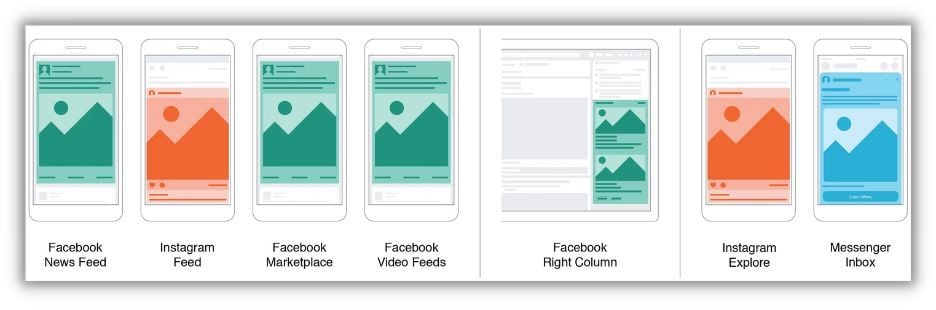 A few important Meta Ads placement choices.
While Google Ads typically allow you to choose whether or not to use partner sites, an increasing number of campaign types (like Performance Max and conversion-focused video campaigns) require you to use all available placements.
A few important Meta Ads placement choices.
While Google Ads typically allow you to choose whether or not to use partner sites, an increasing number of campaign types (like Performance Max and conversion-focused video campaigns) require you to use all available placements.
Another significant distinction is that Meta Ads on Facebook and Instagram need to be connected to a page or profile. This implies that users can click on your call to action whenever your advertisement appears, as well as interact with the post or view your social media profile.
 By reacting to this ad, you can observe that nine people have interacted with it.
In contrast, Google has only recently begun confirming advertisers and including company names in search adverts. Given that this feature is still in beta, I advise always include your brand name in at least one of your headline assets because clicking the headline serves as the “call to action” in a search ad.
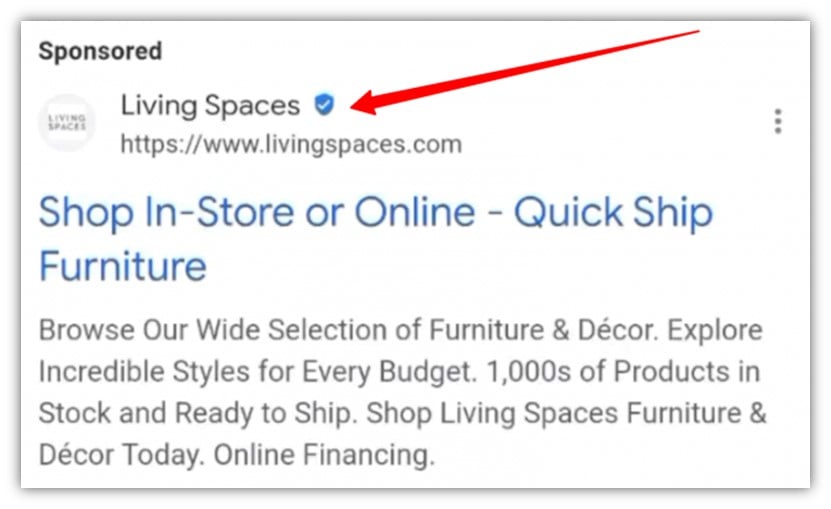 An example of the Google Ads verification badge.
Meta Ads vs. Google Ads: Budgets
The ways that budgets are set up and used in Meta Ads and Google Ads differ significantly.
Where is the budget set?
Your budget is determined at the ad set level in a Meta Ads campaign. You can enable Advantage campaign budget, which gives every ad set in a campaign access to the same funds.
Your budget is determined at the campaign level in a Google Ads campaign; ad group-level budgets are not an option.
What type of budget am I allowed to use?
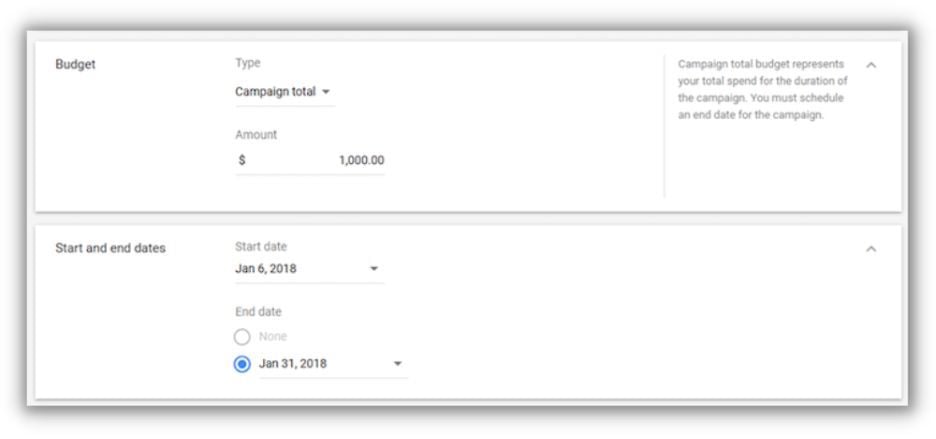
While Google Ads campaigns only use daily budgets—aside from video campaigns—Meta Ads allows you to set daily or lifetime budgets.
The rationale behind this is that the majority of Google Ads campaigns are intended to be “always on,” whereas Meta Ads campaigns are more likely to be flighted. Your campaign must have an end date in order to establish a lifetime budget on either platform.
Why is it exceeding my budget?!
Even if you choose a daily budget, the results on the two platforms will be different! Your daily budget is considered an average daily budget by both Meta Ads and Google Ads, not a maximum daily budget.
On any given day, Meta Ads may spend up to 25% more than your daily budget, but over the course of a week, it won’t spend more than 7 times your daily budget. Your “daily budget” on Meta Ads is effectively a weekly budget.
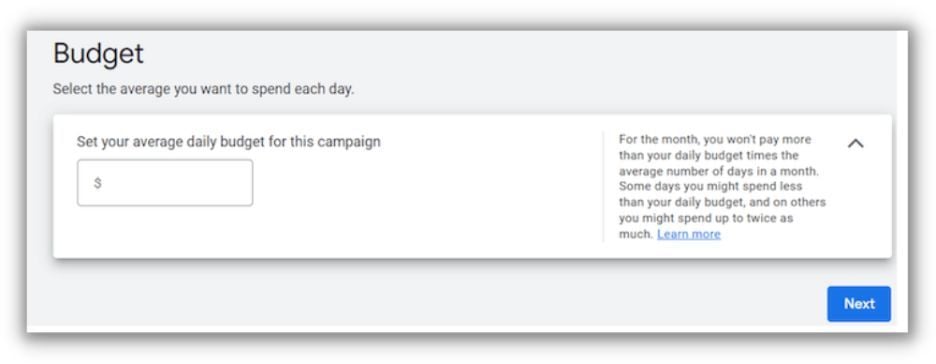
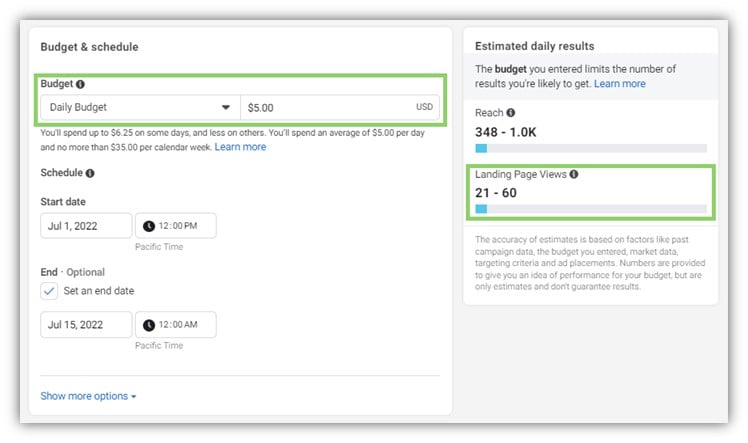 On any given day, Google Ads may spend up to 100% more than your daily budget, but over the course of a month, it won’t spend more than 30.4 times your daily budget. In essence, your “daily budget” on Google Ads is a monthly budget.
 Are you making the most of your Google Ads budget? Find out with our Google Ads Performance Grader.
Meta Ads vs. Google Ads: Creative
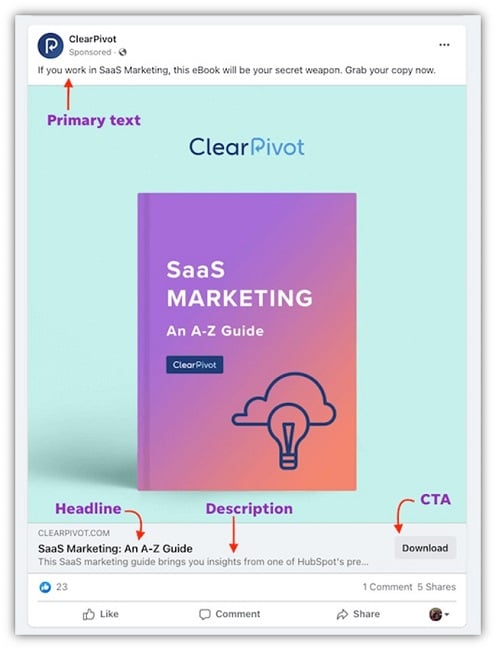
Your ad creative in Meta Ads is made up of a headline, description, main text, and your photos or videos. Although you can have several headlines, descriptions, etc. inside a single ad, it is more typical to test different ads by producing multiple standalone advertisements.
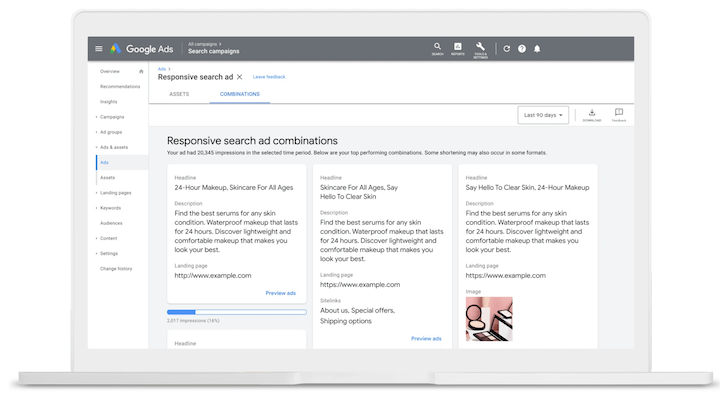
 In contrast, responsive is the new standard in Google Ads. What does responsive mean? In Google’s terminology, a responsive ad has a variety of assets that Google may combine to produce thousands of distinct variations. A Responsive Search Ad, for instance, may contain up to 15 distinct headlines and four distinct descriptions.
 Speaking of descriptions, a Meta Ad’s main text is comparable to a Google Ad’s description. Here, you may write in full sentences and go into greater detail about your offerings.
Meta Ads vs. Google Ads: Targeting
Here are some distinctions between Meta Ads and Google Ads in terms of targeting choices.
Lookalikes
You are likely acquainted with the ideas behind a lookalike audience (Meta Ads terminology) and a similar segment (Google Ads terminology). You can use this targeting to connect with new users that behave similarly online to your current ones by include it in your campaign.
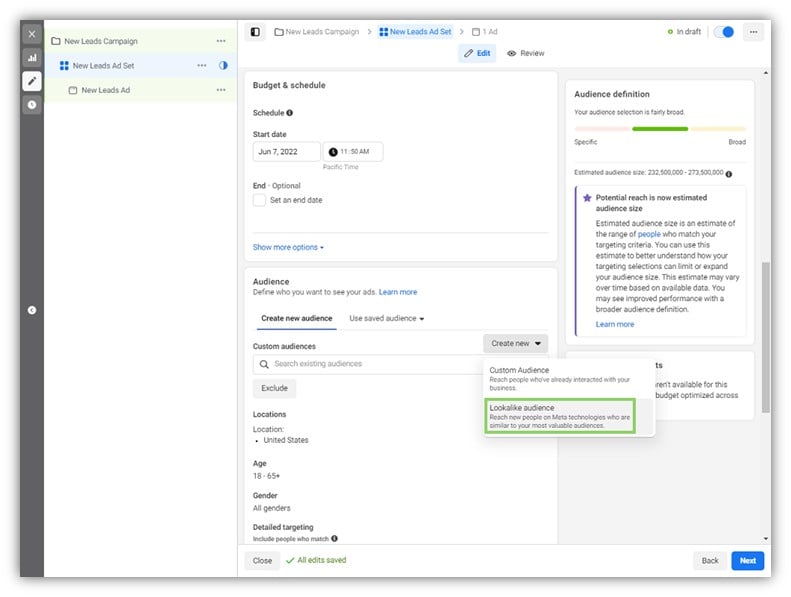 Sadly, Google Ads has decided to discontinue the similar segment; you can no longer use them in campaigns, and by August 2023, they will have stopped running altogether. Lookalikes, on the other hand, are still widely used in Meta Ads and are a popular prospecting strategy for newcomers to the platform.
Audience expansion
If you’ve ever dealt with sponsored advertising, you know that automation is taking over, regardless of the platform. Both Google Ads and Meta Ads will strongly encourage you to automate your audience targeting! This is known as Optimized Targeting in Google Ads and Advantage Detailed Targeting in Meta Ads. Both options are frequently enabled by default and grant the platform permission to display your advertisements to users outside of your target demographic who it believes are likely to convert. I advise giving it a shot; occasionally it’s successful, occasionally it’s not, but you won’t know unless you try.
Meta Ads vs. Google Ads: Reporting
Google Ads undoubtedly prevails in this matchup if you’re seeking reporting clarity.
Transparency
Reporting is available at the campaign, ad set, or ad level in Meta Ads. In practice, this means that if you add several audiences to the same ad set, you won’t know how well each audience does separately, only how well the ad set does as a whole. Although it is feasible to build separate ad sets for each audience, this may result in problems with the budget, reach, and other factors.
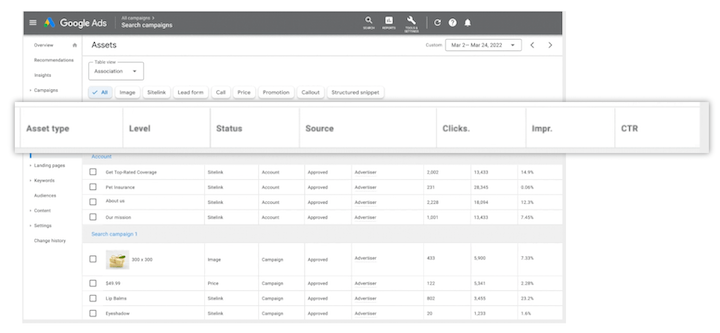
Reporting is available at considerably more granular levels in Google Ads. You will still receive comprehensive reporting on the effectiveness of each component of your targeting strategy even if you add several keywords, placements, audiences, etc. to the same ad group. For optimization, this is really helpful.
Default attribution windows
The standard attribution setting when starting a campaign in Meta Ads is a seven-day click or one-day view. This implies that if someone clicks on your ad and then converts within seven days, your campaign will be credited. The campaign will also get credit if someone sees your ad but doesn’t click it, and then converts within a day. Because Google Analytics is unable to “see” those view-through conversions, your Google Analytics reporting and your Meta Ads Manager reporting will never match.
In general, view-through conversions are not included in Google Ads by default. However, Google Ads Manager’s default click conversion window is 30 days. Your Google Analytics reporting and your Google Ads reporting will never match for this reason; throughout the month, Google Ads will continue to “add” conversions.
 Find out how Meta Ads + Google Ads can make the most of your marketing in our free guide >> 4 Ways to Make Facebook & Google the Perfect Pair
Key differences between Google Ads and Meta Ads
Consider Google Ads and Meta Ads as first cousins rather than distant relatives while comparing their capabilities. They have comparable DNA but have evolved in different ways as a result of having distinct priorities. This is a helpful reminder to conduct your homework (such as reading this article!) to prevent any unpleasant surprises if you are an expert in one platform and want to start using the other.