It’s common knowledge that iOS developers are well-versed in Core Data, Apple’s framework for object graphs and persistence. This framework excels at local data persistence and boasts advanced features like object change tracking and undo management. However, these features, while advantageous, have a cost. They demand a significant amount of boilerplate code, and mastering the framework can be a challenge.
The mobile database Realm was launched in 2014, captivating the development world. Realm presents a compelling alternative if local data persistence is the primary requirement, especially since not every scenario demands the advanced capabilities of Core Data. Realm stands out for its simplicity, requiring minimal boilerplate code compared to Core Data. It’s also thread-safe and reputedly outperforms Apple’s persistence framework in terms of speed.
In the realm of modern mobile apps, persisting data is only half the battle. Fetching data from a remote service, typically via a RESTful API, is often necessary. This is where https://github.com/Mantle/Mantle takes center stage. As an open-source model framework for Cocoa and Cocoa Touch, Mantle streamlines the creation of data models for seamless interaction with APIs that use JSON for data exchange.

This article guides you through building an iOS application that retrieves a list of articles and their corresponding links from the New York Times Article Search API v2. We’ll fetch the list using a standard HTTP GET request, employing Mantle to create request and response models. You’ll witness Mantle’s effortless handling of value transformations, such as converting NSDates to strings. Once fetched, the data will be locally persisted using Realm. The best part? Minimal boilerplate code throughout.
Getting Started with the RESTful API
Start by creating a new Xcode project for iOS. Choose the “Master-Detail Application” template and name it “RealmMantleTutorial.” We’ll use CocoaPods to integrate frameworks into our project. Your Podfile should look like this:
| |
After installing the pods, open the newly created MantleRealmTutorial workspace. You’ll notice that we’ve included the popular AFNetworking framework, which we’ll use to make API requests.
As mentioned, the New York Times offers an exceptional article search API. To use it, you’ll need to sign up for an access key, which you can do at http://developer.nytimes.com. With your API key ready, let’s dive into coding.
Before we create Mantle data models, we need to set up our network layer. In Xcode, create a new group named “Network.” Inside this group, we’ll create two classes.
First, create a class named SessionManager that inherits from AFHTTPSessionManager, a session manager class provided by the excellent networking framework, AFNetworking. Our SessionManager class will be a singleton object responsible for handling GET requests to the API. Once you’ve created the class, paste the following code into its interface and implementation files, respectively:
| |
| |
We initialize the session manager with the base URL defined in the static kBaseURL variable. It’s configured to use JSON for request and response serialization.
Next, within the Network group, create another class named APIManager that inherits from our newly created SessionManager class. Later, we’ll add a method to ApiManager for requesting a list of articles from the API, once the necessary data models are in place.
Exploring the New York Times Article Search API
You can find the official documentation for this impressive API at http://developer.nytimes.com/…/article_search_api_v2. We’ll be working with the following endpoint:
| |
This endpoint allows us to retrieve articles matching a specific search query within a defined date range. For instance, we can request a list of all articles related to basketball published in the New York Times during the first seven days of July 2015. According to the API documentation, we need to include the following parameters in our GET request:
| Parameter | Value |
| q | “basketBall” |
| begin_date | “20150701” |
| end_date | “20150707” |
The API’s response is quite detailed. Below is a simplified example response for a request with the above parameters, limited to one article (a single item in the docs array), with many fields omitted for clarity.
| |
The response essentially consists of three fields. The response field contains the docs array, holding items representing individual articles. The other two fields are status and copyright. Now that we have a grasp of the API’s structure, let’s create data models using Mantle.
Introducing Mantle
As previously mentioned, Mantle is an open-source framework that simplifies the process of writing data models. Let’s begin by creating an article list request model. Name this class ArticleListRequestModel and ensure it inherits from MTLModel, a base class for all Mantle models. Additionally, make it conform to the MTLJSONSerializing protocol. Our request model should have three properties with appropriate data types: query, articlesFromDate, and articlesToDate. For organizational purposes, I recommend placing this class within a Models group.
Your ArticleListRequestModel interface file should look like this:
| |
Referring to the article search endpoint documentation or the table of request parameters, you’ll notice that the variable names in the API request differ from those in our request model. Mantle elegantly addresses this discrepancy with the following method:
| |
Here’s how to implement this method within your request model:
| |
This method’s implementation defines the mapping between model properties and their corresponding JSON representations. With the JSONKeyPathsByPropertyKey method in place, we can obtain a JSON dictionary representation of the model using the class method +[MTLJSONAdapter JSONArrayForModels:].
One remaining detail, as indicated in the parameter list, is that both date parameters must adhere to the “YYYYMMDD” format. Mantle comes to the rescue again. We can introduce custom value transformation for any property by implementing the optional +<propertyName>JSONTransformer method. By doing so, we instruct Mantle on how to transform the value of a specific JSON field during deserialization. We can also implement a reversible transformer for use when generating JSON from the model. Given our need to transform an NSDate object into a string, we’ll utilize the NSDataFormatter class. Here’s the complete implementation of the ArticleListRequestModel class:
| |
Another noteworthy feature of Mantle is that all these models automatically conform to the NSCoding protocol and provide implementations for isEqual and hash methods.
As we’ve observed, the API call returns JSON containing an array of objects, each representing an article. To model this response effectively using Mantle, we’ll create two distinct data models. One model will represent individual article objects (elements of the docs array), while the other will model the overall JSON response, excluding the elements within the docs array. Keep in mind that we don’t need to map every single property from the incoming JSON to our data models. Let’s assume we’re only interested in two fields from the article objects: lead_paragraph and web_url. The ArticleModel class is quite simple to implement:
| |
| |
With the article model defined, let’s complete the response model by creating one for the article list. Here’s how the ArticleListResponseModel class will look:
| |
| |
This class has two properties: status and articles. Comparing it to the endpoint response, we can see that the third JSON attribute, copyright, won’t be mapped to the response model. Looking at the articlesJSONTransformer method, notice that it returns a value transformer for an array containing objects of type ArticleModel.
It’s also worth noting that in the JSONKeyPathsByPropertyKey method, the articles model property corresponds to the docs array nested within the response JSON attribute.
At this point, we should have three model classes implemented: ArticleListRequestModel, ArticleModel, and ArticleListResponseModel.
Making Our First API Request
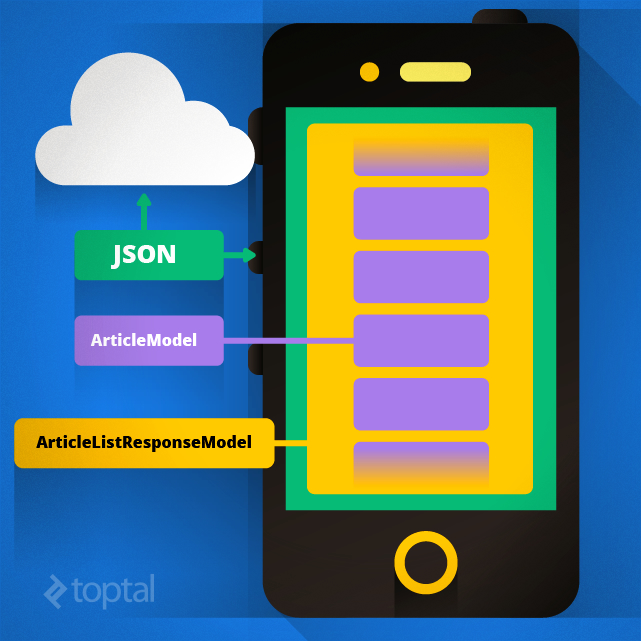
Now that our data models are in place, let’s return to the APIManager class and implement the method for making GET requests to the API. The method signature is as follows:
| |
It accepts an ArticleListRequestModel request model as input and returns an ArticleListResponseModel upon success or an NSError in case of an error. The implementation leverages AFNetworking to perform a GET request to the API. Remember that a valid API key, obtainable by registering at http://developer.nytimes.com, is required for successful requests.
| |
| |
Two crucial things are happening within this method’s implementation. First, let’s examine this line:
| |
Here, we utilize the method provided by the MTLJSONAdapter class to obtain an NSDictionary representation of our data model. This representation mirrors the JSON structure that will be sent to the API. This highlights Mantle’s elegance – by implementing the JSONKeyPathsByPropertyKey and +<propertyName>JSONTransformer methods in the ArticleListRequestModel class, we can effortlessly obtain the correct JSON representation of our data model with a single line of code.
Mantle also enables transformations in the opposite direction. That’s precisely what’s happening with the data received from the API. The received NSDictionary is mapped into an ArticleListResponseModel object using the following class method:
| |
Data Persistence with Realm
With the ability to fetch data from a remote API, let’s shift our focus to persisting this data. As mentioned earlier, we’ll use Realm for this purpose. Realm is a mobile database and serves as a replacement for Core Data and SQLite. As you’ll see, it’s incredibly user-friendly.
To save data in Realm, we first need to encapsulate it within an object that inherits from the RLMObject class. Let’s create a model class to store data for individual articles. Creating such a class is remarkably straightforward.
| |
The implementation of this class can remain empty. Notice that the properties in the model class don’t have attributes like nonatomic, strong, or copy. Realm manages these details for us.
Since we’re retrieving articles modeled with the Mantle Article model, it would be convenient to initialize ArticleRealm objects using instances of the Article class. To achieve this, let’s add an initWithMantleModel method to our Realm model. Here’s the complete ArticleRealm class implementation:
| |
| |
Interaction with the database is handled through objects of the RLMRealm class. Obtaining an RLMRealm object is as simple as calling the method “[RLMRealm defaultRealm].” Keep in mind that such an object is only valid within the thread it was created on and cannot be shared across threads. Writing data to Realm is equally straightforward. A single write operation, or a series of them, must be performed within a write transaction. Here’s an example of writing to the database:
| |
Let’s break down what’s happening here. First, we create an RLMRealm object for database interaction. Next, an ArticleRealm model object is created (remember that it’s derived from the RLMRealm class). Finally, to save it, we begin a write transaction, add the object to the database, and commit the transaction once saving is complete. It’s important to note that write transactions block the thread they are invoked on. While Realm is known for its speed, adding multiple objects to the database within a single transaction on the main thread could potentially make the UI unresponsive until the transaction finishes. A logical solution is to perform such write transactions on a background thread.
Combining API Requests with Realm Persistence
We now have all the pieces in place to persist articles using Realm. Let’s perform an API request using the method:
| |
along with our Mantle request and response models to retrieve New York Times articles related to basketball that were published during the first seven days of June 2015. Once we have this list of articles, we’ll persist it in Realm. Below is the code that accomplishes this, placed within the viewDidLoad method of our app’s table view controller.
| |
The process starts with an API call (2) using a request model (1), which returns a response model containing the list of articles. To persist these articles in Realm, we need to create Realm model objects, which happens in the for loop (4). Since we’re persisting multiple objects within a single write transaction, we perform this transaction on a background thread (3). After saving all articles to Realm, we assign them to the self.articles class property (7). As we’ll access them later on the main thread in TableView datasource methods, it’s safe to retrieve them from the Realm database on the main thread (5). Again, to access the database from a new thread, a new RLMRealm object needs to be created (6) on that thread.
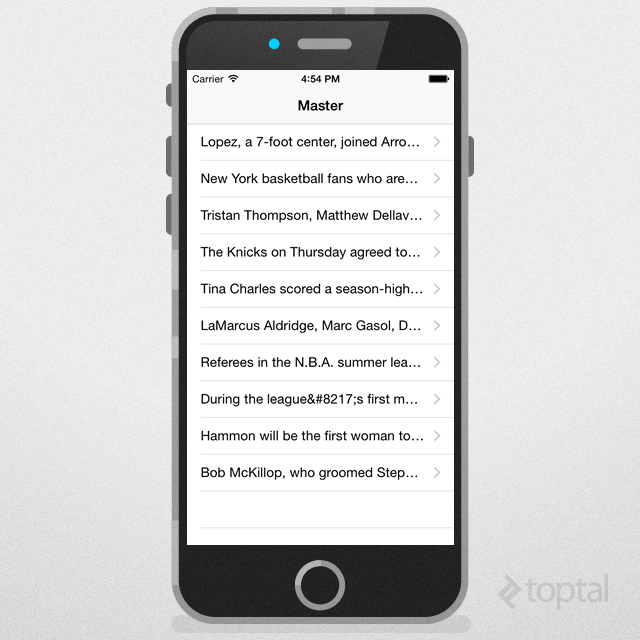
If fetching new articles from the API fails for any reason, the failure block retrieves existing articles from local storage.
In Conclusion
This tutorial covered configuring Mantle, a model framework for Cocoa and Cocoa Touch, to interact with a remote API. We also explored how to locally persist data, retrieved as Mantle model objects, using the Realm mobile database.
If you’d like to experiment with the complete application, the source code is available at its GitHub repository. You’ll need to generate and provide your own API key before running the application.