This document provides a comprehensive guide on implementing the JSON Web Token (JWT) - OAuth2 authorization framework on the server-side. We’ll be utilizing Spring Boot and Maven for this purpose.
Before diving in, it’s recommended to have a basic understanding of OAuth2. You can gain insights from the draft mentioned earlier or explore online resources like this or this.
OAuth2, an evolution of the original OAuth (released in 2006), is an authorization framework. It outlines how clients and HTTP services interact to access protected resources.
Within the OAuth2 framework, we have these server-side roles:
- Resource Owner: The entity controlling access to resources.
- Resource Server: The entity providing access to the resources.
- Authorization Server: The intermediary that manages the authorization process between the client and resource owner.
JSON Web Token (JWT) is a standard for representing claims exchanged between two parties. These claims, encoded as a JSON object, form the payload of a secure structure, allowing for digital signatures or encryption.
The encompassing structure can be either JSON Web Signature (JWS) or JSON Web Encryption (JWE).
JWT is a suitable format for access and refresh tokens within the OAuth2 protocol.
The popularity of OAuth2 and JWT in recent years can be attributed to these advantages:
- Stateless authorization, aligning well with the stateless nature of the REST protocol.
- Seamless integration with microservice architectures, allowing multiple resource servers to leverage a single authorization server.
- Easy client-side management of token content due to its JSON format.
However, OAuth2 and JWT may not always be ideal, particularly if these factors are crucial to your project:
- Stateless nature hindering server-side token revocation.
- Fixed token lifetimes introducing complexity in managing long sessions securely (e.g., using refresh tokens).
- Need for a secure mechanism to store tokens on the client-side.
Understanding the Protocol Flow
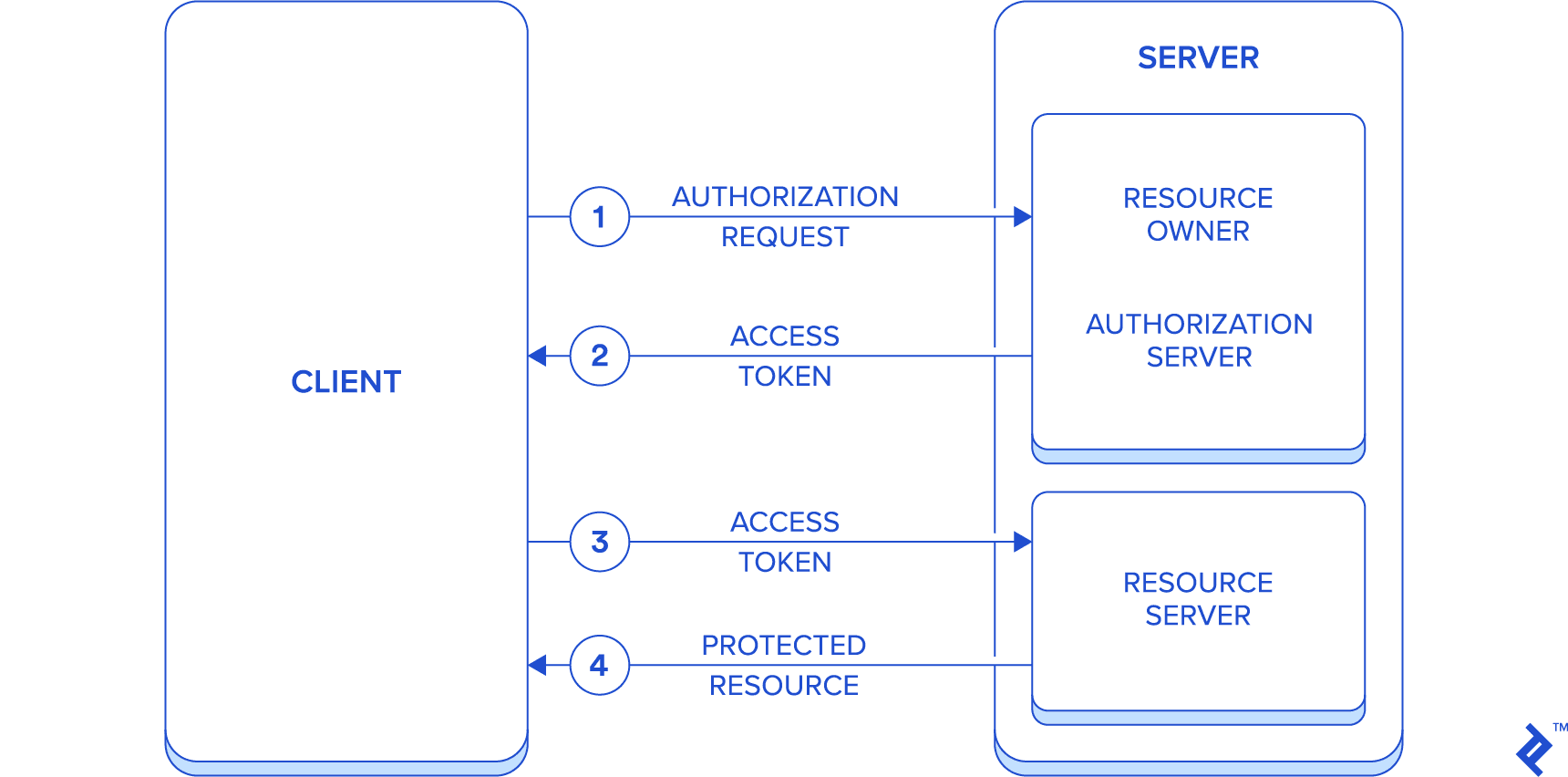
While OAuth2 emphasizes separating authorization from resource owners, for this guide, we’ll simplify things. We’ll have a single application acting as the resource owner, authorization server, and resource server. This means interactions are limited to the server and the client.
This simplification keeps our focus on the core goal: setting up this system within a Spring Boot environment.
Here’s the simplified flow:
- The client initiates an authorization request to the server (acting as the resource owner) using password authorization grant.
- The server responds with Access token to the client (alongside refresh token).
- The client then includes the access token in each subsequent request to the server (acting as the resource server) for accessing protected resources.
- The server then responds with the requested protected resources.
Leveraging Spring Security and Spring Boot
Before we proceed, let’s briefly touch upon the technology stack employed in this project.
We’ll be using Maven for project management. However, given the project’s straightforward nature, transitioning to other tools like Gradle shouldn’t pose any difficulties.
While we’ll primarily concentrate on Spring Security, it’s important to note that all code snippets originate from a fully operational server-side application. You can find the source code in the associated public repository, along with a client application that consumes its REST resources.
Spring Security is a framework that provides a near-declarative approach to securing Spring-based applications. Deeply integrated with Spring since its inception, it is structured as a collection of modules to effectively address a wide array of security technologies.
Let’s delve into the architecture of Spring Security.
At its core, security revolves around authentication—verifying identities—and authorization—granting access rights to resources.
Spring Security supports a diverse range of authentication mechanisms, both third-party and natively implemented. For a comprehensive list, refer to here.
When it comes to authorization, Spring Security focuses on three key aspects:
- Authorization for web requests.
- Authorization at the method level.
- Authorization for accessing domain object instances.
Authentication Mechanisms
The AuthenticationManager interface plays a central role in authentication. It’s responsible for providing an authentication method. UserDetailsService, another crucial interface, handles user information retrieval. You can implement it directly or utilize its internal mechanisms for standard protocols like JDBC or LDAP.
Authorization in Depth
AccessDecisionManager is the primary interface for authorization. Its implementations across web requests, method-level, and domain object instance authorization, rely on a chain of AccessDecisionVoter. Each AccessDecisionVoter links an Authentication (representing a user, the “principal”), a resource, and a set of ConfigAttribute. ConfigAttribute defines the rules governing resource access, often through roles assigned to the user.
Web application security in Spring Security leverages these elements within a series of servlet filters. WebSecurityConfigurerAdapter offers a declarative way to express resource access rules.
Method-level security is activated by the @EnableGlobalMethodSecurity(securedEnabled = true) annotation. You then apply specific annotations like @Secured, @PreAuthorize, and @PostAuthorize to individual methods requiring protection.
Spring Boot complements this by providing pre-configured application setups and integrating third-party libraries. This simplifies development without compromising on quality.
Implementing JWT-Based OAuth2 with Spring Boot
Let’s shift our attention back to the task at hand: setting up an application that implements OAuth2 and JWT using Spring Boot.
While numerous server-side OAuth2 libraries exist in the Java ecosystem (a list is available at here), the Spring-based implementation is the most logical choice. This is because of its seamless integration with Spring Security, minimizing the need to grapple with low-level details.
Maven, aided by Spring Boot, manages all security-related libraries. You’ll only need to explicitly specify the Spring Boot version in your pom.xml file; Maven will automatically determine and fetch compatible versions for other libraries.
Below is the excerpt from the Maven configuration file, pom.xml, containing the dependencies relevant to Spring Boot security:
1
2
3
4
5
6
7
8
9
| <dependency>
<groupId>org.springframework.boot</groupId>
<artifactId>spring-boot-starter-security</artifactId>
</dependency>
<dependency>
<groupId>org.springframework.security.oauth.boot</groupId>
<artifactId>spring-security-oauth2-autoconfigure</artifactId>
<version>2.1.0.RELEASE</version>
</dependency>
|
Our application serves a dual role: as both the OAuth2 authorization server/resource owner and the resource server.
The protected resources (managed by the resource server) are accessible under the /api/ path. The authentication endpoint (managed by the resource owner/authorization server) is mapped to /oauth/token, following standard conventions.
Here’s a breakdown of the application’s structure:
security: Houses the security configurations.errors: Dedicated to error handling.users, glee: Contain REST resources, including models, repositories, and controllers.
Let’s break down the configuration for each of the three OAuth2 roles:
OAuthConfiguration: Extends AuthorizationServerConfigurerAdapter.ResourceServerConfiguration: Extends ResourceServerConfigurerAdapter.ServerSecurityConfig: Extends WebSecurityConfigurerAdapter.UserService: Implements UserDetailsService.
Configuring the Resource Owner and Authorization Server
The @EnableAuthorizationServer annotation activates the authorization server’s functionality. Its configuration is combined with that of the resource owner, both managed within the AuthorizationServerConfigurerAdapter class.
The configurations set here pertain to:
- Client Access (using
ClientDetailsServiceConfigurer)- Storage for client details: Choose between in-memory (
inMemory) or JDBC-based (jdbc) storage. - Basic client authentication: Utilize
clientId and clientSecret attributes (encoded using the specified PasswordEncoder bean). - Token validity: Define the lifespan of access and refresh tokens using
accessTokenValiditySeconds and refreshTokenValiditySeconds. - Allowed grant types: Specify permissible grant types using the
authorizedGrantTypes attribute. - Scope definition: Define access scopes using the
scopes method. - Resource access: Identify resources accessible to the client.
- Authorization Server Endpoint (using
AuthorizationServerEndpointsConfigurer)- JWT token utilization: Enable JWT tokens using the
accessTokenConverter. - Authentication mechanism: Integrate
UserDetailsService and AuthenticationManager interfaces for authentication (as the resource owner).
 1
 2
 3
 4
 5
 6
 7
 8
 9
10
11
12
13
14
15
16
17
18
19
20
21
22
23
24
25
26
27
28
29
30
31
32
33
34
35
36
37
38
39
40
41
42
43
44
45
46
47
48
49
50
51
52
53
54
55
56
57
58
59
60
61
62
63
64
65
66
67
68
69
70
71
72
73
74
75
| package net.reliqs.gleeometer.security;
import org.springframework.beans.factory.annotation.Value;
import org.springframework.context.annotation.Bean;
import org.springframework.context.annotation.Configuration;
import org.springframework.security.authentication.AuthenticationManager;
import org.springframework.security.core.userdetails.UserDetailsService;
import org.springframework.security.crypto.password.PasswordEncoder;
import org.springframework.security.oauth2.config.annotation.configurers.ClientDetailsServiceConfigurer;
import org.springframework.security.oauth2.config.annotation.web.configuration.AuthorizationServerConfigurerAdapter;
import org.springframework.security.oauth2.config.annotation.web.configuration.EnableAuthorizationServer;
import org.springframework.security.oauth2.config.annotation.web.configurers.AuthorizationServerEndpointsConfigurer;
import org.springframework.security.oauth2.provider.token.store.JwtAccessTokenConverter;
@Configuration
@EnableAuthorizationServer
public class OAuthConfiguration extends AuthorizationServerConfigurerAdapter {
private final AuthenticationManager authenticationManager;
private final PasswordEncoder passwordEncoder;
private final UserDetailsService userService;
@Value("${jwt.clientId:glee-o-meter}")
private String clientId;
@Value("${jwt.client-secret:secret}")
private String clientSecret;
@Value("${jwt.signing-key:123}")
private String jwtSigningKey;
@Value("${jwt.accessTokenValidititySeconds:43200}") // 12 hours
private int accessTokenValiditySeconds;
@Value("${jwt.authorizedGrantTypes:password,authorization_code,refresh_token}")
private String[] authorizedGrantTypes;
@Value("${jwt.refreshTokenValiditySeconds:2592000}") // 30 days
private int refreshTokenValiditySeconds;
public OAuthConfiguration(AuthenticationManager authenticationManager, PasswordEncoder passwordEncoder, UserDetailsService userService) {
this.authenticationManager = authenticationManager;
this.passwordEncoder = passwordEncoder;
this.userService = userService;
}
@Override
public void configure(ClientDetailsServiceConfigurer clients) throws Exception {
clients.inMemory()
.withClient(clientId)
.secret(passwordEncoder.encode(clientSecret))
.accessTokenValiditySeconds(accessTokenValiditySeconds)
.refreshTokenValiditySeconds(refreshTokenValiditySeconds)
.authorizedGrantTypes(authorizedGrantTypes)
.scopes("read", "write")
.resourceIds("api");
}
@Override
public void configure(final AuthorizationServerEndpointsConfigurer endpoints) {
endpoints
.accessTokenConverter(accessTokenConverter())
.userDetailsService(userService)
.authenticationManager(authenticationManager);
}
@Bean
JwtAccessTokenConverter accessTokenConverter() {
JwtAccessTokenConverter converter = new JwtAccessTokenConverter();
return converter;
}
}
|
Let’s move on to configuring the resource server.
Configuring the Resource Server
The @EnableResourceServer annotation enables the resource server’s behavior. Its configuration resides within the ResourceServerConfiguration class.
The primary configuration here involves defining resource identification to align with the client access defined earlier.
 1
 2
 3
 4
 5
 6
 7
 8
 9
10
11
12
13
14
15
16
17
| package net.reliqs.gleeometer.security;
import org.springframework.context.annotation.Configuration;
import org.springframework.security.oauth2.config.annotation.web.configuration.EnableResourceServer;
import org.springframework.security.oauth2.config.annotation.web.configuration.ResourceServerConfigurerAdapter;
import org.springframework.security.oauth2.config.annotation.web.configurers.ResourceServerSecurityConfigurer;
@Configuration
@EnableResourceServer
public class ResourceServerConfiguration extends ResourceServerConfigurerAdapter {
@Override
public void configure(ResourceServerSecurityConfigurer resources) {
resources.resourceId("api");
}
}
|
The final step involves configuring the web application’s security.
Configuring Web Security
The ServerSecurityConfig class handles Spring’s web security configuration. It’s enabled using the @EnableWebSecurity annotation. The @EnableGlobalMethodSecurity annotation allows you to enforce security at the method level. The proxyTargetClass attribute is set to ensure that this functions correctly for RestController methods, as controllers are typically classes and not interfaces.
Here’s what’s defined within this configuration:
- Authentication Provider: The authentication mechanism is specified by defining the
authenticationProvider bean. - Password Encoder: The
passwordEncoder bean defines the mechanism for encoding passwords. - Authentication Manager: The authentication manager is defined as a bean.
- Path-Specific Security:
HttpSecurity is used to configure security for different application paths. - Custom Authentication Entry Point: A custom
AuthenticationEntryPoint handles error messages, bypassing Spring REST’s default ResponseEntityExceptionHandler.
 1
 2
 3
 4
 5
 6
 7
 8
 9
10
11
12
13
14
15
16
17
18
19
20
21
22
23
24
25
26
27
28
29
30
31
32
33
34
35
36
37
38
39
40
41
42
43
44
45
46
47
48
49
50
51
52
53
54
55
56
57
58
59
60
61
62
63
64
65
66
67
| package net.reliqs.gleeometer.security;
import net.reliqs.gleeometer.errors.CustomAccessDeniedHandler;
import net.reliqs.gleeometer.errors.CustomAuthenticationEntryPoint;
import org.springframework.beans.factory.annotation.Qualifier;
import org.springframework.context.annotation.Bean;
import org.springframework.context.annotation.Configuration;
import org.springframework.security.authentication.AuthenticationManager;
import org.springframework.security.authentication.dao.DaoAuthenticationProvider;
import org.springframework.security.config.annotation.method.configuration.EnableGlobalMethodSecurity;
import org.springframework.security.config.annotation.web.builders.HttpSecurity;
import org.springframework.security.config.annotation.web.configuration.EnableWebSecurity;
import org.springframework.security.config.annotation.web.configuration.WebSecurityConfigurerAdapter;
import org.springframework.security.config.http.SessionCreationPolicy;
import org.springframework.security.core.userdetails.UserDetailsService;
import org.springframework.security.crypto.bcrypt.BCryptPasswordEncoder;
import org.springframework.security.crypto.password.PasswordEncoder;
@Configuration
@EnableWebSecurity
@EnableGlobalMethodSecurity(prePostEnabled = true, proxyTargetClass = true)
public class ServerSecurityConfig extends WebSecurityConfigurerAdapter {
private final CustomAuthenticationEntryPoint customAuthenticationEntryPoint;
private final UserDetailsService userDetailsService;
public ServerSecurityConfig(CustomAuthenticationEntryPoint customAuthenticationEntryPoint, @Qualifier("userService")
UserDetailsService userDetailsService) {
this.customAuthenticationEntryPoint = customAuthenticationEntryPoint;
this.userDetailsService = userDetailsService;
}
@Bean
public DaoAuthenticationProvider authenticationProvider() {
DaoAuthenticationProvider provider = new DaoAuthenticationProvider();
provider.setPasswordEncoder(passwordEncoder());
provider.setUserDetailsService(userDetailsService);
return provider;
}
@Bean
public PasswordEncoder passwordEncoder() {
return new BCryptPasswordEncoder();
}
@Bean
@Override
public AuthenticationManager authenticationManagerBean() throws Exception {
return super.authenticationManagerBean();
}
@Override
protected void configure(HttpSecurity http) throws Exception {
http
.sessionManagement().sessionCreationPolicy(SessionCreationPolicy.STATELESS)
.and()
.authorizeRequests()
.antMatchers("/api/signin/**").permitAll()
.antMatchers("/api/glee/**").hasAnyAuthority("ADMIN", "USER")
.antMatchers("/api/users/**").hasAuthority("ADMIN")
.antMatchers("/api/**").authenticated()
.anyRequest().authenticated()
.and().exceptionHandling().authenticationEntryPoint(customAuthenticationEntryPoint).accessDeniedHandler(new CustomAccessDeniedHandler());
}
}
|
The code snippet below demonstrates the implementation of the UserDetailsService interface, which provides authentication for the resource owner.
 1
 2
 3
 4
 5
 6
 7
 8
 9
10
11
12
13
14
15
16
17
18
19
20
21
22
23
24
25
26
27
| package net.reliqs.gleeometer.security;
import net.reliqs.gleeometer.users.User;
import net.reliqs.gleeometer.users.UserRepository;
import org.springframework.security.core.GrantedAuthority;
import org.springframework.security.core.authority.SimpleGrantedAuthority;
import org.springframework.security.core.userdetails.UserDetails;
import org.springframework.security.core.userdetails.UserDetailsService;
import org.springframework.security.core.userdetails.UsernameNotFoundException;
import org.springframework.stereotype.Service;
@Service
public class UserService implements UserDetailsService {
private final UserRepository repository;
public UserService(UserRepository repository) {
this.repository = repository;
}
@Override
public UserDetails loadUserByUsername(String username) throws UsernameNotFoundException {
User user = repository.findByEmail(username).orElseThrow(() -> new RuntimeException("User not found: " + username));
GrantedAuthority authority = new SimpleGrantedAuthority(user.getRole().name());
return new org.springframework.security.core.userdetails.User(user.getEmail(), user.getPassword(), Arrays.asList(authority));
}
}
|
Next, let’s examine a REST controller implementation to understand how security constraints are applied.
REST Controller Implementation
Within the REST controller, there are two primary methods for controlling access to resource methods:
- Using
OAuth2Authentication: Spring injects an instance of OAuth2Authentication as a parameter. - Annotations: Utilize
@PreAuthorize or @PostAuthorize annotations.
  1
  2
  3
  4
  5
  6
  7
  8
  9
 10
 11
 12
 13
 14
 15
 16
 17
 18
 19
 20
 21
 22
 23
 24
 25
 26
 27
 28
 29
 30
 31
 32
 33
 34
 35
 36
 37
 38
 39
 40
 41
 42
 43
 44
 45
 46
 47
 48
 49
 50
 51
 52
 53
 54
 55
 56
 57
 58
 59
 60
 61
 62
 63
 64
 65
 66
 67
 68
 69
 70
 71
 72
 73
 74
 75
 76
 77
 78
 79
 80
 81
 82
 83
 84
 85
 86
 87
 88
 89
 90
 91
 92
 93
 94
 95
 96
 97
 98
 99
100
101
102
103
| package net.reliqs.gleeometer.users;
import lombok.extern.slf4j.Slf4j;
import net.reliqs.gleeometer.errors.EntityNotFoundException;
import org.springframework.data.domain.Page;
import org.springframework.data.domain.Pageable;
import org.springframework.data.web.PageableDefault;
import org.springframework.security.access.prepost.PostAuthorize;
import org.springframework.security.access.prepost.PreAuthorize;
import org.springframework.security.crypto.password.PasswordEncoder;
import org.springframework.security.oauth2.provider.OAuth2Authentication;
import org.springframework.validation.annotation.Validated;
import org.springframework.web.bind.annotation.*;
import javax.validation.ConstraintViolationException;
import javax.validation.Valid;
import javax.validation.constraints.Size;
import java.util.HashSet;
@RestController
@RequestMapping("/api/users")
@Slf4j
@Validated
class UserController {
private final UserRepository repository;
private final PasswordEncoder passwordEncoder;
UserController(UserRepository repository, PasswordEncoder passwordEncoder) {
this.repository = repository;
this.passwordEncoder = passwordEncoder;
}
@GetMapping
Page<User> all(@PageableDefault(size = Integer.MAX_VALUE) Pageable pageable, OAuth2Authentication authentication) {
String auth = (String) authentication.getUserAuthentication().getPrincipal();
String role = authentication.getAuthorities().iterator().next().getAuthority();
if (role.equals(User.Role.USER.name())) {
return repository.findAllByEmail(auth, pageable);
}
return repository.findAll(pageable);
}
@GetMapping("/search")
Page<User> search(@RequestParam String email, Pageable pageable, OAuth2Authentication authentication) {
String auth = (String) authentication.getUserAuthentication().getPrincipal();
String role = authentication.getAuthorities().iterator().next().getAuthority();
if (role.equals(User.Role.USER.name())) {
return repository.findAllByEmailContainsAndEmail(email, auth, pageable);
}
return repository.findByEmailContains(email, pageable);
}
@GetMapping("/findByEmail")
@PreAuthorize("!hasAuthority('USER') || (authentication.principal == #email)")
User findByEmail(@RequestParam String email, OAuth2Authentication authentication) {
return repository.findByEmail(email).orElseThrow(() -> new EntityNotFoundException(User.class, "email", email));
}
@GetMapping("/{id}")
@PostAuthorize("!hasAuthority('USER') || (returnObject != null && returnObject.email == authentication.principal)")
User one(@PathVariable Long id) {
return repository.findById(id).orElseThrow(() -> new EntityNotFoundException(User.class, "id", id.toString()));
}
@PutMapping("/{id}")
@PreAuthorize("!hasAuthority('USER') || (authentication.principal == @userRepository.findById(#id).orElse(new net.reliqs.gleeometer.users.User()).email)")
void update(@PathVariable Long id, @Valid @RequestBody User res) {
User u = repository.findById(id).orElseThrow(() -> new EntityNotFoundException(User.class, "id", id.toString()));
res.setPassword(u.getPassword());
res.setGlee(u.getGlee());
repository.save(res);
}
@PostMapping
@PreAuthorize("!hasAuthority('USER')")
User create(@Valid @RequestBody User res) {
return repository.save(res);
}
@DeleteMapping("/{id}")
@PreAuthorize("!hasAuthority('USER')")
void delete(@PathVariable Long id) {
if (repository.existsById(id)) {
repository.deleteById(id);
} else {
throw new EntityNotFoundException(User.class, "id", id.toString());
}
}
@PutMapping("/{id}/changePassword")
@PreAuthorize("!hasAuthority('USER') || (#oldPassword != null && !#oldPassword.isEmpty() && authentication.principal == @userRepository.findById(#id).orElse(new net.reliqs.gleeometer.users.User()).email)")
void changePassword(@PathVariable Long id, @RequestParam(required = false) String oldPassword, @Valid @Size(min = 3) @RequestParam String newPassword) {
User user = repository.findById(id).orElseThrow(() -> new EntityNotFoundException(User.class, "id", id.toString()));
if (oldPassword == null || oldPassword.isEmpty() || passwordEncoder.matches(oldPassword, user.getPassword())) {
user.setPassword(passwordEncoder.encode(newPassword));
repository.save(user);
} else {
throw new ConstraintViolationException("old password doesn't match", new HashSet<>());
}
}
}
|
Wrapping Up
Spring Security, combined with Spring Boot, provides a streamlined and largely declarative way to set up a comprehensive OAuth2 authorization/authentication server. You can further simplify the process by configuring OAuth2 client properties directly within the application.properties/yml file, as explained in tutorial.
The complete source code for this implementation is available in this GitHub repository: spring-glee-o-meter. You can find an Angular client that interacts with the published resources in this repository: glee-o-meter.