It’s no secret that advertising on mobile devices can be challenging. The small screen size, slow connections, and limited attention spans of users all contribute to the fact that mobile conversion rates are generally lower compared to desktop computers.
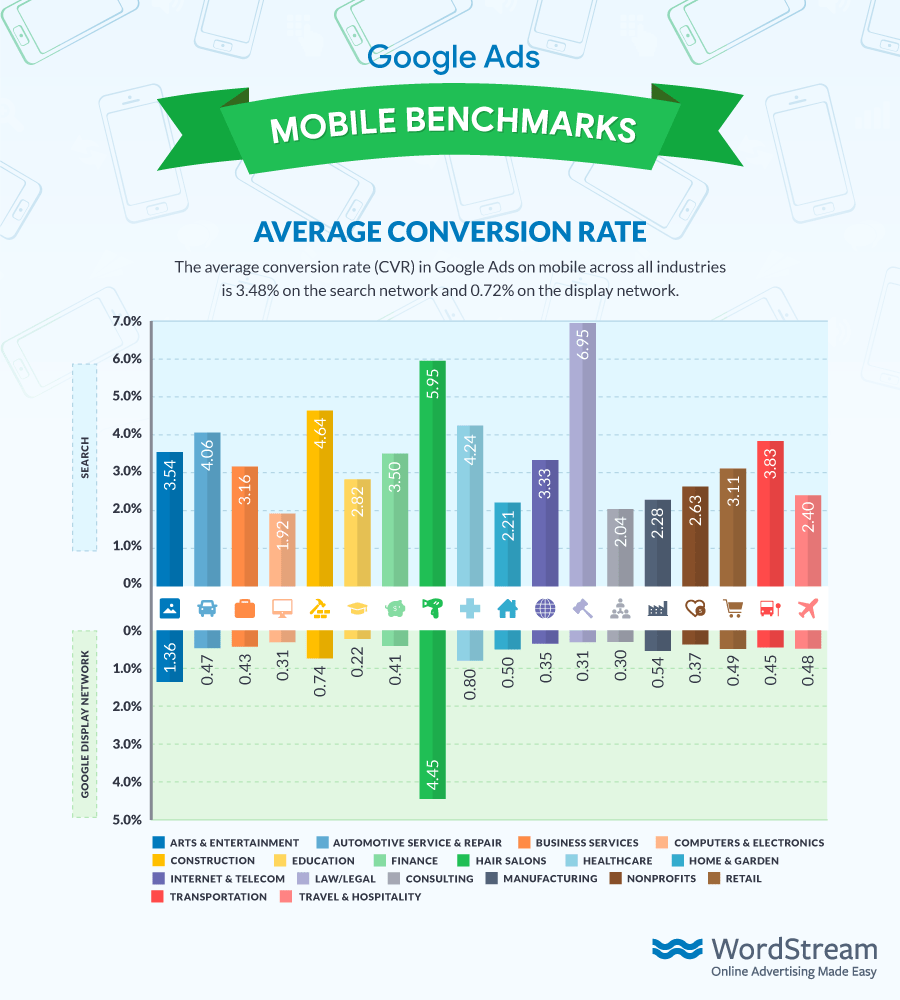
While there are various strategies to enhance mobile conversion rates and encourage more users to convert on mobile devices, the reality is that completing a form on a mobile website will always be a less convenient experience. In the past, Google has explored innovative solutions to enable users to convert without needing to visit a mobile site. These solutions include features like call extensions and call-only ads, message extensions, and even the ability to make purchases directly on the search engine results page (SERP) with Purchases on Google. Initially introduced in 2019, Google’s lead form ad extensions are specifically designed to assist mobile users in converting and submitting their contact details without having to leave the SERP. Recently, Google has made further updates that allows the lead form to open directly on the mobile device when a user taps on the ad headline. This enhancement provides advertisers with an even greater opportunity to generate leads from their Search ad campaigns. This article will provide a comprehensive overview of this ad type.
An Overview of Google Lead Form Extensions
Displayed below search ads on mobile and tablet devices, Google lead form extensions provide users with a convenient way to submit their contact information directly from the ad on the SERP, eliminating the need to visit a landing page. This streamlined process removes the friction of navigating to a mobile website for conversion. If a user is signed in to their Google account, they will be presented with a Google-hosted form that is pre-populated with their contact information, allowing for instant conversion with a single click.
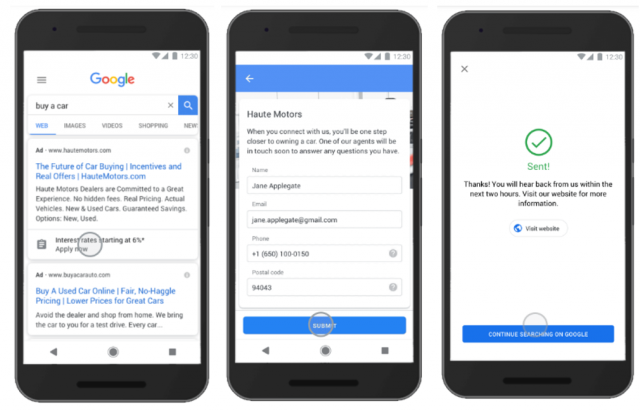 Google’s lead form extensions stand out prominently on the limited screen real estate of the mobile SERP, effectively increasing the visibility of search ads and facilitating faster and easier conversions for users. As with all ad extensions, advertisers are only charged when a user interacts with their lead form extension. It’s important to note that the display of lead form extensions is not guaranteed and is influenced by factors such as ad position, with higher positions generally having a greater likelihood of showing.
Creating Google Lead Form Extensions
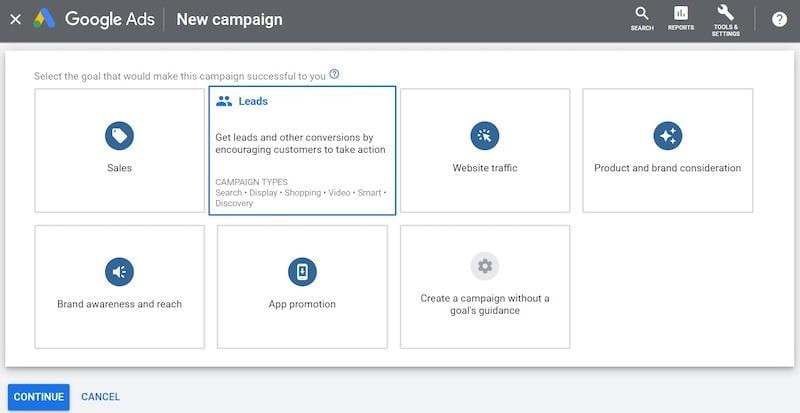
Setting up lead form extensions is a straightforward process. Begin by navigating to a search campaign within the Google Ads interface, ensuring that your campaign goal is set to “Leads” and the campaign type is “Search.”
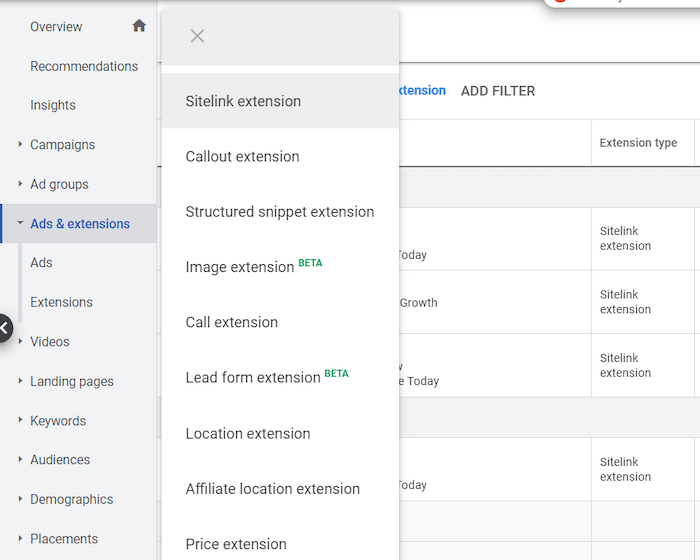
Next, locate and select the “Ads and Extensions” tab situated on the left-hand side of the interface. Then, click on the “Extensions” tab located on the top bar. If your account has been granted access to this beta feature, you will notice a drop-down menu appear when you click on the blue “+” button. Within this menu, you will find the “Lead form extension” option:
From this point onward, there are several key steps involved in creating the ad.
Designing Your Lead Form Extension
Initially, you will be prompted to design the visual presentation of your lead form extension as it will appear below your search ad. This involves selecting a compelling Call-to-action and crafting a concise message to accompany your lead form extension.

- Call to action: You have the option to choose from a predefined list of eight calls to action for your lead form extension. These options include “Get quote,” “Apply now,” “Sign up,” “Contact us,” “Subscribe,” “Download,” “Book now,” and “Get offer.”
- Extension text: This brief message, limited to 30 characters, will be displayed below your call to action within the lead form extension on the SERP. It’s crucial to provide an enticing offer that complements your call to action and encourages user engagement.
Building Your Lead Form
Following the design of your lead form extension, you will proceed to create the actual lead form that users will interact with upon clicking on the extension. You have the flexibility to specify the information you want to collect from users through this form.
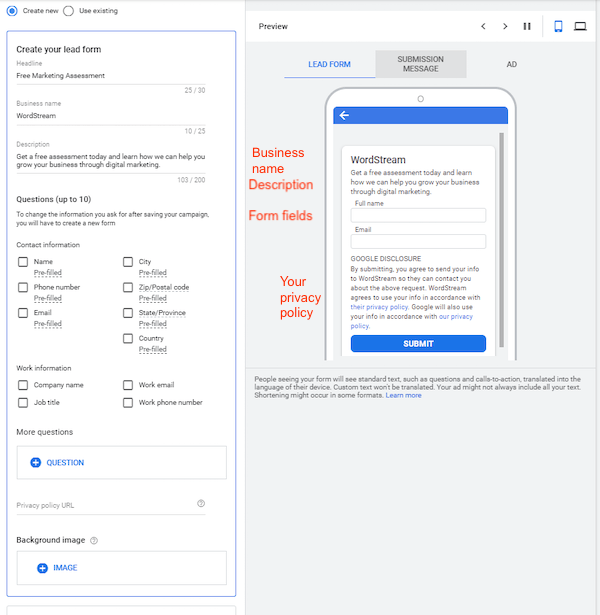
- Business name (30 characters): This field will be prominently displayed at the top of the form.
- Headline (30 characters): Positioned directly below your business name, the headline serves as the primary call to action within the form.
- Description (200 characters): This section constitutes the main body of content within your form. Utilize this space effectively to provide additional context, elaborate on your offer, and communicate your value proposition to potential leads.
- Questions: You have the option to include up to ten fields in your form, allowing you to gather specific contact and work-related information from leads. Google indicates that “These questions may be pre-filled with a person’s information when available, making it more likely a person submits the form,” leveraging the convenience of autofill to enhance conversion rates.
- Privacy policy page: To ensure compliance with Google’s policies, you are required to provide a link to your company’s privacy policy page within the form.
- Background image (optional): While optional, you can enhance the visual appeal of your lead form by incorporating a background image. The recommended dimensions for the image are 1200 x 628 pixels, corresponding to an aspect ratio of 1.91:1.
Crafting Your Form Submission Message
Once you have finalized your lead form, the next step involves creating the form submission message that users will see after successfully submitting their contact information.
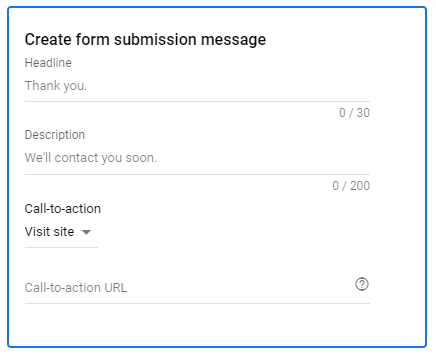
- Headline (30 characters): This headline will be prominently displayed at the top of the submission message. A simple and concise message such as “Thank you” or “Form submitted!” is often effective in this context.
- Description (200 characters): This section provides you with an opportunity to express gratitude to your new leads and set clear expectations regarding the next steps in the process. You can also include a call to action if desired, prompting users to continue their journey on your website.
- Call-to-action (optional): You have the option to incorporate a call to action within the submission message, such as a link to visit your website or download a specific resource.
Lead Delivery Options
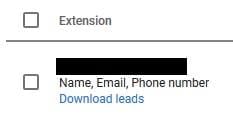
As users engage with your lead form extension and submit their information, it’s crucial to have a system in place for collecting and managing these valuable leads. Google provides two primary options for accessing and utilizing the data collected through lead form extensions. 1. CSV Lead Download: Within the Google Ads interface, beneath your lead form extension, you will find a blue “download leads” link. Clicking on this link will initiate the download of a CSV file containing the contact information of leads captured through the extension. It’s essential to download these leads regularly as Google retains lead data for a period of 30 days only.
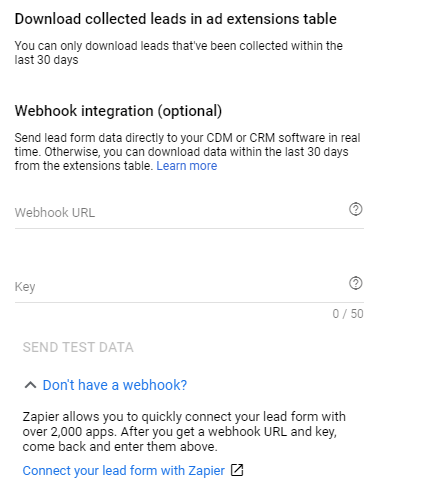
2. Webhook Integration: For seamless integration with a CRM system, it is recommended to add a webhook URL and key to your lead form extension. Once the integration is established, you can send test data to verify the functionality of the integration and ensure that data is being received correctly.
Limitations to Consider
While lead form extensions offer a powerful solution for enhancing mobile conversions, it’s important to be aware of certain limitations associated with this ad format.
- Lead form extensions are exclusively available for search campaigns.
- These extensions are specifically designed to appear on mobile and tablet devices only.
- Lead form extensions cannot be created at the account or ad group level. Each extension can only be implemented at the campaign level.
- Certain sensitive industries, such as healthcare, may face restrictions on collecting personal information using lead form extensions. For a complete list of restrictions, please refer to visit this page.
- It is imperative to handle the personal information collected through lead form extensions in strict compliance with your company’s privacy policy, Google’s data collection policies, and all applicable local legal requirements.
Embrace Lead Form Extensions for Mobile Conversion Optimization
Lead form extensions present a game-changing solution for advertisers aiming to boost conversions from mobile search traffic. As this feature becomes more widely available, it is highly recommended to incorporate lead form extensions into your advertising strategy and optimize your mobile bids accordingly. As a final note, it’s worth highlighting that lead generation forms are an effective means of collecting first-party data. This aspect is becoming increasingly significant in the evolving digital landscape as we transition towards a cookieless future where first-party data will play a pivotal role.