Batch processing is a common approach across various industries, handling tasks ranging from data-heavy operations to computationally intensive computations. This processing method, often characterized by its bulk-oriented, non-interactive, and lengthy background execution, can operate sequentially or concurrently and is triggered through methods like ad hoc, scheduled, or on-demand invocation.
This Spring Batch guide aims to clarify the programming paradigm and domain-specific language used in batch applications. Specifically, it showcases practical strategies for designing and developing such applications using the latest Spring Batch 3.0.7 version.
What is Spring Batch?
Spring Batch is a lightweight yet powerful framework created to simplify the development of robust batch applications. It leverages the familiar POJO-based development style of the Spring Framework, making it easy for experienced Spring developers to adapt. Beyond its core functionalities, Spring Batch offers advanced technical services and features, including optimization and partitioning techniques, to support high-volume and high-performance batch jobs.
To illustrate these concepts, this article delves into the source code of a sample project. This project demonstrates loading customer data from an XML file, applying filters based on specific criteria, and writing the filtered entries to a text file. The source code for this Spring Batch example, which utilizes Lombok annotations, is accessible here on GitHub. It requires Java SE 8 and Maven for execution.
Understanding Batch Processing: Core Ideas and Terms
For anyone involved in batch development, grasping the fundamental concepts of batch processing is crucial. The following diagram presents a simplified representation of the batch reference architecture, a model validated by decades of implementation across various platforms. It introduces the key concepts and terminology associated with batch processing, as employed by Spring Batch.
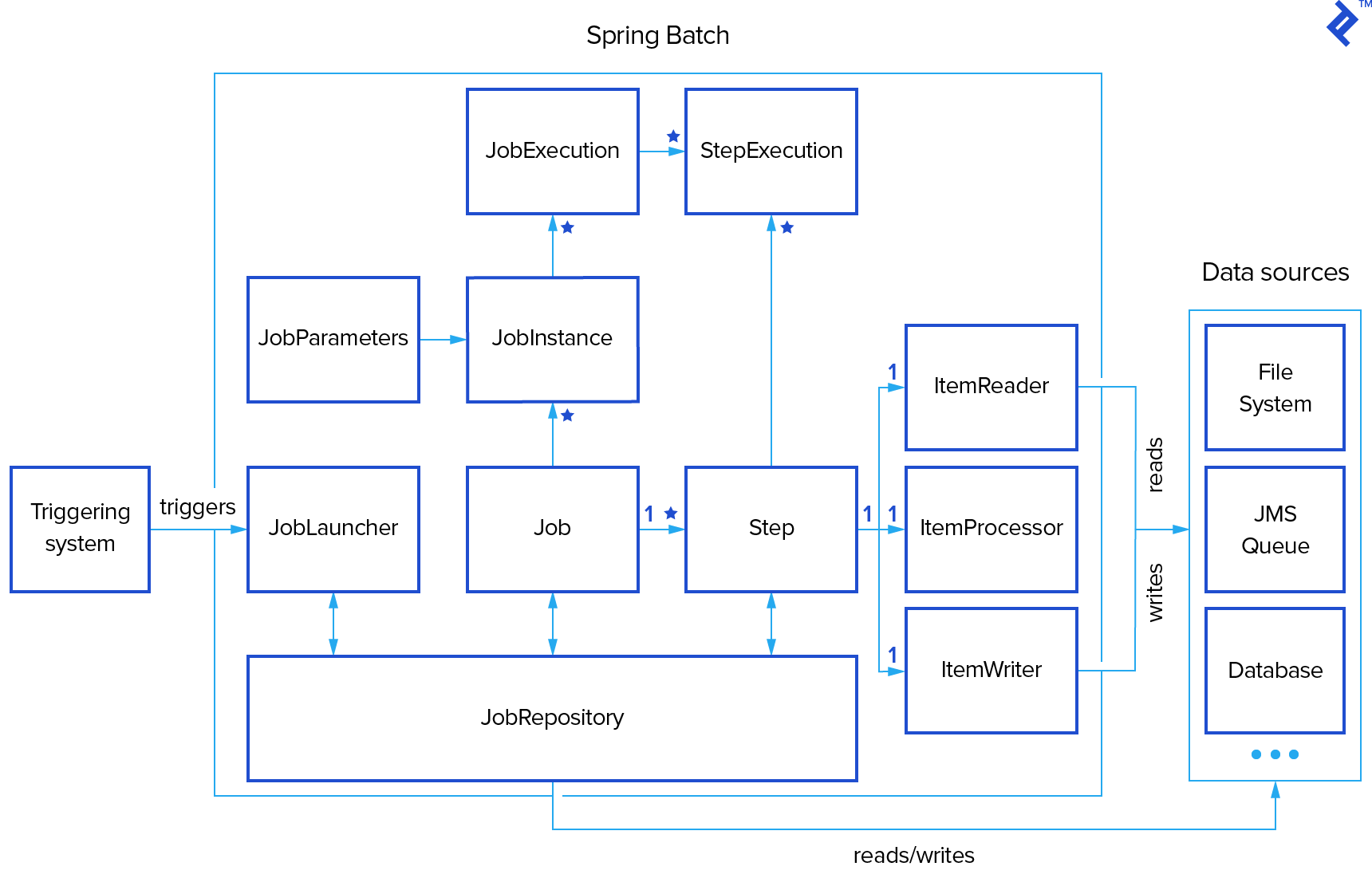
As depicted in our batch processing illustration, a Job encapsulates a batch process, typically comprising multiple Steps. Each Step generally consists of a single ItemReader, ItemProcessor, and ItemWriter. The execution of a Job is managed by a JobLauncher, while metadata about configured and executed jobs is stored within a JobRepository.
A Job might be linked to multiple JobInstances, each uniquely identified by its JobParameters used for job initiation. Every run of a JobInstance is termed a JobExecution, tracking details such as current and exit statuses, start and end times, and more.
A Step represents a distinct and independent phase within a batch Job, meaning a Job is constructed from one or more Steps. Similar to Jobs, Steps have StepExecutions representing individual attempts to execute a Step. Information regarding current and exit statuses, start and end times, and references to the corresponding Step and JobExecution instances are stored within a StepExecution.
An ExecutionContext functions as a repository for key-value pairs holding information relevant to a specific StepExecution or JobExecution. Spring Batch handles the persistence of the ExecutionContext, proving beneficial for scenarios like restarting a batch run after a failure. Any object intended for sharing between steps can be placed within the context, and the framework manages the rest. Upon restart, the values from the previous ExecutionContext are retrieved from the database and reapplied.
JobRepository enables persistence in Spring Batch by providing Create, Read, Update, and Delete (CRUD) operations for instances of JobLauncher, Job, and Step. When a Job is launched, a JobExecution is obtained from the repository. Throughout execution, StepExecution and JobExecution instances are persistently stored within the repository.
Embarking on Spring Batch Framework
One of Spring Batch’s strengths lies in its minimal project dependencies, enabling a quick and straightforward setup process. The few required dependencies are well-defined and explained within the project’s pom.xml file, accessible here.
Application startup is typically handled by a class resembling the following structure:
| |
The @EnableBatchProcessing annotation activates Spring Batch functionalities and establishes a basic configuration for setting up batch jobs.
Derived from the Spring Boot project, the @SpringBootApplication annotation facilitates the creation of self-contained, production-ready Spring applications. It designates a configuration class responsible for declaring one or more Spring beans, simultaneously triggering auto-configuration and Spring’s component scanning mechanism.
In our example project, a single job configured by CustomerReportJobConfig is present. This configuration utilizes injected instances of JobBuilderFactory and StepBuilderFactory. The minimal job configuration within CustomerReportJobConfig is defined as follows:
| |
Two primary approaches exist for building a step.
The example above demonstrates the tasklet-based approach. A Tasklet adheres to a simple interface with a single method, execute(), called repeatedly until it returns RepeatStatus.FINISHED or throws an exception signaling failure. Each invocation of the Tasklet is encapsulated within a transaction.
The alternative approach, chunk-oriented processing, involves sequentially reading data and creating “chunks” for writing within a transactional boundary. Individual items are read from an ItemReader, passed to an ItemProcessor for potential transformation, and aggregated. Once the read items reach a predefined commit interval, the entire chunk is written via the ItemWriter, followed by a transaction commit. Configuration for a chunk-oriented step is illustrated below:
| |
The chunk() method constructs a step that processes items in chunks of the specified size. Each chunk is then sequentially handled by the designated reader, processor, and writer. The subsequent sections of this article delve deeper into these methods.
Implementing a Custom Reader
To read customer data from an XML file in our Spring Batch sample application, we need a custom implementation of the org.springframework.batch.item.ItemReader interface:
| |
An ItemReader provides data and maintains state. It is typically invoked multiple times per batch. Each call to read() should return the next available value and ultimately return null upon exhausting all input data.
Spring Batch offers various ready-to-use ItemReader implementations for purposes such as reading from collections, files, integrating with JMS and JDBC, handling multiple sources, and more.
In our example, the CustomerItemReader class delegates its read() calls to a lazily initialized instance of the IteratorItemReader class:
| |
A Spring bean for this implementation is created using the @Component and @StepScope annotations. These annotations inform Spring that this class is a step-scoped component, instantiated once per step execution:
| |
Implementing Custom Processors
ItemProcessors play a crucial role in item-oriented processing scenarios. They apply transformations to input items and introduce business logic. Implementations must adhere to the org.springframework.batch.item.ItemProcessor interface:
| |
The process() method accepts an instance of type I and may return an instance of the same type or null. Returning null signifies that the item should be excluded from further processing. Spring provides standard processors like CompositeItemProcessor, which passes an item through a series of injected ItemProcessors, and ValidatingItemProcessor for input validation.
Our sample application employs processors to filter customers based on the following criteria:
- Customers must have birthdays in the current month (e.g., for birthday promotions).
- Customers must have completed fewer than five transactions (e.g., to identify new customers).
A custom ItemProcessor implements the “current month” requirement:
| |
The “limited number of transactions” requirement is implemented using a ValidatingItemProcessor:
| |
These two processors are then combined within a CompositeItemProcessor, implementing the delegate pattern:
| |
Implementing Custom Writers
Spring Batch provides the org.springframework.batch.item.ItemWriter interface for serializing and outputting data:
| |
The write() method ensures that internal buffers are flushed. In an active transaction, it typically handles discarding output upon rollback. The destination resource should ideally manage this behavior internally. Standard implementations like CompositeItemWriter, JdbcBatchItemWriter, JmsItemWriter, JpaItemWriter, SimpleMailMessageItemWriter, and others are available.
Our example application writes the filtered customer list as follows:
| |
Scheduling Spring Batch Jobs
Spring Batch defaults to executing all discoverable jobs (configured similarly to CustomerReportJobConfig) upon startup. To modify this, disable job execution at startup by adding the following property to application.properties:
| |
Scheduling is then achieved by annotating a configuration class with @EnableScheduling and using the @Scheduled annotation on the job execution method. Scheduling can be configured with delays, fixed rates, or cron expressions:
| |
However, this example presents a problem. The job will only succeed on its first execution. Subsequent launches (e.g., after five seconds) will result in the following log messages (note that previous Spring Batch versions would have thrown a JobInstanceAlreadyCompleteException):
| |
This occurs because only unique JobInstances are allowed, and Spring Batch cannot distinguish between the first and second instances.
Two solutions exist to circumvent this scheduling issue.
The first involves providing unique parameters for each job, such as the actual start time in nanoseconds:
| |
Alternatively, launch the next job in a sequence of JobInstances determined by the JobParametersIncrementer associated with the specified job using SimpleJobOperator.startNextInstance():
| |
Unit Testing in Spring Batch
Unit testing within a Spring Boot application often necessitates loading an ApplicationContext. Two annotations serve this purpose:
| |
The org.springframework.batch.test.JobLauncherTestUtils utility class facilitates batch job testing, offering methods to launch entire jobs or individual steps for end-to-end testing without executing the entire job. It needs declaration as a Spring bean:
| |
A typical test for a job and step is shown below (mocking frameworks can be integrated as well):
| |
Spring Batch introduces step and job context scopes. Objects in these scopes utilize the Spring container as an object factory, ensuring a single instance per execution step or job. Furthermore, support for late binding of references accessible from StepContext or JobContext is provided. Testing step- or job-scoped components in isolation can be challenging without simulating a step or job execution context. This is where org.springframework.batch.test.StepScopeTestExecutionListener, org.springframework.batch.test.StepScopeTestUtils, JobScopeTestExecutionListener, and JobScopeTestUtils come in.
TestExecutionListeners, declared at the class level, are responsible for creating a step execution context for each test method. For instance:
| |
Two TestExecutionListeners are used here. The first, from the Spring Test framework, handles dependency injection from the configured application context. The second, Spring Batch’s StepScopeTestExecutionListener, sets up the step-scope context for dependency injection within unit tests. A StepContext is created for each test method and made available to injected dependencies. The default behavior involves creating a StepExecution with fixed properties. Alternatively, the test case can provide a factory method returning the appropriate StepContext.
Another approach utilizes the StepScopeTestUtils utility class. This class offers a more flexible way to create and manage StepScope in unit tests without relying solely on dependency injection. For example, reading the ID of a customer filtered by the processor mentioned earlier could be accomplished as follows:
| |
Exploring Advanced Spring Batch Concepts
This article provides a foundational understanding of designing and developing Spring Batch applications. However, advanced topics and capabilities, such as scaling, parallel processing, listeners, and more, fall outside its scope. This article aims to equip you with the necessary groundwork to explore these concepts further.
For in-depth information on these advanced topics, refer to the official Spring Back documentation for Spring Batch.