It’s common for stakeholders and clients to be unsure about unit testing. To them, it can seem like flossing – an extra step they don’t fully grasp the need for, especially when they believe their existing testing methods are already robust.
However, unit tests are incredibly valuable and simpler than they might appear. This article will explore unit testing in DotNet and introduce tools like Microsoft.VisualStudio.TestTools and Moq.
To illustrate, we’ll create a class library to calculate the nth term in the Fibonacci sequence. This will involve building a Fibonacci class that utilizes a custom math class for addition. We’ll then leverage the .NET Testing Framework to validate our program’s functionality.
What is Unit Testing?
Unit testing involves breaking down code into its smallest units, typically functions, and verifying that each unit produces the expected output. Using a unit testing framework allows these tests to run automatically during development.
| |
Example of a simple unit test using Arrange, Act, Assert to verify our math library can add 2 + 2 correctly.
Once set up, these tests act as a safety net whenever code is modified. For instance, if a new condition needs to be accommodated, unit tests will quickly reveal if the updated code still behaves as intended in all scenarios.
It’s important to distinguish unit testing from integration testing and end-to-end testing. While all valuable, unit testing plays a distinct role and should complement, not replace, other testing approaches.
Benefits and Purpose of Unit Testing
The most crucial benefit of unit testing, though often overlooked, is the power to retest modified code instantly. While developers might believe they won’t revisit certain functions or stakeholders question the need to retest already written code, the reality is that even minor changes can have significant consequences.
Think about it:
- Does a new value added to your switch statement have unintended effects?
- How many parts of the code rely on that switch statement?
- Did you account for case sensitivity in string comparisons?
- Are you handling null values appropriately?
- Are exceptions being caught and handled as expected?
Unit testing addresses these concerns by codifying them into repeatable tests, ensuring they’re continuously addressed. Running these fast and automated tests before each build helps identify regressions early. A full test suite can often be completed in under an hour, even for large applications – a speed unmatched by manual user acceptance testing (UAT).

While this might seem like extra work for developers, the peace of mind knowing their code is reliable is invaluable. Furthermore, unit testing can highlight design weaknesses. If you’re writing similar tests for different code sections, it might indicate a need for consolidation.
The process of making code unit-testable itself can lead to better design. By striving for testability, developers often uncover opportunities for improvement they might have otherwise missed.
Making Your Code Unit-Testable
Beyond the Don’t Repeat Yourself (DRY) principle, here are some key considerations for unit-testable code:
Are Your Methods or Functions Trying to do Too Much?
If your unit tests are overly complex or slow, the method under test might be too convoluted. Consider breaking it down into smaller, more manageable units.
Are You Properly Leveraging Dependency Injection?
In unit testing, treat dependencies like black boxes, focusing solely on the method under test. Ensure dependencies have their own unit tests.
Simulate dependencies during testing using techniques like mocking to gain control over their behavior. This helps isolate the code being tested.
Do Your Components Interact with Each Other How You Expect?
Dependency injection, while beneficial, can sometimes lead to circular dependencies (Class A depending on Class B which depends back on A). Identify and refactor such scenarios.
The Beauty of Dependency Injection
Let’s revisit our Fibonacci example. Imagine your boss introduces a new, supposedly superior, Math class to replace the existing addition operator in C#. This new class, delivered as a black box library, contains a single Math class with an Add function.
Without dependency injection, your Fibonacci calculator might look like this:
| |
This approach tightly couples the Fibonacci calculator to the external Math class. Testing becomes reliant on the assumed accuracy of this external dependency, making it difficult to pinpoint the source of errors.
Dependency injection, particularly with interfaces, provides a solution. By defining an IMath interface and implementing it on both the external Math class and a custom OurMath class, we gain flexibility in testing:
| |
We can now inject the IMath interface into the Fibonacci calculator, allowing us to test against a known, accurate implementation (OurMath) or even a mocked version using a library like Moq.
| |
Injecting the IMath interface into the Fibonacci class
| |
Using Moq to define the return value of Math.Add.
With a reliable IMath implementation, we can confidently test specific cases like the 501st term, isolating whether the issue lies within our Fibonacci implementation or the external Math class.
Don’t Let a Method Try to Do Too Much
This example highlights the importance of focused methods. While addition is straightforward, imagine a more complex operation like model validation or data retrieval.
Strive for methods with a single responsibility. Overly complex methods, often indicated by numerous unit tests, should be decomposed.
The number of test cases can escalate rapidly with each parameter added to a method. If you find yourself writing an excessive number of tests, it’s a sign that the method is handling too much and needs simplification.
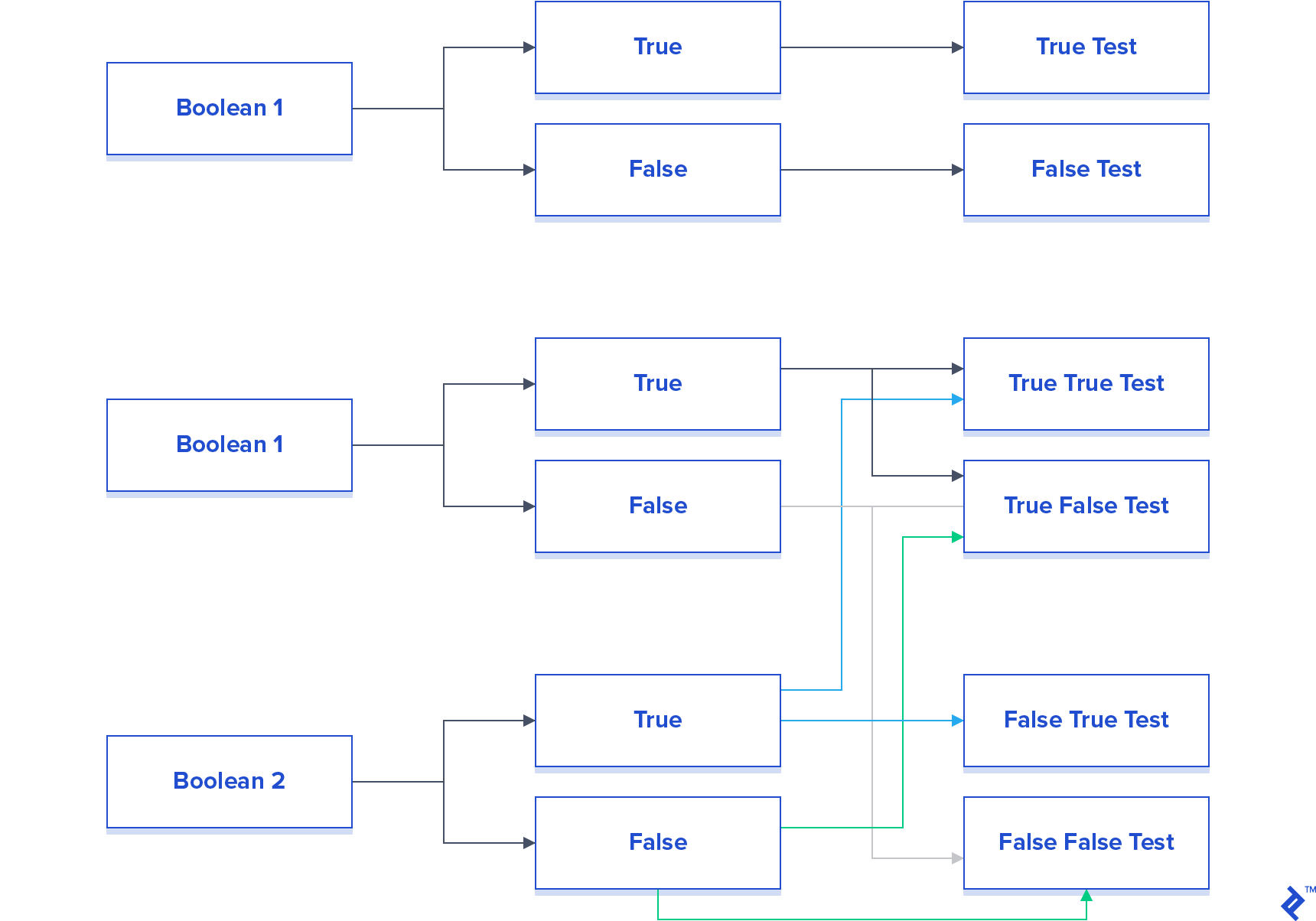
While it’s easy to fall into the trap of adding extra functionality to a method, remember that concise, well-defined methods are easier to test and maintain.
Don’t Repeat Yourself
This fundamental principle applies to unit testing as well. If you’re writing the same tests multiple times, consider refactoring the duplicated logic into a reusable class.
Exploring Unit Testing Tools
DotNet provides a robust unit testing platform out of the box. It enables the implementation of the Arrange, Act, Assert methodology pattern – Arrange, Act, Assert – providing a structured approach to writing tests. This framework allows assertions on various aspects like method calls, return values, exceptions, and more. For those seeking alternatives, NUnit and its Java counterpart, JUnit, are viable options.
| |
Testing exception handling in the Fibonacci method for negative inputs. Unit tests can verify if the expected exception is thrown.
To facilitate dependency injection, DotNet offers both Ninject and Unity. The choice between them depends on your preference for configuration using Fluent Syntax or XML.
Moq is a powerful mocking library that allows you to create simulated versions of your dependencies. You can define specific behaviors for these mocks, such as returning predefined values under certain conditions.
| |
Using Moq to control the behavior of the mocked IMath interface during testing. Specific cases can be defined using It.Is, while ranges can be handled with It.IsInRange.
Unit Testing Frameworks for DotNet
Microsoft Unit Testing Framework
Integrated into Visual Studio, the Microsoft Unit Testing Framework provides a seamless testing experience. It offers tools for analysis and benefits from Microsoft’s support. However, it can be less flexible compared to other frameworks.
NUnit
NUnit stands out with its support for parameterized tests, allowing you to run the same test with different inputs, as demonstrated in our Fibonacci example. However, integration with Visual Studio can be less seamless.
xUnit.Net
https://xunit.net is popular for its strong integration with the .NET ecosystem, including NuGet and Team Foundation Server. However, its extensibility can also make it more challenging for beginners to learn.
Introduction to Test Driven Design/Development
Test driven design/development (TDD), a more advanced topic, promotes writing unit tests before writing the actual code. While conceptually simple, it requires a shift in mindset. However, TDD can lead to better design and reduce the need for refactoring.
Despite being a buzzword, TDD adoption remains relatively low. Nevertheless, it’s a valuable approach to explore, even through small projects, to experience its benefits firsthand.
The Importance of Comprehensive Unit Testing
Unit testing is an indispensable tool for developers, offering benefits in regression testing, code design, and documentation.
Never underestimate the value of thorough unit testing. Every edge case, if overlooked, can potentially lead to significant issues down the line. By incorporating unit tests, you create a safety net that prevents these bugs from resurfacing. While unit testing might increase upfront costs, it ultimately saves time and resources by reducing debugging, fixing, and documentation efforts.
You can find the Bitbucket repository with the code examples from this article here: here.