A Look at the Power of Window Functions in SQL
Although SQL window functions offer substantial power and utility, many find them difficult to grasp and utilize. Their divergence from standard SQL syntax makes them seem unfamiliar and complex, leading to frequent avoidance.
Imagine window functions as calculation functions akin to aggregation. However, unlike GROUP BY clauses that aggregate and then conceal individual rows, window functions retain access to and can incorporate attributes from these rows into the results.
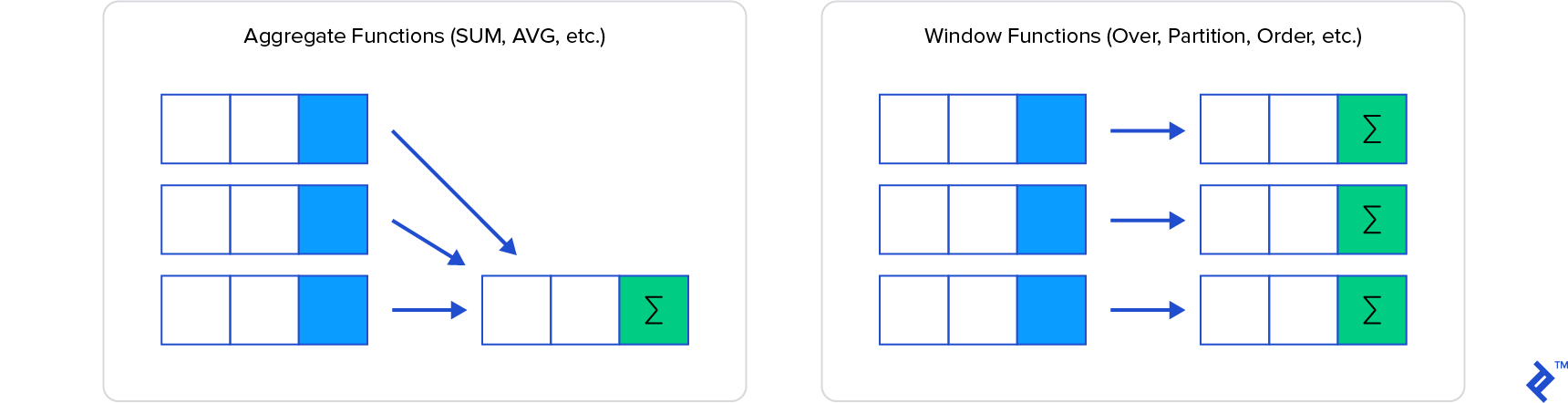
This tutorial delves into the world of SQL window functions, illustrating their advantages, use cases, and providing concrete examples for clarity.
Unveiling Insights with Window Functions
A cornerstone of SQL’s functionality is its ability to aggregate and group data rows in specific ways. Yet, the complexity of grouping can escalate based on the task at hand.
Have you encountered scenarios requiring you to iterate through query results for ranking, generating top-x lists, or similar tasks? Have you struggled to prepare data for visualization tools in analytics projects due to its intricate nature?
Window functions can be the solution. Applied after the WHERE clause and standard aggregation, they operate on the remaining rows (the data window) to deliver the desired outcome.
Let’s explore some key window functions:
OVERCOUNT()SUM()ROW_NUMBER()RANK()DENSE_RANK()LEAD()LAG()
Demystifying the OVER Clause
The OVER clause, a mandatory component of window functions, defines the scope of the function. By default, it encompasses the entire rowset. Consider an employee table illustrating the total employee count alongside individual employee data, including their start dates.
| |
| NumEmployees | firstname | lastname | date_started |
|---|---|---|---|
| 3 | John | Smith | 2019-01-01 00:00:00.000 |
| 3 | Sally | Jones | 2019-02-15 00:00:00.000 |
| 3 | Sam | Gordon | 2019-02-18 00:00:00.000 |
This, like many window functions, has an equivalent non-windowed form, which in this case, is relatively straightforward:
| |
However, let’s aim to display the number of employees who joined in the same month as each employee in the row. This requires restricting the count to each employee’s starting month. The window PARTITION clause helps achieve this:
| |
| NumPerMonth | TheMonth | Firstname | Lastname |
| 1 | January 2019 | John | Smith |
| 2 | February 2019 | Sally | Jones |
| 2 | February 2019 | Sam | Gordon |
Partitions act as filters, dividing the window into sections, often referred to as window frames, based on specific values.
To illustrate further, let’s determine not only the number of employees who joined in the same month but also their order of joining. The familiar ORDER BY clause comes into play, albeit with a slightly modified behavior within a window function.
| |
| NumThisMonth | TheMonth | Firstname | lastname |
| 1 | January 2019 | John | Smith |
| 1 | February 2019 | Sally | Jones |
| 2 | February 2019 | Sam | Gordon |
Here, ORDER BY structures the window from the partition’s beginning (the month and year of employee start date) to the current row, resetting the count at each partition.
Ranking with Window Functions
Window functions excel in ranking scenarios. While COUNT helped us understand the order of employee joining, window ranking functions such as ROW_NUMBER(), RANK(), and DENSE_RANK() offer distinct functionalities.
Let’s add a new employee in the subsequent month and remove the partition to observe the differences:
| |
| StartingRank | EmployeeRank | DenseRank | TheMonth | firstname | lastname | date_started |
| 1 | 1 | 1 | January 2019 | John | Smith | 2019-01-01 |
| 2 | 2 | 2 | February 2019 | Sally | Jones | 2019-02-15 |
| 3 | 2 | 2 | February 2019 | Sam | Gordon | 2019-02-18 |
| 4 | 4 | 3 | March 2019 | Julie | Sanchez | 2019-03-19 |
The variations become apparent. ROW_NUMBER() generates a sequential count within a partition (or across all rows in the absence of a partition). RANK() assigns ranks based on the ORDER BY clause, acknowledging ties and skipping subsequent ranks. DENSE_RANK(), while acknowledging ties, continues with the next consecutive value as if no tie existed.
Additional ranking functions include:
CUME_DIST– Computes the relative rank within a partition.NTILE– Divides rows within each partition as evenly as possible.PERCENT_RANK– Determines the percent rank of the current row.
Note that multiple window functions, each with its own partition and order, can coexist within a single query.
Navigating Rows, Ranges, and Frames
The ROWS and RANGE clauses within the OVER() clause provide further control over the window frame. ROWS specifies rows preceding or following the current row for inclusion.
| |
In this instance, the window frame expands with each row, encompassing rows from the first to the current row minus 1.
RANGE operates differently, potentially yielding different results.
| |
RANGE incorporates rows sharing the same ORDER BY values as the current row, potentially leading to duplicates if the ORDER BY clause doesn’t ensure uniqueness.
While some perceive ROWS as a physical operator and RANGE as a logical one, the default values for both remain UNBOUNDED PRECEDING AND CURRENT ROW.
Exploring Further Capabilities
Most standard aggregate functions like SUM, AVG, MIN, MAX, etc., seamlessly integrate with window functions.
Window functions also facilitate access to both preceding and subsequent records via LAG and LEAD, as well as FIRST_VALUE and LAST_VALUE. For instance, to display the current month’s sales figure alongside the difference from the previous month, you might use:
| |
Embracing the Power of SQL Window Functions
This concise introduction merely scratches the surface of SQL window functions. Hopefully, it piques your curiosity to explore their vast capabilities. We’ve established that window functions perform calculations akin to aggregation functions but with the added advantage of accessing data within individual rows, making them exceptionally powerful. The mandatory OVER clause, alongside optional PARTITION BY, ORDER BY, and a range of aggregate (SUM, COUNT, etc.) and positional functions (LEAD, LAG), provides remarkable flexibility. Understanding window frames and their role in encapsulating data sections is key.
Remember that window function implementations might differ across SQL flavors, with some lacking certain functions or clauses. Always consult your platform’s documentation.
For those interested in optimizing SQL database performance, check out SQL Database Performance Tuning for Developers.
Happy exploring the world of window functions!
For platform-specific details, refer to:
- PostgreSQL’s Window Functions documentation.
- Microsoft’s SELECT - OVER Clause (Transact-SQL) docs.
- Window Functions in SQL Server for a comprehensive overview of SQL Server implementations and its part 2.