Imagine you’re working for a startup selling robots to businesses of all types. You handle diverse client orders, and your operations team works with third-party suppliers to fulfill them perfectly.
Your MVP launch was tough but rewarding, and your investors are ecstatic, showering you with funding. Now, phase two begins. You need clearer profit insights and want to attract larger clients demanding advanced invoicing. Simultaneously, you have a complex product roadmap for higher-margin robots. Resources are tight, yet keeping the company operational is non-negotiable.
Focusing on your strengths is crucial for smaller companies. But what about the aspects that keep your daily operations afloat? Building a CRM or accounting system isn’t ideal when excellent ready-made solutions exist. But how will these integrate with your existing order system?
This is where third-party integration shines. Let’s explore how to sidestep common pitfalls.
Integrating Your CRM
Whether your sales approach is low-touch (content marketing, social media ads, newsletters) or high-touch (cold calling, conferences, client follow-ups), a CRM system can illuminate your performance with existing clients and your success in converting new ones.
Often, CRM selection falls to sales and marketing, which is generally fine. They are, after all, revenue drivers who need top-notch support. However, even the best software is useless if it doesn’t mesh with your robot ordering system.
Involve Your Tech Team Early On
Loop in your CTO or a dedicated engineer from the get-go. They can offer valuable insights into future system synergy.
A note for engineers: approach third-party solutions with an open mind. Dismissing them for API shortcomings or UI aesthetics is tempting, but discovering elegant workarounds within existing systems can be incredibly fulfilling.
Before committing, discuss crucial aspects. Address general questions like “Is this truly necessary?” Determine the scope. Is two-way sync needed, or will the third-party system simply mirror the order system? Once scope is clear, delve into technical implementation details, like webhooks or API limit evaluations.
Do You Need a Custom Integration?
Unsurprisingly, platforms already exist to alleviate potential integration headaches. Currently, Zapier and IFTTT are frontrunners.
Depending on your objective, your robot order system might not even be involved. For instance, if you’re managing newsletter subscribers with a CRM like Salesforce or HubSpot](https://www.hubspot.com) and simply want streamlined outreach through an email service provider like Mailchimp, [Zapier has tons of existing integrations can bridge the gap. Opting for a provider with a Zapier connector is a step in the right direction.
Even when syncing custom data (ordered robots and their prices), Zapier Webhooks can mediate.
However, if you’re already sending data to a third party, why not transmit it directly to the CRM? The more data you sync, the more valuable direct integration becomes.
This leads us to our next point.
Is Two-way Sync Essential?
Integration often begins with a simple requirement like “Can we import all our clients into our CRM?”, often coupled with individual robot order values to leverage client segmentation tools.
However, the need to utilize CRM contact management tools, such as deduplication, social media data enrichment, shipping address normalization, or simply deleting outdated contacts, often arises.
Modifying contacts in your CRM likely necessitates mirroring those changes in your other system, requiring a two-way sync.
Since implementing this surpasses a simple one-way sync, this is an opportune time to strategize your new system usage.
How Will CRM Changes Be Communicated?
A two-way sync begs the question: How will you know when the CRM side changes?
While most systems provide tools for this, webhooks reign supreme for immediate updates. Essentially an HTTP notification system, webhooks can be configured to signal relevant changes, even at a field-by-field level for some systems.

If webhooks aren’t supported, check if the system can provide a list of recently updated entities, sparing you from sifting through all contacts and deals for updates. Remember, this requires polling the system regularly.
Your order system would still modify and create data via CRM API calls. However, all CRM-originating changes would be polled at defined intervals.

Importantly, updates are limited to this interval, potentially causing temporary data inconsistencies. For instance, syncing from your CRM to your order system once daily means your order system data could be up to 24 hours old.
Integration complexity and implementation time hinge on the system’s features. Research these beforehand and double-check your chosen plan. Some CRM systems reserve webhooks for premium tiers.
HubSpot’s CRM exemplifies this. While generally offering webhooks, the feature is exclusive to their Enterprise package. Conversely, Zoho Books, an accounting tool, provides five automated workflows (including webhooks) in its most basic tier.
Is Your Data CRM-Ready?
When replicating datasets externally, understanding your own data is crucial. Luckily, contact and deal representation is fairly standardized. However, the email field is a notorious troublemaker.
Different systems have varying valid email address criteria, and spoiler alert: your clients might have provided invalid ones. Many CRM systems reject contact creation with invalid emails (with validity defined by the CRM provider).
Tip: Prioritize syncing only confirmed email addresses to your CRM. This will save you significant future headaches.
Navigating API Limitations
Address API limitations early on.
Assuming the presence of an API (practically indispensable for any integration), understanding its limitations is crucial. Most startups can work within standard CRM API limits. For instance, HubSpot’s free tier offers 250,000 daily API calls. However, it also limits calls to 10 per second (100 with OAuth). Market leader Salesforce permits only 100,000 calls every 24 hours but offers to purchase more.
While you’ll likely stay within these limits, consider your initial run. Initially, you’ll push substantial contact and deal data to your CRM (potentially multiple times if issues arise), possibly hitting the daily limit.
To mitigate this, test with a smaller dataset, gradually increasing the volume during implementation to stay within the limit. For the initial migration, spread it over several days or a weekend. Alternatively, inform the provider of your plans. During your evaluation phase (pre-payment), they might be amenable to temporarily increasing your allowance.
CRM Implementation: Best Practices
Let’s say you’re all on board, having chosen a stellar CRM tool your engineers are confident in integrating. You’ve opted for a one-way customer and order data push, rendering two-way sync and CRM-based address changes unnecessary.
Several best practices will ensure smooth sailing during implementation.
Leverage a Test Environment
While tempting to develop directly on the production system since the CRM will only be used post-integration, resist the urge.
Several drawbacks exist with this approach:
Delaying the Inevitable: Even with a seamless launch, future feature requests necessitating integration changes are inevitable. A separate testing system becomes unavoidable for larger requests to avoid jeopardizing production data. Why postpone its setup until the first feature request?
Configuration Clutter: Configuring your CRM to align with your order system is common, from adjusting status names to creating custom fields. As your developers familiarize themselves with the CRM, unnecessary configurations might be added, often lingering indefinitely. Replicating the configuration from a test to production system encourages a leaner production configuration. However, note that this can backfire if you forget to replicate crucial configurations, leading to production errors. While some CRM systems offer tools for configuration comparison and copying, documenting your configurations is generally beneficial to avoid missing critical elements. Most CRMs provide APIs for their configurations, allowing automation of this process.
Increased Production Data Contamination Risk: Imagine two developers working on an integration with a staging robot order system connected to your CRM. Post-launch, forgetting to disconnect any of these systems could result in test data polluting your production CRM.
Developing against a test system from the outset, introducing production only at the final stage, circumvents these issues. This ensures a clean configuration, eliminates the risk of forgetting to disconnect local systems, and offers a head start when implementing new features.
Establish an Entity Matching ID
Let’s dive into writing integration code, specifically syncing contacts to a CRM. You’ll need to create new contacts and update existing ones. To differentiate, link the two entities, enabling you to check if the contact exists in your external system.
While tempting to use the email address (a common identifier), a more universal solution exists. For every record synced externally, store an ID in your database.
Add a crm_id or external_id column to your contact table. This offers several advantages:
- Being an ID, it’s immutable, unlike email addresses or phone numbers.
- It indicates whether to create or update an entity without an initial API call (an empty external ID field implies the contact doesn’t exist).
Before:
| Customers | |
| BigInt | id |
| String | name |
| String |
After:
| Customers | |
| BigInt | id |
| String | name |
| String | |
| String | hubspot_id |
For example, let’s say you’re a Ruby on Rails developer building an application that needs to sync existing and new customers to HubSpot.
A simplified code example:
| |
Notice how we leverage HubSpot’s returned companyId. This helps determine whether to update or create a company in HubSpot and visually indicates which database entities are synced to HubSpot and which are pending.
Embrace Flexibility in Field Mapping
I’ve witnessed projects bogged down by elaborate Excel spreadsheets meticulously defining column mapping and data transformations for the CRM.
In reality, contact and deal representation is limited. Instead of agonizing over mapping, start with experimentation. Grant your developer leeway to explore mapping, maintaining open communication for prompt question resolution.
General contact field mapping (name, email, phone, address) is usually straightforward, with trivial transformations.
Deal status mapping might require more communication. Sometimes the initial status is labeled “open,” other times “new,” and sometimes the models mismatch, requiring status grouping. Rather than seeking the ‘perfect’ solution, analyze your current data and determine its optimal fit within the CRM’s model. After all, you embrace agility, right?
In our example, the map method converts our Rails model into a standard hash HubSpot understands. Here, only the name is synced. More advanced usage might involve additional fields. For optimal results, start with an educated guess and communicate frequently with the business side to iron out specifics.
Implement Retries
Let’s get technical: implementing the system-CRM sync. This almost always occurs over HTTP, with most systems offering HTTP APIs and programming languages facilitating easy HTTP calls.
However, no matter the CRM’s cost, it will eventually experience downtime. It’s inevitable. Factor this into your integration development.
Practically, this means retrying failed API calls (500 status codes) using third-party libraries provided by your chosen programming language.
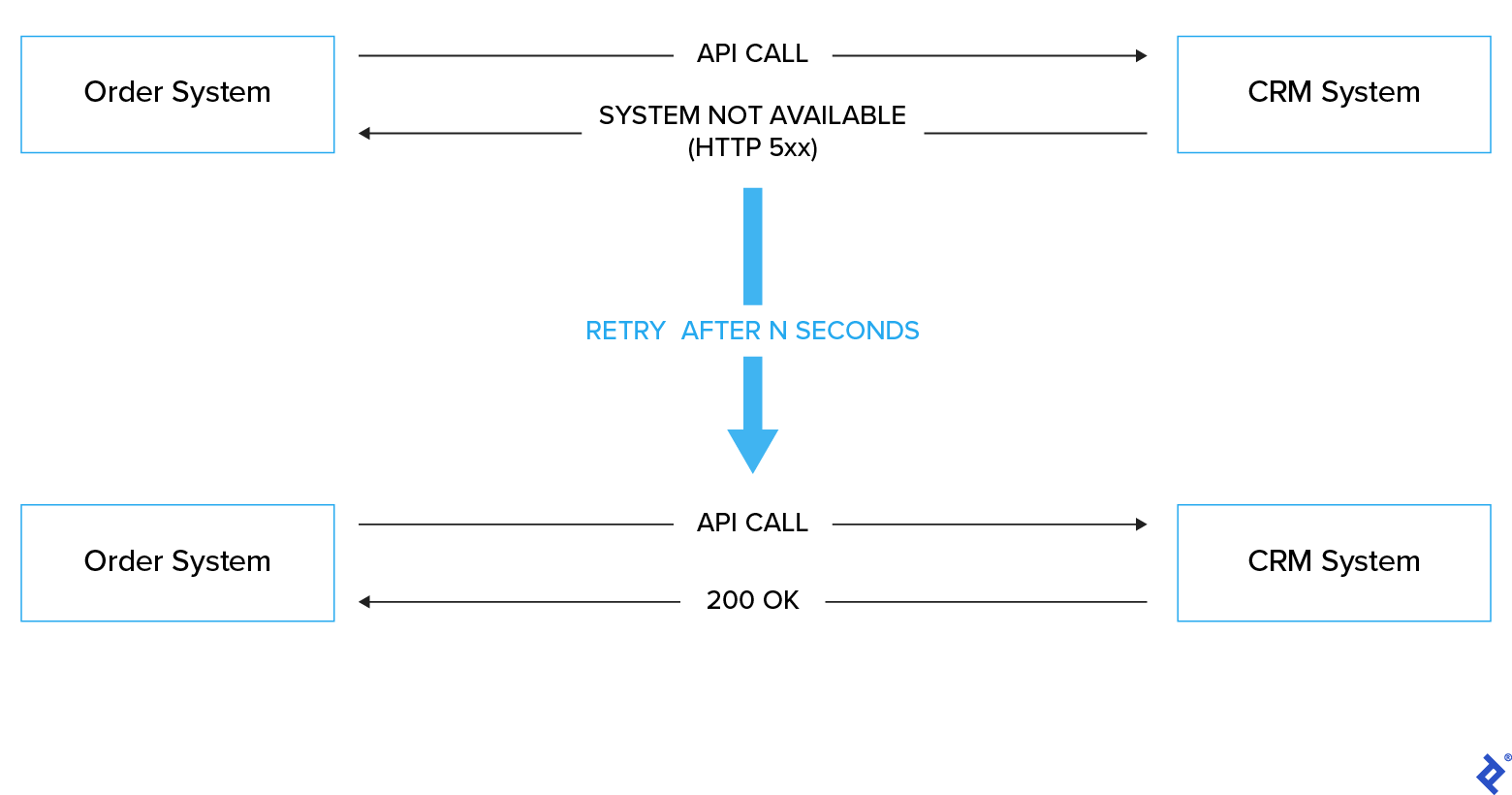
Besides retries, consider logging these events. Notifications about errors resolved on the first retry can be frustrating.
Rather than flooding your error channel with resolved issues, log all callouts with the retry count to gauge system reliability (especially after investing a significant sum).
Using our example class within the Ruby on Rails context, wrapping the call in an ActiveJob provides reasonable assurance of eventual success. The handle_response method throws an error for unexpected status codes, prompting ActiveJob to attempt retries with an exponential backoff. For added sophistication, incorporate 4xx status code handling to prevent retries and raise appropriate error messages.
| |
Ensure System Utilization
Let’s assume a successful launch. You’re incredibly proud, and the system is live. What’s next?
This is just the beginning. Despite rigorous testing, bugs and change requests are inevitable.
The catch? You won’t discover these unless the system is actively used. This can happen for various reasons: a swamped sales department, strategic shifts, or even the evaluation of new systems.
To prevent long-term issues, eliminate any roadblocks hindering the system’s production use. Maintain frequent inter-team communication to align new requirements. If the system proves unsuitable, deactivate the integration. It might feel drastic and frustrating, but it’s less so than perpetually grappling with data inconsistencies and workarounds.
In Conclusion
Integration projects are challenging, with numerous potential pitfalls. They’re not popular among engineers for good reason, but witnessing the positive impact on team productivity can be immensely satisfying.
Therefore, engineers: strive to grasp the needs a CRM or invoicing system fulfills by asking specific questions: “How will this simplify your work? Have you explored alternatives? Why are they unsuitable?”
For everyone else involved: involve engineers early, trust their judgment when they flag concerns, and avoid budget plans that complicate integration, ultimately hindering your long-term success.