Over the past several years, “productivity” has become a buzzword. In the constantly changing world of the internet, speed is always appreciated. As a seasoned PHP developer, I found myself spending countless hours on tasks like database setup, caching, deployments, and monitoring, despite the pressure to deliver business logic swiftly and accurately. These auxiliary tasks have plagued developers for years, robbing us of valuable time that could be better spent on core project logic.
My world shifted four years ago when I was introduced to Amazon Web Services (AWS) by a friend. It was a game-changer, significantly enhancing both my productivity and the quality of my projects. If you haven’t experienced the power of AWS, I urge you to read on – you won’t regret it.

Understanding AWS
Officially launched in 2006, Amazon Web Services is a familiar name, but its potential often remains untapped. So, what exactly is AWS?
Amazon Web Services (AWS) is a suite of cloud computing services, also known as web services, forming a comprehensive cloud-computing platform offered by Amazon.com.
Wikipedia
This definition highlights two key aspects: AWS’s cloud foundation and its nature as a collection of services, not just a single offering. To paint a clearer picture for beginners:
- AWS offers a collection of cloud-based services, as the definition states.
- AWS provides rapid access to online computing resources (setting up a Linux server in mere minutes, for example).
- AWS boasts cost-effective pricing.
- AWS offers user-friendly, ready-to-use services, eliminating the need for time-consuming manual configuration of databases, caches, storage, networks, and other infrastructure elements.
- AWS ensures high availability and seamless scalability.
These are just a few of the many advantages of using AWS. Let’s delve into how it can supercharge your productivity.
Getting Started with a Free AWS Account
Every journey begins with a single step, and in the case of AWS, it’s creating an account. This should take no more than five minutes. Have the following information handy:
- An email address for receiving confirmation.
- A credit card (you won’t be charged during the free setup).
- A phone number for an automated verification call.
That’s all it takes. Head over to AWS web page and follow the simple instructions to create your account.
Keep in mind:
- Most AWS services offer a generous free tier with monthly resource allocations. Testing the waters with AWS typically comes at little to no cost.
- Based on my experience, phone numbers and other personal information are handled responsibly.
Launching Your First EC2 Server
One of the hallmarks of cloud services is on-demand access to shared resources. Amazon provides four tiers of service access, ranging from the simplest to the most complex:
- Management Console
- Command-Line-Tool
- SDK
- RESTful API
This article will guide you through the Management Console. Upon log in to the console, you’ll be greeted with a screen like this:
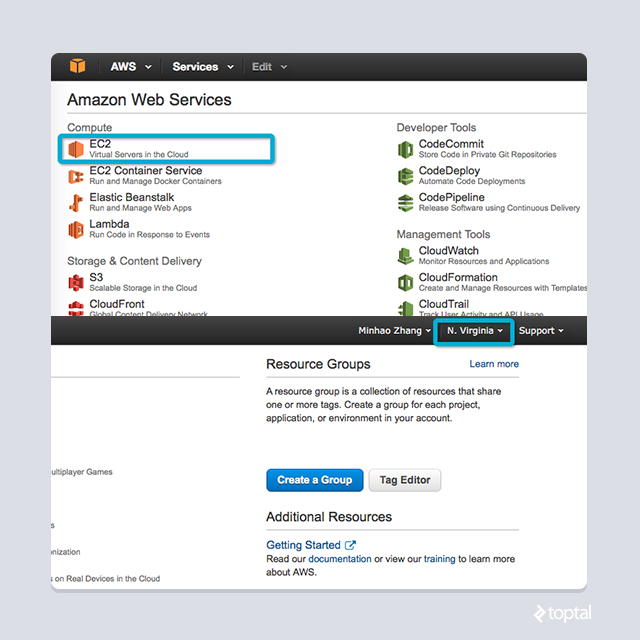
Pay attention to two areas:
- The top-right corner houses the region selector. AWS operates in 11 regions globally, and it’s still expanding. Choose a region that suits you or stick with the default US East (N. Virginia). Keep in mind that pricing may vary across regions as your usage scales.
- The majority of the screen displays a list of services, with EC2 being our focus in this section. Take a moment to explore the breadth of AWS offerings. Don’t fret if they seem unfamiliar – each service functions independently. However, true productivity lies in harnessing their combined power.
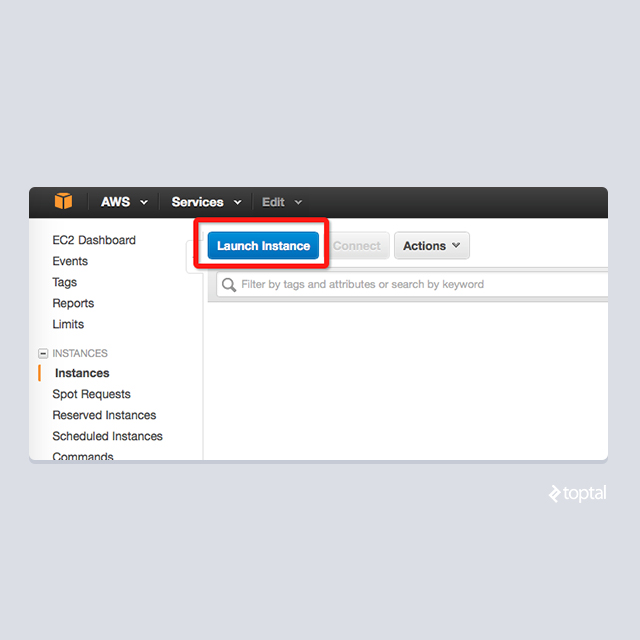
Virtual servers are the cornerstone of cloud resources. Amazon aptly names its virtual server service EC2, short for Elastic Compute Cloud. Let’s see how effortlessly you can bring a Linux server online:
- From the EC2 management console, initiate the launch process as shown below:
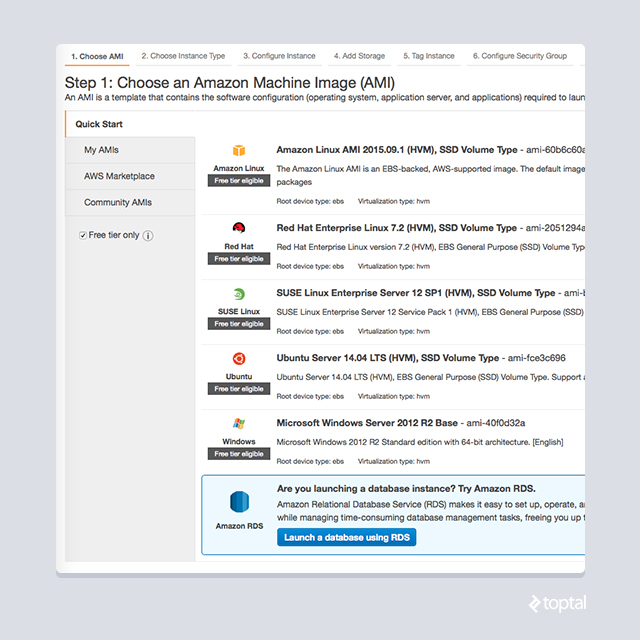
- Begin by selecting a machine image (AMI). This is the operating system for your virtual server. Choose your preferred system; I recommend Amazon Linux with its
yumpackage manager for a smooth start:
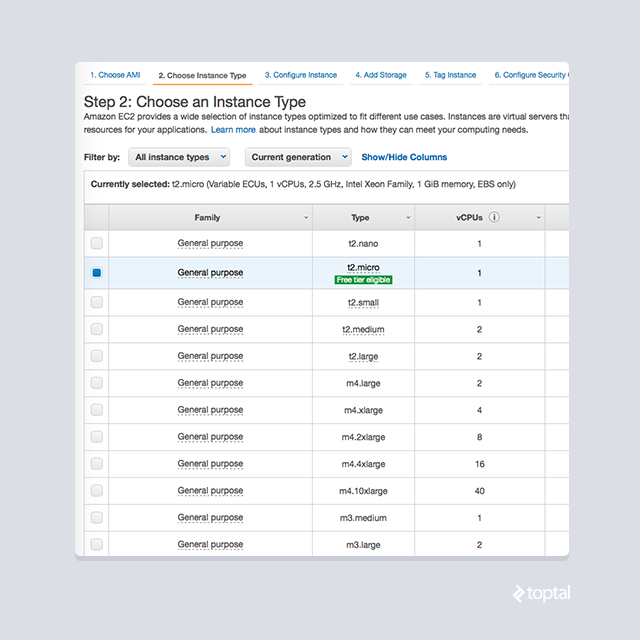
- Next, choose an instance type, essentially the hardware specifications for your server. The t2.micro instance is an excellent starting point, offering 750 hours of free usage monthly for the first year. Remember: This offer is valid only during the first year from your signup date and exclusively for the t2.micro instance. It’s a fantastic opportunity to dip your toes into the AWS waters.
- You can further customize the server before launching it. First-time EC2 users will encounter a screen like the one below. The security warning underscores Amazon’s commitment to safeguarding your data. We’ll address this aspect when we delve into managed services.
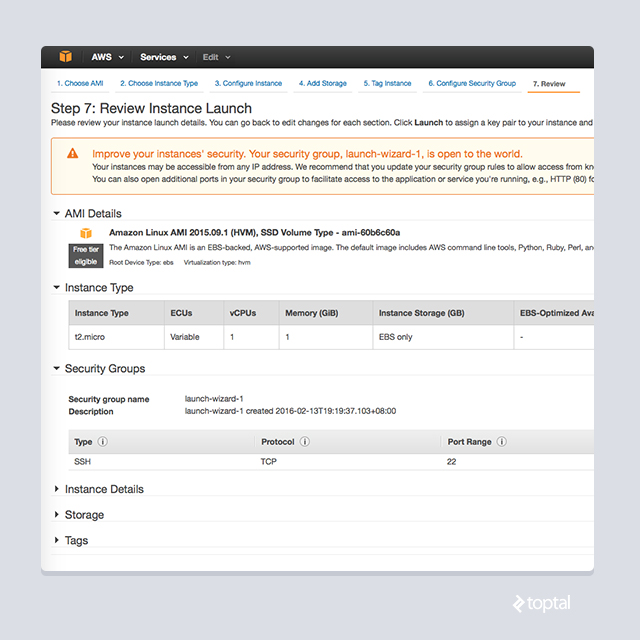
- Finally, remote server access requires authentication. AWS will prompt you to choose an SSH key pair, as shown below. Download the private key file and hit that launch button. Congratulations, your new virtual server is being configured and will be ready in minutes!

- Once the instance is ready, you can log in using the default user
ec2-userand your private key.ec2-useris the standard AWS account with sudo privileges. While changing the default username isn’t possible, you can create custom users and assign permissions as needed. Your server’s address will be displayed here:
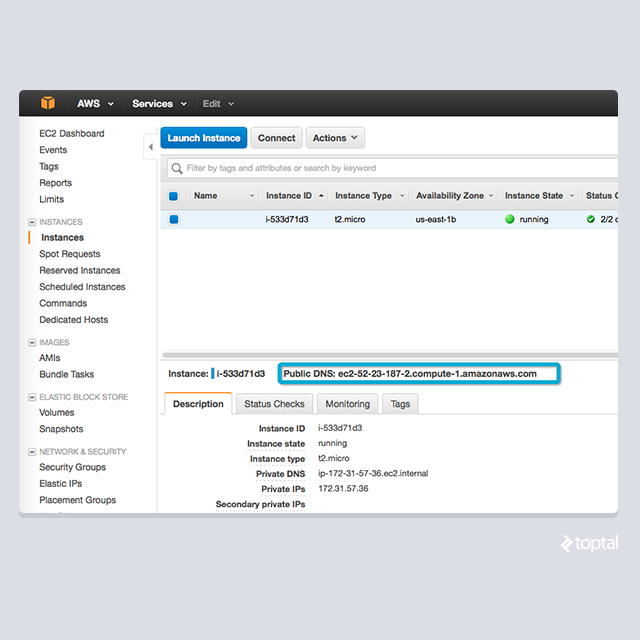
This entire process should take less than five minutes – that’s how simple it is to get a virtual server up and running with AWS. Next, we’ll explore how AWS streamlines the management of your newly created instance.
The Benefits of On-Demand Billing
AWS offers exceptional flexibility by billing most resources hourly. For instance, your EC2 instance can be taken out of service in two ways: stopping and terminating. Both actions halt billing, but there’s a key difference. Stopping an instance allows you to restart it later with all your data intact. Terminating, however, releases the instance back to AWS for recycling, making data recovery impossible. Termination is sometimes necessary due to AWS’s default limit of 20 instances per region per account – stopped instances still count toward this limit until terminated.
Stopping an instance is a breeze:
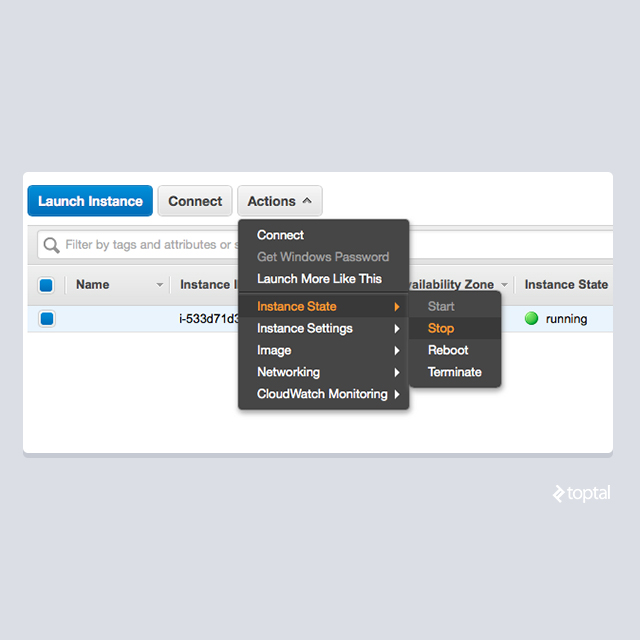
Stopping your EC2 instance effectively pauses your bill. This is particularly advantageous in several scenarios:
- Experimenting with new technologies becomes more cost-effective when you only pay for a few hours of usage, likely staying within the free tier limits.
- Scaling resources in a production environment becomes a breeze. In the past, I’d over-provision resources by 30-50% to handle peak usage. AWS allows for dynamic provisioning:

AWS pricing is transparently available online. While calculating hourly rates extrapolated over a month might raise questions about cost-effectiveness, the answer is both yes and no.
Solely considering on-demand hourly rates might make AWS appear expensive. However, reserved instances paint a different picture:

By opting for reserved instances for your baseline resource needs, you can unlock discounts ranging from 30% to 70%, while supplementing with on-demand instances for variable workloads. In practice, this translates to 30-40% savings with one-year commitments, and even greater savings with three-year commitments. Factor in the added benefits of robust security and monitoring, and AWS emerges as a clear winner in terms of value.
Managed Services: Offloading Operational Overhead
AWS strives to minimize operational costs. Traditionally, maintaining infrastructure security and health requires large teams of system engineers, both online and on-site. While seasoned teams automate tasks with custom tools, managing services at scale remains complex. AWS steps in as a lifesaver, simplifying resource management. Let’s delve into some of AWS’s most popular managed services:
- AWS Security Groups
- IAM (Identity Access Management)
- CloudWatch
- And a suite of automated deployment services, such as OpsWorks (beyond the scope of this article)
AWS Security Groups: Simplifying Network Access Control
AWS employs a two-layered approach to access control. At the network level, “security groups” act as gatekeepers. All AWS services reside within these groups, which dictate traffic flow. For instance, AWS automatically creates a security group for your EC2 instance:
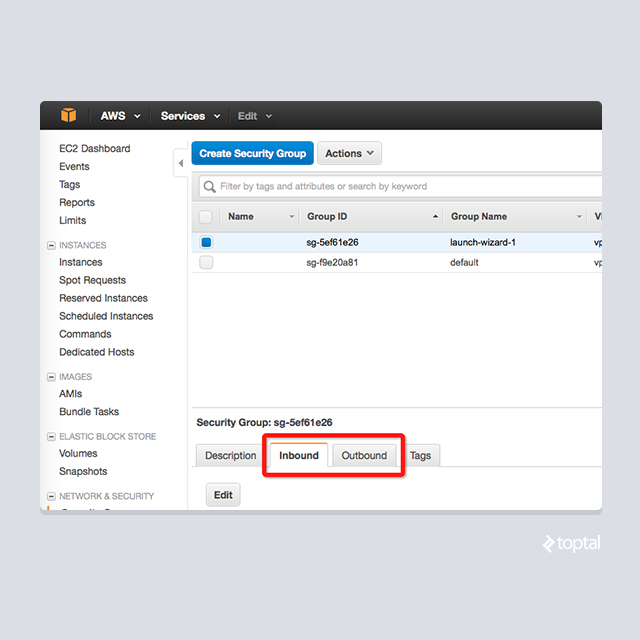
Configuring inbound/outbound rules governs traffic flow. The EC2 service supports TCP, UDP, and ICMP rules. Think of security groups as external hardware firewalls – without the patching headaches.
Security groups offer reusability, extending their benefits across multiple resources. This streamlines maintenance, eliminating the need for individual security configurations. Their shareability further enhances efficiency, allowing you to define a security policy once and apply it seamlessly across resources.
Identity and Access Management: Fine-Grained Application Security
AWS introduces IAM for granular control over RESTful interface access. Each REST request requires signing, verifying the requester’s identity to AWS. Predefined policies then determine whether to grant or deny access.
While a detailed IAM discussion is beyond our scope, it underscores AWS’s unwavering focus on security, assuring you that sensitive data remains protected.
CloudWatch: Your Monitoring and Alerting Ally
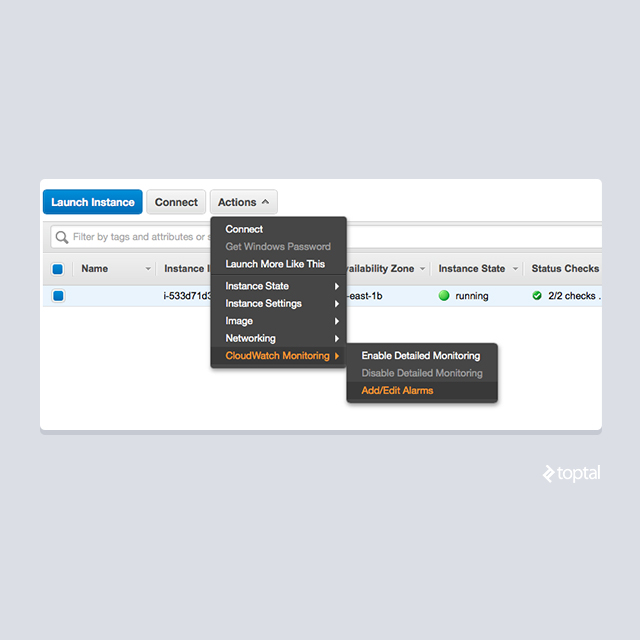
CloudWatch is AWS’s answer to comprehensive resource monitoring. This service collects and tracks various metrics from your AWS resources and offers powerful event-driven actions (alarms). Let’s see how CloudWatch helps us monitor our EC2 instance:
- Adding alarms is straightforward:
- Alarms are highly configurable, allowing you to define criteria for various purposes:
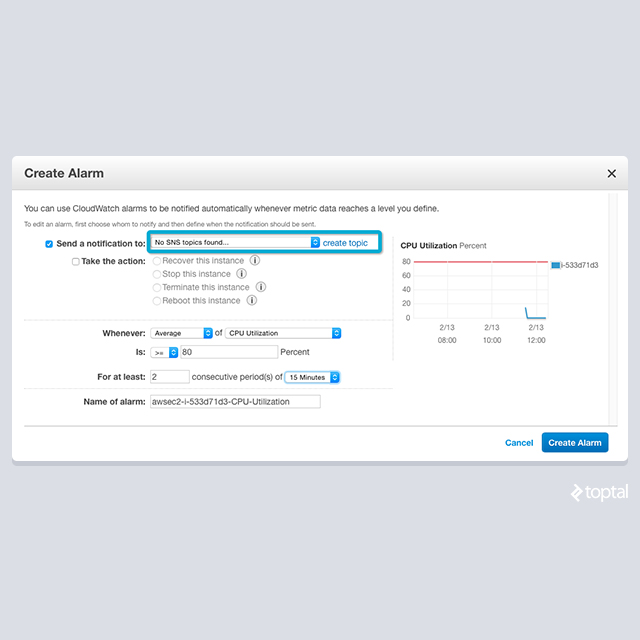
NOTE: SNS (Simple Notification Service) is a topic-based AWS service for sending notifications via email, SMS, iOS/Android push notifications, and other formats.
CloudWatch automates monitoring and notification with just a few clicks. Numerous predefined metrics cater to various AWS services. Advanced users can even define custom application-specific metrics.
For startups, CloudWatch’s free tier is often more than sufficient. As your business grows, the incremental costs are typically negligible (less than 1% of service costs). Refer to detailed pricing for detailed pricing information. Considering its ease of use and affordability, CloudWatch has earned its place as a go-to monitoring tool.
Hassle-Free Application Services: Focusing on What Matters
As developers, we’ve all faced these scenarios:
- Database Integration: Requiring server provisioning, database software installation, monitoring setup, backup planning, software patching, and countless other tasks.
- Distributed File Storage: Entailing the search for suitable open-source or commercial solutions, server preparation, complex installation and configuration, monitoring, and more.
- Caching, Message Queues, and Beyond: Each with its own set of pre-configuration and post-monitoring challenges.
This is where AWS truly shines. It offers a plethora of application-level services, eliminating these headaches and allowing you to focus on your core competencies.
Let’s explore some of these time-saving offerings:
RDS: Your Managed Database Solution
Relational databases (RDBMS) are the backbone of many applications. Deploying RDBMS-based applications in production demands meticulous attention, from database setup and configuration to backup and restoration procedures.
In my team, our Database Administrator (DBA) used to dedicate at least 30% of their time to crafting setup and maintenance scripts. With the arrival of AWS RDS, our DBA was liberated to focus on SQL performance tuning – a far more valuable use of their expertise.
What does RDS bring to the table? In a nutshell:
- Support for major database engines, including MySQL, SQLServer, and PostgreSQL.
- Effortless database creation (single node or cluster) with just a few clicks.
- Built-in support for shared database parameters via “Parameter Groups.”
- Integrated access management using familiar Security Groups, similar to EC2.
- Enhanced availability and fault tolerance through Multi-AZ deployments, with automated monitoring, standby, and failover mechanisms.
- Automated maintenance and backups.
RDS significantly reduces database setup and maintenance overhead. While it might cost around 40% more than a comparable self-managed EC2 server, the time saved translates into focusing on business logic rather than infrastructure management. This shift towards managed services is a recurring theme in the AWS ecosystem.
DynamoDB: Key-Value Storage Built for Scale
NoSQL databases have gained significant traction in recent years. Amazon recognizes this trend and offers DynamoDB (https://aws.amazon.com/dynamodb), a key-value store launched in 2012. The driving force behind this service is Werner Vogels, Amazon’s CTO and a renowned expert in ultra-scalable systems.
Amazon’s ability to handle massive traffic is no secret. DynamoDB is rooted in Dynamo, the internal storage engine powering many of Amazon’s services, including its shopping cart system that handles billions of requests during peak seasons. DynamoDB is designed for limitless scalability.
Compared to alternative NoSQL solutions like Cassandra or MongoDB, DynamoDB offers a compelling economic advantage. It’s billed based on reserved throughput (read/write capacity per second), which can be adjusted in real-time. The table below illustrates the cost comparison:
| Business Need | DynamoDB service | DynamoDB cost | Using another service | Cost when using another service |
| Small Business (less than 1000 DAU, 16GB data) | 10 write unit 10 read unit | $9.07/month • | t1.micro •• 16GB EBS ••• | $14.64/month |
| Medium Business (less than 100k DAU, 160GB data) | 100 write unit 100 read unit | $101.62/month | m4.xlarge 160GB EBS | $190.95/month |
| Large Business (up to 1m DAU, 1TB data) | 1000 write unit 1000 read unit | $852.58/month | Clustered c4.4xlarge • 512GB EBS • | $1329.24/month |
• For a fair comparison, prices are based on on-demand rates in the US-EAST region. •• AWS EC2 instances are assumed to host other NoSQL services. ••• EBS refers to Amazon’s persistent storage service.
As the table demonstrates, DynamoDB provides a fully managed, out-of-the-box solution that often proves more cost-effective than building your own key-value store. With self-managed solutions, you’re essentially paying for unused capacity unless you’re constantly operating at peak load.
Amazon’s managed approach eliminates the need for setup, scaling, or monitoring. DynamoDB consistently delivers constant-time read and write performance, regardless of data size. This efficiency has even led some applications to forgo caching layers altogether after adopting DynamoDB.
SQS: Your Reliable Distributed Queue
Processing large datasets often involves distributing tasks across multiple computing nodes. Global operations frequently require pipelines to handle data from geographically dispersed sources. AWS addresses these needs with SQS, its Simple Queue Service. SQS, like other queueing systems, enables persistent message/job passing between logical components.
While SQS began as a basic service, it has evolved significantly. It can be as simple or as sophisticated as your needs dictate, with numerous customizable parameters. Some of its advanced features include:
- Message retention for up to 14 days.
- Visibility mechanisms to prevent message loss during failures.
- Per-message delivery delays.
- Redrive policies for handling failed messages (“dead-letter queues”).
You might wonder why we’re dedicating a whole section to a seemingly simple queue service. The answer, as with many AWS offerings, lies in its fully managed nature. This means:
- Effortless Scalability: Whether you’re handling a handful or millions of messages per second, SQS scales seamlessly to meet your demands.
- Persistence and Distribution: Critical data is preserved through persistent, distributed storage (subject to expiration policies).
- Zero Infrastructure Management: Say goodbye to server setup, complex monitoring configurations, and other operational burdens.
S3: More Than Just File Storage
S3, or Simple Storage Service, is often compared to Dropbox for applications. While its name suggests simplicity, S3 offers a wealth of advanced features. It has become an industry standard, particularly within the AWS ecosystem, thanks to its seamless integration with other AWS services.
S3’s importance becomes evident when you consider its role as a backup destination for various AWS services, including DynamoDB, RDS, Redshift, and many others. It also serves as a common data import/export hub.
Like other AWS services, S3 is fully managed, freeing you from server management and failover complexities. Its pay-as-you-go pricing model makes experimentation risk-free and budget-friendly.
Unlocking Advanced Services and SDKs
The AWS landscape extends far beyond these core services. Due to space constraints, we’ll briefly highlight some noteworthy offerings:
- Redshift (https://aws.amazon.com/redshift/): A columnar database engine designed for lightning-fast processing of massive datasets (trillions of records). If you work with large-scale ETL processes, Redshift is worth exploring.
- Data Pipeline: Facilitates rapid data transfer between AWS services and enables periodic processing of data in smaller, more manageable chunks.
- ElastiCache: Managed Memcached service – simple yet highly effective.
- Lambda: The next generation of cloud computing. Lambda executes uploaded code snippets in an event-driven manner, opening up exciting possibilities for building distributed applications.
- Route53 (https://aws.amazon.com/route53/): A robust DNS solution offering weighted response routing, geolocation-based routing, and other industry-standard DNS features.
- SNS: User-friendly notification service based on the publisher/subscriber model.
- And Many More!
Make it a habit to explore AWS offerings whenever you introduce new components to your applications. You’ll likely be pleasantly surprised by the wealth of ready-to-use SaaS alternatives at your disposal.
To further streamline access to RESTful interfaces, Amazon provides SDKs for virtually every popular programming language. Finding your preferred SDK should be effortless.
Conclusion
This article has merely scratched the surface of AWS’s vast potential. It’s highly likely that AWS offers services that align perfectly with your business needs. If you find yourself wondering, “Is there an AWS service for this?” chances are, the answer is yes. So why wait? Sign up for your free AWS account today and embark on a journey toward unparalleled productivity.