Automating the deployment of new code to production is known as continuous deployment (CD). Most CD systems validate code through unit and functional tests before deploying it in stages for easy rollback if needed.
While many blog posts explain how to build CD pipelines using various tools like AWS, Google Cloud, or Bitbucket, they often don’t align with the idea of a good CD pipeline: building first, then testing and deploying that single artifact.
This article demonstrates building an event-driven CD pipeline that prioritizes building before testing the final artifact, ensuring reliable test results and pipeline extensibility. The process involves:
- A commit to the source repository.
- Building the associated image.
- Testing the built artifact.
- Deploying the image to production if everything is satisfactory.
This article assumes basic knowledge of Kubernetes and container technology. For those unfamiliar, refer to resources like “What Is Kubernetes? A Guide to Containerization and Deployment.”
Issues with Typical CD Setups
Most CD pipelines have a common flaw: they execute everything within the build file. Many tutorials demonstrate a sequence similar to this in their build files (cloudbuild.yaml, bitbucket-pipeline.yaml, etc.):
- Run tests
- Build image
- Push image to container repo
- Update environment with new image
Tests Not Run on Final Artifact
This order tests the code before building the image. However, what if the build process alters the image, rendering the previous tests irrelevant? Ideally, the final container image should be the artifact, remaining unchanged from build to deployment, ensuring consistent data about the artifact (test results, size, etc.).
Build Environment with Excessive Permissions
Using the build environment for deployment grants it significant control over the production environment. This poses a risk as anyone with write access to the source repository could potentially manipulate the production environment.
Full Pipeline Rerun on Failure
If the final deployment step fails (e.g., due to credential issues), rerunning the entire pipeline wastes time and resources.
Lack of Step Independence
Independent steps offer pipeline flexibility. Adding functional tests to a monolithic build file requires the build environment to handle both unit and functional tests, likely sequentially. Independent steps could trigger both tests concurrently in separate environments upon a “image built” event.
Envisioning an Ideal CD Setup
A more effective approach involves independent steps connected via an event mechanism.
This offers several advantages:
Independent Actions on Events
Building a new image would publish a “successful build” event, triggering actions like running unit and functional tests, or sending alerts on build failures.
Environment-Specific Permissions
Separate environments for each step limit permissions, enhancing security. The build environment can only build, the test environment only tests, and the deployment environment only deploys, ensuring immutability of the built image and simplifying auditing.
Enhanced Flexibility
Adding functionalities like email notifications for successful builds becomes simpler. You only need to add a component reacting to that specific event.
Easier Retries
Independent steps allow retrying only the failed step instead of the entire pipeline, saving time and resources.
Building a CD Pipeline with Google Cloud
Google Cloud Platform provides the tools to build such a system efficiently.
Our test application, a simple Flask application serving static text, is deployed on a Kubernetes cluster.
The implemented pipeline is a simplified version of the previous example, omitting the testing phase:
- A new commit triggers an image build.
- A successful build pushes the image to the container repository and publishes an event to a Pub/Sub topic.
- A script subscribed to the topic checks the image parameters and deploys it to the Kubernetes cluster if they match the requirements.
Here’s a visual representation:
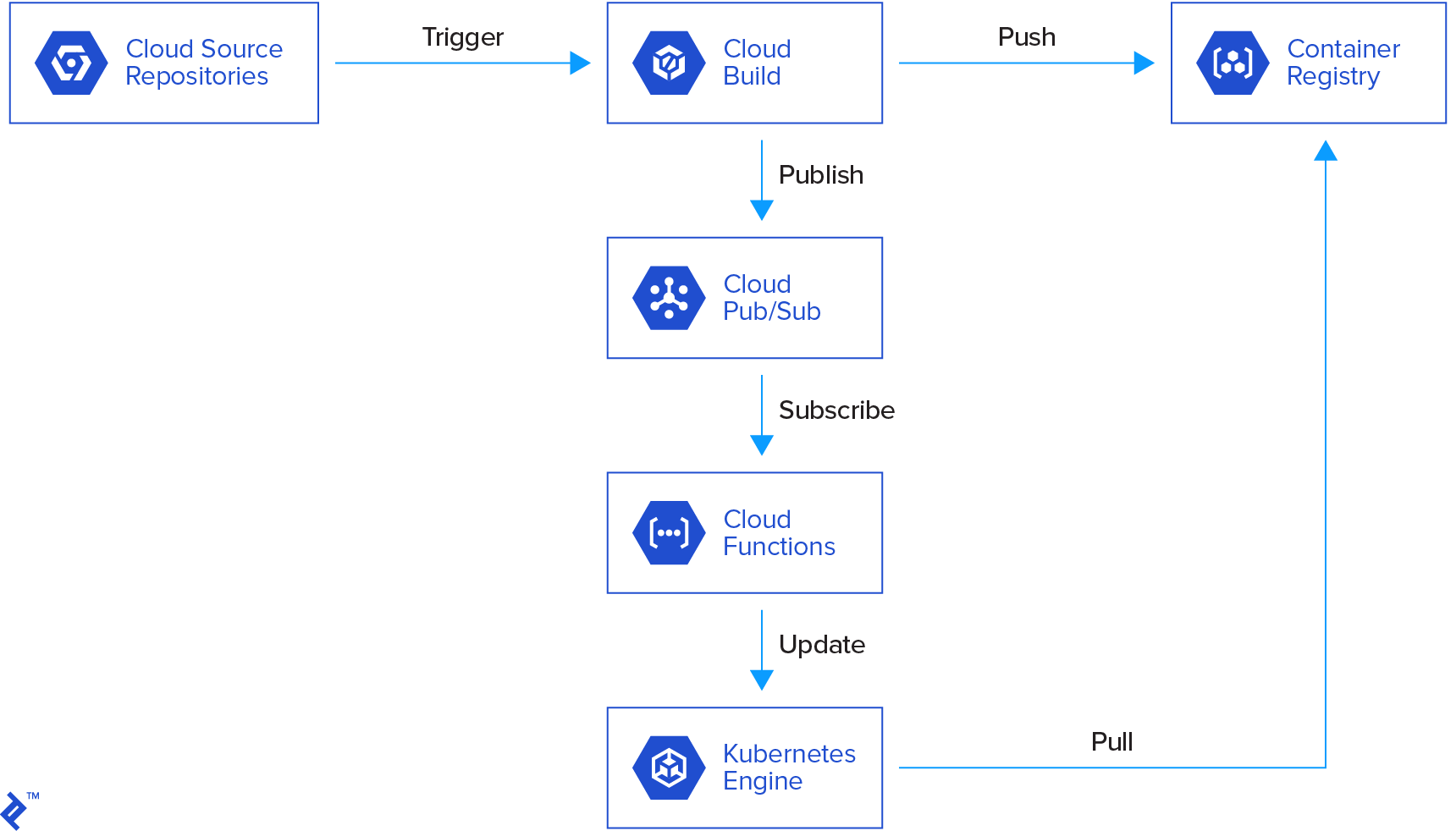
The workflow is as follows:
- A commit to the repository triggers a cloud build.
- The cloud build creates a Docker image and pushes it to the container registry.
- A message is published to Cloud Pub/Sub.
- A cloud function is triggered, verifying the message parameters (build status, image name, etc.).
- If the parameters are valid, the cloud function updates a Kubernetes deployment.
- Kubernetes deploys the new image in containers.
Source Code
Our source code represents a simple Flask app serving static text. Here’s the project structure:
| |
The Docker directory contains the Docker image configuration, based on uWSGI and Nginx image, installing dependencies and copying the app.
The k8s directory houses the Kubernetes configuration, including a service and deployment. The deployment runs a container based on the built image, while the service exposes it through a load balancer with a public IP.
Cloud Build
The cloud build configuration can be done through the cloud console or command line. For this example, the cloud console was used.
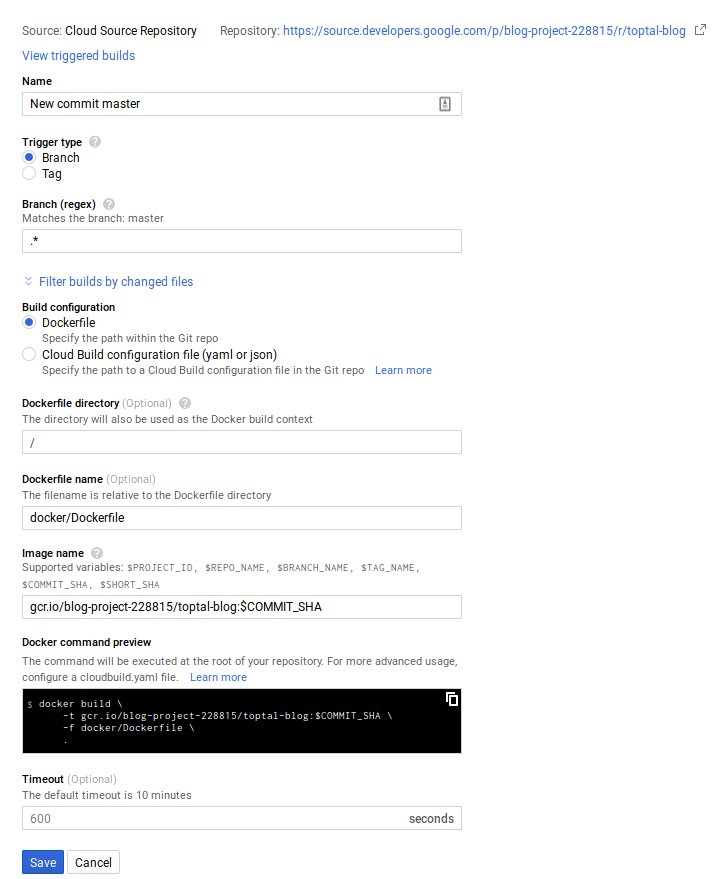
Here, any commit on any branch triggers a build. However, this can be customized (e.g., separate images for development and production).
A successful build automatically pushes the image to the container registry and publishes a message to the cloud-builds Pub/Sub topic.
Cloud Build also publishes messages for in-progress and failed builds, allowing for customized responses.
Documentation for Cloud Build’s Pub/Sub notifications is available here, and the message format is explained here.
Cloud Pub/Sub
The cloud console’s Cloud Pub/Sub tab shows a “cloud builds” topic created by Cloud Build for publishing status updates.

Cloud Function
A Cloud Function, triggered by new messages in the cloud-builds topic, can be created via the cloud console or command line. In this case, Cloud Build deploys the Cloud Function whenever changes are made.
The Cloud Function’s source code is here.
The code deploying the cloud function:
| |
This utilizes the Google Cloud Docker image for easy execution of gcloud commands. It’s equivalent to running the following command:
| |
This command instructs Google Cloud to deploy (or replace) a Cloud Function triggered by messages in the cloud-builds topic, using the Python 3.7 runtime. The source code location and entry point function are specified.
The cloudbuild service account needs “cloud functions developer” and “service account user” roles to deploy the Cloud Function.
Here are some commented code snippets from the Cloud Function:
The entrypoint data contains the Pub/Sub message.
| |
Deployment-specific variables are retrieved from the environment.
| |
The code for checking message structure, build success, and image artifact is omitted here.
Next, the built image is verified against the intended deployment image.
| |
A Kubernetes client fetches the deployment to modify.
| |
Finally, the deployment is patched with the new image, and Kubernetes handles the rollout.
| |
Conclusion
This demonstrates a basic CD pipeline architecture. You can expand it by modifying the Pub/Sub events and their triggers.
For example, a container running tests within the image could publish events upon success or failure, triggering deployment updates or alerts.
While this pipeline is simple, additional cloud functions can be written for other tasks, such as sending email notifications to developers about failing unit tests.
The build environment cannot modify the Kubernetes cluster, and the deployment code (Cloud Function) cannot change the built image. This ensures privilege separation and prevents unauthorized modifications to the production cluster. Ops-focused developers can access and manage the cloud function code.
Feel free to ask questions, share feedback, or suggest improvements in the comments.